
1. Produktüberschreitungview
The Zerone Multi-Language Translator Bluetooth Earphone is a portable wireless device designed for real-time language translation and audio playback. It features Bluetooth 4.1 connectivity, high-fidelity audio output, and a compact in-ear design for comfortable use during various activities.

Abbildung 1.1: Hauptteil view of the Zerone Multi-Language Translator Bluetooth Earphone.
2. Packungsinhalt
Bitte überprüfen Sie, ob alle unten aufgeführten Artikel in Ihrem Paket enthalten sind:
- Zerone Multi-Language Translator Bluetooth Earphone
- USB-Ladekabel
- Zusätzliche Ohrstöpsel (verschiedene Größen)
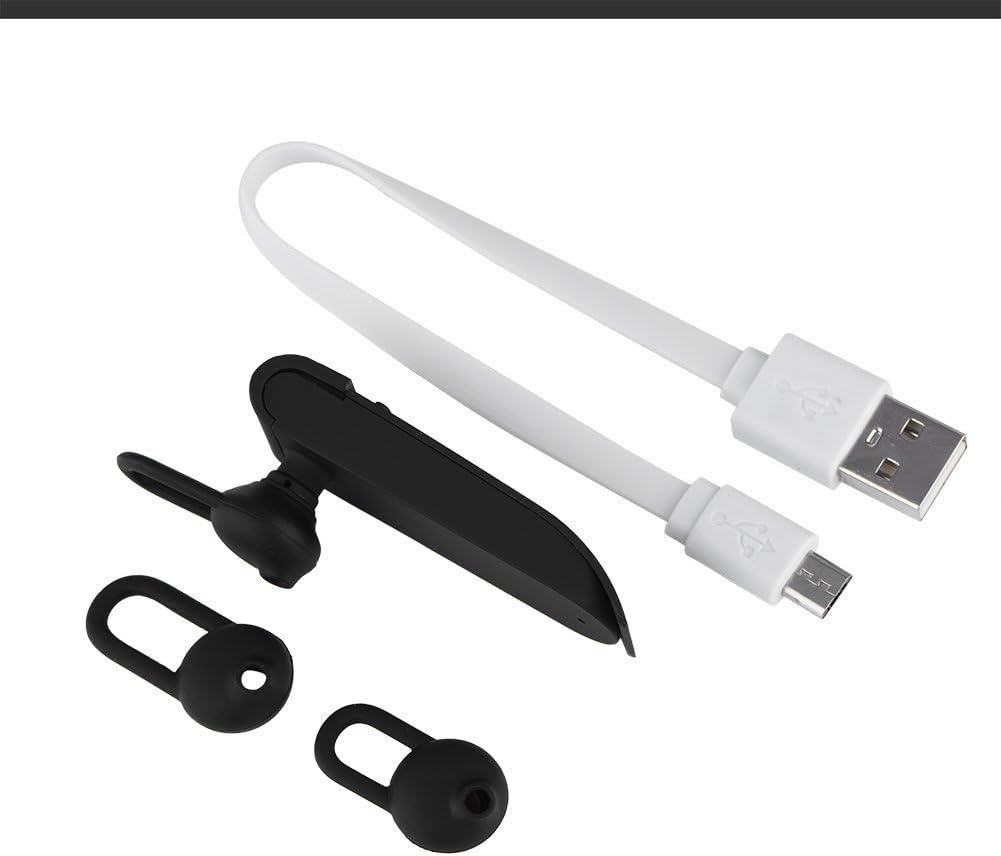
Image 2.1: The earphone with its charging cable and two additional ear tips.
3. Produktmerkmale
- Mehrsprachige Übersetzung: Supports up to 16 languages for real-time translation. Speak into the earphone, and it will translate into the desired language.
- High Fidelity Audio Output: Equipped with an 8mm moving coil speaker for clear, smooth audio and enhanced bass.
- True Wireless In-Ear Design: Mini and compact, offering a stable and comfortable fit without tangled wires, suitable for various activities.
- Bluetooth 4.1-Konnektivität: Optimized Bluetooth 4.1 version ensures a stable and fast wireless connection with a range of up to 10 meters.
- Verlängerte Akkulaufzeit: Built-in 90mAh rechargeable lithium battery provides approximately 5-8 hours of playback time and up to 13 hours of talk time.

Image 3.1: Visual representation of the 16 languages translation feature.

Image 3.2: Illustration of the high fidelity audio output with an 8mm moving coil speaker.

Image 3.3: Visual representation of the Bluetooth true wireless connection with a 10-meter transmission range.

Image 3.4: Details on the earphone's 90mAh rechargeable lithium battery and extended usage times.
4. Einrichtung
4.1 Charging the Earphone
Before initial use, fully charge the earphone. Connect the provided USB charging cable to the earphone's charging port and the other end to a USB power source (e.g., computer, wall adapter). The charging time is approximately 2 hours.
4.2 Bluetooth-Kopplung
- Ensure the earphone is fully charged and powered off.
- Press and hold the multi-function button on the earphone until the indicator light flashes red and blue alternately, indicating pairing mode.
- Navigieren Sie auf Ihrem Smartphone oder Bluetooth-fähigen Gerät zu den Bluetooth-Einstellungen.
- Suchen nach available devices and select "Zerone Translator Earphone" (or similar name) from the list.
- Sobald die Verbindung hergestellt ist, leuchtet die Kontrollleuchte normalerweise dauerhaft blau oder blinkt langsam blau.
4.3 Companion Application (for Translation)
To utilize the multi-language translation feature, you will need to download and install a compatible companion application on your smartphone. Refer to the packaging or product documentation for the specific app name and download instructions. Ensure your phone is connected to the internet for translation services.
5. Bedienungsanleitung
5.1 Ein-/Ausschalten
- Einschalten: Halten Sie die Multifunktionstaste etwa 3 Sekunden lang gedrückt, bis die Kontrollleuchte blau leuchtet.
- Ausschalten: Press and hold the multi-function button for approximately 5 seconds until the indicator light turns red.
5.2 Musikwiedergabe
- Abspielen/Pause: Drücken Sie kurz die Multifunktionstaste.
- Nächster Titel: Drücken Sie die Multifunktionstaste zweimal.
- Vorheriges Lied: Drücken Sie die Multifunktionstaste dreimal.
5.3 Anrufmanagement
- Anruf annehmen/beenden: Drücken Sie kurz die Multifunktionstaste.
- Anruf ablehnen: Halten Sie die Multifunktionstaste 2 Sekunden lang gedrückt.
5.4 Verwendung der Übersetzungsfunktion
After successfully pairing the earphone with your device and setting up the companion application:
- Open the translation application on your smartphone.
- Select the source and target languages within the app.
- Activate the translation mode as instructed by the application (this may involve pressing a button on the earphone or within the app).
- Speak clearly into the earphone's microphone. Your speech will be translated and played back through the earphone or your phone's speaker, depending on the app's settings.

Image 5.1: A conceptual image demonstrating the earphone's translation capability between two languages.
6. Wartung
- Reinigung: Use a soft, dry cloth to clean the earphone. Do not use abrasive cleaners or immerse the device in water.
- Lagerung: Bewahren Sie den Kopfhörer an einem kühlen, trockenen Ort fern von direkter Sonneneinstrahlung und extremen Temperaturen auf.
- Batteriepflege: To prolong battery life, avoid fully discharging the earphone frequently. Charge it regularly, even if not in use for extended periods.
7. Fehlerbehebung
| Problem | Mögliche Ursache | Lösung |
|---|---|---|
| Earphone does not power on | Schwache Batterie | Laden Sie den Kopfhörer mindestens 30 Minuten lang auf. |
| Kopplung mit dem Gerät nicht möglich | Earphone not in pairing mode; Bluetooth off on device; device too far | Ensure earphone is in pairing mode (flashing red/blue). Turn on Bluetooth on your device. Move device closer to earphone (within 10m). |
| No sound during playback/calls | Volume too low; earphone not connected; media output not selected | Increase volume on both earphone and connected device. Re-pair the earphone. Check device's audio output settings. |
| Übersetzungsfunktion funktioniert nicht | Companion app not open/configured; no internet connection; microphone blocked | Ensure the companion app is open and correctly configured. Verify internet connectivity. Check if the earphone's microphone is clear. |
8. Spezifikationen
| Besonderheit | Detail |
|---|---|
| Modellnummer | 4351510494 |
| Konnektivitätstechnologie | Kabellos (Bluetooth) |
| Bluetooth-Version | 4.1 |
| Bluetooth-Reichweite | Bis zu 10 Meter |
| Batteriekapazität | 90mAh Lithiumbatterie |
| Spielzeit | 5-8 Stunden |
| Gesprächszeit | Bis zu 13 Stunden |
| Ladezeit | Ungefähr 2 Stunden |
| Kopfhöreranschluss | USB (zum Aufladen) |
| Material | Plastik |
| Platzierung des Ohrs | Im Ohr |
| Formfaktor | Im Ohr |
| Steuerungstyp | Mediensteuerung, Touch |
| Lärmschutz | Aktive Geräuschunterdrückung |
| Artikelgewicht | 2.39 Unzen |
9. Garantie und Support
For warranty information and technical support, please refer to the documentation included with your purchase or visit the official Zerone webBewahren Sie Ihren Kaufbeleg für Garantieansprüche auf.