
Einführung
The Lindy 32115 HDMI 2.0 EDID Emulator is designed to provide a stable and consistent EDID (Extended Display Identification Data) to a source device, ensuring optimal compatibility and performance in HDMI setups. This device is particularly useful in complex AV systems, long cable runs, or when using splitters/switches where EDID communication issues might arise, preventing problems like incorrect resolutions or audio dropouts.
Produkt überview
The Lindy 32115 is a compact and robust solution for managing EDID information in HDMI 2.0 environments. It supports high-speed data transfer and is capable of emulating or learning EDID from a connected display.
Hauptmerkmale:
- HDMI 2.0 compatibility, supporting resolutions up to 4K@60Hz (18Gbps).
- EDID emulation and learning capabilities for consistent signal delivery.
- Compact and robust design for easy integration into any setup.
- Aids in troubleshooting HDMI communication issues.
- Ensures compatibility between various source and display devices.
- Provides consistent EDID to source devices, even when a display is disconnected.

Abbildung 1: Vorderseite view of the Lindy 32115 HDMI 2.0 EDID Emulator.
Packungsinhalt
- 1 x Lindy 32115 HDMI 2.0 EDID Emulator
Note: The product listing may contain generic component descriptions. This manual assumes the primary product included is the EDID emulator itself.
Setup und Konfiguration
Understanding EDID
EDID (Extended Display Identification Data) is crucial information transmitted from a display to a source device. It informs the source about the display's capabilities, such as supported resolutions, refresh rates, and audio formats. An EDID emulator stores this data and presents it to the source, preventing issues when a display is disconnected, or when multiple displays with differing capabilities are used, ensuring the source always outputs a compatible signal.
Grundlegende Verbindung
To use the emulator with its default EDID, simply connect the Lindy 32115 HDMI 2.0 EDID Emulator directly to the HDMI output port of your source device (e.g., PC, game console, media player). The emulator will then present a default EDID to the source.

Abbildung 2: Zurück view of the emulator, showing the HDMI connector.
EDID Learning Mode (Cloning)
To ensure optimal compatibility and leverage your specific display's capabilities, it is recommended to clone the EDID from your target display. This process allows the emulator to store the exact EDID of your preferred display.
- Anschluss an das Display: Connect the Lindy 32115 HDMI 2.0 EDID Emulator directly to the HDMI input of your desired display.
- Anzeige beim Einschalten: Ensure the display is powered on and actively receiving a signal (if possible) or is in a ready state.
- Lernprozess einleiten: The emulator will automatically detect the display and begin the EDID learning process. During this time, an indicator light on the emulator (if present) may blink or change color.
- Lernerfolg bestätigen: Once the EDID is successfully learned, the indicator light will typically become solid or change to a specific color (e.g., solid green). Refer to any specific LED indicators on your device for confirmation.
- Disconnect from Display: Once the EDID is learned and confirmed, disconnect the emulator from the display.
- Verbindung zur Quelle herstellen: Connect the emulator to the HDMI output of your source device. The source device will now receive the learned EDID, ensuring it outputs a signal perfectly compatible with your display.
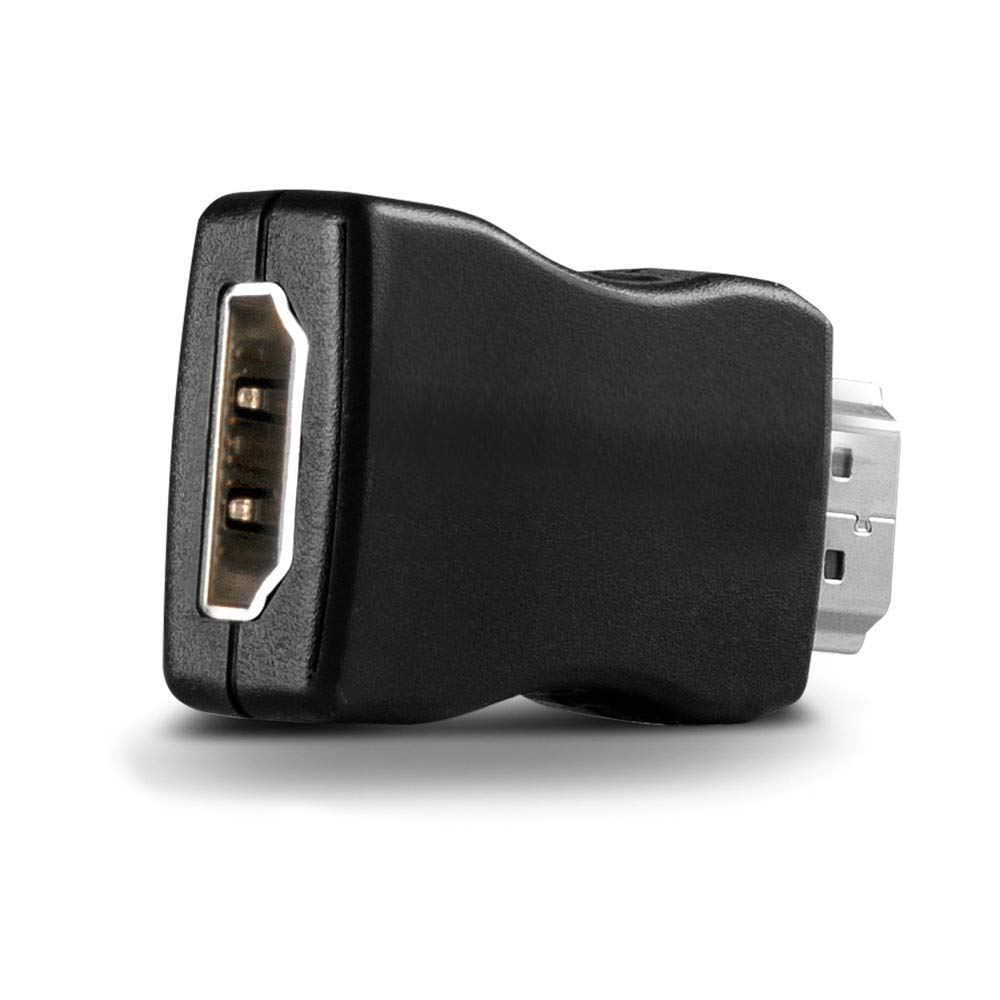
Abbildung 3: Schräg view of the emulator, highlighting its compact form factor.
Betrieb
Once the Lindy 32115 HDMI 2.0 EDID Emulator is configured (either with its default EDID or a learned EDID), it operates automatically. It continuously provides the stored EDID to the source device, ensuring a stable connection and preventing resolution or audio issues that can occur when a display is disconnected, powered off, or when switching between different displays in a complex setup. No further user interaction is typically required during normal operation.
Wartung
The Lindy 32115 HDMI 2.0 EDID Emulator is a low-maintenance device. To ensure its longevity and optimal performance:
- Halten Sie das Gerät sauber und staubfrei. Verwenden Sie zum Reinigen ein weiches, trockenes Tuch.
- Avoid exposing it to extreme temperatures, direct sunlight, or high humidity.
- Do not attempt to open or repair the device, as this will void the warranty and may cause damage.
- Ensure proper ventilation if used in an enclosed space, although its low power consumption typically prevents overheating.
Fehlerbehebung
No Signal or Incorrect Resolution
- Re-learn EDID: If you experience no signal or an incorrect resolution, try re-learning the EDID from your display. Ensure the display is powered on and active during the learning process.
- Kabel prüfen: Ensure all HDMI cables are securely connected and are of sufficient quality to support the desired resolution and refresh rate (e.g., High-Speed HDMI cables for 4K).
- Aus- und Wiedereinschalten: Disconnect and reconnect the emulator from the source device to power cycle it. Also, try power cycling the source device and display.
- Einstellungen des Quellgeräts: Verify that your source device's display settings are configured to output a resolution and refresh rate supported by your display and the emulator.
EDID Learning Issues
- Some users have reported difficulties with the EDID learning procedure. Ensure you follow the steps precisely as outlined in the 'EDID Learning Mode' section.
- If the indicator lights do not behave as expected (e.g., not changing to solid after learning), try repeating the process.
- Ensure the target display is fully active and recognized by the source (if connected directly) before attempting to clone its EDID.
Technische Daten
| Besonderheit | Detail |
|---|---|
| Marke | Lindy |
| Modellname | 32115 HDMI 2.0 EDID Emulator |
| Steckertyp | HDMI, Mini USB (for potential power/firmware, if applicable) |
| Kabeltyp | HDMI |
| Kompatible Geräte | Monitor, Personal computer, Server, Smartphone (with appropriate adapters) |
| Besonderheit | Datenübertragung, hohe Geschwindigkeit |
| Connector-Geschlecht | Male-to-Male (implied by form factor) |
| Datenübertragungsrate | 18 Gigabit pro Sekunde |
| Frequenz | 60 Hz (for 4K resolution) |
| Maximale Lautstärketage | 5 Volt |
| Empfohlene Verwendung | Troubleshooting HDMI communication issues, ensuring compatibility between devices, providing consistent EDID to displays |
| Spezifikation erfüllt | HDCP |
| Artikelgewicht | 0.02 Kilogramm |
Garantie und Support
Lindy products are designed for reliability and performance. For detailed warranty information, technical support, and customer service, please refer to the official Lindy webSeite? ˅ (www.lindy.com) or contact your local Lindy distributor. Please retain your proof of purchase for any warranty claims.