
TMC CDD-9U-B
TMC 8-Inch Dementia Clock User Manual
Model: CDD-9U-B
Einführung
The TMC 8-Inch Dementia Clock is designed to assist seniors and individuals with memory challenges by providing clear, easy-to-read time, date, and day information. Its high-contrast display, auto-dimming feature, and customizable reminders help maintain daily routines and promote independence. This manual provides comprehensive instructions for setting up, operating, and maintaining your clock.

Bild: Vorderseite view of the TMC 8-Inch Dementia Clock, showing its large, clear display.
Aufstellen
1. Auspacken und Aufstellen
Carefully remove the clock from its packaging. The clock can be placed on a desk or table using its integrated stand, or mounted on a wall. Ensure the clock is placed in a location with a stable power supply.

Bild: Rückseite view of the clock, highlighting the power input, USB port, and the adjustable desktop stand.
2. Stromanschluss
Connect the provided power adapter to the DC IN port on the back of the clock and plug it into a standard electrical outlet. The clock will power on automatically.
3. Grundeinstellungen (Uhrzeit, Datum, Sprache)
Upon first power-on or after a power interruption (if battery backup is depleted), you may need to set the time, date, and preferred language. Use the buttons on the back of the clock to navigate the menu and adjust settings. The clock supports 12-hour and 24-hour time modes, and various date formats (e.g., Day-Month-Year, Month-Day-Year). Multiple languages are supported.
Video: A demonstration of setting the time, date, and language on the TMC 8-Inch Digital Calendar Day Clock.
Bedienungsanleitung
1. Anzeigefunktionen
- Kontrastreiche Anzeige: The large, clear text and numbers are designed for easy readability, especially for individuals with vision impairments.
- Automatisches Dimmen: The clock features an automatic dimming sensor that adjusts screen brightness based on ambient light, ensuring comfortable viewing day and night. Brightness levels can also be manually set.
- Mehrere Anzeigemodi: Choose from various display formats to show the day of the week, time, and date in a way that best suits the user's preference.

Image: Illustration of the clock's auto-dimming function, showing how the display adjusts from bright morning to dim evening.
2. Alarm- und Erinnerungsfunktionen
The clock supports up to 12 customizable multi-function alarms. These can be set for various reminders such as medication, meals, appointments, or daily activities. Each alarm can be tagged with a specific message (e.g., "TAKE YOUR MORNING MEDICINE").
- Alarme einstellen: Navigate to the "Alarm Status" menu to add and configure alarms. You can set the time, date (for one-time alarms), and repetition (daily, specific days of the week).
- Brauch Tags: Select from predefined tags like "Meal", "Medicine", "Clinic", "Shower", "Gardening", "Cleaning", "Appointment", etc., to personalize the alarm message.
- Alarmlautstärke: The alarm volume can be adjusted to suit the user's hearing needs.

Image: The clock showing a "Medicine" reminder, illustrating its dual alarm capability for various daily tasks.

Image: The clock displaying a medicine reminder, demonstrating its utility in a care setting.
Video: Ein kurzer Überblickview of the TMC 8-Inch Digital Day Calendar Clock's features and display modes.
3. Multimedia-Wiedergabe
The clock can play photos and videos from an SD card (not included). This feature allows for personalized content, such as family photos or short video messages, to be displayed when not showing the clock face.
- SD-Karte einlegen: Locate the SD card slot on the side of the clock and insert a compatible SD card with your media files.
- Wiedergabe: Use the clock's menu to select and play media files.

Image: Instructions on how to easily set up multimedia playback by inserting a USB drive into the clock.
Wartung
To ensure the longevity and optimal performance of your TMC Dementia Clock, follow these maintenance guidelines:
- Reinigung: Gently wipe the screen and body of the clock with a soft, dry, lint-free cloth. Avoid using abrasive cleaners, solvents, or spray cleaners directly on the screen.
- Stromversorgung: Always use the original power adapter provided with the clock.
- Batterie-Backup: The clock includes a battery backup feature to retain time and date settings during brief power outages. This is not for continuous operation.
- Lagerung: Wenn Sie die Uhr über einen längeren Zeitraum lagern, trennen Sie sie vom Stromnetz und bewahren Sie sie an einem kühlen, trockenen Ort auf.
Fehlerbehebung
| Problem | Mögliche Ursache | Lösung |
|---|---|---|
| Die Uhr lässt sich nicht einschalten. | Netzteil nicht angeschlossen oder defekt; Steckdose funktioniert nicht. | Ensure power adapter is securely connected. Try plugging into a different outlet. Use the original power adapter. |
| Time/Date is incorrect after power cycle. | Battery backup depleted or not functioning. | Reconnect power and reset time/date manually. Ensure continuous power supply for consistent operation. |
| Der Alarm ertönt unerwartet. | An alarm was previously set and not deactivated; factory default alarm. | Check the "Alarm Status" menu and deactivate any unwanted alarms. Ensure all alarm settings are reviewed during initial setup. |
| Das Display ist entweder zu hell oder zu dunkel. | Automatic dimming setting; manual brightness level. | Adjust the "Automatic Brightness" setting or manually set the brightness level in the menu. |
| SD card media not playing. | Unvereinbar file format; SD card not inserted correctly or faulty. | Medien sicherstellen files are in supported formats. Reinsert the SD card. Try a different SD card. |
Technische Daten
| Besonderheit | Detail |
|---|---|
| Marke | TMC |
| Modellnummer | CDD-9U-B |
| Anzeigetyp | Digitales |
| Bildschirmgröße | 8 Zoll |
| Technische Daten | 7.5 Zoll B x 8.7 Zoll H |
| Stromquelle | Kabelgebundene Elektrik |
| Material | Kunststoff, Acrylnitril-Butadien-Styrol |
| Montagetyp | Table top or Wall Mount |
| Besondere Merkmale | Alarm, Auto-Dimming, Multi-Language Support, Multimedia Playback (SD card) |
| Artikelgewicht | 15.7 Unzen |
| UPC | 781520871805 |
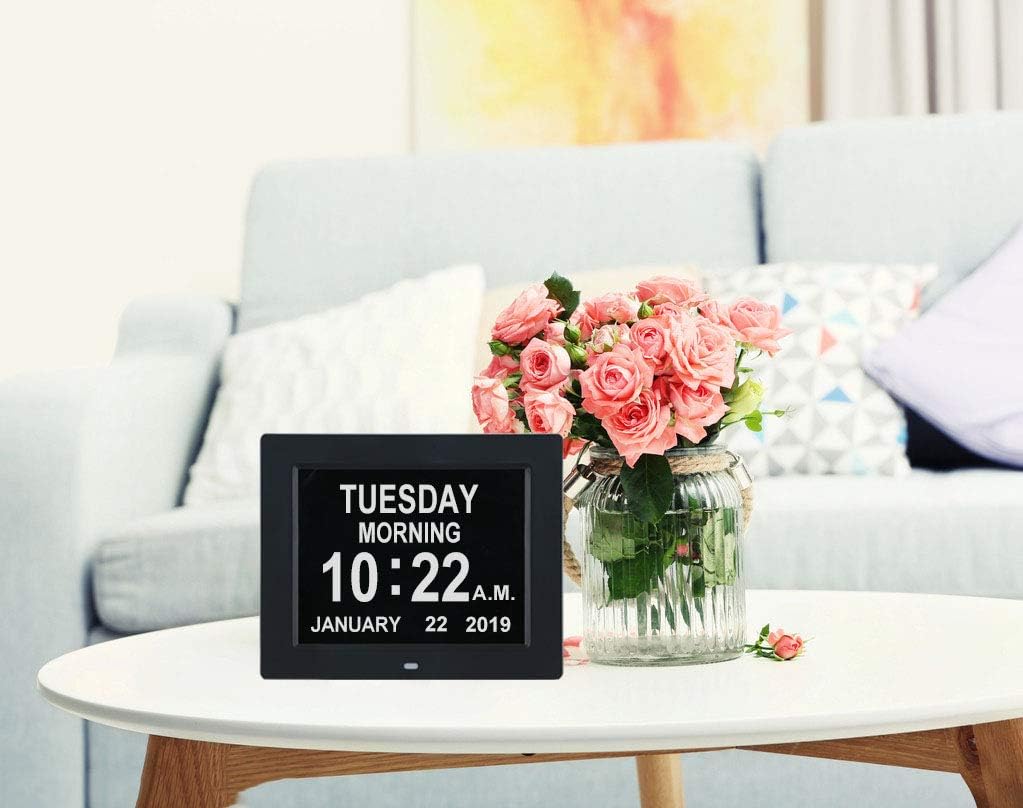
Image: Detailed dimensions of the clock for placement planning.
Garantie und Support
The TMC 8-Inch Dementia Clock comes with a Limited Warranty provided by the manufacturer, TMC. For specific warranty details, claims, or technical support, please refer to the warranty card included with your product or contact TMC customer service directly.
Manufacturer: TMC
Ask a question about this manual
Ask about setup, troubleshooting, compatibility, parts, safety, or missing instructions. Manuals+ will review the question and use this page’s manual context to help answer it.