
1. Einleitung
Thank you for choosing the Technoline WT 538 Wireless Projection Alarm Clock. This modern device features a touch sensor for projection and illumination, designed to integrate seamlessly into your digital lifestyle. It offers a radio-controlled clock with manual setting options, date and weekday display in 7 languages, 12/24 hour format, time zone adjustment, and indoor temperature display in Celsius or Fahrenheit. The alarm includes a customizable snooze function, and the time can be projected onto a wall or ceiling. This manual provides detailed instructions for setup, operation, and maintenance to ensure optimal performance of your alarm clock.

Bild 1.1: Vorderseite view of the Technoline WT 538 Wireless Projection Alarm Clock in use, showing its display and projection feature.
2. Sicherheitshinweise
- Lesen Sie alle Anweisungen sorgfältig durch, bevor Sie das Gerät verwenden.
- Halten Sie das Gerät von Wasser, Feuchtigkeit und extremen Temperaturen fern.
- Use only the specified power adapter (4.5V) and battery type (2 x 1.5V AAA).
- Versuchen Sie nicht, das Gerät selbst zu zerlegen oder zu reparieren. Überlassen Sie alle Wartungsarbeiten qualifiziertem Fachpersonal.
- Entsorgen Sie gebrauchte Batterien verantwortungsvoll gemäß den örtlichen Vorschriften.
3. Packungsinhalt
Bitte prüfen Sie, ob alle Artikel vorhanden und in gutem Zustand sind:
- Technoline WT 538 Wireless Projection Alarm Clock
- 4.5V Netzteil
- 2 x 1.5 V AAA-Batterien
- Benutzerhandbuch (dieses Dokument)
4. Produktüberschreitungview
Familiarize yourself with the main components and controls of your WT 538 alarm clock.
4.1 Front Display and Projection
The front of the device features a clear digital display showing time, date, weekday, and indoor temperature. The projection lens is located on the side, allowing time to be projected onto a surface.

Abbildung 4.1: Detailansicht view of the alarm clock's digital display.
4.2 Rear Controls and Connections
The back of the alarm clock houses the control buttons, battery compartment, and power adapter input.

Bild 4.2: Hinten view showing buttons (SET, ALARM, +, -, WAVE), projection ON/OFF switch, alarm ON/OFF switch, battery compartment, and DC 4.5V power input.
5. Einrichtung
5.1 Einlegen der Batterie
- Öffnen Sie den Batteriefachdeckel auf der Rückseite des Geräts.
- Insert 2 x 1.5V AAA batteries, ensuring correct polarity (+ and -).
- Schließen Sie den Batteriefachdeckel fest.
5.2 Netzteilanschluss
For continuous operation and permanent projection, connect the included 4.5V power adapter.
- Plug the small end of the power adapter into the DC 4.5V input jack on the back of the alarm clock.
- Stecken Sie das andere Ende des Netzteils in eine normale Wandsteckdose.
5.3 Ersteinrichtung
Upon first power-on (either with batteries or power adapter), the clock will attempt to synchronize with the radio-controlled time signal. This process may take a few minutes. If the signal is not received, you can set the time manually.
6. Bedienungsanleitung
6.1 Time Setting (Radio-Controlled and Manual)
- Funkgesteuerte Zeit: The clock automatically attempts to receive the DCF-77 radio signal for accurate time. A signal icon on the display indicates reception status.
- Manuelle Zeiteinstellung: If radio reception is poor, press and hold the 'SET' button to enter manual time setting mode. Use the '+' and '-' buttons to adjust hours, minutes, and other settings. Press 'SET' again to confirm each step.
- 12/24-Stunden-Format: During manual time setting, you can switch between 12-hour (with AM/PM indicator) and 24-hour formats.
- Zeitzoneneinstellung: Adjust the time zone offset if needed, typically during manual setup.
6.2 Datums- und Wochentagsanzeige
The display shows the current date and weekday. The weekday can be displayed in 7 different languages. Refer to the manual setting section to cycle through language options.
6.3 Anzeige der Innentemperatur
The alarm clock continuously displays the indoor temperature. Press the '°C/°F' button to switch between Celsius and Fahrenheit units.
6.4 Alarmfunktion
- Drücken Sie einmal die Taste „ALARM“, um view die aktuelle Weckzeit.
- Press and hold the 'ALARM' button to enter alarm setting mode. Use '+' and '-' to adjust the alarm hour and minute. Press 'ALARM' to confirm.
- Use the 'ALARM ON/OFF' switch on the back to activate or deactivate the alarm. An alarm icon will appear on the display when active.
6.5 Schlummerfunktion
When the alarm sounds, gently touch the top of the alarm clock (touch sensor area) to activate the snooze function. The alarm will pause for a preset duration (adjustable during alarm setup) and sound again later.
6.6 Aktivierung der Hintergrundbeleuchtung
The display backlight can be activated by gently touching the top of the alarm clock (touch sensor area). This provides temporary illumination for easy viewbei schlechten Lichtverhältnissen.
6.7 Projektionsfunktion
The WT 538 can project the time onto a wall or ceiling.
- Temporary Projection: Gently touch the top of the alarm clock (touch sensor area) to activate the projection temporarily.
- Permanent Projection: Permanent projection is only possible when the alarm clock is powered by the included 4.5V power adapter. Use the 'Projection ON/OFF' switch on the back of the device to enable continuous projection.
- Adjust the angle of the projection lens to achieve the desired position and focus.
7. Wartung
7.1 Reinigung
Wipe the device with a soft, dry cloth. Do not use abrasive cleaners or solvents, as these may damage the surface.
7.2 Batteriewechsel
When the display dims or the device functions become unreliable, it is time to replace the batteries. Follow the battery installation steps in Section 5.1.
8. Fehlerbehebung
- Kein Display/Gerät schaltet sich nicht ein: Check battery polarity, ensure batteries are fresh, or verify the power adapter is correctly connected and plugged into a working outlet.
- Poor Radio Signal Reception: Move the alarm clock to a location away from electronic devices that may cause interference. Try different orientations.
- Projektion unscharf/unscharf: Adjust the projection lens to focus the image. Ensure the projection surface is within the optimal range.
- Projection Not Permanent: Ensure the alarm clock is connected to the power adapter and the 'Projection ON' switch is activated. Permanent projection is not available when running on batteries alone.
- Alarm ertönt nicht: Check if the alarm is set correctly and the 'ALARM ON' switch is activated.
9. Spezifikationen
| Besonderheit | Spezifikation |
|---|---|
| Marke | Technoline |
| Modell | WT 538 |
| Anzeigetyp | Digitales |
| Besondere Merkmale | Alarm, Calendar Display, Multiple Time Zones, Snooze, Silent Clock, Illuminated, Projection |
| Produktabmessungen (L x H x T) | 15 cm x 9 cm x 1.5 cm (with battery compartment: 4 cm) |
| Gewicht (inkl. Batterien) | 0.202 kg |
| Stromquelle | 4.5V Power Adapter (included) or 2 x 1.5V AAA Batteries (included) |
| Montagetyp | Tischplatte |
| Rahmenmaterial | Acrylnitril-Butadien-Styrol |
| Temperaturmessbereich | -9.9 °C bis 50 °C |
| Temperaturauflösung | 0.1 °F |
| Temperaturgenauigkeit | 0 °C to 40 °C: ± 1 °C; -9.9 °C to -0.1 °C: ± 2 °C; 40 °C to 50 °C: ± 2 °C |
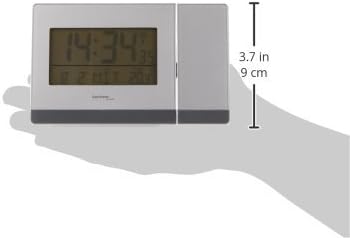
Abbildung 9.1: Seite view illustrating the dimensions of the alarm clock.
10. Garantie und Support
Informationen zur Garantie und technische Unterstützung finden Sie in der mit Ihrem Kauf gelieferten Dokumentation oder wenden Sie sich an Ihren Händler. Bewahren Sie Ihren Kaufbeleg für eventuelle Garantieansprüche auf.