
1. Einleitung
The SUNMI L2 SmartOrder is a rugged industrial terminal designed for various business applications requiring mobility and data capture. It features an Android 7.1 operating system, a 5-inch display, and an integrated 1D/2D Zebra scanner. This manual provides essential information for the proper setup, operation, and maintenance of your device.
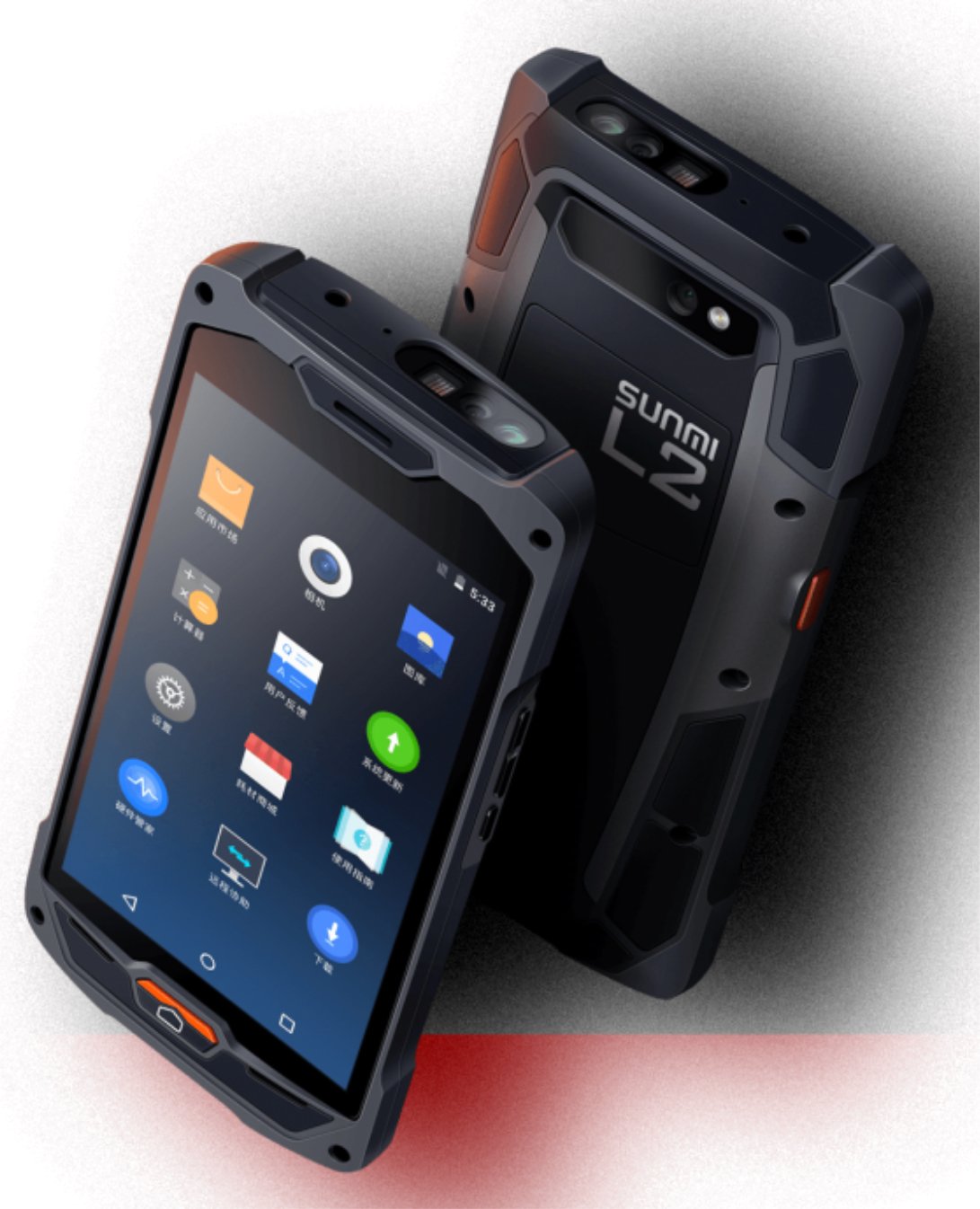
Abbildung 1: Vorder- und Rückseite view of the Sunmi L2 SmartOrder industrial terminal.
2. Sicherheitshinweise
Bitte lesen Sie vor der Benutzung des Geräts alle Sicherheitshinweise, um Verletzungen oder Schäden zu vermeiden. Bewahren Sie diese Bedienungsanleitung zum späteren Nachschlagen auf.
- Setzen Sie das Gerät keinen extremen Temperaturen, direkter Sonneneinstrahlung oder hoher Luftfeuchtigkeit aus.
- Use only SUNMI-approved accessories and power adapters.
- Trotz seiner robusten Bauweise sollte das Gerät nicht fallen gelassen oder starken Stößen ausgesetzt werden.
- Versuchen Sie nicht, das Gerät selbst zu zerlegen oder zu reparieren. Wenden Sie sich an qualifiziertes Servicepersonal.
- Halten Sie das Gerät von medizinischen Geräten fern, da es deren Funktion beeinträchtigen könnte.
3. Gerät überview
The SUNMI L2 SmartOrder is designed for durability and functionality. Key features include:
- 5-Zoll-Display: High-resolution touchscreen for clear visibility.
- 1D/2D Zebra Scanner: Integrated for efficient barcode and QR code scanning.
- USB-C-Anschluss: Zum Aufladen und zur Datenübertragung.
- SIM-Kartensteckplatz: Für Mobilfunknetzverbindungen.
- TF-Karten-Slot: Für erweiterbaren Speicher.
- PSAM Card Slot (Optional): For enhanced security in professional applications.
- NFC Induction Area: Für die Nahfeldkommunikation.

Abbildung 2: Rückseite view showing SIM card slot, TF card slot, PSAM card slot, and NFC induction area.

Figure 3: Three different scanner options for the Sunmi L2: Zebra Code Scanner, Standard Code Scanner, and without scanner.
4. Einrichtung
4.1. Einbau und Aufladen der Batterie
The device is equipped with a 5000mAh high-volume battery. Ensure the battery is fully charged before initial use.
- Connect the provided USB-C cable to the USB-C port on the device.
- Connect the other end of the USB-C cable to a compatible power adapter and plug it into a power outlet.
- The charging indicator will illuminate. Allow the device to charge completely before disconnecting.

Figure 4: Illustration of the 5000mAh high-volume battery with Quick Charge technology.
4.2. Installation der SIM- und TF-Karte
To install SIM or TF cards:
- Locate the card slot cover on the rear of the device (refer to Figure 2).
- Öffnen Sie den Deckel vorsichtig.
- Insert the SIM card into the designated SIM card slot with the gold contacts facing down.
- Insert the TF card (microSD) into the TF card slot if additional storage is required.
- Close the card slot cover securely to maintain the device's IP67 rating.
4.3. Erstes Einschalten
After charging, press and hold the power button located on the side of the device until the screen illuminates and the SUNMI logo appears. The device will boot into the Android 7.1 operating system.
5. Bedienungsanleitung
5.1. Grundlegende Navigation
The SUNMI L2 operates on Android 7.1. Navigate the interface using the touchscreen. Swipe to unlock, tap icons to open applications, and use the navigation buttons (Home, Back, Recent Apps) as standard for Android devices.
5.2. Using the 1D/2D Zebra Scanner
The integrated Zebra scanner is located at the top of the device.
- Öffnen Sie die Scan-Anwendung auf Ihrem Gerät.
- Point the scanner window at the barcode or QR code you wish to scan.
- Press the dedicated scan button (if available on your model) or trigger the scan via the software interface.
- Ensure the barcode is well-lit and within the scanner's optimal range for accurate reading.

Abbildung 5: Unten view of the Sunmi L2, highlighting its rugged design and integrated scanner.
5.3. Konnektivität
Das Gerät unterstützt verschiedene Verbindungsoptionen:
- WLAN (Wi-Fi): Supports 2.4 GHz and 5 GHz bands. Access Wi-Fi settings from the Android system menu to connect to available networks.
- Bluetooth (BT): Pair with other Bluetooth-enabled devices such as printers or headsets via the Bluetooth settings.
- GPRS/LTE: Utilize cellular data by inserting a SIM card and configuring network settings.
- NFC: For short-range wireless communication, typically used for contactless payments or data exchange.
6. Wartung
6.1. Reinigen des Geräts
Um die Leistungsfähigkeit und das Aussehen des Geräts zu erhalten:
- Mit einem weichen, fusselfreien Tuch leichtampMit Wasser oder einem milden Bildschirmreiniger abspülen.
- Avoid using harsh chemicals, abrasive cleaners, or solvents, as these can damage the device's surface and seals.
- Ensure all port covers are securely closed before cleaning to maintain water and dust resistance.
6.2. Batteriepflege
Die richtige Batteriepflege verlängert ihre Lebensdauer:
- Vermeiden Sie häufiges vollständiges Entladen des Akkus.
- Setzen Sie das Gerät keiner extremen Hitze oder Kälte aus, da dies die Batterieleistung beeinträchtigen kann.
- Wenn Sie das Gerät über einen längeren Zeitraum lagern, laden Sie den Akku auf etwa 50 % auf und bewahren Sie ihn an einem kühlen, trockenen Ort auf.
6.3. Speicherung
When not in use, store the SUNMI L2 in a cool, dry environment, away from direct sunlight and corrosive materials.
7. Fehlerbehebung
This section addresses common issues you might encounter with your SUNMI L2 device.
- Gerät lässt sich nicht einschalten: Ensure the battery is sufficiently charged. Connect the device to a power source and attempt to power it on again.
- Scanner not working: Verify that the scanning application is active and the scanner is enabled in the device settings. Ensure the barcode is clean, undamaged, and properly illuminated.
- Verbindungsprobleme (WLAN/Mobilfunk): Check your Wi-Fi network connection or cellular data settings. Ensure the SIM card is correctly inserted. Try restarting the device.
- Touchscreen reagiert nicht: Starten Sie das Gerät neu. Sollte das Problem weiterhin bestehen, wenden Sie sich bitte an den Support.
8. Spezifikationen
Key technical specifications for the SUNMI L2 SmartOrder:
| Modellnummer | Sunmi L2 Zebra T8900 |
| Betriebssystem | Android 7.1 |
| Anzeige | 5 Zoll |
| CPU | Quad-Core-Prozessor |
| RAM | 2 GB |
| ROM | 16 GB |
| Scanner | 1D/2D Zebra Scanner |
| Konnektivität | USB-C, WLAN 2.4/5 GHz, Bluetooth, GPRS, LTE, NFC |
| Batterie | 5000mAh (up to 2 days use, 30 days standby) |
| Haltbarkeit | IP67 rated (dust-proof, water-resistant, drop-resistant) |
| Betriebstemperatur | -20°C bis +55°C |
| Gewicht | 349.27 g |
| Kompatible Geräte | Desktop computer, Laptop, POS, Smartphone, Tablet |

Figure 6: Sunmi L2 device partially submerged in water, demonstrating its IP67 dust-proof and water-resistant capabilities.
9. Garantie und Support
For detailed warranty information, technical support, or service inquiries, please refer to the official SUNMI website or contact your authorized SUNMI distributor. Please retain your purchase receipt as proof of purchase for any warranty claims.