
Einführung
This manual provides instructions for the installation, operation, and maintenance of your Audiovox ELEAUDAX80EXT Wireless Extension. This device is designed to expand the functionality of compatible Audiovox phone models, specifically the AX8001, AX8001E, and AX8101AM, by providing an additional wireless handset.
Packungsinhalt
Bitte überprüfen Sie vor der Einrichtung, ob alle Artikel im Paket vorhanden sind.
- Audiovox ELEAUDAX80EXT Wireless Extension Unit
- Netzteil (falls zutreffend)
- Wiederaufladbarer Akku (vorinstalliert oder separat)
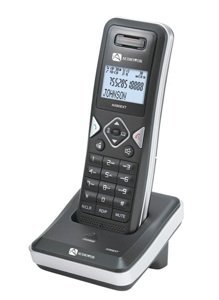
Image: The Audiovox ELEAUDAX80EXT Wireless Extension Unit. This image displays the compact design of the extension handset.
Aufstellen
- Laden Sie den Akku auf: If the battery is not pre-installed, insert it into the extension unit according to the markings. Place the extension unit on its charging cradle (if included) or connect the power adapter directly to the unit and a power outlet. Allow the unit to charge for at least 12-16 hours before initial use.
- Register the Extension:
- Ensure your main Audiovox phone base (AX8001, AX8001E, or AX8101AM) is powered on.
- On the main phone base, locate and press the "Register" or "Page" button. Hold it until the indicator light on the base begins to flash (refer to your main phone's manual for exact instructions).
- While the base is in registration mode, on the ELEAUDAX80EXT extension unit, navigate to the "Menu" and select "Register Handset" or a similar option. Follow the on-screen prompts.
- Once registration is successful, the extension unit will display a confirmation message, and the indicator light on the base will stop flashing.
- Testverbindung: Make a test call from the extension unit to ensure proper functionality.
Bedienungsanleitung
Einen Anruf tätigen
- Nehmen Sie den Hörer ab oder drücken Sie die Taste SPRECHEN Taste.
- Wählen Sie die gewünschte Telefonnummer.
- Drücken Sie die SPRECHEN Drücken Sie die Taste erneut oder legen Sie den Hörer zurück in die Ladeschale, um das Gespräch zu beenden.
Einen Anruf annehmen
- Wenn das Telefon klingelt, nehmen Sie den Hörer ab oder drücken Sie die Taste SPRECHEN Taste.
- Um den Anruf zu beenden, drücken Sie die ENDE button or place the handset back on the cradle.
Intercom Function (if supported by base unit)
- Drücken Sie die GEGENSPRECHANLAGE Taste.
- Dial the number of the extension you wish to call (e.g., "2" for the second handset).
- Drücken SPRECHEN to initiate the intercom call.
Wartung
- Reinigung: Wischen Sie das Gerät mit einem weichen, damp Tuch. Verwenden Sie keine scharfen Chemikalien oder Scheuermittel.
- Batteriepflege: For optimal battery life, avoid fully discharging the battery frequently. Keep the unit on its charger when not in use.
- Lagerung: If storing the unit for an extended period, remove the battery and store it in a cool, dry place.
Fehlerbehebung
| Problem | Lösung |
|---|---|
| Kein Wählton / Anrufe können nicht getätigt werden |
|
| Handy lädt nicht |
|
| Schlechte Gesprächsqualität / Rauschen |
|
Technische Daten
- Modellnummer: ELEAUDAX80EXT
- Kompatible Basiseinheiten: Audiovox AX8001, AX8001E, AX8101AM
- Abmessungen (L x B x H): 20 x 40 x 30 Millimeter
- Gewicht: 20 Gramm
- UPC: 044476082719
Garantie und Support
For specific warranty information and technical support, please refer to the documentation included with your original Audiovox phone system or visit the official Audiovox webBewahren Sie Ihren Kaufbeleg als Kaufnachweis für Garantieansprüche auf.
For further assistance, please contact Audiovox customer service.