
1. Einleitung
Thank you for choosing the ToughTested 24,000 mAh Solar Power Bank. This device is designed to provide reliable portable power for your electronic devices, especially in outdoor and emergency situations. This manual contains important information regarding the safe and efficient use, maintenance, and troubleshooting of your power bank. Please read it thoroughly before use and retain it for future reference.
2. Produktüberschreitungview
2.1 Hauptmerkmale
- Massive 24,000 mAh Capacity: Ermöglicht das gleichzeitige Aufladen von Smartphones, Tablets und anderen USB-betriebenen Geräten.
- Hocheffiziente Solarmodule: Supplementary charging via sunlight, converting solar energy efficiently.
- Mehrere Ladeanschlüsse: Includes 2 USB-A ports and 1 fast-charging USB-C port for simultaneous device charging.
- Durable and Rugged Design: IP67 rated for water, dust, and shock resistance, suitable for harsh environments.
- Intelligente Ladetechnologie: Instasense Power Sharing detects and delivers optimal charge for connected devices.
- Integrierte LED-Taschenlampe: Features a 4-mode LED flashlight for emergency lighting.
2.2 Packungsinhalt
- ToughTested 24,000 mAh Solar Power Bank
- USB-C-auf-USB-C-Kabel
- USB-A zu Micro-USB-Kabel
- Bedienungsanleitung
2.3 Produktdiagramm

Abbildung 1: Vorderseite view of the ToughTested Solar Power Bank, showing the solar panel and rugged casing.
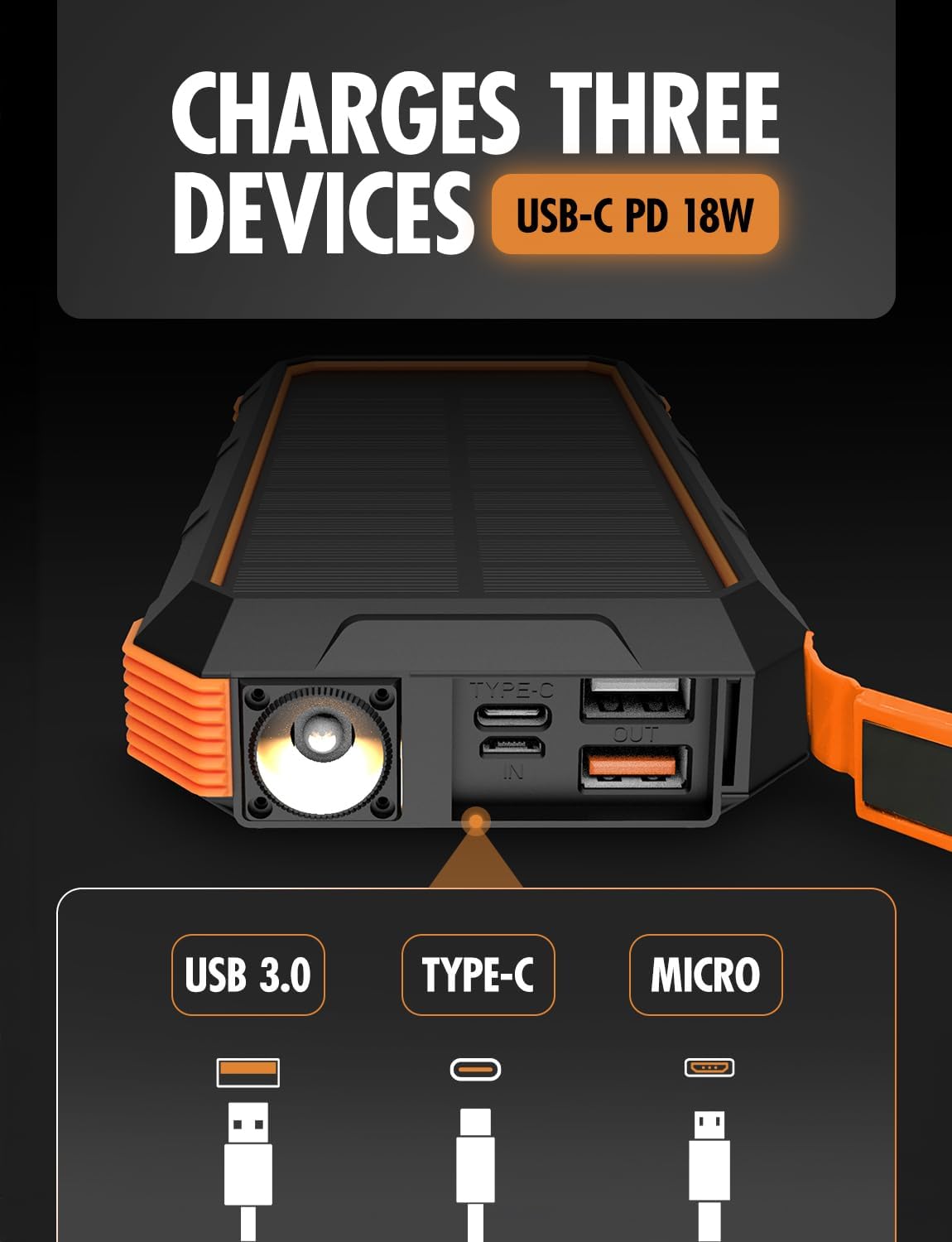
Abbildung 2: Seite view of the power bank, highlighting the USB-C (input/output), USB 3.0 (output), and Micro-USB (input) ports, along with the LED flashlight.
3. Einrichtung
3.1 Erstes Aufladen der Powerbank
Laden Sie die Powerbank vor dem ersten Gebrauch vollständig mit einem Netzteil auf. Dadurch wird sichergestellt, dass der interne Akku für eine optimale Leistung vorbereitet ist.
- Verbinden Sie das mitgelieferte USB-C-Kabel mit dem USB-C-Anschluss der Powerbank.
- Verbinden Sie das andere Ende des USB-C-Kabels mit einem kompatiblen USB-Netzteil (nicht im Lieferumfang enthalten).
- Allow the power bank to charge until all battery indicator lights are solid, indicating a full charge.
The USB-C port supports 18W Power Delivery (PD) for faster charging of the power bank itself.

Figure 3: Illustration of the power bank's PD fast charging capability, indicating 18W power delivery.
4. Bedienungsanleitung
4.1 Aufladen der Powerbank
Your ToughTested Solar Power Bank can be charged via two methods:
- Wall Adapter (Recommended for primary charging): Use the USB-C port with a wall adapter for the fastest and most efficient charge.
- Solar Panel (Supplementary charging): Place the power bank in direct sunlight. The solar panel will convert sunlight into energy to charge the internal battery. Note that solar charging is slower and intended for emergency or supplementary power, not as a primary charging method.
4.2 Laden Ihrer Geräte
Die Powerbank verfügt über mehrere Ausgangsanschlüsse, um verschiedene Geräte gleichzeitig aufzuladen.
- Schließen Sie das Ladekabel Ihres Geräts an einen der verfügbaren Ausgänge (USB-A oder USB-C) der Powerbank an.
- Verbinden Sie das andere Ende des Kabels mit Ihrem Gerät.
- The power bank will automatically begin charging your device. The Instasense Power Sharing Technology will detect your device's charging requirements and deliver the optimal current.
- Überwachen Sie den Ladestatus Ihres Geräts. Trennen Sie es vom Stromnetz, sobald es vollständig aufgeladen ist.
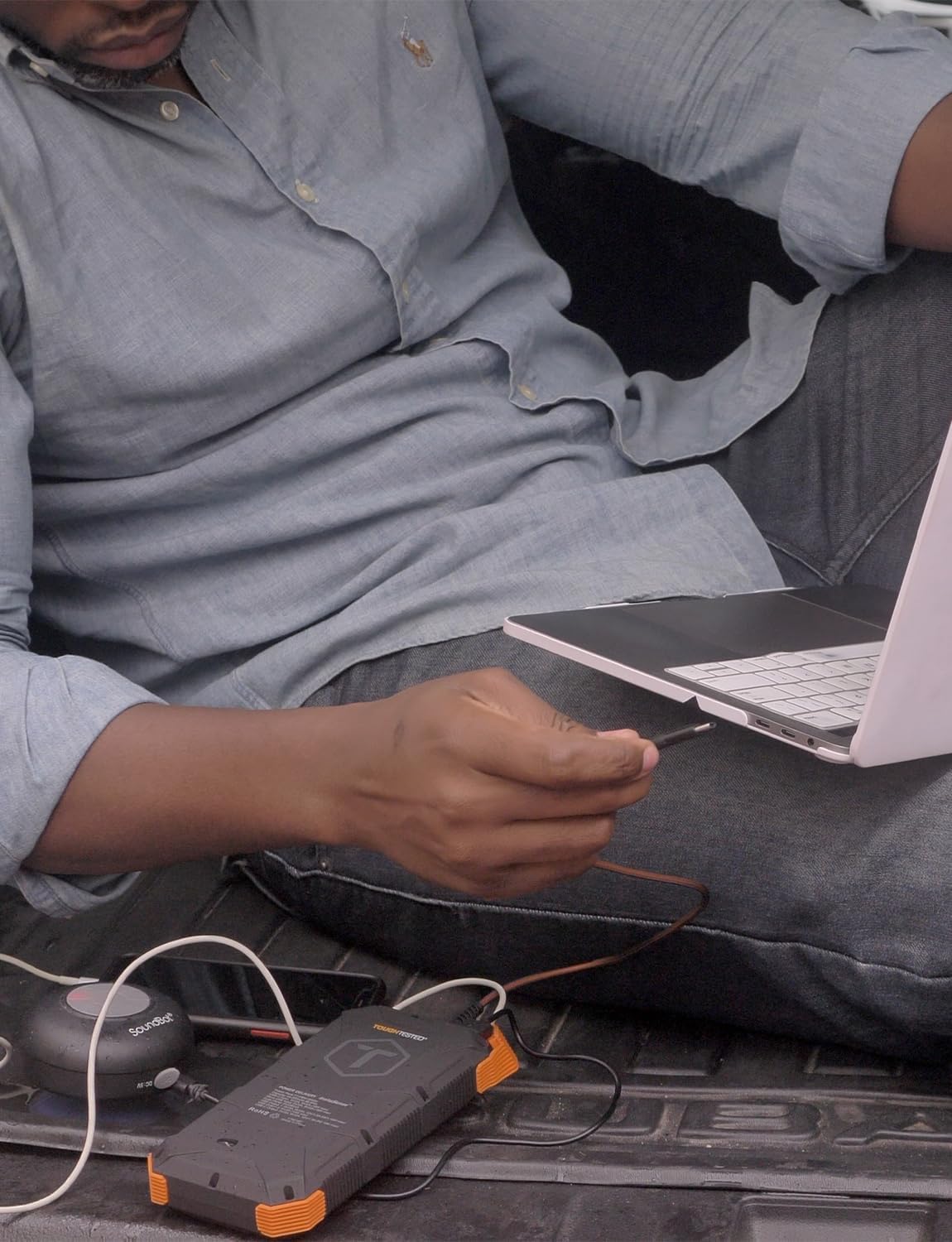
Figure 4: A user charging a laptop using the ToughTested Solar Power Bank, demonstrating its multi-device charging capability.
4.3 Betrieb der LED-Taschenlampe
The integrated LED flashlight has four modes: Standard, SOS, Strobe, and Off.
- So schalten Sie es ein: Press and hold the power button for approximately 3 seconds. The flashlight will turn on in Standard mode.
- Um die Modi durchzuschalten: Briefly press the power button to switch between Standard, SOS, and Strobe modes.
- So schalten Sie es aus: Halten Sie den Netzschalter etwa 3 Sekunden lang gedrückt.

Figure 5: The power bank with its ultra-bright LED flashlight activated.
5. Wartung
5.1 Reinigung
Wipe the power bank with a soft, dry cloth. For stubborn dirt, a slightly damp cloth can be used. Ensure all ports are dry before use. Do not use harsh chemicals or abrasive cleaners.
5.2 Speicherung
Store the power bank in a cool, dry place away from direct sunlight and extreme temperatures. For long-term storage, it is recommended to charge the power bank to approximately 50-75% every 3-6 months to maintain battery health.
5.3 Haltbarkeit
The power bank is IP67 rated, meaning it is protected against dust ingress and can withstand immersion in water up to 1 meter for 30 minutes. While rugged, avoid intentional submersion or exposing it to high-pressure water jets.

Figure 6: The power bank's weather-proof housing, showing its resistance to water and dust. Note: Product is IP67 rated, image may show IP66.
6. Fehlerbehebung
- Powerbank lädt nicht:
- Stellen Sie sicher, dass das Ladekabel sowohl mit dem Eingangsanschluss der Powerbank als auch mit der Stromquelle fest verbunden ist.
- Verify the wall adapter or USB port is functional.
- If using solar charging, ensure the solar panel is exposed to direct sunlight and is clean. Solar charging is slow and primarily supplementary.
- Gerät lädt nicht über die Powerbank:
- Prüfen Sie, ob die Powerbank ausreichend geladen ist.
- Ensure the charging cable between the power bank and your device is functional and securely connected.
- Versuchen Sie einen anderen Ausgangsanschluss an der Powerbank.
- Some devices may require the power button on the power bank to be pressed to initiate charging.
- Taschenlampe funktioniert nicht:
- Ensure the power bank has charge.
- Zum Aktivieren der Taschenlampe den Ein-/Ausschalter 3 Sekunden lang gedrückt halten.
7. Spezifikationen
| Besonderheit | Detail |
|---|---|
| Modellnummer | TT-PBW-SW24 |
| Batteriekapazität | 24,000 mAh |
| Eingang (USB-C) | 5V/3A (15W), Power Delivery (PD) |
| Ausgang (USB-C) | 5V/3A (15W), Power Delivery (PD) |
| Ausgang (USB-A) | 5 V/3 A (15 W) |
| Solarpanel | High-efficiency 400mAh |
| Wasserdicht/staubdicht | IP67 |
| Maße | 2 x 4 x 8 Zoll |
| Gewicht | 1 Pfund |
| Besondere Merkmale | 4-Mode LED Flashlight, Instasense Power Sharing |
8. Sicherheitshinweise
- Das Batteriefach darf nicht auseinandergenommen, geöffnet oder zerkleinert werden.
- Setzen Sie die Powerbank keiner Hitze oder Feuer aus. Vermeiden Sie die Lagerung in direktem Sonnenlicht.
- Schließen Sie den Akku nicht kurz. Bewahren Sie Akkus nicht ungeordnet in Schachteln oder Schubladen auf, wo sie sich gegenseitig kurzschließen oder durch leitfähige Materialien kurzgeschlossen werden könnten.
- Bei einem Batterieaustritt darf die Flüssigkeit nicht mit Haut oder Augen in Berührung kommen. Sollte es dennoch zu Kontakt gekommen sein, spülen Sie die betroffene Stelle gründlich mit Wasser ab und suchen Sie einen Arzt auf.
- Halten Sie die Powerbank sauber und trocken.
- Lassen Sie eine Batterie nicht über längere Zeit geladen, wenn Sie sie nicht verwenden.
- Setzen Sie die Powerbank keinen mechanischen Erschütterungen aus.
- Dispose of the power bank according to local regulations. Do not dispose of as household waste.
- Warnung gemäß California Proposition 65: Dieses Produkt kann Chemikalien enthalten, von denen bekannt ist, dass sie Krebs, Geburtsfehler oder andere reproduktive Schäden verursachen.
9. Garantie und Support
The ToughTested 24,000 mAh Solar Power Bank is backed by a 5-Year ToughCare Warranty, ensuring durability and performance. For warranty claims, technical support, or any questions regarding your product, please contact ToughTested customer service through their official webWebsite oder den Händler, bei dem das Produkt gekauft wurde.

Figure 7: Product packaging indicating the 5-Year Warranty and key features.