
1. Einleitung
This manual provides detailed instructions for the setup, operation, and maintenance of your OWLENZ SD60 Wi-Fi Mini Projector. Please read this manual thoroughly before using the product to ensure proper functionality and safety. The SD60 features advanced LED light technology with 1500 lumens brightness, Wi-Fi screen sharing capabilities (Miracast/Airplay), and multiple media playback options for a versatile home theater experience. Its portable and compact design allows for easy installation and use.
2. Wichtige Sicherheitshinweise
- Schauen Sie nicht direkt in die Projektorlinse, wenn der lamp ist eingeschaltet.
- Sorgen Sie für eine ausreichende Belüftung rund um den Projektor, um eine Überhitzung zu vermeiden.
- Halten Sie den Projektor von Wasser oder anderen Flüssigkeiten fern.
- Verwenden Sie ausschließlich das mit dem Projektor gelieferte Netzteil.
- Stellen Sie den Projektor nicht auf instabile Oberflächen.
- The LED light technology is designed to be gentle on the eyes and has no radiation.
3. Packungsinhalt
Bitte prüfen Sie, ob alle unten aufgeführten Artikel in Ihrem Paket enthalten sind. Sollten Artikel fehlen oder beschädigt sein, kontaktieren Sie bitte unseren Kundenservice.
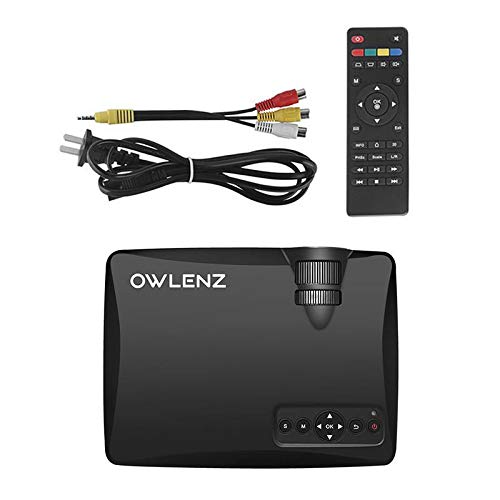
Image: OWLENZ SD60 Projector, remote control, power cable, and AV cables.
- OWLENZ SD60 Mini Projector
- Fernbedienung
- Stromkabel
- AV-Kabel
- Benutzerhandbuch (dieses Dokument)
4. Produktüberschreitungview
Familiarize yourself with the various parts and controls of your OWLENZ SD60 projector.
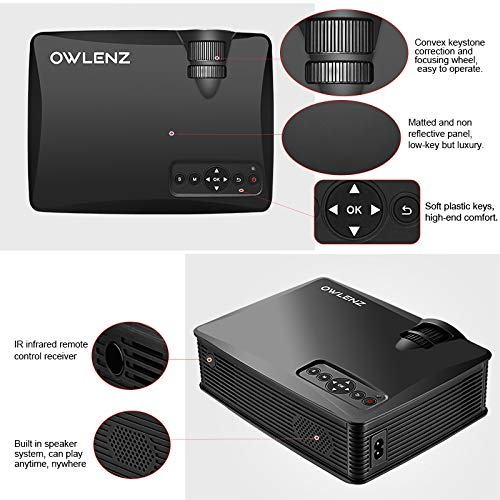
Image: Key features of the OWLENZ SD60 projector, including the focusing wheel, keystone correction, control panel, IR receiver, and built-in speaker.
- Convex Keystone Correction and Focusing Wheel: Located on the top, these allow for easy image adjustment.
- Matted and Non-Reflective Panel: Provides a sleek, low-key appearance.
- Soft Plastic Keys: For comfortable and responsive control.
- IR Infrared Remote Control Receiver: For remote operation.
- Eingebautes Lautsprechersystem: A 3W speaker for integrated audio playback.
- Eingangsanschlüsse: HDMI, USB, AV, SD Card slot (located on the side/rear).
5. Einrichtung
5.1 Stromanschluss
- Schließen Sie das Netzkabel an den Stromeingang des Projektors an.
- Stecken Sie das andere Ende des Stromkabels in eine geeignete Steckdose.
- Drücken Sie den Netzschalter am Projektor oder an der Fernbedienung, um ihn einzuschalten.
5.2 Anschließen von Eingangsquellen
The projector supports various input options:
- HDMI: Connect an HDMI cable from your device (laptop, gaming console, etc.) to the projector's HDMI port.
- USB: Stecken Sie einen USB-Stick in den USB-Anschluss, um Medien direkt wiederzugeben.
- EIN V: Verwenden Sie das mitgelieferte AV-Kabel, um Geräte mit AV-Ausgang anzuschließen.
- SD-Karte: Insert an SD card into the SD card slot for media playback.
After connecting, select the appropriate input source from the projector's menu using the remote or control panel.
5.3 Wi-Fi Screen Sharing (Miracast / Airplay)
The SD60 supports wireless screen sharing from compatible smartphones and tablets.
- Stellen Sie sicher, dass Ihr Mobilgerät und der Projektor mit demselben WLAN-Netzwerk verbunden sind.
- On the projector, navigate to the "Screen Share" or "Miracast/Airplay" option in the main menu.
- Aktivieren Sie auf Ihrem Mobilgerät die Bildschirmspiegelungsfunktion (z. B. „Smart“). View"auf Android, "Bildschirmspiegelung" auf iOS).
- Wählen Sie den Namen des Projektors aus der Liste der verfügbaren Geräte aus, um die Verbindung herzustellen.
5.4 Fokus- und Trapezkorrektur
- Fokus: Rotate the focusing wheel near the lens until the projected image is clear and sharp.
- Trapezkorrektur: Use the keystone correction wheel to adjust the image shape if it appears trapezoidal (wider at the top or bottom).
6. Bedienung
6.1 Grundlegende Bedienelemente
Use the control panel on the projector or the remote control to navigate menus and adjust settings.
- Netzschalter: Schaltet den Projektor ein/aus.
- Navigationsschaltflächen (Pfeile/OK): Zur Menünavigation und -auswahl.
- Quellentaste: Switches between input sources (HDMI, USB, AV, SD Card, Wi-Fi).
- Menü-Schaltfläche: Öffnet das Einstellungsmenü des Projektors.
6.2 Medienwiedergabe
Once an input source is selected, the projector will display content. For USB/SD card playback, navigate through the file browser to select your desired media.
6.3 Audioausgang
- Eingebauter Lautsprecher: The projector has a built-in 3W speaker suitable for small viewing-Bereiche.
- Externer Sprecher: For a better listening experience, connect external speakers or headphones to the 3.5mm audio port.
6.4 Projektionsgröße
The projector supports projection sizes ranging from 40 to 150 inches, offering a large screen experience.
7. Wartung
7.1 Reinigung
- Verwenden Sie ein weiches, trockenes Tuch, um das Äußere des Projektors zu reinigen.
- For the lens, use a lens cleaning cloth and specialized lens cleaning solution. Do not use abrasive materials.
- Regularly clean the ventilation openings to ensure proper airflow and prevent dust buildup.
7.2 LED Bulb Lifespan
The OWLENZ SD60 features an LED bulb with a lifespan of up to 30,000+ hours, significantly longer than traditional projector lamps. No regular bulb replacement is typically required under normal usage conditions.
8. Anwendungsfälle
The OWLENZ SD60 Mini Projector is versatile and suitable for various applications:
- Heimkino: Genießen Sie Filme, Fernsehsendungen und Sport auf einem großen Bildschirm.
- Spielen: Connect gaming consoles for an immersive gaming experience.
- Bildungszwecke: Project educational content, videos, and presentations.
- Children's Entertainment: Ideal for playing videos and cartoons for children.
- Klein Viewing-Bereiche: Its compact design and built-in speaker make it perfect for use in smaller rooms or spaces.
9. Fehlerbehebung
| Problem | Mögliche Ursache | Lösung |
|---|---|---|
| Kein Bild angezeigt | Incorrect input source selected; loose cable connection; source device not powered on. | Wählen Sie die richtige Eingangsquelle. Überprüfen Sie alle Kabelverbindungen. Stellen Sie sicher, dass das Quellgerät eingeschaltet ist. |
| Bild ist verschwommen | Der Fokus ist nicht richtig eingestellt. | Adjust the focusing wheel until the image is clear. |
| Das Bild ist trapezförmig | Keystone not adjusted correctly. | Adjust the keystone correction wheel. |
| Kein Ton | Lautstärke zu niedrig; externe Lautsprecher nicht richtig angeschlossen; Audioformat wird nicht unterstützt. | Increase volume. Check external speaker connection or use built-in speaker. Ensure audio format is compatible. |
| Wi-Fi screen sharing not working | Devices not on the same Wi-Fi network; screen mirroring function not activated on mobile device. | Ensure both devices are on the same Wi-Fi. Activate screen mirroring on your mobile device and select the projector. |
10. Spezifikationen
| Besonderheit | Detail |
|---|---|
| Marke | EULENZ |
| Modell | SD60 |
| Produktabmessungen (L x B x H) | 20.8 x 16.5 x 8 cm |
| Artikelgewicht | 949 g |
| Hardware-Schnittstelle | HDMI, USB |
| Konnektivitätstechnologie | HDMI, USB, WLAN |
| Kompatible Geräte | Smartphones, Tablets, Laptops |
| Besondere Merkmale | Eingebauter Lautsprecher, tragbar |
| Display-Technologie | LCD |
| Helligkeit | 1500 Lumen |
| Lebensdauer der LED-Lampe | Up + Stunden 30,000 |
| Projektionsgröße | 40 bis 150 Zoll |
| Eingebaute Lautsprecherleistung | 3W |
| Formfaktor | Tragbar |
| Montagetyp | Tischhalterung |
| Wastage | 24 Watt |
| Batterien erforderlich | Ja (Fernbedienung nicht im Lieferumfang enthalten) |
11. Produktvideo beendetview
Sehen Sie sich dieses kurze Video für einen schnellen Überblick an.view of the OWLENZ SD60 Mini Projector's features and capabilities.
Video: Ein kurzer Überblickview highlighting the OWLENZ SD60 projector's display, sound, smart features, other features, portability, and use cases.
12. Garantie und Support
The OWLENZ SD60 Mini Projector comes with a standard brand warranty. For detailed warranty information, technical support, or service inquiries, please refer to the product detail page on Amazon.in or contact OWLENZ customer service directly.
For further information, visit the product detail page: Amazon-Produktseite