
1. Einleitung
This manual provides detailed instructions for the assembly, operation, and maintenance of your FLEXISPOT Electric Sit Stand Desk Base. Designed for a DIY desktop workstation, this adjustable desk frame offers flexibility and ergonomic benefits for both home and office environments. It includes an integrated power strip and a cable management tray to enhance your workspace efficiency and organization.

This image displays the assembled FLEXISPOT standing desk frame within a modern office environment, showcasing its sleek design and how it fits into a professional workspace.
2. Wichtige Sicherheitshinweise
Bitte lesen und verstehen Sie alle Sicherheitshinweise vor der Montage und Inbetriebnahme, um Verletzungen oder Schäden am Produkt zu vermeiden.
- Befolgen Sie stets die mitgelieferte Montageanleitung.
- Keep the desk away from water and heat sources.
- Do not use the desk if the cord is damaged.
- Always use the desk within its weight limit.
- Keep the desk away from children and pets when in use.
3. Packungsinhalt
Verify that all components are present before beginning assembly. If any parts are missing or damaged, please contact FLEXISPOT customer support.

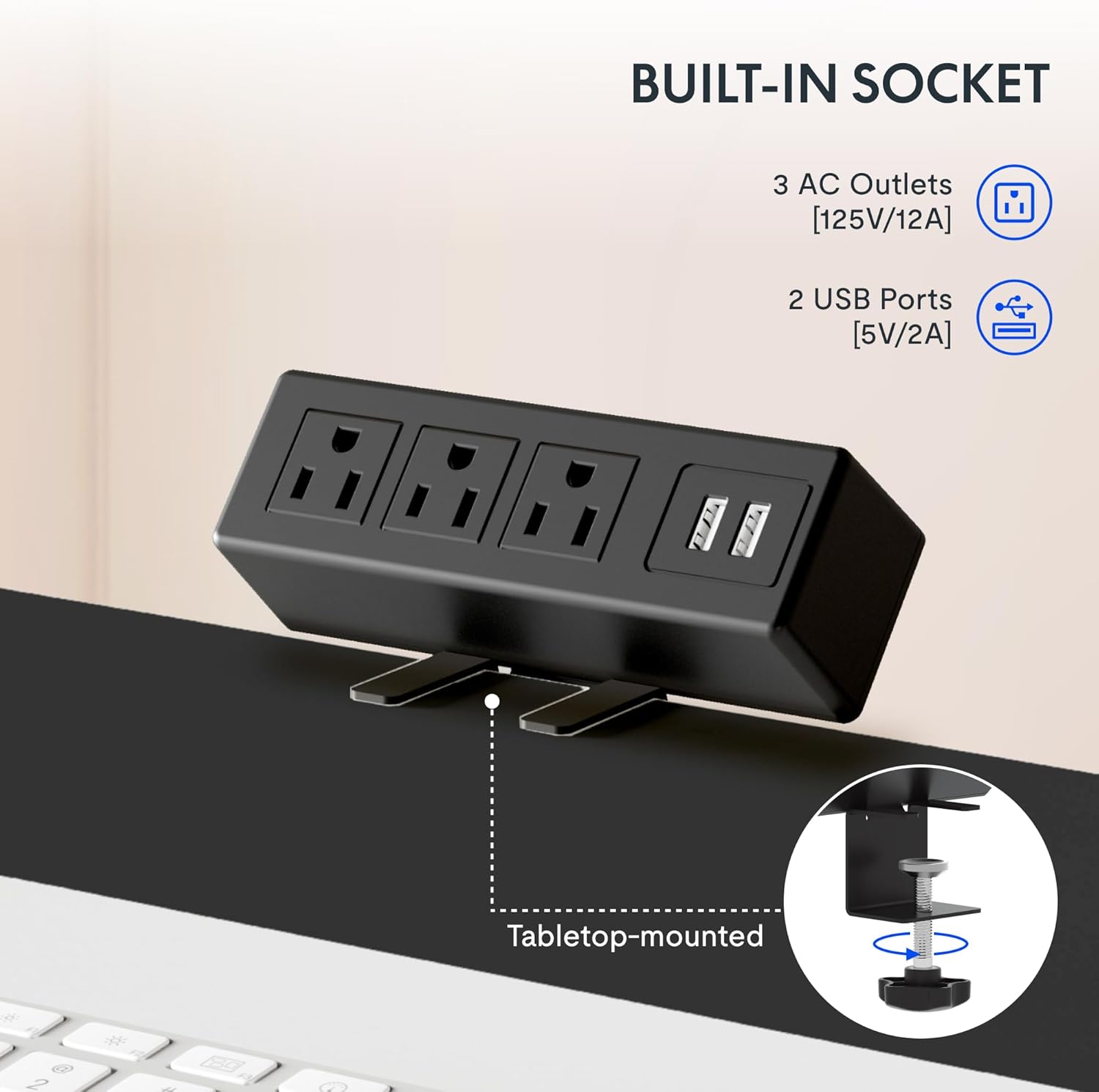
Dieses Bild zeigt eine Nahaufnahme. view der clamp-on power strip, highlighting its three AC outlets and two USB ports, designed for convenient tabletop mounting.
Liste der Komponenten:
- Adjustable Desk Legs (2)
- Querträger-/Rahmenstütze
- Control Panel with Memory Functions
- Clamp Power Strip (3 AC outlets, 2 USB ports)
- Kabelführungsschale
- Mounting Hardware and Tools (as provided)
- Cable Clips/Ties
4. Aufbau und Montage
Assembly of the FLEXISPOT desk frame is designed to be straightforward and typically takes less than 30 minutes. Follow these steps carefully.
4.1 Prepare Your Workspace
Clear an area large enough to assemble the desk frame. Ensure you have all components and the provided tools readily available.
4.2 Bauen Sie den Rahmen zusammen
Attach the adjustable desk legs to the crossbar according to the detailed instructions in the included assembly guide. Ensure all screws are tightened securely.
4.3 Attach Your Desktop
The frame is compatible with various desktop sizes. Recommended desktop sizes are a width of 39.3" to 63" and a depth of 19.7" to 31.5". Secure your chosen desktop to the assembled frame using appropriate screws (may not be included with frame only purchase).

This diagram illustrates the recommended dimensions for a desktop panel to be used with the FLEXISPOT desk frame, ensuring proper fit and stability.
4.4 Install Power Strip and Cable Management
Befestigen Sie dieamp power strip to the edge of your desktop for easy access to power outlets. Install the cable management tray and use the provided cable clips to organize and conceal your cords, maintaining a clean and clutter-free workspace.

Dieses Bild zeigt eine Nahaufnahme. view der clamp-on power strip, highlighting its three AC outlets and two USB ports, designed for convenient tabletop mounting.
This side-by-side comparison demonstrates the significant improvement in desk organization achieved by utilizing the integrated cable management tray, transforming a cluttered setup into a tidy workspace.
5. Bedienungsanleitung
Your FLEXISPOT desk frame features an electric height adjustment system with a memory controller for personalized comfort.
5.1 Höhenverstellung
Use the up (▲) and down (▼) arrow buttons on the control panel to smoothly raise or lower the desk to your desired height. The adjustable height range is 28.1'' to 45.7''.

This visual demonstrates the extensive height adjustment capabilities of the desk, showing its minimum height of 28.1 inches and maximum height of 45.7 inches, allowing for versatile use.
5.2 Verwenden von Speichervoreinstellungen
The control panel allows you to save up to four preferred height settings. To save a height, adjust the desk to the desired level, then press and hold one of the numbered memory buttons (1, 2, 3, or 4) until the display confirms the setting is saved. To recall a saved height, simply press the corresponding numbered button.
This detailed image highlights the desk's control panel, featuring a digital display, up/down adjustment buttons, and four memory preset buttons for convenient height recall.
5.3 Produktüberschussview Video
Für eine visuelle Darstellungview of the FLEXISPOT desk and its features, please watch the official product video below.
Dieses Video bietet einen allgemeinen Überblickview of FlexiSpot products, showcasing the ergonomic benefits and various uses of their adjustable desks in different settings. It demonstrates the smooth height adjustment and integrated features.
6. Wartung
To ensure the longevity and optimal performance of your FLEXISPOT Standing Desk Frame, follow these simple maintenance guidelines:
- Reinigung: Wischen Sie Rahmen und Bedienfeld mit einem weichen, fusselfreien Tuch ab.amp Mit einem Tuch abwischen. Vermeiden Sie die Verwendung von scharfen Chemikalien oder Scheuermitteln, die die Oberfläche beschädigen könnten.
- Kabelmanagement: Periodically check and re-organize cables to prevent tangles and ensure smooth operation of the desk's height adjustment mechanism.
- Motorpflege: The motor is designed for maintenance-free operation. Avoid obstructing the movement of the legs during adjustment.
- Regelmäßige Inspektion: Occasionally check all screws and connections to ensure they remain tight. Re-tighten if necessary.
7. Fehlerbehebung
If you encounter any issues with your FLEXISPOT Standing Desk Frame, refer to the following common troubleshooting tips:
| Problem | Mögliche Ursache | Lösung |
|---|---|---|
| Der Schreibtisch bewegt sich nicht und reagiert nicht auf die Bedienelemente. | Power cable disconnected; overload protection activated; motor error. | Check power connections. Unplug and re-plug the desk. Reduce weight on the desk. Refer to the specific error codes in your detailed manual if available. |
| Der Schreibtisch wackelt ungleichmäßig oder macht ungewöhnliche Geräusche. | Lose Verbindungen; ungleichmäßige Gewichtsverteilung; Verstopfung. | Ensure all assembly screws are tight. Distribute weight evenly on the desktop. Check for any obstructions under or around the desk. |
| Speichervoreinstellungen funktionieren nicht. | Fehlerhafter Speichervorgang. | Ensure you press and hold the memory button until the setting is confirmed. Re-save your desired heights. |
If the problem persists after attempting these solutions, please contact FLEXISPOT customer support for further assistance.
8. Spezifikationen
Key technical specifications for the FLEXISPOT Standing Desk Frame (Model E1):
| Besonderheit | Detail |
|---|---|
| Marke | FLEXISPOT |
| Modellnummer | E1 |
| Produktabmessungen (T x B x H) | 19.7"D x 63"W x 45.7"H (frame only, max extension) |
| Einstellbarer Höhenbereich | 28.1" (Min.) - 45.7" (Max.) |
| Recommended Desktop Width | 39.3" bis 63" |
| Empfohlene Tischplattentiefe | 19.7" bis 31.5" |
| Grundmaterial | Legierter Stahl |
| Farbe | Grau |
| Maximalgewichtsempfehlung | 70 Kilogramm (ca. 154 Pfund) |
| Funktionen des Bedienfelds | Digital Display, Up/Down Adjustment, 4 Memory Presets |
| Mehrfachsteckdose | 3 AC-Steckdosen (125 V/12 A), 2 USB-Anschlüsse (5 V/2 A) |
| Erforderliche Montage | Ja |
| UPC | 855427008913 |
9. Garantie und Support
FLEXISPOT stands behind the quality of its products. Your Standing Desk Frame is covered by the following warranty:
- 5 Jahr Garantie: Covers the frame, motor, and other mechanisms.
- 2 Jahr Garantie: Covers the controller, switch, and electronics.
For warranty claims, technical assistance, or any questions regarding your product, please visit the official FLEXISPOT website or contact their customer support directly. Please have your model number (E1) and proof of purchase ready when contacting support.