
1. Einleitung
This manual provides detailed instructions for the proper use and maintenance of your Meike MK-MT24S Macro Twin Lite Flash. Please read this manual thoroughly before using the product to ensure optimal performance and safety. The Meike MK-MT24S is designed to provide versatile lighting solutions for macro photography with compatible Sony mirrorless cameras.
2. Packungsinhalt
Bitte prüfen Sie, ob alle unten aufgeführten Artikel in Ihrem Paket enthalten sind. Sollten Artikel fehlen oder beschädigt sein, wenden Sie sich bitte an Ihren Händler.
- 1 x MK-GT620 TTL-Transceiver
- 2 x MK-R200 Wireless Remote Flashes
- 2 x MK-R200 Soft Flash Diffusers
- 2 x Hot Shoe Mounts (MK-AS-R200A)
- 2 x L.amp Holders (MK-AS-R200B)
- 1 x Annular Lamp Halter
- 6 x Lens Adapter Rings (52mm, 55mm, 62mm, 67mm, 72mm, 77mm)
- 18 x Color Filters (MK-SB-R200)
- 1 x MK-MT24S Storage Pocket

Abbildung 2.1: Überview of the Meike MK-MT24S Macro Twin Lite Flash and its included accessories.
3. Sicherheitshinweise
Bitte beachten Sie die folgenden Sicherheitsvorkehrungen, um Verletzungen oder Schäden am Produkt zu vermeiden:
- Die Blitzeinheit darf nicht zerlegt oder verändert werden.
- Das Produkt sollte von Wasser und hoher Luftfeuchtigkeit ferngehalten werden.
- Vermeiden Sie direkten Augenkontakt mit dem Blitzlicht, insbesondere aus nächster Nähe.
- Use only recommended batteries and dispose of them properly.
- Do not operate in environments with extreme temperatures (-10°C to 50°C operating, -20°C to 70°C storage).
4. Einrichtung
4.1 Einlegen der Batterie
The MK-R200 flashes require 2x AAA Ni-MH batteries each, and the MK-GT620S trigger requires 2x AA Ni-MH batteries. Ensure correct polarity when inserting batteries.

Abbildung 4.1: Hinteren view of the MK-R200 flashes, showing the battery compartment and hot shoe mount.
4.2 Mounting the Trigger (MK-GT620S)
Slide the MK-GT620S TTL transceiver onto your camera's hot shoe mount until it clicks into place. Secure it by tightening the locking mechanism if available.

Abbildung 4.2: The MK-GT620S trigger and MK-R200 flashes mounted on a Sony camera with a macro lens.
4.3 Attaching Lens Adapter Rings and Annular Lamp Halter
Select the appropriate lens adapter ring (52mm, 55mm, 62mm, 67mm, 72mm, or 77mm) for your camera lens. Screw the adapter ring onto the front filter thread of your lens. Then, attach the annular lamp holder to the adapter ring.
4.4 Mounting MK-R200 Flashes
The MK-R200 flashes can be attached to the annular lamp holder or positioned independently using the included lamp holders (MK-AS-R200B) and hot shoe mounts (MK-AS-R200A). Each R200 flash can rotate up to 60° horizontally and 45° vertically for flexible positioning.

Abbildung 4.3: The MK-R200 flashes attached to the annular lamp holder, along with various lens adapter rings.
5. Bedienung
5.1 Ein-/Ausschalten
To power on the MK-GT620S trigger and MK-R200 flashes, slide the power switch to the 'ON' position. To power off, slide the switch to 'OFF'.
5.2 Blitzmodi
The MK-MT24S supports various flash modes:
- TTL-Modus (Through-The-Lens): The camera automatically determines the flash output for correct exposure.
- Manual Flash (M) Mode: Allows manual adjustment of flash output from 1/1 to 1/64.
- Optische Slave-Modi S1/S2: The R200 flashes can be triggered by another flash. S1 mode triggers on the first flash, S2 mode ignores the pre-flash of a TTL system.
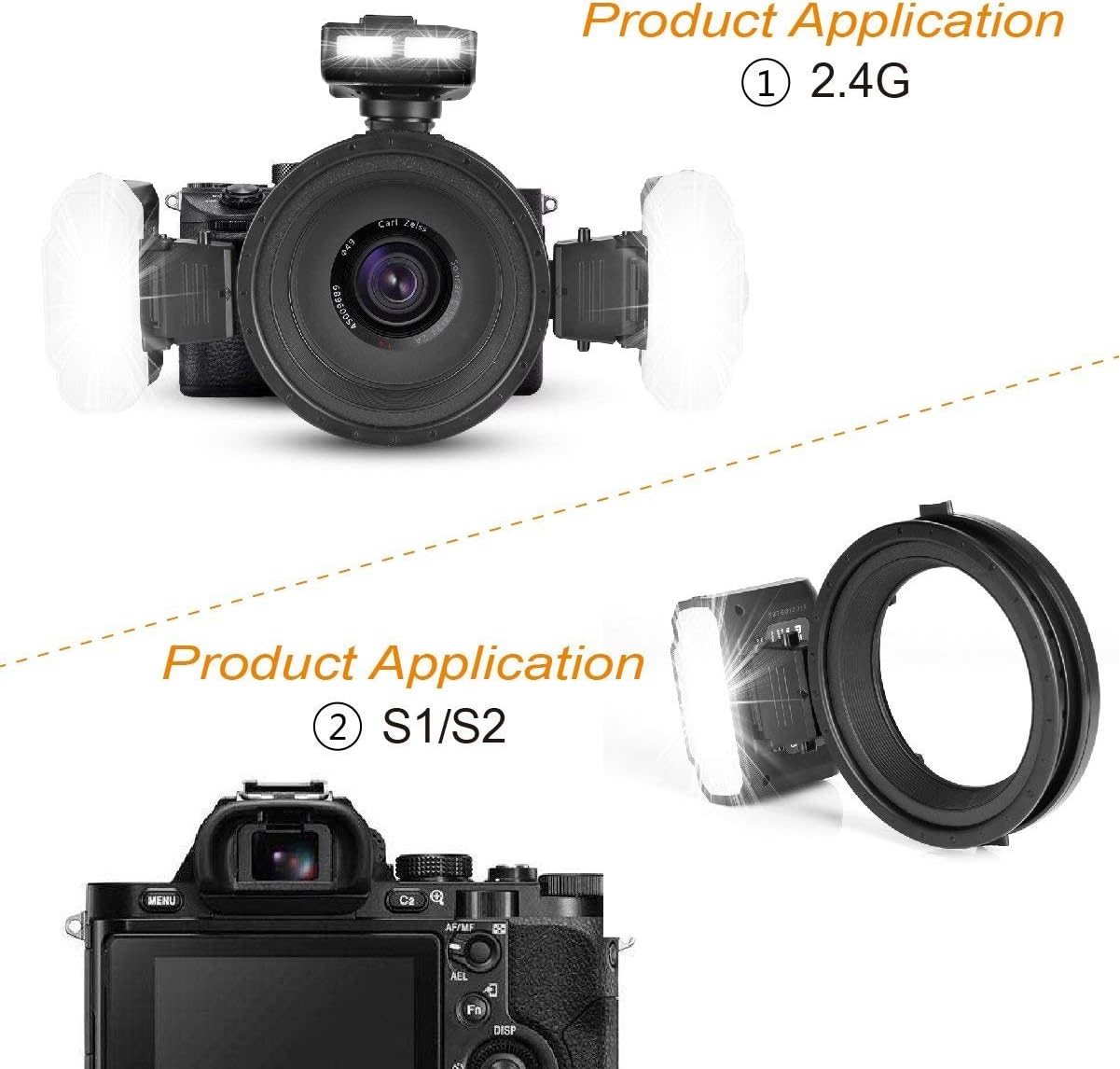
Abbildung 5.1: Illustration of 2.4G wireless triggering and S1/S2 optical slave modes.
5.3 2.4-GHz-Funksteuerung
The MK-GT620S trigger communicates with the MK-R200 flashes via 2.4G wireless transmission. This system supports three groups (A/B/C) and four channels (1/2/3/4). The default ID is 0000. Ensure the trigger and flashes are set to the same group and channel for proper communication.
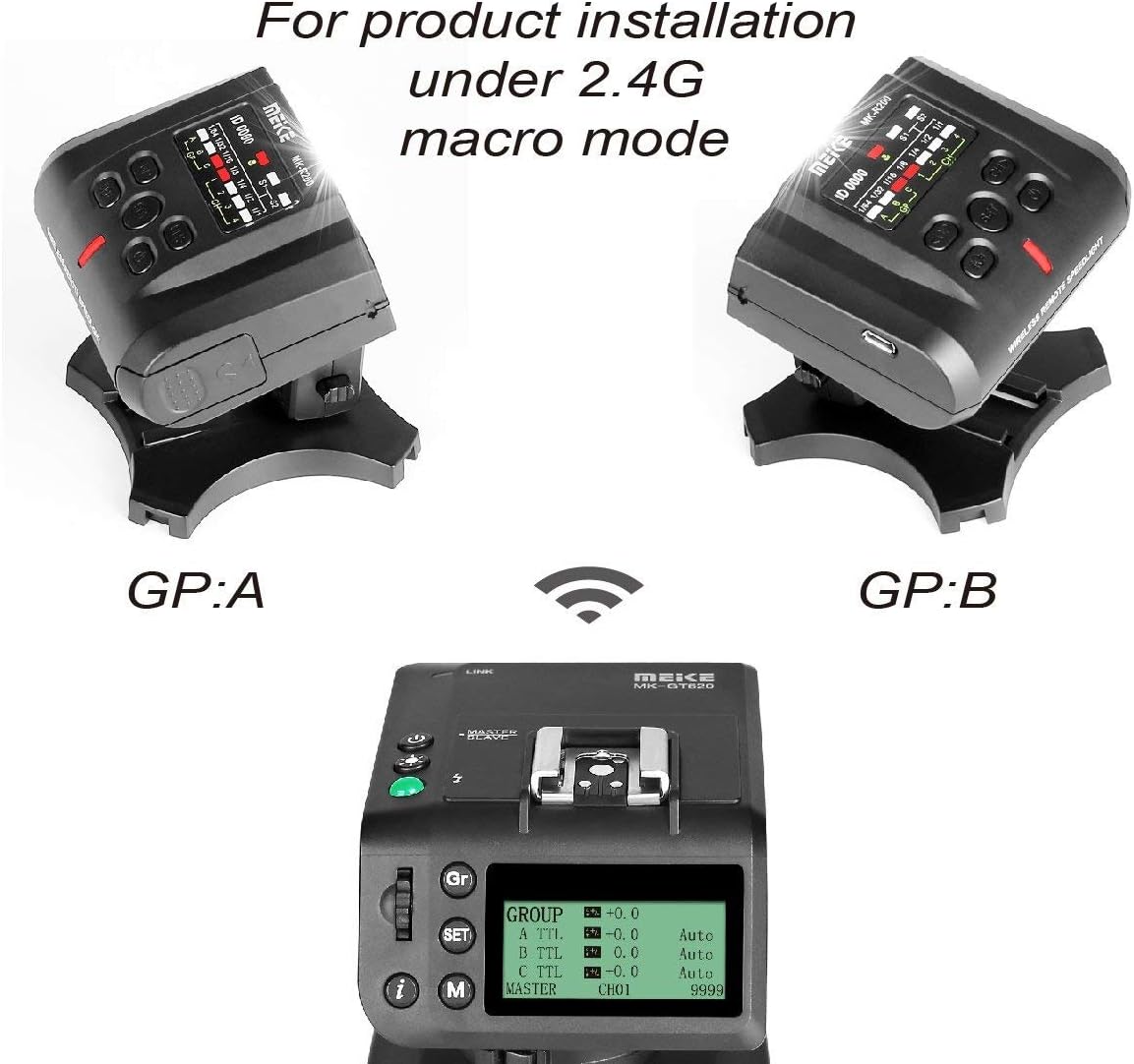
Abbildung 5.2: Configuration for 2.4G macro mode, displaying the trigger's interface and two R200 flashes set to groups A and B.
5.4 Flash Ratio Adjustment
The system supports flash ratio adjustment, allowing independent control of the output for each R200 flash within groups A/B/C. Flash intensity can be adjusted in 7 levels (1/64-1/1).
5.5 Hochgeschwindigkeitssynchronisation (HSS)
The MK-MT24S supports High Speed Sync, Front-curtain Sync, FE lock, and Rear-curtain Sync, enabling flash photography at shutter speeds faster than the camera's native sync speed.
5.6 LED Assistive Preview Fokus
The flashes are equipped with an LED light (0.5W, 5500K±200, Ra 90) to assist with focusing in low-light conditions.
5.7 Firmware-Upgrade
The unit supports firmware upgrading online. Refer to the Meike official webWebsite für die neueste Firmware und Anweisungen.
6. Wartung
To ensure the longevity and proper functioning of your Meike MK-MT24S Macro Twin Lite Flash, follow these maintenance guidelines:
- Reinigung: Use a soft, dry cloth to clean the exterior of the flash units and trigger. For stubborn dirt, a slightly damp Ein Tuch kann verwendet werden, anschließend mit einem trockenen Tuch nachwischen. Verwenden Sie keine Lösungsmittel oder Scheuermittel.
- Lagerung: When not in use for extended periods, remove the batteries from all units to prevent leakage. Store the product in a cool, dry place, preferably in its original storage pocket, away from direct sunlight and extreme temperatures.
- Handhabung: Vermeiden Sie es, die Geräte fallen zu lassen oder starken Stößen auszusetzen, da dies zu Schäden an den internen Bauteilen führen kann.
7. Fehlerbehebung
If you encounter issues with your Meike MK-MT24S, refer to the following common problems and solutions:
- Blitz zündet nicht:
- Prüfen Sie, ob die Batterien korrekt eingesetzt und geladen sind.
- Ensure the trigger and flashes are powered on.
- Verify that the trigger is securely mounted on the camera's hot shoe.
- Confirm that the trigger and flashes are set to the same group and channel.
- Unregelmäßige Blitzausgabe:
- Prüfen Sie den Batteriestand; ein niedriger Batteriestand kann die Leistung beeinträchtigen.
- Ensure there are no obstructions between the trigger and flashes in wireless mode.
- Review camera and flash settings for correct exposure mode (TTL/Manual).
- Flash not syncing with shutter:
- Ensure High Speed Sync (HSS) is enabled if using shutter speeds above the camera's X-sync speed.
- Überprüfen Sie die Blitzlichteinstellungen der Kamera.
If the problem persists, please contact Meike customer support.
8. Spezifikationen
| Besonderheit | Spezifikation |
|---|---|
| Leitzahl | 10 (ISO 100.m), 14 (ISO 200.m) |
| LED-Licht | 0.5 W, 5500 K ± 200, Ra 90 |
| Gruppen & Kanäle | Gruppe A/B/C, Kanäle 1/2/3/4 |
| ID | Default as 0000 |
| S1/S2 Übertragungsdistanz | Innenbereich >20 m, Außenbereich >10 m |
| 2.4G Wireless Distance | Stable within 15m (any angle), Actual measurement >100m (open environment) |
| Abdeckwinkel | Deckt das Licht eines 24-mm-Objektivs ab. |
| Recyclingzeit | 4s (1/1 output) |
| Batterien | 2x AAA Ni-MH (for R200), 2x AA Ni-MH (for GT620) |
| Betriebstemperatur | -10°C bis 50°C |
| Lagertemperatur | -20°C bis 70°C |
| TTL Flasher Size | 63 x 84 x 53.6 mm |
| Macro Flash Size | 80 x 60 x 75 mm |
| Gewicht | Approx. 1.1 KG (total package) |
9. Kompatibilität
The Meike MK-MT24S Macro Twin Lite Flash is compatible with Sony MI Hot Shoe Mount Mirrorless Cameras, including but not limited to:
- DSC-RX10M2, DSC-HX50, DSC-HX60, DSC-HX400, DSC-RX100M2, DSC-RX10, DSC-RX1R, DSC-RX1, DSC-RX10M4
- ILCE-9, ILCE-7RM2, ILCE-7SM2, ILCE-7M2, ILCE-6500, ILCA-99M2, ILCE-6000, ILCE-7, ILCE-7M2, ILCE-7R, ILCE-7S, ILCE-5100
- NEX-6, NEX-7, NEX-3, NEX-5
10. Garantie und Support
For warranty information, please refer to the warranty card included with your product or visit the official Meike website. For technical support or service inquiries, please contact Meike customer service through their official channels.