
Einführung
This manual provides essential information for the safe and effective use of your POWERTEC 71354 120V Magnetic Safety Switch. This switch is designed to enhance the safety of your power tools by preventing automatic restarts after power interruptions and providing an immediate power cut-off function. Please read these instructions thoroughly before installation and operation.
Sicherheitshinweise
WARNING: Always disconnect power to the tool before installing, servicing, or performing any maintenance on the magnetic switch or the connected power tool.
- This magnetic switch is rated for 120V, 9A, and is suitable for motors up to 1/2 HP.
- Do not use this switch with 220V power systems.
- Ensure all wiring connections are secure and comply with local electrical codes. If you are unsure about electrical wiring, consult a qualified electrician.
- The magnetic safety feature prevents accidental restarts of power tools after a power outage, protecting both the operator and the equipment.
- The switch is designed with a robust ABS housing that is dustproof and impact-resistant for workshop environments.
- This product is UL certified, ensuring professional-grade safety compliance.
Packungsinhalt
- 1 x POWERTEC 71354 120V Magnetic Safety Switch
Technische Daten
| Besonderheit | Spezifikation |
|---|---|
| Modellnummer | 71354 |
| Bandtage Bewertung | 120 V |
| Aktuelle Bewertung | 9 Amps |
| Maximale Leistung | 1 / 2 HP |
| Schaltertyp | Push Button, Magnetic Safety |
| Montagetyp | Oberflächenmontage |
| Gehäusematerial | ABS |
| Zertifizierungen | UL-Normen |
| Abmessungen (L x B x H) | 4 x 3 x 2 Zoll (ungefähr) |
Setup und Installation
The POWERTEC 71354 Magnetic Safety Switch is designed for surface mounting and features convenient wire knockouts and pre-cut mounting holes for easy installation on your machine or stand.
- Montage des Schalters:
Position the switch box on a flat surface of your power tool or workbench. Use appropriate screws (not included) to secure the switch through the pre-cut mounting holes. Ensure the switch is mounted in a location that allows for easy access during operation and emergencies.
- Kabelverbindungen:
Refer to the wiring diagram below for proper electrical connections. This switch requires basic electrical knowledge for installation. If you are not comfortable with electrical wiring, please seek professional assistance.

Bild: Wiring Diagram for POWERTEC 71354 Magnetic Safety Switch. This diagram illustrates the connections for power source (Hot In, Neutral In), emergency stop button, ON/OFF switch, and output to the machine (Hot Out, Neutral Out), including a green ground wire connection.
- Energiequelle: Connect the incoming hot and neutral wires from your power source to the designated 'Hot In' and 'Neutral In' terminals on the switch.
- Maschinenanschluss: Connect the hot and neutral wires from the switch's 'Hot Out' and 'Neutral Out' terminals to your power tool.
- Erdung: Ensure the green ground wire is properly connected to a verified ground point on your machine.
- Emergency Stop Button Wiring: The E-stop button wires should be connected to terminals 13 and 23 on the magnetic switch. Incorrect wiring (e.g., to 14 and 24) can cause the magnetic switch to buzz or vibrate.
- Terminal Connectors: When making connections, consider using 90-degree spade connectors if space inside the switch box is limited, as straight spade connectors may be too long and prevent the cover from closing properly.
Important: Verify that your motor's power consumption is within the 1/2 HP limit and that your power supply is 120V. This switch is not designed for 220V applications.
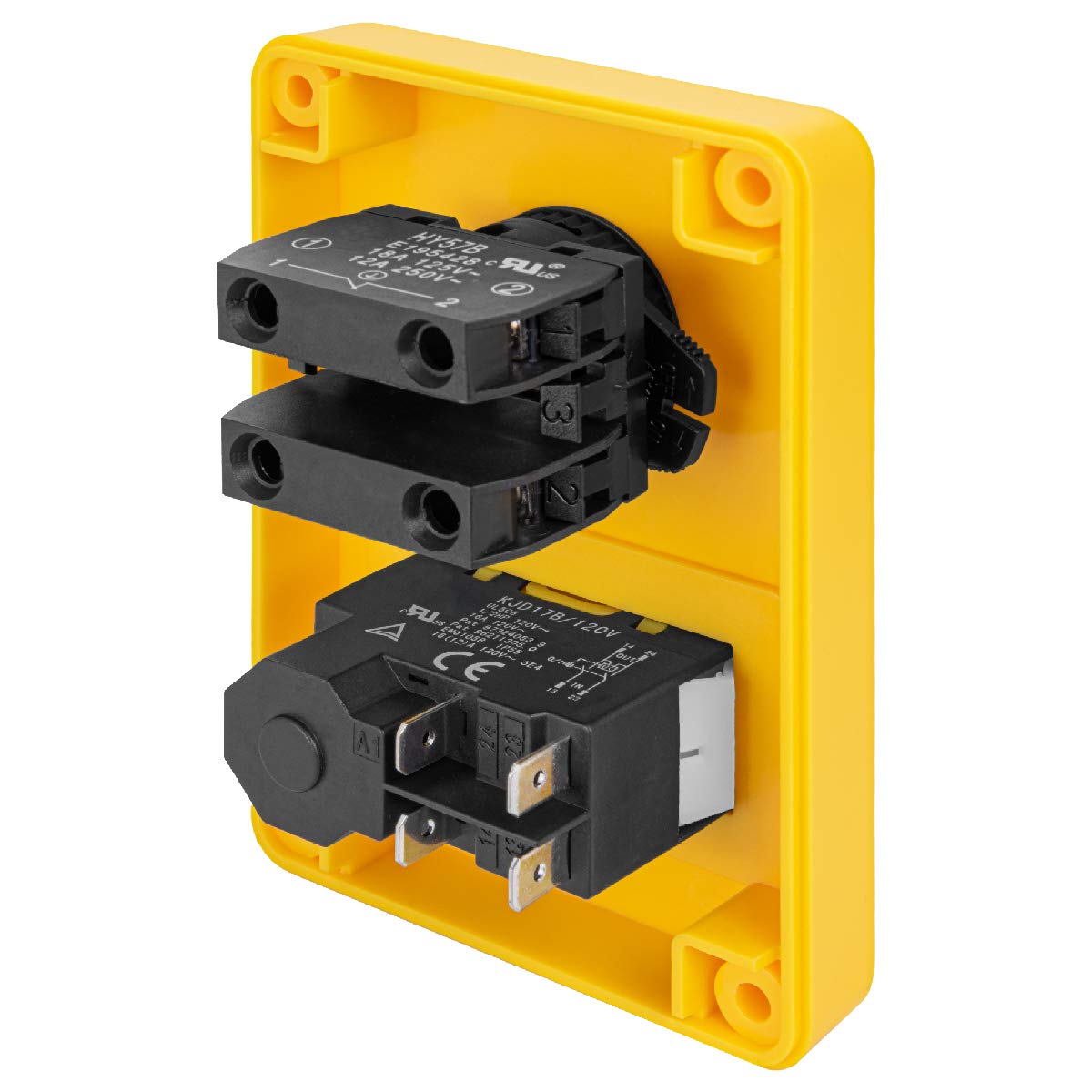
Bild: Intern view of the POWERTEC 71354 Magnetic Safety Switch, showing the wiring terminals and internal components.
Betrieb
The POWERTEC 71354 Magnetic Safety Switch features a simple and intuitive control layout.
- Turning On the Tool:
Press the green 'ON' button to supply power to your connected power tool.
- Turning Off the Tool:
Press the red 'OFF' button to cut power to your connected power tool.
- Not-Halt:
In an emergency, firmly press the large red emergency stop button. This will immediately terminate the power supply to the machine.

Bild: A finger pressing the large red Emergency Stop Button on the POWERTEC 71354 switch, highlighting its immediate power cut-off function.
- Releasing the Emergency Stop:
To release the emergency stop button and restore normal operation, twist the red button clockwise until it pops out. The machine will remain off until you manually press the green 'ON' button again.

Bild: An arrow indicating the clockwise turn required to release the Latching Turn Release mechanism of the Emergency Stop Button on the POWERTEC 71354 switch.
- Magnetic Safety Feature:
In the event of a power loss or outage, the magnetic switch will automatically cut power to the tool. This prevents the tool from restarting unexpectedly when power is restored, providing an important safety measure. You must manually press the green 'ON' button to restart the tool after a power interruption.
Wartung
To ensure the longevity and reliable operation of your POWERTEC 71354 Magnetic Safety Switch, follow these general maintenance guidelines:
- Keep the switch housing clean and free from dust and debris. Use a dry cloth for cleaning.
- Überprüfen Sie regelmäßig alle Kabelverbindungen, um sicherzustellen, dass sie fest und sicher sitzen.
- Check the functionality of the ON, OFF, and Emergency Stop buttons regularly to confirm they operate smoothly.
- Do not attempt to open the sealed internal components of the switch.
Fehlerbehebung
| Problem | Mögliche Ursache | Lösung |
|---|---|---|
| Switch buzzes or vibrates when power is applied. | Incorrect wiring of the E-stop button. | Ensure E-stop wires are connected to terminals 13 and 23 as per the wiring diagram. |
| Switch cover does not close properly after wiring. | Straight spade connectors are too long for the internal space. | Use 90-degree spade connectors for internal wiring to allow sufficient clearance. |
| Elektrowerkzeug lässt sich nicht einschalten. | No power to the switch, loose connections, or E-stop engaged. | Check power supply, verify all wiring connections, and ensure the E-stop button is released. |
| Power tool restarts automatically after a power outage. | This should not happen with a magnetic safety switch. | If this occurs, immediately disconnect power and inspect the switch for damage or malfunction. Do not use until the issue is resolved. |
Garantie und Support
POWERTEC products are manufactured to high-quality standards. For warranty information or technical support, please contact POWERTEC customer service. Keep your purchase receipt for warranty claims.


