
Einführung
This manual provides detailed instructions for the operation and maintenance of your BOBLOV BT-S3 Helmet Headset. The BT-S3 is designed for motorcycle communication, offering hands-free calling, music playback, FM radio, and intercom functionality for riders. Please read this manual thoroughly before using the device to ensure proper function and safety.
Packungsinhalt
Bitte überprüfen Sie, ob alle unten aufgeführten Artikel in Ihrem Paket enthalten sind:
- 1 x BOBLOV BT-S3 Helmet Intercom Unit
- 1 x Stereo Headphones (with microphone)
- 1 x Mounting Clip & Screws
- 1 x Schraubendreher
- 1 x USB-Ladekabel
- 1 x Benutzerhandbuch
- 1 x Velcro Pad (for mounting)
- 1 x Audio Line

Abbildung 1: All components included in the BOBLOV BT-S3 package.
Produkt überview
Bedienknöpfe und Anschlüsse

Abbildung 2: BOBLOV BT-S3 control buttons and connection ports.
- Telefontaste: Used for answering/ending calls, redialing, and activating voice assistant.
- Lautstärke + Taste: Increases volume, navigates forward in music/FM.
- Lautstärketaste: Decreases volume, navigates backward in music/FM.
- Ein-/Ausschalter/Gegensprechanlage: Powers the device on/off, initiates/ends intercom, plays/pauses music, activates FM radio.
- Charger and Headset Socket: Multi-purpose port for charging and connecting the headset.
- Cable Input Interface: For connecting the headset cable.
Aufstellen
1. Aufladen des Geräts
Before initial use, fully charge the BT-S3 unit. Connect the provided USB cable to the charging port on the device and to a standard USB power adapter (not included). The LED indicator will show charging status. A full charge typically takes approximately 2-3 hours.
2. Einbau des Headsets in Ihren Helm
The BT-S3 can be installed in various helmet types, including full-face, half-face, and open-face helmets.
- Attach the mounting clip to the side of your helmet using the provided screws and screwdriver, or use the adhesive Velcro pad for a tool-free installation. Ensure the clip is securely fastened.
- Slide the BT-S3 intercom unit onto the mounting clip until it clicks into place.
- Open the helmet's inner lining. Position the stereo headphones inside the helmet, ensuring they are aligned with your ears for optimal sound.
- Route the microphone to a position near your mouth, ensuring it is not obstructed.
- Connect the headset cable to the designated port on the BT-S3 unit.

Abbildung 3: Helmet mounting clip and unit attachment.
Bedienungsanleitung
Ein-/Ausschalten
- Einschalten: Halten Sie die Ein/Aus-/Intercom-Taste for approximately 3 seconds until you hear an audible prompt and the LED indicator lights up.
- Ausschalten: Halten Sie die Ein/Aus-/Intercom-Taste for approximately 3 seconds until you hear an audible prompt and the LED indicator turns off.
Bluetooth-Kopplung mit Mobiltelefon
- Ensure the BT-S3 is powered off.
- Halten Sie die Ein/Aus-/Intercom-Taste for approximately 5-7 seconds until the LED indicator flashes red and blue alternately, indicating pairing mode.
- Aktivieren Sie Bluetooth auf Ihrem Mobiltelefon und suchen Sie nach verfügbaren Geräten.
- Select "BT-S3" from the list of devices. If prompted for a password, enter "0000".
- Nach erfolgreicher Kopplung blinkt die LED-Anzeige langsam blau und Sie hören einen Bestätigungston.
Intercom-Funktionalität
The BT-S3 supports full-duplex wireless communication. It allows for 2 riders to intercom simultaneously, with a maximum talking range of 1000 meters. Up to 3 riders can be connected, but only two can actively communicate at any given time. If a third rider wishes to join, one of the active intercom participants must end their conversation.

Abbildung 4: Intercom connection scenarios.
- Kopplung von Gegensprechanlagen:
- Ensure both BT-S3 units are powered off.
- Drücken und halten Sie bei beiden Geräten die Taste Ein/Aus-/Intercom-Taste for approximately 5-7 seconds until the LED indicators flash red and blue alternately.
- Drücken Sie kurz die Ein/Aus-/Intercom-Taste on one of the units. The units will search and pair with each other.
- Once paired, the LED indicators will flash blue slowly, and you will hear a confirmation tone.
- Gegensprechanlage aktivieren: After pairing, a short press of the Ein/Aus-/Intercom-Taste on either unit will initiate an intercom conversation.
- Ende der Sprechanlage: Ein kurzes Drücken der Ein/Aus-/Intercom-Taste will end the intercom conversation.
Telefonanrufe
- Anruf annehmen: When a call comes in, the device will automatically answer after a few rings (auto-receiving phone calls feature). Alternatively, short press the Telefontaste zu antworten.
- Anruf beenden: Drücken Sie kurz die Telefontaste einen aktiven Anruf beenden.
- Anruf ablehnen: Halten Sie die Telefontaste 2 Sekunden lang, um einen eingehenden Anruf abzulehnen.
- Wahlwiederholung letzte Nummer: Drücken Sie zweimal die Telefontaste um die zuletzt gewählte Nummer erneut zu wählen.
Musikwiedergabe
After pairing with your mobile phone, you can stream music to the BT-S3.
- Abspielen/Pause: Drücken Sie kurz die Ein/Aus-/Intercom-Taste um Musik abzuspielen oder zu pausieren.
- Nächster Titel: Drücken Sie kurz die Lautstärke + Taste.
- Vorheriges Lied: Drücken Sie kurz die Lautstärkeregler.
UKW-Radio
The BT-S3 includes an FM radio function.
- FM ein-/ausschalten: Drücken Sie zweimal die Ein/Aus-/Intercom-Taste to activate or deactivate FM radio.
- Scanstationen: While FM is active, short press the Volume + or Lautstärke - Tasten zum Umschalten der Sender.
GPS Voice Instructions
When paired with a smartphone running a GPS application, the BT-S3 can receive voice instructions directly to your headset.
Wartung
- Keep the device dry. Do not expose it to extreme temperatures.
- Reinigen Sie das Gerät mit einem weichen, damp Tuch. Vermeiden Sie die Verwendung aggressiver Chemikalien oder Scheuermittel.
- Um die Wasserdichtigkeit zu gewährleisten, stellen Sie sicher, dass die Abdeckung des Ladeanschlusses fest verschlossen ist, wenn der Ladevorgang nicht durchgeführt wird.
- Bewahren Sie das Gerät an einem kühlen, trockenen Ort auf, wenn es längere Zeit nicht benutzt wird.
Fehlerbehebung
| Problem | Mögliche Ursache | Lösung |
|---|---|---|
| Gerät lässt sich nicht einschalten. | Schwache Batterie. | Laden Sie das Gerät vollständig auf. |
| Kopplung mit dem Telefon nicht möglich. | Gerät nicht im Kopplungsmodus; Bluetooth am Telefon deaktiviert. | Ensure BT-S3 is flashing red/blue. Enable Bluetooth on phone and search again. |
| Gegensprechanlage verbindet sich nicht. | Units not paired or out of range. | Re-pair intercom units. Ensure units are within 1000m range. |
| Poor audio quality / Wind noise. | Microphone placement; environmental factors. | Adjust microphone closer to mouth. The device features DSP cancellation for wind noise. |
| Die Akkulaufzeit ist kürzer als erwartet. | Frequent use of high volume or intercom. | Battery life varies with usage. Ensure full charge before use. |
Technische Daten
- Modell: BT-S3
- Konnektivität: Kabellos (Bluetooth)
- Reichweite der Gegensprechanlage: Up to 1000 meters (between 2 riders)
- Arbeitsgeschwindigkeit: Bis zu 100 km/h
- Gesprächszeit: Bis zu 8 Stunden
- Standby-Zeit: Bis zu 300 Stunden
- Anrufzeit: Bis zu 10 Stunden
- Musikwiedergabezeit: Bis zu 6 Stunden
- Wasserbeständigkeit: Water-resistant (fully weather protection)
- Geräuschunterdrückung: Wind noise DSP cancellation
- Merkmale: Auto-receiving phone calls, FM Radio, Stereo music (A2DP), GPS voice instructions
- Helmkompatibilität: Fits all kinds of helmets (full/half/open face)
- Kontrollmethode: Touch-Tasten
- Kopfhöreranschluss: 3.5-mm-Klinkenstecker (für Headset-Anschluss)
- UPC: 889251631535

Abbildung 5: Estimated battery performance for various functions.
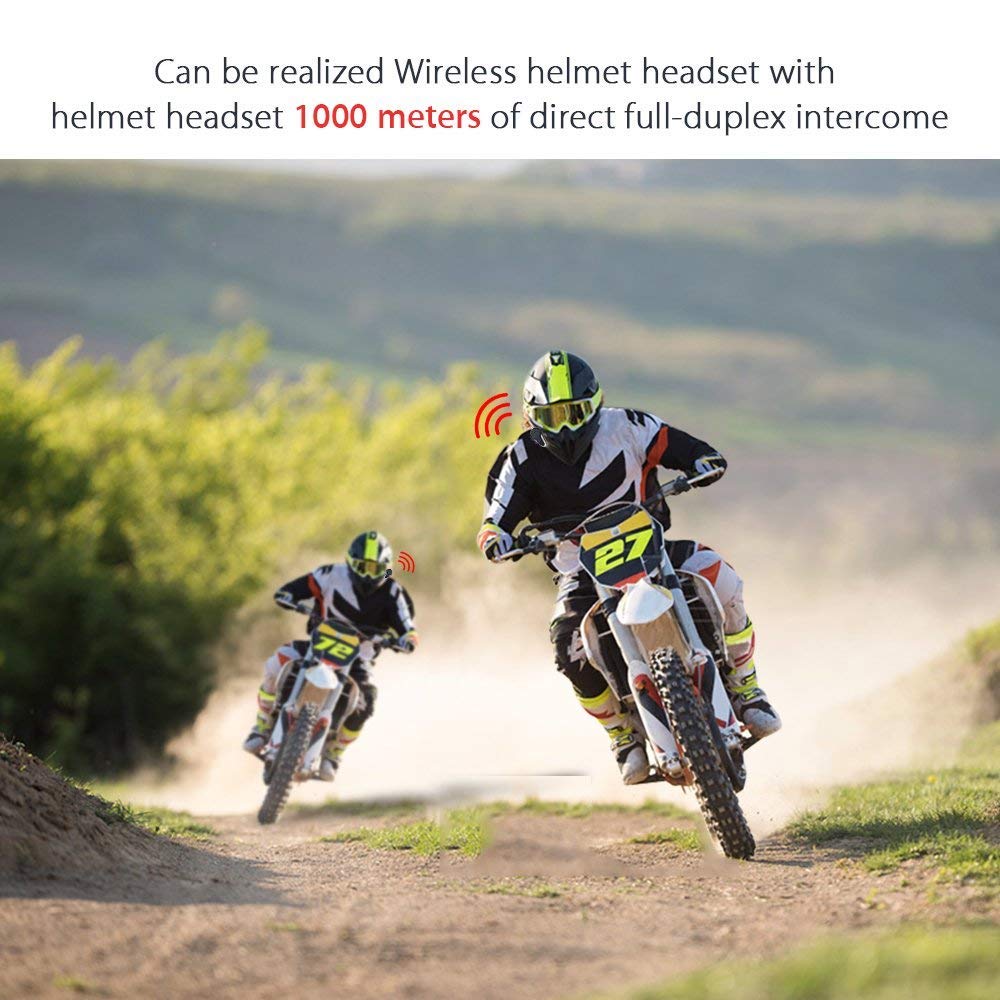
Abbildung 6: Wireless helmet headset with 1000 meters direct full-duplex intercom.

Abbildung 7: Versatile applications for the BT-S3 headset, including motorcycling and skiing.
Garantie und Support
Specific warranty information is not provided in the product details. For warranty claims, technical support, or further assistance, please contact your retailer or the manufacturer directly. Retain your proof of purchase for any warranty-related inquiries.
Manufacturer: BOBLOV


