Einführung
This manual provides essential information for the safe and effective operation of your VOLTCRAFT IR 2201-50D USB Infrared Thermometer. Please read these instructions thoroughly before using the device and retain them for future reference. This device is designed for non-contact temperature measurement across a wide range, featuring a dual laser for precise targeting and a USB interface for data transfer.
Sicherheitshinweise
- Lasersicherheit: Schauen Sie nicht direkt in den Laserstrahl und richten Sie ihn nicht auf Personen oder Tiere. Der Laser dient ausschließlich der Zielerfassung.
- Augenschutz: Always wear appropriate eye protection when operating the device in environments where laser exposure is a concern.
- Temperaturgrenzen: Setzen Sie das Gerät keinen extremen Temperaturen außerhalb seines Betriebstemperaturbereichs aus.
- Batteriehandhabung: Ensure correct battery polarity. Remove batteries if the device will not be used for an extended period. Dispose of batteries according to local regulations.
- Wartung: Only perform maintenance as described in this manual. Refer all other servicing to qualified personnel.
- Umgebungsbedingungen: Avoid using the device in high humidity, dusty, or explosive environments.
Packungsinhalt
Verify that all items listed below are present and in good condition upon unpacking.
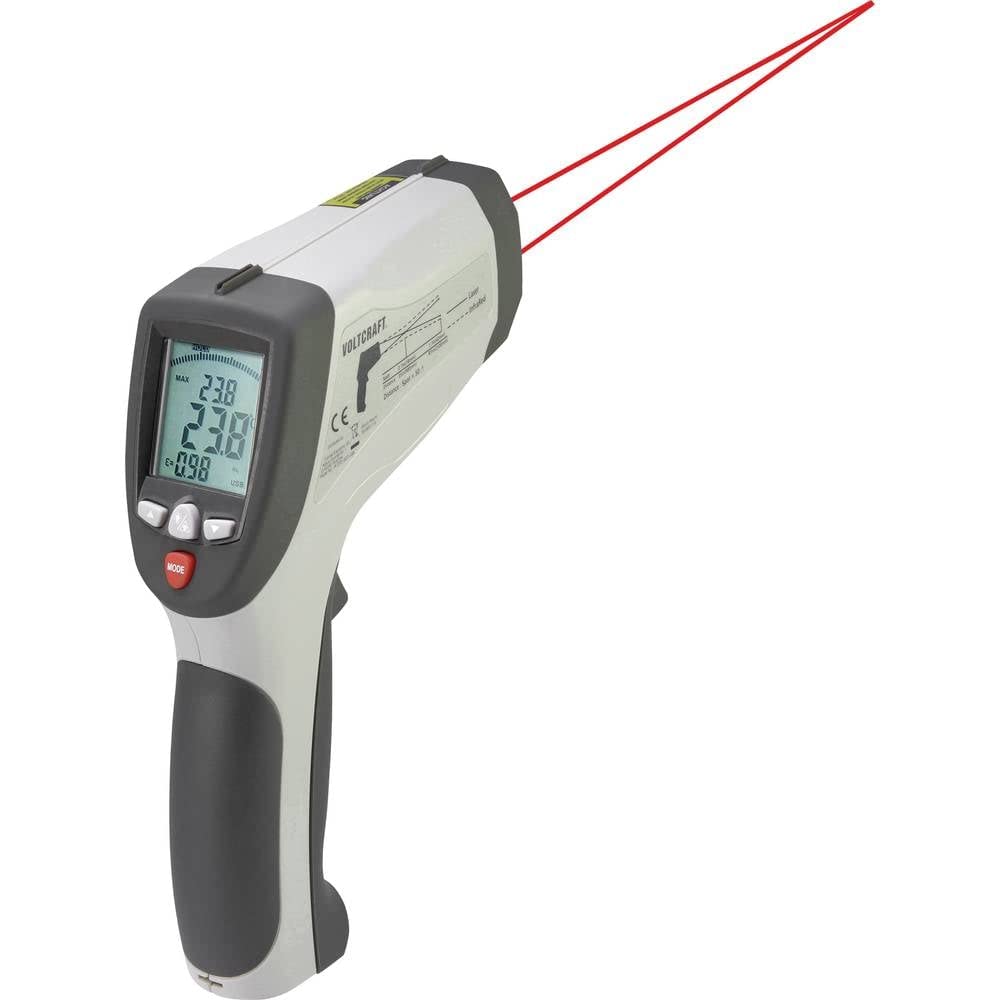
Image: Complete kit for the VOLTCRAFT IR 2201-50D Infrared Thermometer.
- VOLTCRAFT IR 2201-50D Infrared Thermometer
- Hartschalenkoffer
- Mini-Stativ
- USB-Verbindungskabel
- Temperaturfühler vom Typ K
- Software-CD
- Benutzerhandbuch (dieses Dokument)
Produkt überview
The VOLTCRAFT IR 2201-50D is a high-precision infrared thermometer designed for non-contact temperature measurements. Key features include:
- Duales Laser-Zielen: Provides accurate aiming for precise measurement areas.
- Großer Temperaturbereich: Measures from -50 °C to 2200 °C (-58 °F to 3992 °F).
- High Optical Resolution (D:S): 50:1 distance-to-spot ratio for measuring small targets from a distance.
- Schnelle Reaktionszeit: 150 ms for quick readings.
- Einstellbarer Emissionsgrad: Range from 0.1 to 1.0, allowing for accurate measurements on various surfaces.
- USB-Schnittstelle: For data logging and connection to a computer (software included).
- K-Type Input: Supports external K-type thermocouples for contact temperature measurements.

Bild: Vorderseite view of the thermometer, highlighting the measurement lens and laser emitters.

Abbildung: Seite view of the thermometer, showing the display and controls.
Aufstellen
- Einlegen der Batterie: Open the battery compartment (usually located in the handle). Insert one 9V battery, ensuring correct polarity. Close the compartment securely.
- Einschalten: Press the trigger to power on the device. The display will illuminate.
- Einheitenauswahl: If necessary, use the 'MODE' button to cycle through settings and select your preferred temperature unit (°C or °F). Refer to the on-screen indicators.
- Emissionsgradanpassung: For accurate readings, adjust the emissivity setting (E) to match the surface being measured. Consult a standard emissivity table for common materials. Use the up/down arrow buttons to change the value.
- K-Type Probe Connection (Optional): If using the K-type probe, insert its connector into the designated K-type input port on the side of the thermometer.
- USB-Anschluss (optional): To connect to a computer for data logging, use the provided USB cable. Install the software from the included CD before connecting the device.
Bedienungsanleitung
- Berührungslose Messung:
- Richten Sie das Thermometer auf die Zieloberfläche.
- Press and hold the trigger. The dual lasers will indicate the measurement area.
- The temperature reading will appear on the display. Release the trigger to hold the reading.
- Maintain the specified distance-to-spot ratio (50:1) for optimal accuracy. For example, at 50 inches distance, the measurement spot diameter is 1 inch.
- K-Type Probe Measurement:
- Ensure the K-type probe is securely connected.
- Select the K-type measurement mode using the 'MODE' button.
- Place the tip of the K-type probe in contact with the surface or substance to be measured.
- The temperature reading from the probe will be displayed.
- Data Logging (via USB):
- Connect the thermometer to your computer using the USB cable.
- Launch the installed software.
- Follow the software instructions to configure data logging parameters and start/stop recording measurements.
- Anzeigefunktionen: The display may show various indicators such as MAX/MIN temperature, average temperature, differential temperature, and emissivity settings. Use the 'MODE' button to navigate these functions.
Wartung
- Reinigung:
- Wischen Sie das Gerät ab.asing mit einem weichen, damp Tuch. Keine Scheuer- oder Lösungsmittel verwenden.
- Clean the infrared lens gently with a soft cloth or cotton swab and a small amount of isopropyl alcohol. Avoid scratching the lens.
- Lagerung: Store the thermometer in its hard carrying case in a cool, dry place when not in use. Remove batteries if storing for extended periods.
- Batteriewechsel: Tauschen Sie die 9V-Batterie aus, sobald die Anzeige für niedrigen Batteriestand erscheint.
Fehlerbehebung
| Problem | Mögliche Ursache | Lösung |
|---|---|---|
| Gerät lässt sich nicht einschalten. | Batterie defekt oder falsch eingebaut. | Tauschen Sie die 9V-Batterie aus oder überprüfen Sie deren Polarität. |
| Ungenaue Temperaturmessungen. | Incorrect emissivity setting; dirty lens; target too far or too small. | Adjust emissivity for the target material. Clean the lens. Ensure the target fills the measurement spot. |
| Laser nicht sichtbar. | Laser function disabled; low battery. | Check device settings to enable laser. Replace battery. |
| USB connection not recognized. | Software not installed; faulty cable; driver issue. | Install the software from the CD. Try a different USB port or cable. Consult software documentation for driver installation. |
Technische Daten
| Parameter | Wert |
|---|---|
| Modellnummer | 1599565 |
| Temperaturbereich (IR) | -50 °C bis 2200 °C (-58 °F bis 3992 °F) |
| Optische Auflösung (D:S) | 50:1 |
| Ansprechzeit | 150 ms |
| Emissionsgrad | Einstellbar von 0.1 bis 1.0 |
| Lasertyp | Doppellaser |
| Konnektivität | USB |
| Stromversorgung | 9V-Batterie (nicht im Lieferumfang enthalten) |
| Abmessungen (L x B x H) | 15.5 x 5.2 x 20.4 cm (6.1 x 2.0 x 8.0 Zoll) |
| Gewicht | 320 Gramm (0.7 Pfund) |
| Material | Plastik |
Garantie und Support
VOLTCRAFT products are designed for reliability and performance. For warranty information, technical support, or service inquiries, please refer to the documentation included with your purchase or visit the official VOLTCRAFT website. Please have your model number (IR 2201-50D) and serial number (if applicable) ready when contacting support.
Hersteller: VOLTCRAFT
Pflegehinweise: Clean the device as described in the Maintenance section.