
Einführung
Thank you for choosing the MIFA A3 Soundbox Bluetooth Portable Speaker. This manual provides essential information for the safe and efficient use of your device. Please read it thoroughly before operating the speaker and retain it for future reference.
Sicherheitshinweise
- Setzen Sie den Lautsprecher keinen extremen Temperaturen, direkter Sonneneinstrahlung oder hoher Luftfeuchtigkeit aus.
- Vermeiden Sie, den Lautsprecher fallen zu lassen oder starken Stößen auszusetzen.
- Zerlegen Sie den Lautsprecher nicht und versuchen Sie nicht, ihn selbst zu reparieren. Wenden Sie sich an qualifiziertes Servicepersonal.
- Keep the speaker away from water and liquids, despite its waterproof rating, to prevent damage to charging ports or internal components.
- Verwenden Sie ausschließlich das angegebene Ladekabel und den dazugehörigen Adapter.
Packungsinhalt
Bitte prüfen Sie das Paket auf folgende Artikel:
- MIFA A3 Bluetooth Portable Speaker
- USB-Ladekabel
- AUX-Audiokabel
- Benutzerhandbuch (dieses Dokument)
Produkt überview
The MIFA A3 speaker features intuitive touch controls and multiple connectivity options. Familiarize yourself with the speaker's layout:
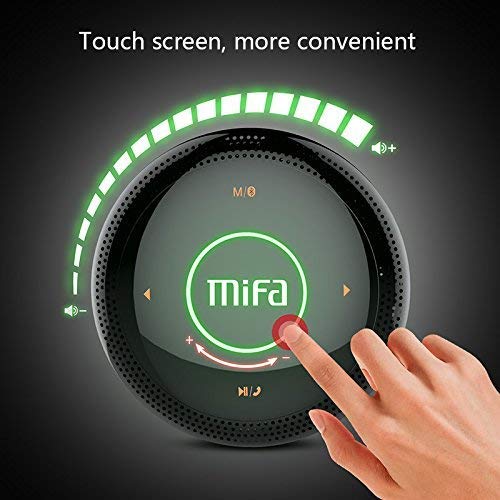
Abbildung 1: Spitze view of the MIFA A3 speaker, highlighting the touch-sensitive control panel. The panel displays volume indicators, play/pause, and track navigation buttons. A central 'Mifa' logo is also visible.
- Touch-Bedienfeld: Located on the top surface for volume adjustment, playback control, and mode selection.
- Mikrofon: Für Freisprechanrufe.
- Ladeanschluss: Micro-USB-Anschluss zum Aufladen.
- AUX-Eingang: 3.5-mm-Audiobuchse für kabelgebundene Verbindung.
- Micro-SD-Kartensteckplatz: Zum direkten Abspielen von Musik von einer Speicherkarte.
Aufstellen
1. Laden Sie den Lautsprecher auf
Laden Sie den Lautsprecher vor dem ersten Gebrauch vollständig auf. Verbinden Sie das mitgelieferte USB-Ladekabel mit dem Ladeanschluss des Lautsprechers und das andere Ende mit einem USB-Netzteil (nicht im Lieferumfang enthalten) oder einem USB-Anschluss Ihres Computers.
- Die Ladeanzeigeleuchte leuchtet während des Ladevorgangs.
- The indicator will turn off or change color once fully charged.
- A full charge provides approximately 8 hours of continuous playtime.
2. Ein-/Ausschalten
- So schalten Sie das Gerät ein: Press and hold the Power button (usually integrated into the touch panel or a dedicated button) for 2-3 seconds until you hear an audible prompt or see an indicator light.
- So schalten Sie das Gerät aus: Press and hold the Power button again for 2-3 seconds.
Bedienungsanleitung
1. Bluetooth-Kopplung
- Ensure the speaker is powered on and in Bluetooth pairing mode (indicated by a flashing blue light or audible prompt).
- Aktivieren Sie auf Ihrem Gerät (Smartphone, Tablet, PC) Bluetooth und suchen Sie nach verfügbaren Geräten.
- Wählen Sie „MIFA A3“ aus der Geräteliste aus.
- Once paired, the speaker will provide an audible confirmation, and the indicator light will become solid blue.
- The speaker will automatically connect to the last-paired device when powered on, if that device's Bluetooth is active and within range.
2. AUX-Anschluss
For devices without Bluetooth, use the provided 3.5mm AUX audio cable:
- Connect one end of the AUX cable to the speaker's AUX input port.
- Verbinden Sie das andere Ende mit der Kopfhörerbuchse Ihres Audiogeräts.
- Der Lautsprecher schaltet automatisch in den AUX-Modus.
3. Wiedergabe von Micro-SD-Karten
Insert a Micro SD card (up to 32GB, FAT32 format) with music fileLegen Sie die Karte in den dafür vorgesehenen Steckplatz ein. Der Lautsprecher erkennt die Karte automatisch und beginnt mit der Wiedergabe.
4. Touch Control Operations
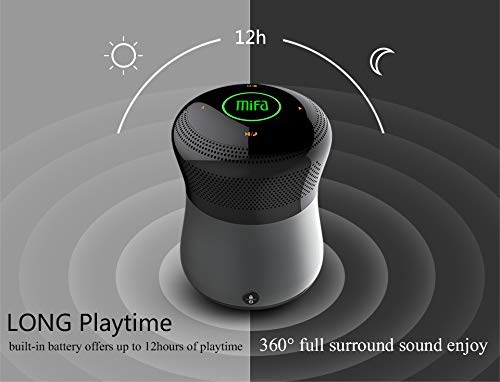
Abbildung 2: The MIFA A3 speaker shown with an overlay indicating "LONG Playtime" (up to 12 hours) and "360° full surround sound enjoy." This image emphasizes the speaker's battery life and audio dispersion.
- Lautstärkeregelung: Slide your finger clockwise on the touch panel to increase volume, counter-clockwise to decrease.
- Abspielen/Pause: Tap the central Play/Pause icon.
- Nächster Titel: Tap the "Next" arrow icon.
- Vorheriges Lied: Tap the "Previous" arrow icon.
- Modusschalter: Tap the "M/O" icon to cycle between Bluetooth, AUX, and Micro SD card modes.
- Sperrtaste: Press the lock icon to prevent accidental touch inputs.
5. Call Handling (Bluetooth Mode)
- Anruf annehmen: Tap the Play/Pause icon when a call comes in.
- Anruf beenden: Tap the Play/Pause icon again.
- Anruf ablehnen: Press and hold the Play/Pause icon for 2 seconds.
Wartung
- Reinigen Sie den Lautsprecher mit einem weichen, trockenen Tuch. Verwenden Sie keine Scheuermittel oder Lösungsmittel.
- Bewahren Sie den Lautsprecher an einem kühlen, trockenen Ort auf, wenn er längere Zeit nicht benutzt wird.
- Charge the battery at least once every three months to maintain battery health.
Fehlerbehebung
| Problem | Mögliche Lösung |
|---|---|
| Der Lautsprecher lässt sich nicht einschalten. | Stellen Sie sicher, dass der Akku geladen ist. Schließen Sie das Gerät an eine Stromquelle an und versuchen Sie es erneut. |
| Kopplung via Bluetooth nicht möglich. |
|
| Kein Ton. |
|
| Schlechte Tonqualität. |
|
Technische Daten
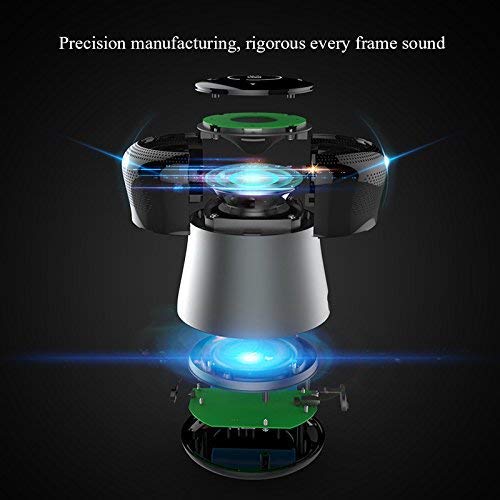
Abbildung 3: An exploded diagram of the MIFA A3 speaker, illustrating its internal components and structural design, emphasizing precision manufacturing.
| Modell | MIFA A3 |
| Ausgangsleistung | 10 W |
| Konnektivität | Bluetooth 4.2, AUX, Micro SD Card |
| Batterie | 1800 mAh Lithium-Ionen-Akku |
| Spielzeit | Bis zu 8 Stunden (bei 60 % Lautstärke) |
| Ladezeit | Ungefähr 3-4 Stunden |
| Mikrofon | Eingebaut für Freisprechanrufe |
| Wasserdicht | Yes (as per product specifications, but general caution advised for ports) |
| Kontrollmethode | Berühren |
| Kompatible Geräte | Laptop, PC, Smartphone, Tablet |
Garantie und Support
MIFA products are designed to provide reliable performance. For warranty information or technical support, please refer to the warranty card included with your purchase or visit the official MIFA webBewahren Sie Ihren Kaufbeleg für Garantieansprüche auf.
For further assistance, you may contact MIFA customer support through their official channels.