
1. Einleitung
Thank you for choosing the Easytry123 Replacement Remote Control. This remote is designed to provide convenient control for various Goodman AC Air Conditioner models. It is an infrared, button-controlled device, engineered for ease of use.
Compatible Goodman AC Models include: WMC-24-1-KFAA, WMH241, WMH181A, HDP181A, HG31ES, WMH121, HG31AS, WMH241A.
Important Note: As a replacement unit, this remote control may not support all functions of your original air conditioner remote. Please verify compatibility with your specific AC model before use.
2. Einrichtung: Batterieeinbau
Your Easytry123 Replacement Remote Control requires two (2) AAA batteries (not included) for operation. Follow these steps to install the batteries:
- Suchen Sie das Batteriefach auf der Rückseite der Fernbedienung.
- Drücken Sie auf die Lasche und schieben Sie die Abdeckung des Batteriefachs nach unten, um es zu öffnen.
- Legen Sie zwei AAA-Batterien ein und achten Sie darauf, dass die Plus- (+) und Minus- (-) Anschlüsse mit den Markierungen im Inneren des Batteriefachs übereinstimmen.
- Schieben Sie den Batteriefachdeckel wieder an seinen Platz, bis er sicher einrastet.
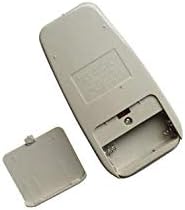
Figure 1: Back of the remote control with the battery cover removed, illustrating the battery compartment for AAA batteries.
After installing the batteries, the remote control is ready for use.
3. Bedienungsanleitung
To operate your Goodman AC Air Conditioner using the Easytry123 Replacement Remote Control, follow these general guidelines:
- Point the Remote: Ensure the remote control is pointed directly at the infrared receiver on your Goodman AC unit. Obstructions between the remote and the AC unit can prevent proper communication.
- Ein-/Ausschalten: Drücken Sie die LEISTUNG Knopf zum Ein- und Ausschalten der Klimaanlage.
- Temperatur anpassen: Verwenden Sie die TEMP AUF (▲) und TEMP UNTEN (▼) buttons to set your desired temperature.
- Auswahlmodus: Drücken Sie die MODUS button to cycle through available operating modes such as Cool, Fan, Dry, or Heat (if supported by your AC unit).
- Lüftergeschwindigkeit: Verwenden Sie die LÜFTERGESCHWINDIGKEIT button to adjust the fan's intensity (e.g., Low, Medium, High, Auto).
- Timerfunktionen: If your AC unit and this replacement remote support timer functions, refer to your AC unit's original manual for specific timer settings.
Familiarize yourself with the buttons on the remote and their corresponding functions. Due to the nature of replacement remotes, some advanced features present on your original remote may not be available or function identically.
4. Wartung
Proper care and maintenance will extend the life of your remote control:
- Reinigung: Reinigen Sie die Fernbedienung mit einem weichen, trockenen Tuch. Verwenden Sie keine flüssigen Reiniger, Scheuerschwämme oder chemische Lösungsmittel, da diese die Oberfläche oder die internen Bauteile beschädigen können.
- Batteriewechsel: Replace batteries promptly when the remote's range decreases or it stops responding. Always replace both batteries at the same time with new AAA batteries. Do not mix old and new batteries, or different types of batteries.
- Lagerung: Wenn die Fernbedienung längere Zeit nicht benutzt wird, entfernen Sie die Batterien, um ein Auslaufen und mögliche Schäden zu vermeiden. Bewahren Sie die Fernbedienung an einem kühlen, trockenen Ort, geschützt vor direkter Sonneneinstrahlung und extremen Temperaturen, auf.
- Vermeiden Sie Tropfen: Schützen Sie die Fernbedienung vor Stößen. Durch Herunterfallen kann die interne Elektronik beschädigt werden.
5. Fehlerbehebung
If you encounter issues with your Easytry123 Replacement Remote Control, please refer to the following troubleshooting steps:
- Fernbedienung reagiert nicht:
- Überprüfen Sie die Batterien. Stellen Sie sicher, dass sie richtig eingelegt sind und die richtige Polarität (+/-) aufweisen.
- Ersetzen Sie die Batterien durch neue AAA-Batterien.
- Ensure there are no obstructions between the remote control and the AC unit's infrared receiver.
- Confirm you are within the effective operating range of the AC unit (typically within 20 feet and direct line of sight).
- Bestimmte Funktionen funktionieren nicht:
- As a replacement remote, some specific or advanced functions of your original AC remote may not be supported. This is normal for universal or replacement remotes.
- Verify that your AC unit model is listed as compatible in the introduction section of this manual.
- AC Unit Not Responding to Any Remote:
- Ensure the AC unit itself is powered on and receiving electricity.
- Consult your Goodman AC unit's original user manual for troubleshooting steps related to the AC unit's receiver.
6. Spezifikationen
| Marke | Easytry123 |
| Modellnummer | Easytry3659 |
| Kompatible Geräte | Goodman AC Air Conditioners (specific models listed in Introduction) |
| Konnektivitätstechnologie | Infrarot |
| Controllertyp | Tastensteuerung |
| Akku-Typ | 2 x AAA-Batterien (nicht im Lieferumfang enthalten) |
| Besonderheit | Ergonomisches Design |
7. Garantie und Support
For any questions, concerns, or support regarding your Easytry123 Replacement Remote Control, please contact the seller directly through the platform where you made your purchase.
Please note that the product typically comes with a return policy of 30 days from the date of purchase. Refer to your purchase details for specific return and warranty information.