
Einführung
This manual provides instructions for the Insignia NS-PNKNUM19 Wired Numeric Keypad. This device is designed to enhance data entry for accounting functions and spreadsheet applications on both Mac and PC computers. It features a standard numeral arrangement and responsive keys for efficient operation.
Sicherheitshinweise
Please read these safety instructions carefully before using your new numeric keypad to prevent damage to the device or injury to yourself.
- Do not expose the keypad to water or excessive moisture.
- Vermeiden Sie extreme Temperaturen.
- Do not attempt to disassemble or repair the keypad yourself. Refer all servicing to qualified personnel.
- Keep the keypad away from strong magnetic fields.
- Nur mit kompatiblen Geräten verwenden, wie in diesem Handbuch angegeben.
Packungsinhalt
- Insignia NS-PNKNUM19 Wired Numeric Keypad
- Quick Setup Guide (not included in this digital manual)

Image: The Insignia NS-PNKNUM19 Wired Numeric Keypad shown in its retail packaging, highlighting the product and its simple design.
Merkmale
- 19 Tasten: Offers a comfortable and complete numeric typing experience.
- USB-Schnittstelle: Enables a simple wired connection to your computer.
- PC and Mac Compatible: Designed for use with both Windows and macOS operating systems.
- Plug-and-Play: Für die meisten Betriebssysteme ist keine Treiberinstallation erforderlich.
- LED-Anzeige: An LED light indicates when the keypad is connected and active.
Aufstellen
Setting up your Insignia NS-PNKNUM19 Wired Numeric Keypad is a straightforward process.
- Schließen Sie das Tastenfeld an: Locate an available USB port on your computer (PC or Mac). Plug the USB connector of the numeric keypad into the USB port.
- Systemerkennung: Ihr Computer sollte die benötigten Treiber automatisch erkennen und installieren. Da es sich um ein Plug-and-Play-Gerät handelt, ist in der Regel keine manuelle Treiberinstallation erforderlich.
- Verbindung überprüfen: An LED indicator on the keypad will illuminate, confirming that the device is connected and ready for use.
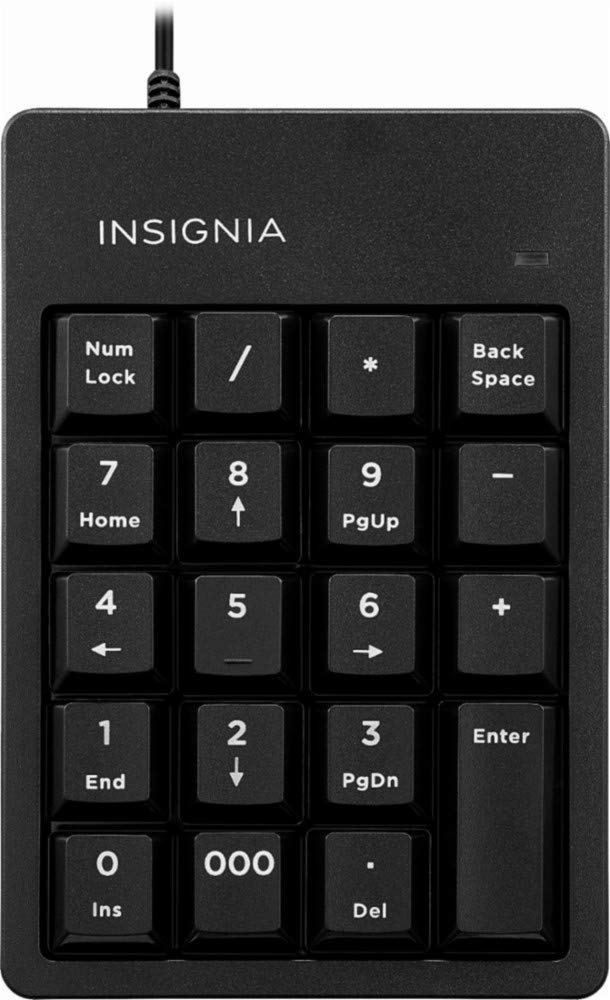
Image: The Insignia NS-PNKNUM19 Wired Numeric Keypad, showing its 19 keys and the attached USB cable ready for connection.
Bedienungsanleitung
Once connected, the numeric keypad functions similarly to the numeric section of a full-sized keyboard.
- Numerische Eingabe: Press the number keys (0-9) to input numerical data.
- Arithmetische Operatoren: Use the +, -, *, and / keys for basic arithmetic operations.
- Komma: The '.' key allows for decimal input.
- Enter-Taste: Functions as a standard Enter key.
- Num Lock: The "Num Lock" key toggles the numeric function of the keys. When Num Lock is active (indicated by the LED), the keys function as numbers. When Num Lock is off, some keys may perform alternative functions like Home, End, PgUp, PgDn, or arrow navigation, depending on the application.
- Rückraum: Löscht das Zeichen links vom Cursor.
- Del (Löschen): Deletes the character to the right of the cursor or selected text.
- 000 Schlüssel: Ermöglicht die schnelle Eingabe von drei Nullen.
Wartung
To ensure the longevity and optimal performance of your numeric keypad, follow these simple maintenance guidelines:
- Reinigung: Use a soft, dry, lint-free cloth to clean the surface of the keypad. For stubborn dirt, slightly dampen the cloth with water or a mild, non-abrasive cleaner. Avoid spraying liquids directly onto the keypad.
- Lagerung: Bewahren Sie das Tastenfeld bei Nichtgebrauch an einem sauberen, trockenen Ort fern von direkter Sonneneinstrahlung und extremen Temperaturen auf.
- Handhabung: Avoid dropping the keypad or subjecting it to strong impacts, which can damage internal components.
Fehlerbehebung
If you encounter issues with your Insignia NS-PNKNUM19 Wired Numeric Keypad, refer to the following common solutions:
| Problem | Lösung |
|---|---|
| Keypad is not recognized by the computer. |
|
| Die Tasten reagieren nicht oder geben falsche Zeichen ein. |
|
| Die LED-Anzeige ist aus. |
|
Technische Daten
| Modellnummer: | NS-PNKNUM19 |
| Marke: | Insignien |
| Konnektivität: | Wired USB (standard USB-A connector) |
| Anzahl Schlüssel: | 19 |
| Kompatibilität: | PC, Mac |
| Farbe: | Schwarz |
| Tastaturbeschreibung: | Ergonomisch |
| Maße (ca.): | 25.9 x 14.9 x 3.9 cm (Paketabmessungen) |
| Gewicht (ca.): | 156 g |
Garantie und Support
Insignia products are manufactured to high quality standards. For specific warranty information, please refer to the warranty card included with your purchase or visit the official Insignia website. For technical support or customer service, please contact Insignia customer support through their official channels.
Manufacturer Contact Information: Peachtree City, GA 30269, US