
Einführung
The Xfinity HD 720p Wireless Indoor/Outdoor Home Security Camera allows you to monitor your home environment with live video accessible from anywhere. Designed for both indoor and outdoor use, this camera provides essential security features to keep you informed.
Lieferumfang
- Xfinity HD 720p Wireless Security Camera (Model: SCHC2AEW)
- Netzteil
- USB-Kabel
- Montagezubehör (Schrauben und Dübel)

Image: Xfinity Home Security Camera and accessories neatly packaged in its box.
Installationshandbuch
- Stromanschluss: Connect the camera to the power adapter using the provided USB cable, then plug the adapter into a standard electrical outlet.
- App herunterladen: Download the official Xfinity Home app from your smartphone's app store (iOS App Store or Android Google Play).
- Gerätepaarung: Open the Xfinity Home app and follow the on-screen instructions to add a new device. You will typically need to scan a QR code on the camera or manually enter its details to pair it with your home Wi-Fi network. Ensure your Wi-Fi network is 2.4 GHz for compatibility.

Image: The Xfinity Home Security Camera placed on a surface, ready for setup.
Bedienungsanleitung
Live View und grundlegende Bedienelemente
Once paired, access the live video feed through the Xfinity Home app. The app provides controls for:
- Live-Streaming: View Echtzeit footage von Ihrer Kamera.
- Aufnahme: Videoclips manuell aufzeichnen.
- Screenshot: Erfassen Sie Standbilder aus dem Live-Feed.
- Zweiwege-Audio: Speak through the camera's speaker and hear audio from its microphone.
Nachtsicht
The camera features night vision capabilities for clear monitoring in low-light conditions. This feature automatically activates when ambient light is insufficient, providing a black-and-white image. Some models may offer color night vision depending on ambient light and settings.
Bewegungserkennung und Alarme
Configure motion detection settings within the Xfinity Home app to receive alerts on your smartphone when activity is detected. You can customize sensitivity levels and notification preferences.
Speicheroptionen
The camera supports local storage via a MicroSD card (not included). Insert a compatible MicroSD card into the designated slot to store recorded video clips directly on the device. Cloud storage options may also be available through your Xfinity Home service subscription.
Installation und Montage
The Xfinity Home Security Camera can be placed on a flat surface or mounted to a wall. Use the included mounting hardware for secure wall installation. Ensure the camera is positioned to cover the desired monitoring area.
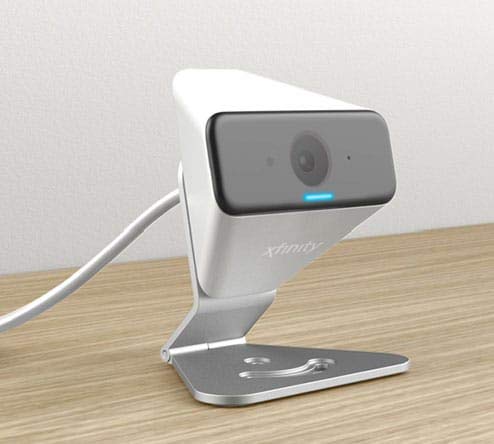
Image: The Xfinity Home Security Camera positioned on a desk, demonstrating its compact design.
Produktspezifikationen
| Besonderheit | Detail |
|---|---|
| Modellnummer | SCHC2AEW |
| Auflösung der Videoaufnahme | 720p |
| Konnektivitätstechnologie | Kabellos (Wi-Fi) |
| Konnektivitätsprotokoll | Wi-Fi (2.4 GHz compatible) |
| Verwendung im Innen- und Außenbereich | Innenbereich, Außenbereich |
| Besondere Merkmale | Bewegungssensor, Nachtsicht |
| Stromquelle | DC (12 Volts, 1 Watt) |
| Abmessungen (L x B x H) | 3 x 3 x 2 Zoll |
| Artikelgewicht | 1.57 Pfund |
| Internationale Schutzbewertung | IP65 |
Fehlerbehebung
- Kein Strom: Stellen Sie sicher, dass das Netzteil sowohl mit der Kamera als auch mit einer funktionierenden Steckdose fest verbunden ist.
- Verbindungsprobleme: Verify your Wi-Fi network is 2.4 GHz. Restart your router and the camera. Ensure the camera is within range of your Wi-Fi signal.
- App reagiert nicht: Close and reopen the Xfinity Home app. If the issue persists, try reinstalling the app.
- Schlechte Videoqualität: Prüfen Sie die Stärke Ihres WLAN-Signals. Stellen Sie sicher, dass die Kameralinse sauber und frei von Verunreinigungen ist.
Garantie und Kundendienst
For warranty information, please refer to the documentation included with your purchase or visit the official Xfinity support website. For technical assistance or customer service, please contact Xfinity customer support directly.