
1. Einleitung
This manual provides detailed instructions for the safe and effective operation of your SOCOTRAN SC-R40 Rechargeable FRS Two-Way Radio. Please read this manual thoroughly before use and retain it for future reference.
2. Packungsinhalt
Your SOCOTRAN SC-R40 package includes the following items:
- 2 x SOCOTRAN SC-R40 Two-Way Radios
- 2 x wiederaufladbare Lithium-Ionen-Batterien
- 2 x Adjustable Lanyards
- 1 x USB-Ladekabel
- 1 x Benutzerhandbuch (dieses Dokument)

Figure 2.1: Included components of the SOCOTRAN SC-R40 package.
3. Produktmerkmale
The SOCOTRAN SC-R40 Two-Way Radio offers a range of features designed for reliable communication:
- Wiederaufladbarer Lithium-Ionen-Akku: 1500mAh battery provides up to 72 hours of standby time and 18 hours of continuous use.
- Erweiterte Reichweite: Up to 5 miles communication range with 0.5W output (actual range varies by terrain).
- Integrierte Taschenlampe: Built-in flashlight for illumination in low-light conditions.
- VOX-Funktion: Sprachaktivierte Übertragung für freihändige Bedienung.
- Tastensperre: Verhindert versehentliche Änderungen der Einstellungen.
- 22 Channels with Auto Scan: Easy channel selection and scanning for active channels.
- 121 Datenschutzrichtlinien (CTCSS/DCS): Offers 3,124 channel options to minimize interference.
- Robustes Design: Built with 1.2m drop resistance for durability.

Abbildung 3.1: Überview of SOCOTRAN SC-R40 key features.
4. Einrichtung
4.1 Einlegen der Batterie
- Suchen Sie die Abdeckung des Batteriefachs auf der Rückseite des Radios.
- Schieben Sie den Deckel nach unten, um das Fach zu öffnen.
- Insert the rechargeable Li-ion battery, ensuring correct polarity.
- Bringen Sie die Abdeckung des Batteriefachs wieder an und schieben Sie sie nach oben, bis sie einrastet.
4.2 Aufladen der Akkus
The SC-R40 radios feature a convenient USB charging design.
- Connect the provided USB charging cable to the charging port on the side of the radio.
- Plug the other end of the USB cable into a compatible power source such as a power bank, laptop, car charger, or PC.
- Die Ladeanzeigeleuchte leuchtet auf, um den Ladestatus anzuzeigen.
- Rechnen Sie mit einer Ladezeit von etwa 2 Stunden für eine vollständige Aufladung.
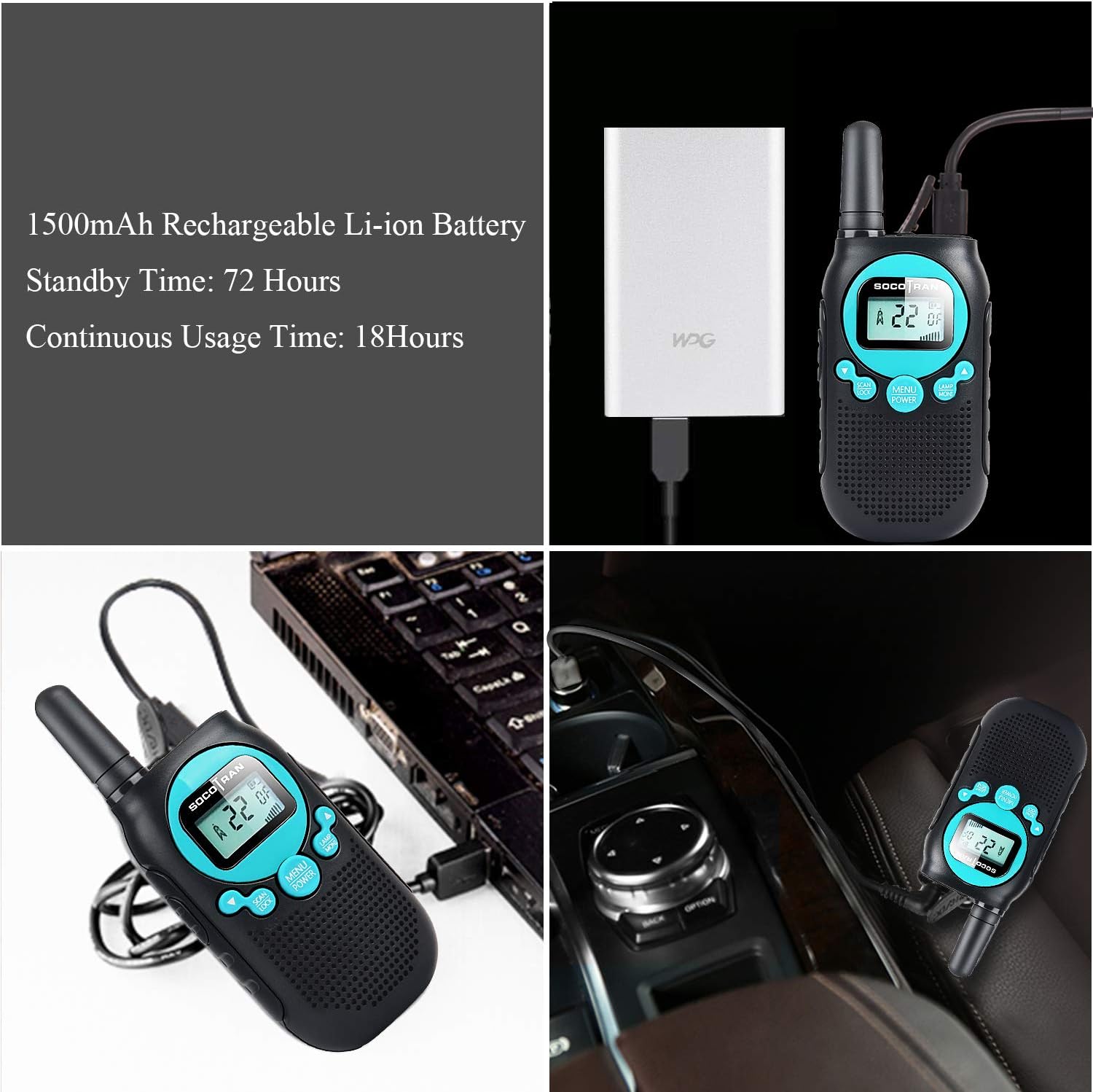
Figure 4.1: Various charging methods for the SC-R40 walkie-talkie.
4.3 Attaching Lanyard and Belt Clip
To attach the adjustable lanyard, thread it through the small loop located at the top of the radio. The belt clip can be attached to the designated slot on the back of the radio for easy carrying.

Figure 4.2: Walkie-talkie with attached lanyard for convenient carrying.
5. Bedienungsanleitung
5.1 Ein-/Ausschalten
Zum Einschalten des Radios drehen Sie den Ein-/Ausschalter/Lautstärkeregler im Uhrzeigersinn, bis Sie ein Klicken hören und das Display aufleuchtet. Zum Ausschalten drehen Sie den Regler gegen den Uhrzeigersinn, bis er einrastet.
5.2 Kanalauswahl
Your SC-R40 radio has 22 FRS channels. To change channels:
- Drücken Sie die SPEISEKARTE Drücken Sie die Taste einmal. Die Kanalnummer im Display blinkt.
- Verwenden Sie die UP or RUNTER arrow buttons to select your desired channel.
- Drücken SPEISEKARTE Klicken Sie erneut, um Ihre Auswahl zu bestätigen, oder warten Sie einige Sekunden, bis die Einstellung automatisch gespeichert wird.
5.3 Lautstärke anpassen
Drehen Sie den Ein-/Ausschalter/Lautstärkeregler im Uhrzeigersinn, um die Lautstärke zu erhöhen, und gegen den Uhrzeigersinn, um sie zu verringern.
5.4 Senden und Empfangen (PTT)
Zum Senden die Taste gedrückt halten PTT (Push-to-Talk) button located on the side of the radio. Speak clearly into the microphone. Release the PTT button to receive incoming transmissions.
5.5 VOX-Funktion (Sprachgesteuerte Vermittlungsstelle)
The VOX function allows for hands-free communication. When activated, the radio will automatically transmit when it detects your voice, without needing to press the PTT button.
- Drücken Sie die SPEISEKARTE Drücken Sie die Taste mehrmals, bis das VOX-Symbol auf dem Display erscheint.
- Verwenden Sie die UP or RUNTER arrow buttons to select the VOX sensitivity level (1-3, with 3 being most sensitive) or turn VOX off.
- Drücken SPEISEKARTE zur Bestätigung.
5.6 Tastensperre
To prevent accidental changes to your settings, you can lock the keypad. Press and hold the SPEISEKARTE button until the key lock icon appears on the display. Repeat the process to unlock the keypad.
5.7 Taschenlampe
Um die eingebaute Taschenlampe zu aktivieren, drücken Sie die LAMP button. Press it again to turn off the flashlight.
5.8 Kanalscan
The auto scan feature allows you to quickly find active channels. Press the SCAN button to initiate channel scanning. The radio will stop on any active channel. Press SCAN erneut, um den Scanvorgang fortzusetzen oder PTT auf dem aktuellen Kanal senden.
5.9 Datenschutzbestimmungen (CTCSS/DCS)
To ensure private communication, you can use privacy codes. Your radio supports 121 privacy codes (38 CTCSS and 83 DCS). To set a privacy code:
- Drücken Sie die SPEISEKARTE button twice (for CTCSS) or three times (for DCS). The code number will flash.
- Verwenden Sie die UP or RUNTER arrow buttons to select your desired code.
- Drücken SPEISEKARTE zur Bestätigung.
6. Range and Environment
The SOCOTRAN SC-R40 offers an ideal range of up to 5 miles. However, actual range can vary significantly based on terrain, weather conditions, and obstructions. For optimal performance, use in open, flat areas with minimal interference.

Figure 6.1: The compact size of the SC-R40 walkie-talkie.
7. Wartung
7.1 Batteriepflege
- Laden Sie die Akkus vor dem ersten Gebrauch vollständig auf.
- Recharge batteries when the low battery alert flashes.
- Vermeiden Sie, Batterien extremen Temperaturen auszusetzen.
7.2 Reinigung
Wischen Sie das Radio mit einem weichen, damp Tuch. Verwenden Sie keine scharfen Chemikalien oder Scheuermittel.
8. Fehlerbehebung
If you experience issues with your radio, try the following:
- Ensure both radios are powered on and have sufficient battery charge.
- Verify that both radios are set to the same channel and privacy code.
- Check the volume level on both radios.
- Move to an area with fewer obstructions if experiencing poor reception.
9. Spezifikationen
| Besonderheit | Spezifikation |
|---|---|
| Modellnummer | SC-R40 |
| Artikelgewicht | 1.6 Unzen |
| Technische Daten | 4.9 x 1.9 x 0.9 Zoll |
| Batterien | 2 Lithium-Ionen-Akku (im Lieferumfang enthalten) |
| Anzahl der Kanäle | 22 |
| Frequenzbereich | FRS |
| Maximale Sprechreichweite | 5 Kilometer |
| Bandtage | 2 Volt |
| Wasserbeständigkeit | Nicht wasserfest |
10. Garantie und Support
SOCOTRAN provides a one-year warranty for all SOCOTRAN walkie-talkies. If you encounter any issues such as damaged packaging, need an exchange, or require a refund, please contact customer service for assistance.
11. Offizielle Produktvideos
Rechargeable Walkie Talkies for Kids 2 Packs
Video 11.1: A seller-provided video demonstrating the features and use of rechargeable walkie-talkies for children.
rechargeable walkie talkies for kids play at neighborhood enjoy outdoor weekend sunshine
Video 11.2: Eine vom Verkäufer bereitgestellte Videopräsentationasing children using rechargeable walkie-talkies for outdoor play.


