
1. Einleitung
This manual provides detailed instructions for the proper use and maintenance of your AKAMATE EB03 Active Noise Cancelling Bluetooth Neckband Earphones. Please read this manual thoroughly before using the product to ensure optimal performance and longevity.
The AKAMATE EB03 earphones feature Active Noise Cancellation (ANC) technology, Bluetooth V4.2 connectivity, a magnetic design for secure wear, and an IPX5 water-resistant rating, making them suitable for various activities.
2. Sicherheitshinweise
Bitte beachten Sie die folgenden Sicherheitshinweise, um Schäden am Gerät oder Verletzungen zu vermeiden:
- Die Kopfhörer dürfen keinen extremen Temperaturen, hoher Luftfeuchtigkeit oder ätzenden Substanzen ausgesetzt werden.
- Vermeiden Sie es, die Kopfhörer fallen zu lassen oder starken Stößen auszusetzen.
- Do not attempt to disassemble or modify the earphones. This will void the warranty and may cause damage.
- Reinigen Sie die Ohrhörer mit einem weichen, trockenen Tuch. Verwenden Sie keine scharfen Chemikalien oder Scheuermittel.
- Verbraucherwarnung: Die meisten Benutzer benötigen keine Lizenz, um dieses drahtlose Mikrofonsystem zu betreiben. Der lizenzfreie Betrieb dieses Mikrofonsystems unterliegt jedoch gewissen Einschränkungen: Das System darf keine schädlichen Störungen verursachen; es muss auf einem niedrigen Leistungsniveau betrieben werden (nicht über 50 Milliwatt); und es hat keinen Schutz vor Störungen, die von anderen Geräten empfangen werden.
- Purchasers should also be aware that the FCC is currently evaluating use of wireless microphone systems, and these rules are subject to change. For more information, call the FCC at 1-888-CALL-FCC (TTY: 1-888-TELL-FCC) or visit the FCC's wireless microphone webSeite unter fcc.gov/cgb/wirelessmicrophones.
3. Packungsinhalt
Bitte prüfen Sie das Paket auf folgende Artikel:
- AKAMATE EB03 Active Noise Cancelling Earphones
- USB-Ladekabel
- Ohrstöpsel in verschiedenen Größen (Klein, Mittel, Groß)
- Bedienungsanleitung
4. Produktüberschreitungview
Familiarize yourself with the components of your AKAMATE EB03 earphones.

Bild 4.1: Überview of the AKAMATE EB03 Active Noise Cancelling Earphones, showing the earbuds, inline control panel, and neckband cable.
- Ohrhörer: In-Ear-Design mit Ohrhaken für sicheren Halt.
- Inline Control Panel: Contains buttons for power, volume, track control, and ANC activation.
- Mikrofon: Integriert für Freisprechfunktion.
- Ladeanschluss: Befindet sich auf der Inline-Steuereinheit.
5. Einrichtung
5.1 Aufladen der Kopfhörer
Before first use, fully charge the earphones. A full charge takes approximately 1.5 hours.
- Connect the provided USB charging cable to the charging port on the inline control unit.
- Verbinden Sie das andere Ende des USB-Kabels mit einer USB-Stromquelle (z. B. Computer, Wandadapter).
- Die LED-Anzeige zeigt den Ladestatus an (z. B. rot für Ladevorgang, blau für vollständig geladen).

Image 5.1: The earphones connected to a USB charging cable, illustrating the charging process and battery life information.
5.2 Koppeln mit einem Bluetooth-Gerät
The earphones use Bluetooth V4.2 for wireless connection. Ensure your device's Bluetooth is enabled.
- With the earphones powered off, press and hold the Multi-function button (usually the center button on the inline control) for approximately 5-7 seconds until the LED indicator flashes red and blue alternately. This indicates pairing mode.
- On your Bluetooth-enabled device (smartphone, tablet, etc.), go to the Bluetooth settings and search for available devices.
- Select "AKAMATE EB03" (or similar name) from the list of found devices.
- Nach erfolgreicher Kopplung blinkt die LED-Anzeige langsam blau, und Sie hören möglicherweise einen Bestätigungston.
5.3 Tragen der Kopfhörer
Für optimale Klangqualität und Tragekomfort wählen Sie die richtige Ohrstöpselgröße und achten Sie auf einen sicheren Sitz.

Image 5.2: The AKAMATE EB03 earphones displayed with different sizes of ear tips and ear hooks, highlighting their ergonomic design for comfortable wear.
- Select the ear tips that provide a snug and comfortable seal in your ear canal.
- Position the ear hooks over your ears to secure the earphones during movement.
- The neckband cable should rest comfortably around your neck.
6. Bedienungsanleitung
6.1 Ein-/Ausschalten
- Einschalten: Press and hold the Multi-function button for approximately 3 seconds until the LED flashes blue and you hear a power-on prompt.
- Ausschalten: Press and hold the Multi-function button for approximately 3-4 seconds until the LED flashes red and you hear a power-off prompt.
6.2 Active Noise Cancellation (ANC) Function
The ANC feature reduces ambient noise by up to 22dB, blocking approximately 92% of background noise.

Image 6.1: Visual representation of Active Noise Cancelling technology, showing how inverse sound waves cancel out ambient noise, with an ANC switch on the earphone's control unit.
- ANC aktivieren: Locate the dedicated ANC switch or button on the inline control unit and slide/press it to the 'ON' position. The ANC indicator light will illuminate.
- ANC deaktivieren: Slide/press the ANC switch/button to the 'OFF' position.
6.3 Musikwiedergabe

Image 6.2: The AKAMATE EB03 earphones, emphasizing their capability to produce high-fidelity stereo sound with deep bass and clear mid-tones.
- Abspielen/Pause: Drücken Sie kurz die Multifunktionstaste.
- Lautstärke erhöhen: Drücken Sie kurz die Taste „+“.
- Lautstärke runter: Drücken Sie kurz die Taste „-“.
- Nächster Titel: Die Taste „+“ lange drücken.
- Vorheriges Lied: Die Taste „-“ lange drücken.
6.4 Anrufmanagement
- Anruf annehmen/beenden: Drücken Sie kurz die Multifunktionstaste.
- Anruf ablehnen: Die Multifunktionstaste 2 Sekunden lang gedrückt halten.
- Wahlwiederholung letzte Nummer: Drücken Sie die Multifunktionstaste zweimal.
6.5 Magnetic Earbuds Feature
The earbuds feature built-in magnets, allowing them to attach to each other when not in use, preventing tangles and securing them around your neck.
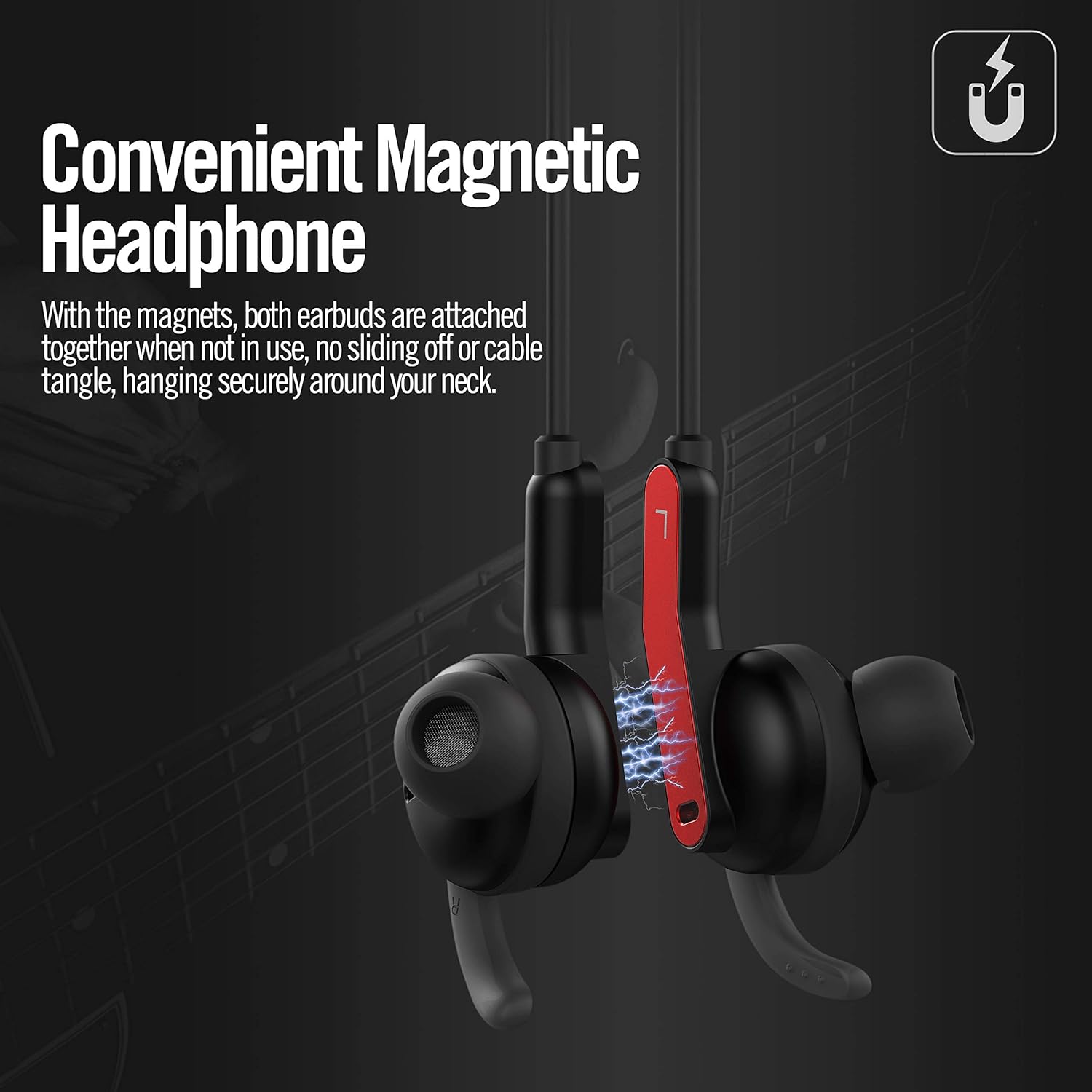
Image 6.3: The AKAMATE EB03 earbuds shown magnetically connected, illustrating how they can be secured around the neck to prevent loss or tangling.
7. Wartung
7.1 Reinigung
- Wipe the earphones with a soft, slightly damp Tuch. Keine Scheuer- oder Lösungsmittel verwenden.
- Remove ear tips and clean them separately with mild soap and water, then dry thoroughly before reattaching.
7.2 Speicherung
- Bewahren Sie die Kopfhörer an einem kühlen, trockenen Ort fern von direkter Sonneneinstrahlung und extremen Temperaturen auf.
- When not in use, the magnetic earbuds can be connected to prevent tangling.
7.3 Wasserdichtigkeit (IPX5)
The AKAMATE EB03 earphones are rated IPX5, meaning they are protected against low-pressure water jets from any direction. This makes them resistant to sweat and light rain.

Image 7.1: A person wearing the AKAMATE EB03 earphones in a wet setting, demonstrating the product's IPX5 water resistance against sweat and splashes.
- Tauchen Sie die Ohrhörer nicht in Wasser.
- Um die Wasserdichtigkeit zu gewährleisten, stellen Sie sicher, dass die Abdeckung des Ladeanschlusses fest verschlossen ist.
8. Fehlerbehebung
Sollten Sie Probleme mit Ihren Kopfhörern haben, beachten Sie bitte die folgenden häufig auftretenden Probleme und Lösungen:
| Problem | Mögliche Lösung |
|---|---|
| Die Kopfhörer lassen sich nicht einschalten. | Stellen Sie sicher, dass die Ohrhörer vollständig aufgeladen sind. |
| Kopplung mit Bluetooth-Gerät nicht möglich. |
|
| Kein Ton oder schlechte Tonqualität. |
|
| ANC function not working effectively. |
|
9. Spezifikationen
| Besonderheit | Detail |
|---|---|
| Modell | EB03 |
| Bluetooth-Version | V4.2 |
| Aktive Geräuschunterdrückung (ANC) | Up to 22 dB reduction (92% of background noise) |
| Drahtlose Reichweite | Bis zu 33 Fuß (10 Meter) |
| Akkulaufzeit (ANC aus) | Bis zu 8 Stunden |
| Akkulaufzeit (ANC eingeschaltet) | Bis zu 4 Stunden |
| Ladezeit | Ungefähr 1.5 Stunden |
| Standby-Zeit | Bis zu 200 Stunden |
| Wasserbeständigkeit | IPX5 |
| Gewicht | 19 Gramm (0.67 Unzen) |
| Mikrofon | Eingebaut |
| Material | Plastik |
| Kontrollmethode | Berührung (bezogen auf Tastendrücke) |
10. Garantie und Support
For warranty information and customer support, please refer to the documentation included with your purchase or contact AKAMATE customer service through the retailer where the product was purchased. Please retain your proof of purchase for warranty claims.