
1. Einleitung
The Zerone Sport Action DV Camera is a compact and portable device designed for capturing high-definition video during various outdoor activities. Featuring 1080P and 720P recording options, a 120-degree wide-angle lens, and an IPX-4 waterproof aluminum alloy shell, this camera is built for durability and ease of use. It includes a built-in microphone for audio recording and provides vibration feedback for operational status.
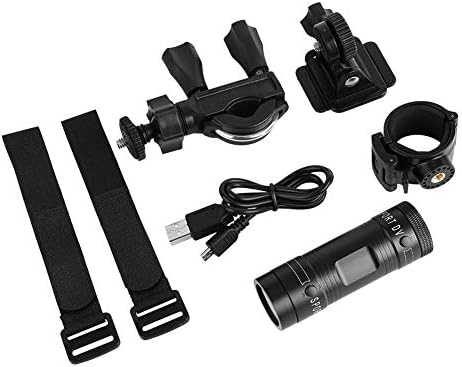
Image 1.1: The Zerone Sport Action DV Camera unit.
2. Sicherheitshinweise
- Setzen Sie die Kamera weder extremen Temperaturen noch über längere Zeiträume direkter Sonneneinstrahlung aus.
- While the camera features an IPX-4 waterproof rating, it is designed to withstand splashes and light rain. Do not submerge or soak the camera in water.
- Halten Sie das Gerät von starken Magnetfeldern fern.
- Um Beschädigungen zu vermeiden, verwenden Sie ausschließlich das angegebene Ladekabel und Netzteil.
- Versuchen Sie nicht, die Kamera zu zerlegen oder zu verändern, da dies zum Erlöschen der Garantie führt und Schäden verursachen kann.
- Bewahren Sie die Kamera an einem trockenen, kühlen Ort auf, wenn sie nicht benutzt wird.
3. Packungsinhalt
Bitte überprüfen Sie das Paket, um sicherzustellen, dass alle Artikel vorhanden sind:
- Zerone Sport Action DV Camera Unit
- USB-Ladekabel
- Mounting Accessories (e.g., bike mount, helmet mount, strap mounts)
- Rechargeable Battery (may be pre-installed)
- Benutzerhandbuch (dieses Dokument)
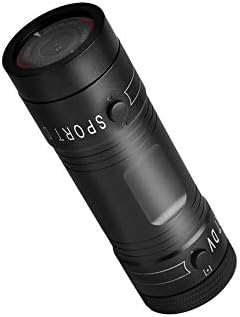
Image 3.1: Contents of the Zerone Sport Action DV Camera package, showing the camera, USB cable, and various mounting options.
4. Kamera überview
Machen Sie sich mit den Komponenten und Bedienelementen der Kamera vertraut.
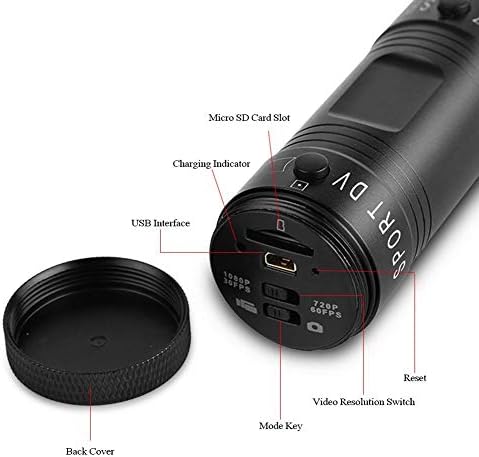
Abbildung 4.1: Detailansicht view of the camera's rear end, highlighting the Micro SD card slot, USB interface, charging indicator, mode key, video resolution switch (1080P 30fps / 720P 60fps), and reset button.
- Micro-SD-Kartensteckplatz: Insert your Micro SD card here. A card is required for operation.
- Ladeanzeige: Displays charging status. A red light indicates charging; it turns off when fully charged.
- USB-Schnittstelle: Zum Aufladen und Anschließen an einen Computer.
- Modus-Taste: Used to switch between recording modes (e.g., video, photo).
- Video Resolution Switch: Selects between 1080P 30fps and 720P 60fps recording resolutions.
- Reset-Taste: Dient zum Zurücksetzen des Geräts, falls es nicht mehr reagiert.
- Ein-/Ausschalter (Vorderseite): Located on the front side of the camera.
- Record/Stop Button (Back): Located on the back side of the camera.
5. Einrichtung
5.1 Laden des Akkus
- Schließen Sie die Kamera mithilfe des mitgelieferten USB-Kabels an eine USB-Stromquelle (z. B. Computer, Netzteil) an.
- Der Rotlicht on the back of the camera will illuminate, indicating that it is charging.
- Sobald der Akku vollständig aufgeladen ist, erlischt das rote Licht.
- Note: If the camera blinks red and blue when plugged in, it indicates that an SD card is not inserted. This is not a charging indicator.
5.2 Einlegen einer Micro SD-Karte
A Micro SD card (not included) is required for recording video and photos. The camera supports Micro SD cards up to a certain capacity (check product packaging for maximum supported size, typically 32GB or 64GB for similar devices).
- Schrauben Sie die hintere Abdeckung der Kamera ab.
- Locate the Micro SD card slot (refer to Image 4.1).
- Schieben Sie die Micro-SD-Karte vorsichtig in den Steckplatz, bis sie einrastet. Achten Sie darauf, dass die Karte richtig ausgerichtet ist.
- Replace the back cover, ensuring it is securely tightened to maintain water resistance.
5.3 Montage der Kamera
The camera comes with various mounting accessories for different applications.
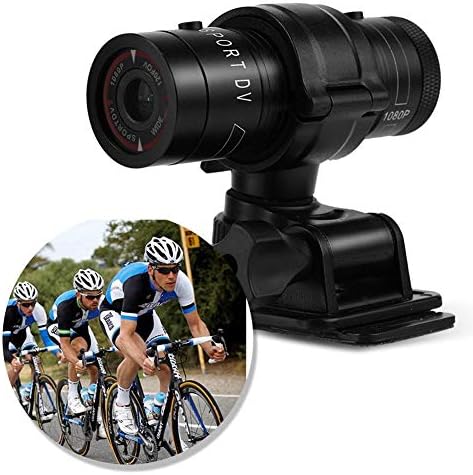
Image 5.1: The camera attached to a bicycle handlebar, demonstrating one of its mounting options.
- Fahrradhalterung: Verwenden Sie die clamp mount to attach the camera securely to bicycle handlebars or other tubular structures.
- Helmhalterung: Utilize the adhesive or strap mounts to fix the camera to a helmet.
- Strap Mounts: For attaching to various gear or body parts.
Ensure all mounts are securely fastened before engaging in activities to prevent the camera from falling.
6. Bedienung der Kamera
6.1 Ein-/Ausschalten
- Zum Einschalten halten Sie die Netzschalter (front switch) until the camera vibrates.
- Halten Sie zum Ausschalten die Taste gedrückt Netzschalter again until the camera vibrates once.
6.2 Selecting Video Resolution
Before recording, select your desired video resolution using the switch on the back of the camera (refer to Image 4.1).
- Schieben Sie den Schalter auf "1080P 30fps" for Full HD video at 30 frames per second.
- Schieben Sie den Schalter auf "720P 60fps" for HD video at 60 frames per second.
6.3 Video aufnehmen
- Stellen Sie sicher, dass die Kamera eingeschaltet ist.
- Drücken Sie die Aufnahme-/Stopp-Taste (back switch) to start recording. The camera will vibrate three times to indicate recording has started.
- Um die Aufnahme zu stoppen, drücken Sie die Aufnahme-/Stopp-Taste again. The camera will vibrate once to indicate recording has stopped.
6.4 Anschließen an einen Computer
Übertragen files or access recorded content:
- Stellen Sie sicher, dass die Kamera ausgeschaltet ist.
- Schließen Sie die Kamera mit dem mitgelieferten USB-Kabel an Ihren Computer an.
- The camera will be recognized as a removable storage device.
- You can then access and transfer your video files.
7. Wartung
- Reinigung: Reinigen Sie das Kameragehäuse mit einem weichen, trockenen Tuch. Verwenden Sie für das Objektiv ein spezielles Objektivreinigungstuch und eine entsprechende Reinigungslösung. Vermeiden Sie scheuernde Materialien.
- Lagerung: When not in use for extended periods, store the camera in a cool, dry place. Ensure the battery is partially charged (around 50%) to prolong its lifespan.
- Wasserbeständigkeit: Regularly check that the back cover is securely tightened to maintain the IPX-4 water resistance. Avoid exposing the USB port or SD card slot to moisture when the cover is open.
- Batteriepflege: Avoid fully discharging the battery frequently. Recharge it when the low battery indicator appears.
8. Fehlerbehebung
| Problem | Mögliche Ursache | Lösung |
|---|---|---|
| Die Kamera lässt sich nicht einschalten. | Batterie ist leer. | Laden Sie die Kamera vollständig auf. |
| Camera blinks red and blue, then turns off. | No Micro SD card inserted or card is faulty. | Insert a functional Micro SD card. Ensure it is properly seated. |
| Videoaufnahme nicht möglich. | Keine Micro-SD-Karte, Karte voll oder Kartenfehler. | Legen Sie eine Micro-SD-Karte ein und löschen Sie alte Dateien. files oder formatieren Sie die Karte (dadurch werden alle Daten gelöscht). |
| Schlechte Videoqualität. | Lens is dirty; low light conditions; incorrect resolution setting. | Clean the lens. Ensure adequate lighting. Select 1080P resolution for higher detail. |
| Die Kamera reagiert nicht. | Softwarefehler. | Verwenden Sie einen dünnen Gegenstand (z. B. eine Büroklammer), um die Reset-Taste (siehe Abbildung 4.1). |
9. Spezifikationen
| Besonderheit | Detail |
|---|---|
| Marke | Zerone |
| Modellnummer | Zeronefg3h149y2s |
| Auflösung der Videoaufnahme | 1080p (30fps), 720p (60fps) |
| Linsenwinkel | 120-degree A+ grade wide-angle |
| Wasserdichtigkeit | IPX-4 (splash-proof) |
| Schalenmaterial | Aluminiumlegierung |
| Fotosensor-Technologie | CMOS |
| Maximale Blendenöffnung | 1.8 Millimeter |
| Flash-Speichertyp | Micro SD (card not included) |
| Videoaufnahmeformat | AVI |
| Unterstütztes Audioformat | AAC, MP3, PCM, FLAC, or Dolby Digital/AC-3 |
| Konnektivitätstechnologie | USB |
| Artikelgewicht | 10.8 Unzen (ca. 306 Gramm) |
| Technische Daten | 11.81 x 6.3 x 5.91 Zoll (ca. 30 x 16 x 15 cm) |
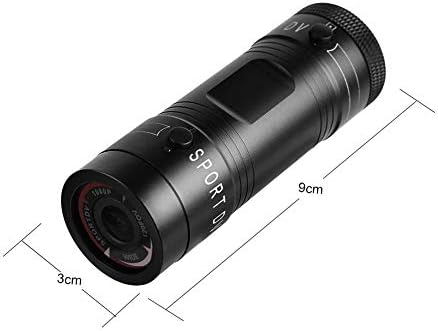
Image 9.1: Physical dimensions of the camera, showing a length of 9cm and a diameter of 3cm.
10. Garantie und Support
Informationen zur Garantie und zum technischen Support finden Sie in der mitgelieferten Dokumentation oder wenden Sie sich direkt an den Händler/Hersteller. Bewahren Sie Ihren Kaufbeleg für Garantieansprüche auf.
Manufacturer: Zerone
For further assistance, you may visit the Zerone Store on Amazon: Zerone Store