
1. Einleitung
The T'nB FM Bluetooth Transmitter (Model FMCT05B) allows you to stream audio from your smartphone or other compatible devices to your car's FM radio. This device features Bluetooth connectivity, a USB port, an SD card slot, and an LCD screen for displaying essential information. Enjoy hands-free calling and versatile music playback directly through your vehicle's sound system.
2. Sicherheitshinweise
WARNUNG: Use only the power adapter provided with this device. To prevent interference, avoid operating the transmitter in close proximity to other electronic devices.
3. Produktüberschreitungview
Familiarize yourself with the components of your T'nB FM Bluetooth Transmitter.
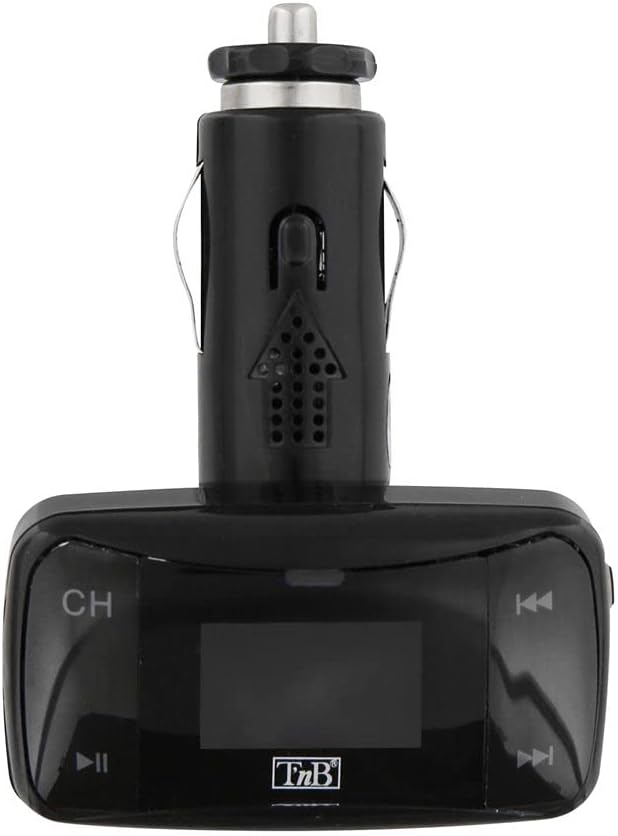
Abbildung 1: Front view of the T'nB FM Bluetooth Transmitter. This image displays the device's LCD screen, 'CH' button for frequency adjustment, and track navigation buttons.

Abbildung 2: Abgewinkelt view of the T'nB FM Bluetooth Transmitter. This perspective shows the device's overall shape, the 12V car socket connector, and the side profile der Bedienknöpfe.

Abbildung 3: 3.5mm AUX Audio Cable. This cable can be used to connect external audio sources to the transmitter's AUX input.
4. Einrichtungsanweisungen
- Sender einsetzen: Plug the T'nB FM Bluetooth Transmitter firmly into your vehicle's 12V power socket (cigarette lighter port). The device's LCD screen should illuminate.
- Stellen Sie Ihr Autoradio ein: Turn on your car's FM radio and tune it to an unused FM frequency. Choose a frequency that has no strong broadcast signal to minimize interference.
- Senderfrequenz anpassen: On the T'nB transmitter, use the 'CH' button or frequency adjustment controls to set the transmitter's FM frequency to match the frequency selected on your car radio. Ensure both frequencies are identical for optimal audio transmission.
- Kopplung über Bluetooth:
- Aktivieren Sie Bluetooth auf Ihrem Smartphone oder Audiogerät.
- Suchen nach available Bluetooth devices. The transmitter should appear as "FMCT05B" or a similar name.
- Select the transmitter to pair. Once paired, the device will confirm the connection, and you can begin streaming audio.
5. Bedienungsanleitung
5.1 Musikwiedergabe
- Bluetooth-Streaming: Once paired, play music on your smartphone. The audio will be transmitted to your car's FM radio. Use the transmitter's track navigation buttons (◀◀ / ▶▶) to skip tracks and the play/pause button (▶▌▌) to control playback.
- USB-/SD-Kartenwiedergabe: Insert a USB flash drive or an SD card containing MP3/MP4 audio files into the respective slot on the transmitter. The device will automatically detect and begin playing the audio files. Use the track navigation and play/pause buttons to control playback.
- AUX-Eingang: Connect an external audio device (e.g., MP3 player) to the transmitter's 3.5mm AUX input using the provided cable. Select the AUX input mode on the transmitter if available, or ensure no other media is playing.
5.2 Freisprechfunktion
- Anrufe entgegennehmen / beenden: When a call comes in, the music will pause. Press the play/pause button (▶▌▌) to answer the call. Press it again to end the call.
- Wahlwiederholung: Double-press the play/pause button (▶▌▌) to redial the last number called.
- Lautstärkeregelung: Adjust the call volume using the volume controls on the transmitter or your car's radio.
5.3 LCD Display
The LCD screen displays the current FM frequency, volume level, track number, and song titles (when available from the source).
6. Wartung
- Halten Sie das Gerät sauber und trocken. Wischen Sie die Oberfläche mit einem weichen, trockenen Tuch ab.
- Avoid exposing the transmitter to extreme temperatures, direct sunlight, or high humidity.
- Versuchen Sie nicht, das Gerät zu zerlegen oder zu verändern, da dies zum Erlöschen der Garantie führt und Schäden verursachen kann.
7. Fehlerbehebung
- Kein Strom: Ensure the transmitter is securely plugged into the 12V power socket and that the car's ignition is on. Check the car's fuse for the 12V socket if necessary.
- Schlechte Audioqualität/Rauschen:
- Adjust the FM frequency on both the transmitter and your car radio to a different, clear frequency with no strong broadcast signals.
- Ensure the volume on your audio source (smartphone, USB, SD card) is set to an appropriate level.
- Meiden Sie Gebiete mit starken Funkstörungen.
- Bluetooth stellt keine Verbindung her:
- Ensure Bluetooth is enabled on your smartphone and the transmitter is powered on.
- Delete the transmitter from your phone's Bluetooth device list and attempt to pair again.
- Restart both your phone and the transmitter.
- USB-/SD-Karte spielt nicht ab: Ensure the media is inserted correctly and contains compatible audio files (MP3/MP4 format). Try a different USB drive or SD card.
8. Spezifikationen
| Besonderheit | Spezifikation |
|---|---|
| Modellname | FMCT05B |
| Marke | T'nB |
| Konnektivitätstechnologie | Bluetooth, USB |
| Stromquelle | USB (12V DC Car Socket) |
| Drahtloser Kommunikationsstandard | Bluetooth |
| Kompatible Geräte | Speaker, MP3 Player, Car Stereo System, Smartphone, Headset |
| Medientyp | SD-Karte, USB-Laufwerk |
| Hardware-Schnittstelle | USB Typ A |
| Kontrollmethode | Taktil (Knöpfe) |
| Audioausgabetyp | FM Radio, Speaker |
| Audioeingang | 3.5 mm AUX |
| Bandtage | 12 Volt (DC) |
9. Garantie und Support
For warranty information or technical support, please refer to the documentation included with your purchase or contact T'nB customer service directly. Contact details can typically be found on the manufacturer's official webWebsite.


