
Einführung
This manual provides instructions for the setup, operation, and maintenance of your Zelotes T20 Ergonomic Vertical Mouse. Please read this manual thoroughly before using the product to ensure proper function and longevity.
Produkt überview
The Zelotes T20 is an ergonomic vertical mouse designed to promote a natural hand and wrist posture, reducing strain during extended use. It features adjustable DPI settings and multiple programmable buttons for enhanced control.

Figure 1: Zelotes T20 Ergonomic Vertical Mouse. This image displays the overall design of the mouse, highlighting its vertical orientation and LED lighting.
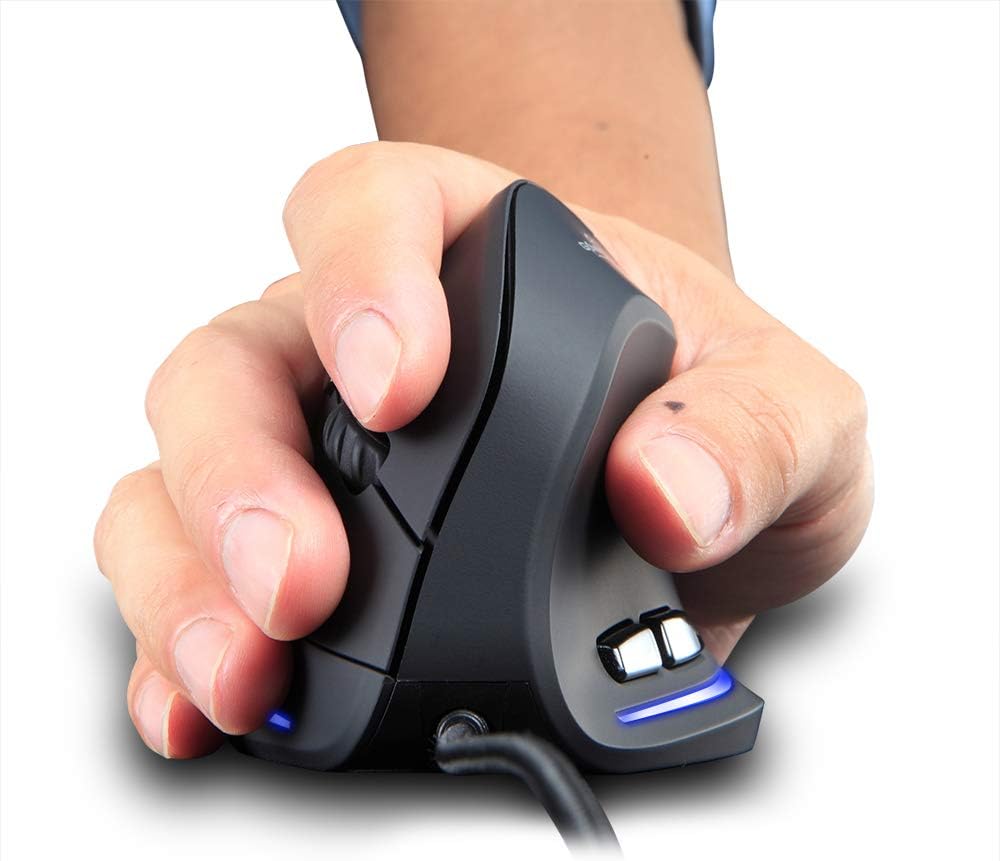
Figure 2: Proper hand placement on the Zelotes T20 mouse. This image illustrates how the vertical design allows for a natural handshake grip, intended to reduce wrist strain.

Figure 3: Ergonomic comparison. This diagram contrasts the natural wrist posture with a vertical mouse against the twisted posture often associated with traditional horizontal mice, emphasizing fatigue reduction.
Packungsinhalt
Überprüfen Sie, ob alle Artikel im Paket vorhanden sind:
- 1 x Zelotes Ergonomic Vertical Mouse
- 1 x Bedienungsanleitung (dieses Dokument)
Aufstellen
- Schließen Sie die Maus an: Plug the USB cable of the Zelotes T20 mouse into an available USB port on your computer.
- Treiberinstallation: The mouse is plug-and-play. Your operating system should automatically detect and install the necessary drivers. No additional software installation is typically required.
- Schutzfolie entfernen: Before use, locate and remove the protective film from the "Bigfoot pads" on the underside of the mouse for optimal gliding performance.

Figure 4: Underside of the mouse. This image shows the Teflon material pads and indicates the location of the protective film that should be removed before initial use.
Bedienungsanleitung
Tastenfunktionen
The Zelotes T20 mouse features 6 buttons for various functions:
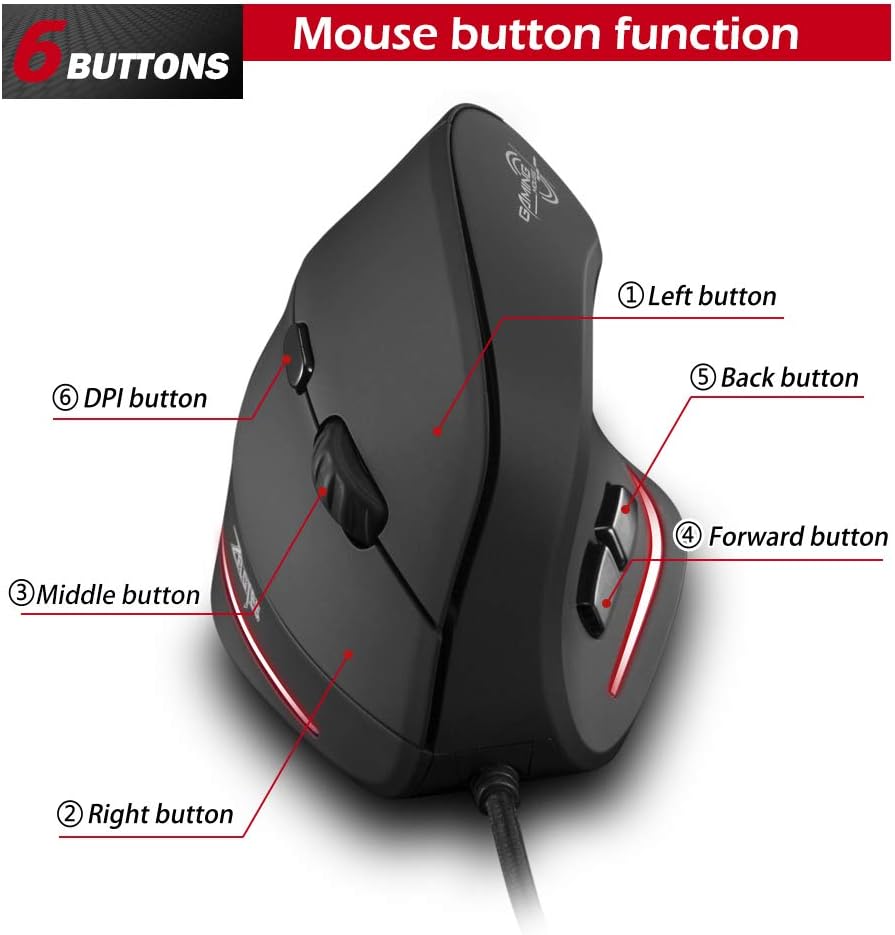
Figure 5: Mouse button layout. This diagram labels each of the six buttons: Left, Right, Middle (scroll wheel click), Forward, Back, and DPI adjustment button.
- Linke Taste: Standardmäßige Linksklick-Funktion.
- Rechter Knopf: Standardmäßige Rechtsklick-Funktion.
- Mittlere Taste (Scrollrad): Klickbares Scrollrad für Mittelklick-Funktionen.
- Vorwärts-Taste: Navigiert vorwärts in web Browser bzw file Entdecker.
- Zurück-Schaltfläche: Navigiert rückwärts in web Browser bzw file Entdecker.
- DPI-Taste: Passt die Mausempfindlichkeit (DPI) an.
DPI-Einstellung (Empfindlichkeit)
The mouse offers four adjustable DPI settings to suit different tasks and preferences. Press the DPI button (Button 6 in Figure 5) to cycle through the settings. Each DPI level is indicated by a specific LED light color:
- 1200 DPI: Blue light hint
- 1600 DPI: Dark purple light hint
- 2400 DPI: Red light hint
- 3200 DPI: Light purple light hint
The light will stay on for approximately 3 seconds when switching DPI settings to indicate the current level.

Figure 6: DPI adjustment and LED indicators. This image illustrates the DPI button and the color coding for each of the four sensitivity settings.
Using Forward/Back Keys
The dedicated Forward and Back buttons (Buttons 4 and 5 in Figure 5) provide quick navigation. These buttons are designed to streamline browsing through web pages or folders, reducing the need for on-screen clicks.

Figure 7: Forward and Back navigation buttons. This image highlights the placement of the forward and back buttons, designed for convenient web Und file Navigation.
Wartung
- Reinigung: Reinigen Sie die Oberfläche der Maus mit einem weichen, trockenen Tuch. Bei hartnäckigem Schmutz kann ein leicht feuchtes Tuch helfen.amp Man kann ein Tuch verwenden, um sicherzustellen, dass keine Flüssigkeit in die Maus eindringt.
- Sensorwartung: Um eine genaue Abtastung zu gewährleisten, halten Sie den optischen Sensor an der Unterseite der Maus sauber und frei von Staub und Schmutz.
- Kabelpflege: Um Beschädigungen zu vermeiden, sollten Sie das USB-Kabel nicht scharf biegen oder übermäßig daran ziehen.

Figure 8: Mouse surface texture. This image provides a close-up view of the mouse's surface, described as smooth for comfortable handling.
Fehlerbehebung
- Maus reagiert nicht:
- Stellen Sie sicher, dass das USB-Kabel fest an einen funktionierenden USB-Anschluss Ihres Computers angeschlossen ist.
- Versuchen Sie, die Maus an einen anderen USB-Anschluss anzuschließen.
- Starten Sie Ihren Computer neu.
- Ungenaue Nachverfolgung:
- Reinigen Sie den optischen Sensor an der Unterseite der Maus.
- Verwenden Sie die Maus auf einer geeigneten Oberfläche (z. B. einem Mauspad). Stark reflektierende oder transparente Oberflächen können Probleme verursachen.
- Passen Sie die DPI-Einstellung mit der DPI-Taste an.
- Tasten funktionieren nicht richtig:
- Überprüfen Sie, ob die Maus ordnungsgemäß angeschlossen ist.
- Testen Sie die Maus an einem anderen Computer, um festzustellen, ob das Problem an der Maus oder an den Computereinstellungen liegt.
Technische Daten
| Besonderheit | Detail |
|---|---|
| Modell | T20 |
| Schaltflächennummer | 6 Tasten |
| Ortungssystem | Optisch |
| USB-Kabellänge | 1.8 m |
| Arbeitsvolumentage/Aktuell | 5 V/100 mA |
| Schaltfläche Leben | 5 Millionen Mal |
| Roller Life | 1.2 million turns |
| Produktabmessungen (L x B x H) | 110 x 72 x 75 mm (4.33 x 2.83 x 2.95 Zoll) |
| Produktgewicht | 160 ± 5 g (5.6 Unzen) |
| Auflösung (DPI) | 1200-1600-2400-3200 |
| Wahlbeteiligung (Umfragequote) | 125 Hz |
| Kompatibilität | Windows 2000/ME/XP (x64)/Vista/7/8/10, Mac OS X (over V10.4), Linux |

Figure 9: Product dimensions. This image provides detailed measurements of the mouse from various angles.
Garantie und Support
Informationen zur Garantie oder technische Unterstützung erhalten Sie auf der offiziellen Website des Herstellers. webBesuchen Sie die Website oder kontaktieren Sie den Kundendienst. Bewahren Sie Ihren Kaufbeleg als Kaufnachweis auf.