
Einführung
Thank you for choosing the SIMOLIO Kids Wireless Headphones Model JH-711. This manual provides essential information for the proper setup, operation, and maintenance of your headphones. Please read it carefully to ensure safe and optimal use.
Produkteigenschaften
- 3-stufige Lautstärkebegrenzung: Protects children's hearing with switchable volume limits (75dB for toddlers, 85dB for kids, 94dB for adults). This feature is active in both wired and wireless modes.
- Geräuschisolierung: Over-ear design provides passive noise reduction, helping to block external sounds for improved listening focus.
- Wireless & Wired Modes: Offers Bluetooth connectivity for wireless use and includes a 3.5mm audio cable for wired connection when the battery is depleted or for non-Bluetooth devices.
- Eingebautes Mikrofon: Enables hands-free calling and voice chat.
- Audio Sharing Port: Allows another headphone to connect and share audio from the same device.
- Robustes und flexibles Design: Constructed with memory stainless steel strips in the headband for impressive durability and flexibility, designed to withstand active use. Earmuffs feature an anti-shedding design.
- Faltbar und kompakt: Easy to fold and store in the included EVA carrying case, ideal for travel and school.
- Lange Akkulaufzeit: Bis zu 15 Stunden Spielzeit mit einer einzigen Akkuladung.

The headphones feature a 3-level volume limiter to protect hearing, adjustable for toddlers, kids, and adults.
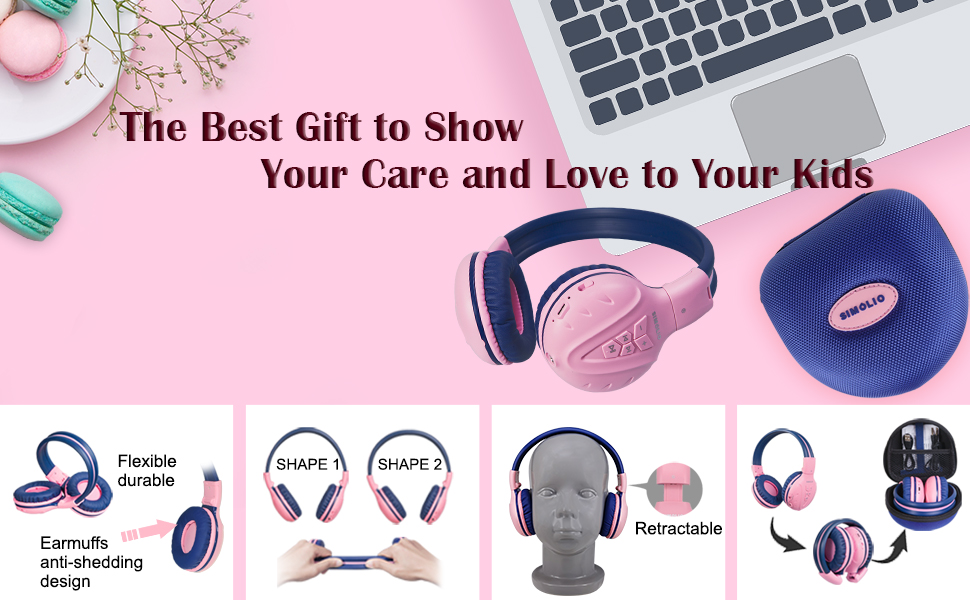
The flexible and durable design allows the headphones to withstand bending and twisting.
Lieferumfang
Das Paket enthält die folgenden Artikel:
- SIMOLIO Kids Wireless Headphones JH-711
- Ladekabel (USB)
- AUX-Kabel (3.5-mm-Audiokabel)
- Bedienungsanleitung
- EVA-Tragetasche
Aufstellen
1. Aufladen der Kopfhörer
Before first use, fully charge the headphones. Connect the provided USB charging cable to the charging port on the headphones and to a USB power source (e.g., computer, wall adapter). The LED indicator will show charging status and turn off when fully charged.
2. Bluetooth-Kopplung
- Stellen Sie sicher, dass die Kopfhörer ausgeschaltet sind.
- Press and hold the Multi-Function Button (MFB) until the LED indicator flashes blue and red alternately, indicating pairing mode.
- Aktivieren Sie auf Ihrem Gerät (Smartphone, Tablet usw.) Bluetooth und suchen Sie nach verfügbaren Geräten.
- Wählen Sie "SIMOLIO JH-711" aus der Geräteliste aus.
- Sobald die Verbindung hergestellt ist, blinkt die LED-Anzeige langsam blau.
3. Kabelgebundene Verbindung
To use the headphones in wired mode, connect one end of the 3.5mm AUX cable to the audio jack on the headphones and the other end to the audio output of your device. The headphones will automatically switch to wired mode, even if the battery is dead.

The headphones support both wireless Bluetooth mode and wired mode via the included AUX cable.
4. Volume Limiter Adjustment
Locate the 3-level volume limiter switch on the headphones. Adjust the switch to the desired maximum volume level:
- 75dB (S): Recommended for toddlers or very quiet environments.
- 85dB (M): Recommended for children in general listening environments.
- 94dB (L): Recommended for adults or noisy environments.

Adjust the physical switch to select the appropriate volume limit.
5. Using the Sharing Port
The headphones feature an additional sharing jack on the right side. To share audio, plug another headphone into this port. This allows two users to listen to the same audio source simultaneously.

Connect another headphone to the sharing port to share audio with a friend.
Bedienungsanleitung
1. Ein-/Ausschalten
- Einschalten: Halten Sie den Multifunktionsknopf etwa 3 Sekunden lang gedrückt, bis die LED-Anzeige aufleuchtet.
- Ausschalten: Halten Sie den Multifunktionsknopf etwa 3 Sekunden lang gedrückt, bis die LED-Anzeige erlischt.
2. Musikwiedergabe
- Abspielen/Pause: Drücken Sie kurz die MFB.
- Nächster Titel: Drücken Sie kurz die "+"-Taste.
- Vorheriges Lied: Drücken Sie kurz die "-"-Taste.
- Lautstärke erhöhen: Die "+"-Taste lange drücken.
- Lautstärke runter: Die "-"-Taste lange drücken.
3. Anrufverwaltung
When connected via Bluetooth:
- Anruf annehmen/beenden: Drücken Sie kurz die MFB.
- Anruf ablehnen: Die Multifunktionstaste lange drücken.

Das eingebaute Mikrofon ermöglicht freihändiges Telefonieren.
Wartung
- Reinigen Sie die Kopfhörer mit einem weichen, trockenen Tuch. Verwenden Sie keine Scheuermittel oder Lösungsmittel.
- Vermeiden Sie es, die Kopfhörer extremen Temperaturen, hoher Luftfeuchtigkeit oder direkter Sonneneinstrahlung auszusetzen.
- Bewahren Sie die Kopfhörer bei Nichtgebrauch im mitgelieferten EVA-Trageetui auf, um sie vor Staub und Beschädigungen zu schützen.
- Versuchen Sie nicht, die Kopfhörer zu zerlegen oder zu verändern, da dies zum Erlöschen der Garantie führt und Schäden verursachen kann.

The headphones fold compactly and fit into the included EVA case for easy storage and transport.
Fehlerbehebung
| Problem | Mögliche Ursache | Lösung |
|---|---|---|
| Die Kopfhörer lassen sich nicht einschalten. | Schwache Batterie. | Laden Sie die Kopfhörer vollständig auf. |
| Kopplung via Bluetooth nicht möglich. | Kopfhörer nicht im Kopplungsmodus; Bluetooth am Gerät ausgeschaltet; zu weit vom Gerät entfernt. | Stellen Sie sicher, dass sich die Kopfhörer im Kopplungsmodus befinden (rot/blau blinkend). Aktivieren Sie Bluetooth auf Ihrem Gerät. Bringen Sie die Kopfhörer näher an Ihr Gerät heran (innerhalb von 9 Metern). |
| Kein Ton im drahtlosen Modus. | Lautstärke zu niedrig; nicht verbunden; falscher Audioausgang am Gerät ausgewählt. | Erhöhen Sie die Lautstärke an Kopfhörern und Gerät. Koppeln Sie die Kopfhörer erneut. Überprüfen Sie die Audioeinstellungen des Geräts. |
| Kein Ton im Kabelmodus. | AUX-Kabel nicht vollständig eingesteckt; Kabel beschädigt; Gerätelautstärke zu niedrig. | Ensure AUX cable is securely connected at both ends. Try a different AUX cable. Increase device volume. |
Technische Daten
| Besonderheit | Detail |
|---|---|
| Modellname | Kids Bluetooth Headphones JH-711 |
| Konnektivitätstechnologie | Kabellos (Bluetooth), Kabelgebunden (3.5-mm-Klinkenstecker) |
| Bluetooth-Version | 4.0 |
| Bluetooth-Reichweite | 9 Meter |
| Lärmschutz | Schallisolierung |
| Empfindlichkeit | 94dB (max.) |
| Akkulaufzeit | 15 Stunden |
| Ladezeit | 3 Stunden |
| Artikelgewicht | 187 Gramm (6.6 Unzen) |
| Technische Daten | 5.51 x 3.15 x 5.31 Zoll |
| Material | Nylon, Stainless Steel (headband) |
| Tragetaschenmaterial | EVA |
| Besondere Merkmale | 3 Adjustable Volume Limited, Microphone, Durable, Flexible, Foldable, Wired & Wireless, Share Port, EVA Case |
Offizielles Produktvideo
Dieses Video bietet einen visuellen Überblick überview of the SIMOLIO Bluetooth Headphones for Kids with Case JH-711, demonstrating its features and functionality.
Garantie und Support
SIMOLIO products are designed for quality and reliability. For specific warranty information, please refer to the warranty card included with your product or visit the official SIMOLIO website. If you encounter any issues or require technical assistance, please contact SIMOLIO customer support through their official channels.