
1. Einleitung
The Hyper Tough 22-Piece Scraper Set is a versatile tool designed for various scraping tasks. It is ideal for removing stickers, labels, and decals from surfaces such as glass, windshields, and bumpers. Additionally, it can be effectively used for removing wallpaper and other sticky materials from floors and walls. This set provides both sharp razor blades for tough jobs and non-marring blades to protect delicate surfaces.
2. Inhalt festlegen
Your Hyper Tough 22-Piece Scraper Set includes the following components:
- 1 x Scraper Handle (with 4-position extendable blade holder)
- 11 x Razor Scraper Blades
- 10 x Non-Marring Scraper Blades
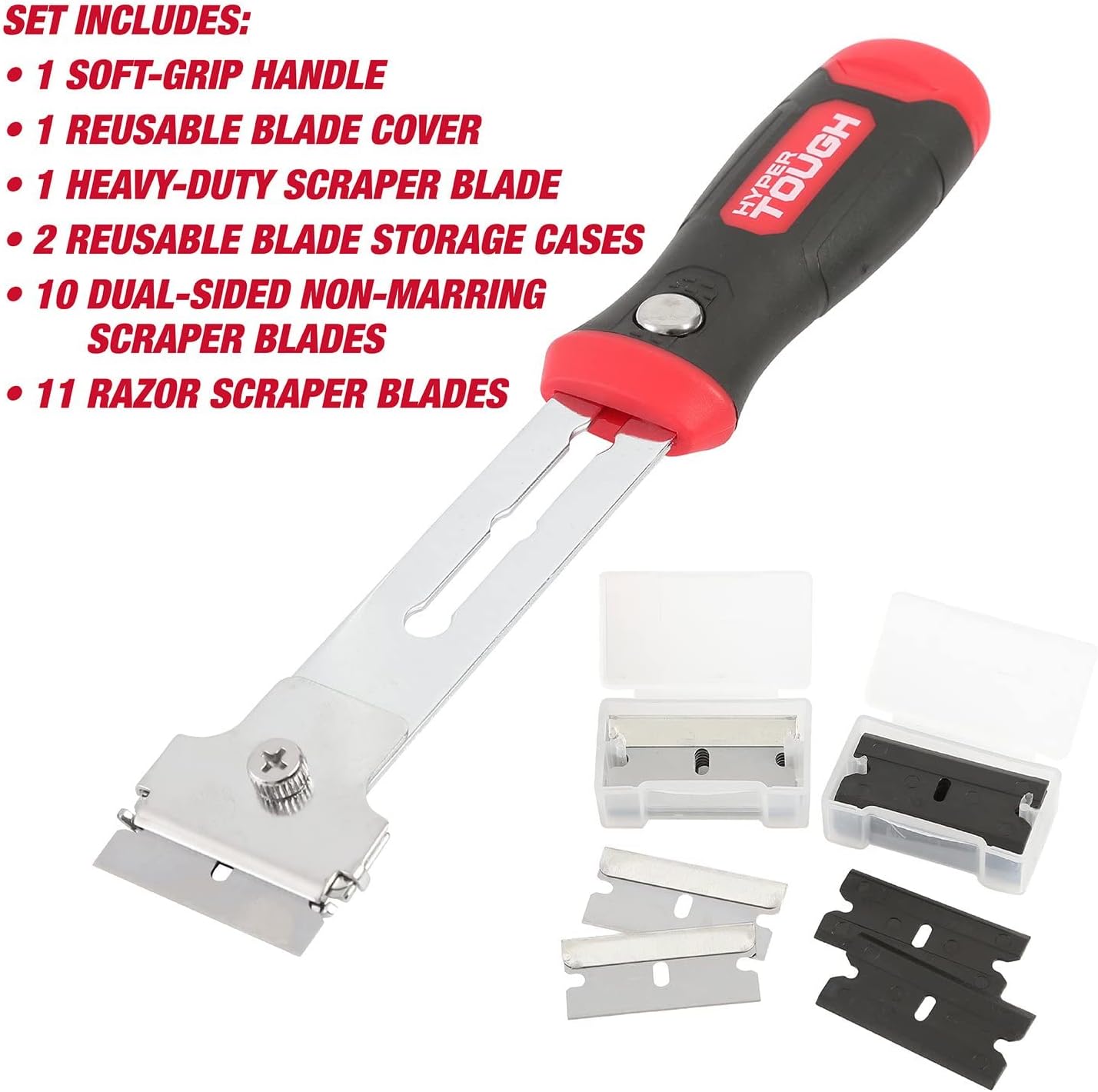
Abbildung 1: Überview of the Hyper Tough 22-Piece Scraper Set, showing the scraper handle, razor blades, and non-marring blades.
3. Einrichtung
3.1 Installation der Klinge
- Unscrew the Tightening Screw: Locate the small screw on the front of the scraper head. Use a screwdriver to loosen and remove this screw.
- Klinge einsetzen: Carefully slide either a razor blade or a non-marring blade into the slot on the scraper head. Ensure the blade is seated correctly and aligned with the holder.
- Sichere Klinge: Reinsert the tightening screw and tighten it firmly to secure the blade in place. Ensure the blade is stable and does not wobble before use.

Abbildung 2: Proper method for inserting a blade into the scraper head.

Abbildung 3: Securing the blade with the tightening screw using a screwdriver.
3.2 Handle Extension
The scraper features a 4-position extendable blade holder for increased reach. To adjust the length:
- Press the button located on the side of the handle.
- Slide the blade holder forward or backward to your desired length.
- Release the button to lock the blade holder into one of the four available positions.

Abbildung 4: The scraper handle with its extendable feature and on-board blade storage.
4. Bedienungsanleitung
4.1 Klingenauswahl
- Razor Scraper Blades: Use these sharp blades for tough, stubborn materials like dried paint, heavy-duty adhesives, and thick decals on durable surfaces such as glass or metal. Exercise caution due to their sharpness.
- Non-Marring Scraper Blades: These plastic blades are designed for delicate surfaces where scratching is a concern, such as painted walls, plastic, or wood. They are effective for removing lighter adhesives, labels, and wallpaper without causing damage.
4.2 Allgemeine Schabetechnik
- Oberfläche vorbereiten: Ensure the surface is clean and free of loose debris. For some materials, a softening agent (e.g., water, solvent) may aid removal.
- Angle the Scraper: Hold the scraper at a shallow angle (typically 15-30 degrees) to the surface. A steeper angle can dig into the surface, while too shallow an angle may not provide enough leverage.
- Druck ausüben: Apply steady, even pressure while pushing the scraper forward. Use smooth, controlled strokes.
- Testen Sie an einem unauffälligen Ort: Always test the scraper on a small, hidden area first to ensure it does not damage the surface.

Abbildung 5: Demonstrating the scraper in use on a surface.
5. Wartung
5.1 Reinigung
After each use, clean the scraper head and handle to remove any residue. Use a damp cloth for the handle and a suitable solvent for the blade if necessary, ensuring to dry thoroughly to prevent rust on metal parts.
5.2 Klingenaufbewahrung
The scraper handle features an internal storage compartment for spare blades. To access it:
- Gently pull open the red end cap at the bottom of the handle.
- Store up to 8 blades (4 on each side) securely within the compartment.
- Close the end cap firmly to prevent blades from falling out.

Abbildung 6: Internal blade storage compartment in the scraper handle.
5.3 Klingenwechsel
Replace blades when they become dull or damaged to ensure optimal performance and safety. Follow the blade installation steps in Section 3.1 to replace a worn blade with a new one.
6. Fehlerbehebung
6.1 Blade Not Secure
If the blade feels loose or wobbly after installation:
- Ensure the blade is fully seated in the slot.
- Tighten the screw on the scraper head firmly. Do not overtighten, but ensure it is snug.
6.2 End Cap for Blade Storage Falls Out
If the end cap for blade storage does not stay closed:
- Verify that the cap is aligned correctly with the handle.
- Push the cap firmly until it clicks or feels secure.
7. Spezifikationen
| Besonderheit | Detail |
|---|---|
| Modellnummer | 2300 |
| UPC / GTIN | 076812123503 |
| Klingenmaterial | Alloy Steel (Razor Blades) / Plastic (Non-Marring Blades) |
| Griffmaterial | Plastik |
| Artikelgewicht | 0.48 Pfund |
| Klingenhalter | 4-Position Extendable |
8. Garantie und Support
For warranty information or product support, please refer to the packaging or contact Hyper Tough customer service directly. Specific warranty details are not provided in this manual.