
1. Wichtige Sicherheitshinweise
Please read all instructions carefully before using this projector and retain them for future reference. Improper operation may result in electric shock, fire, or other hazards.
- Energiequelle: Verwenden Sie ausschließlich das mit dem Projektor gelieferte Netzteil. Stellen Sie sicher, dass die Lautstärketage entspricht der örtlichen Stromversorgung.
- Belüftung: Do not block any ventilation openings. Ensure adequate airflow around the projector to prevent overheating.
- Platzierung: Stellen Sie den Projektor auf eine stabile, ebene Fläche. Vermeiden Sie direkte Sonneneinstrahlung, die Nähe zu Wärmequellen oder Umgebungen mit hoher Luftfeuchtigkeit oder Staub.
- Wasser und Feuchtigkeit: Do not expose the projector to rain, moisture, or immerse it in water. If liquid enters the device, disconnect power immediately and contact support.
- Reinigung: Ziehen Sie vor der Reinigung den Netzstecker des Projektors. Verwenden Sie ein weiches, trockenes Tuch. Verwenden Sie keine flüssigen oder Aerosol-Reinigungsmittel.
- Wartung: Versuchen Sie nicht, dieses Produkt selbst zu reparieren. Überlassen Sie alle Wartungsarbeiten qualifiziertem Servicepersonal. Öffnen des Gehäusesasing kann Sie gefährlichen Temperaturen aussetzentage oder andere Gefahren.
- Augenschutz: Schauen Sie nicht direkt in die Projektorlinse, wenn der lamp ist eingeschaltet, da das helle Licht Augenschäden verursachen kann.
2. Packungsinhalt
Bitte prüfen Sie, ob alle unten aufgeführten Artikel in Ihrem Paket enthalten sind. Sollten Artikel fehlen oder beschädigt sein, kontaktieren Sie bitte unseren Kundenservice.
- DBPOWER T22 Portable Video Projector
- Fernbedienung
- HDMI-Kabel
- AV-Kabel
- Stromkabel
- Bedienungsanleitung
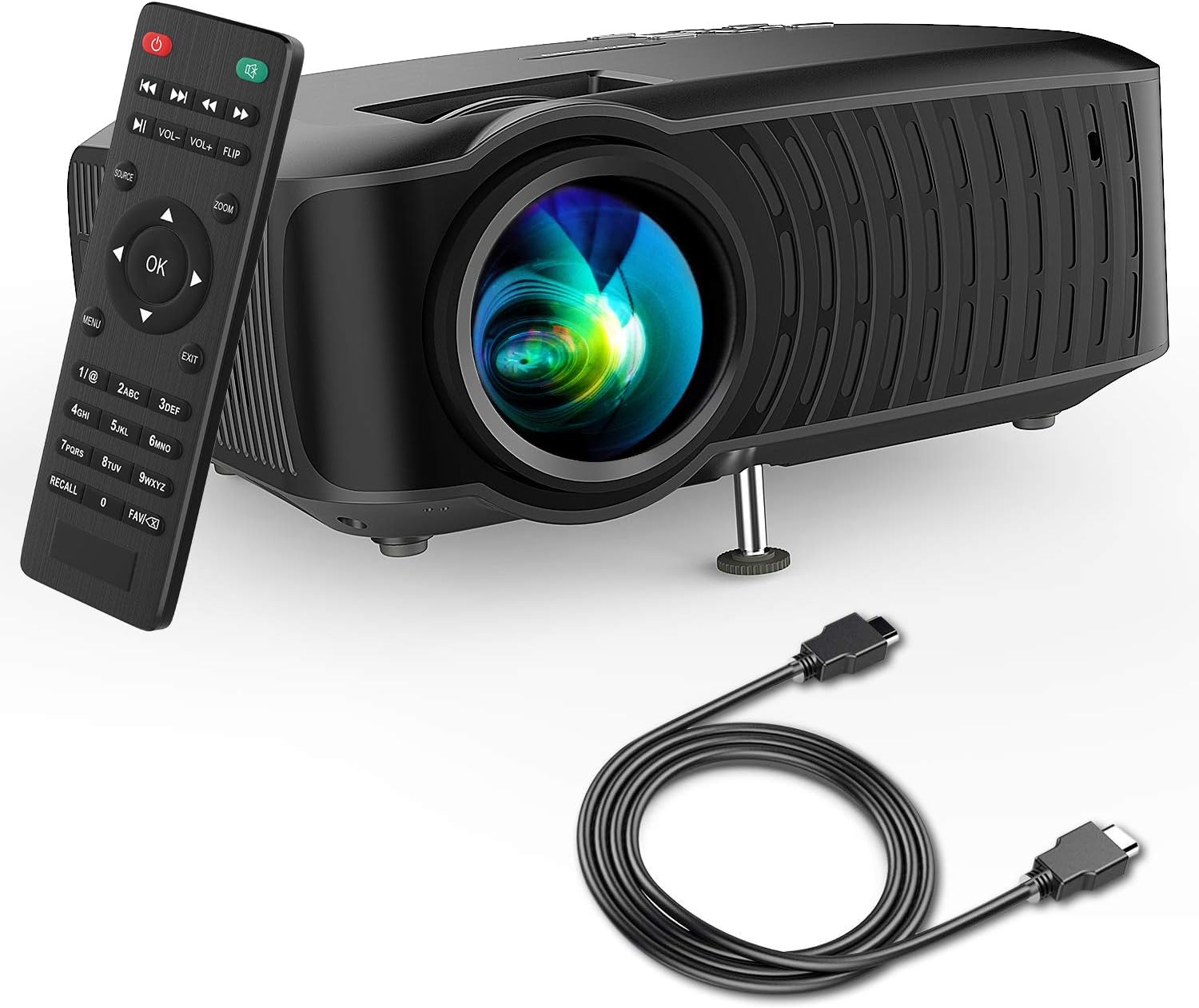
Image: The DBPOWER T22 Portable Video Projector, its remote control, and an HDMI cable, representing the typical package contents.
3. Produktüberschreitungview
Familiarize yourself with the various parts of your DBPOWER T22 projector.
3.1 Vorder- und Seitenansicht View

Abbildung: Seite A view of the DBPOWER T22 projector with dimensions indicating its compact and portable design (21.8cm length, 17.2cm width, 9.16cm height).
- Projektionsobjektiv: Gibt das Bild auf dem Bildschirm aus.
- Fokusring: Passt die Bildschärfe an.
- Keystone-Korrekturring: Korrigiert trapezförmige Bildverzerrungen.
- Belüftungsöffnungen: Zur Wärmeableitung. Nicht blockieren.
- Verstellbarer Fuß: Raises or lowers the front of the projector.
3.2 Rückseite und Anschlüsse
The rear panel provides various input and output ports for connecting external devices.
- HDMI-Anschluss: Connects to devices like laptops, Blu-ray players, game consoles, and TV sticks.
- USB-Anschluss: Anschlussmöglichkeit für USB-Flash-Laufwerke zur Medienwiedergabe.
- AV-Anschluss: Lässt sich über das mitgelieferte AV-Kabel mit älteren Geräten verbinden.
- SD-Kartensteckplatz: Zum direkten Abspielen von Medien von einer SD-Karte.
- Audioausgang (3.5-mm-Klinkenbuchse): Anschlussmöglichkeit für externe Lautsprecher oder Kopfhörer.
- Leistungsaufnahme: Wird mit dem Netzteil verbunden.
3.3-Fernbedienung
The remote control allows convenient operation of the projector from a distance.
- Netzschalter: Schaltet den Projektor ein/aus.
- Quellentaste: Selects input source (HDMI, AV, USB, SD).
- Navigationstasten (Auf/Ab/Links/Rechts): Navigiert durch Menüs.
- OK-Taste: Bestätigt die Auswahl.
- Menü-Schaltfläche: Greift auf die Projektoreinstellungen zu.
- Exit-Taste: Verlässt das aktuelle Menü oder die aktuelle Funktion.
- Lautstärke +/-: Stellt die Lautsprecherlautstärke ein.
- Flip Button: Rotates the projected image.
- Zoom-Schaltfläche: Adjusts image zoom (digital zoom).
4. Einrichtung
4.1 Ein-/Ausschalten
- Connect the power cable to the projector's power input, then plug the other end into a power outlet.
- Press the power button on the projector or the remote control to turn it on. The indicator light will change.
- Zum Ausschalten drücken Sie erneut den Netzschalter.
4.2 Bildfokus und Trapezkorrektur anpassen
Achieve a clear and rectangular image by adjusting the focus and keystone correction.

Image: Diagram showing the manual keystone correction and focus rings on the side of the projector, with examples of de-focused and focused images, and trapezoidal correction.
- Fokus: Drehen Sie den Fokusring until the projected image appears sharp and clear.
- Trapezkorrektur: If the image appears trapezoidal (wider at the top or bottom), rotate the Trapezkorrekturring to make the image rectangular. The projector supports ±15° manual keystone correction.
4.3 Externe Geräte anschließen
The DBPOWER T22 supports multiple input sources.
- HDMI: Connect an HDMI cable from your device (e.g., laptop, game console, Amazon Fire TV Stick) to the projector's HDMI port.
- USB: Stecken Sie einen USB-Stick in den USB-Anschluss.
- EIN V: Verwenden Sie das mitgelieferte AV-Kabel, um Geräte mit AV-Ausgang anzuschließen.
- SD-Karte: Stecken Sie eine SD-Karte in den SD-Kartensteckplatz.
- Smartphones: For iOS devices, an external Lightning to HDMI adapter is required. For Android devices, an external Micro USB/Type-C to HDMI adapter is required. (Adapters not included).
5. Bedienung des Projektors
5.1 Auswahl der Eingangsquelle
After connecting your device, you need to select the correct input source.
- Drücken Sie die Quelle button on the remote control or the projector.
- Use the navigation buttons to select the desired input source (e.g., HDMI, USB, AV, SD).
- Drücken OK zur Bestätigung.
5.2 Medienwiedergabe (USB/SD)
When a USB drive or SD card is inserted, the projector will display a media browser.
- Navigieren Sie durch Ordner und files mithilfe der Navigationstasten der Fernbedienung.
- Wählen Sie ein file (e.g., video, photo, music, text) and press OK zum Spielen.
5.3 Audioausgang
The projector features an improved built-in speaker system. For enhanced audio, you can connect external speakers.

Image: An illustration of the DBPOWER T22 projector highlighting its stereo speakers, indicating that external speakers are not always necessary for an enjoyable audio experience.
- Eingebauter Lautsprecher: The projector's internal speaker provides audio. Adjust volume using the LAUTSTÄRKE +/- Tasten auf der Fernbedienung.
- External Speakers/Headphones: Connect a 3.5mm audio cable from your external audio device to the projector's Audio Out port.
5.4 Projector Settings (Menu)
Drücken Sie die Speisekarte button on the remote to access settings such as Picture Mode, Aspect Ratio, Sound Mode, and other system preferences.
6. Wartung
6.1 Reinigung der Linse
Use a professional lens cleaning cloth or lens paper to clean the projector lens. Avoid touching the lens directly with your hands.

Bild: Eine explodierte view of the projector lens assembly, highlighting the tempered glass lens and the importance of a dust cover to protect it from scratches and dust.
6.2 Reinigung des Projektorgehäuses
Wipe the projector body with a soft, dry cloth. Do not use abrasive cleaners or solvents.
6.3 Heat Dispersion System
The projector features an advanced cooling system to ensure stable operation and extend lamp life. Ensure ventilation ports are clear.

Abbildung: Ein interner view of the DBPOWER T22 projector, illustrating the advanced heat dispersion system with air flowing through cooling fins to maintain optimal operating temperature.
6.4 Literamp Leben
Die LED lamp in your DBPOWER T22 projector has an extended lifespan of over 50,000 hours, significantly reducing the need for lamp Ersatz.
7. Fehlerbehebung
Sollten Sie auf Probleme stoßen, konsultieren Sie bitte die folgenden häufigen Probleme und Lösungen.
| Problem | Mögliche Ursache | Lösung |
|---|---|---|
| Kein Bild oder Meldung „Kein Signal“. | Falsche Eingangsquelle ausgewählt; lose Kabelverbindung; Gerät nicht eingeschaltet. |
|
| Unscharfes Bild | Fokus nicht eingestellt; Projektor zu nah/zu weit von der Leinwand entfernt. |
|
| Trapezförmiges Bild | Der Projektor steht nicht senkrecht zur Leinwand. |
|
| Kein Ton oder geringe Lautstärke | Volume too low; mute enabled; external audio device issues. |
|
| Fernbedienung funktioniert nicht | Dead batteries; obstruction; remote not pointed at IR receiver. |
|
8. Spezifikationen
Detailed technical specifications for the DBPOWER T22 Portable Video Projector.
| Besonderheit | Detail |
|---|---|
| Marke | dBpower |
| Modellnummer | T22 |
| Helligkeit | 120 ANSI Lumens (80% brighter than most market projectors) |
| Kontrastverhältnis | 2000:1 |
| Unterstützte Auflösung | 1080P (Full HD) |
| Native Bildschirmauflösung | 800 x 480 |
| Anzeigetyp | LCD |
| Lamp Leben | 50,000 Stunden |
| Projektionsgröße | 32-176 Zoll |
| Projektionsabstand | 1-5.2 Meter |
| Keystone-Korrektur | Manuell ±15° |
| Konnektivitätstechnologie | HDMI, USB, AV, SD Card |
| Eingebauter Lautsprecher | Yes (Improved system) |
| Technische Daten | 21.59 x 17.02 x 9.14 cm |
| Artikelgewicht | 1.9 kg |
| Wastage | 24 Watt |
9. Garantie und Support
DBPOWER products are designed and manufactured to the highest quality standards. For warranty information, technical support, or customer service inquiries, please refer to the contact information provided with your purchase or visit the official DBPOWER webWebsite.
Offiziell WebWebsite: www.dbpower.co (Bitte beachten Sie: URL may vary by region. Refer to product packaging for specific regional support details.)