
Einführung
This manual provides essential information for the safe and effective use of your Canon PowerShot SX740 HS Digital Camera. Please read it thoroughly before operating the camera to ensure proper handling and to maximize its features. The Canon PowerShot SX740 HS is a compact digital camera featuring a 20.3-megapixel CMOS sensor, 40x optical zoom, 4K video recording capabilities, and built-in Wi-Fi and Bluetooth connectivity.

Abbildung 1: Vorderseite view of the Canon PowerShot SX740 HS Digital Camera with the lens retracted.
Lieferumfang
Bitte überprüfen Sie, ob alle folgenden Artikel in Ihrem Paket enthalten sind:
- Canon PowerShot SX740 HS Digitalkamera
- NB-13L Lithium-Ion Battery Pack
- CB-2LH Battery Charger
- Handschlaufe
- HDMI-Kabel
- Stativ
- SanDisk 64GB SDHC Memory Card
- Premium Camera Case
- High Speed USB Card Reader
Aufstellen
1. Laden und Einsetzen des Akkus
- Insert the NB-13L battery into the CB-2LH charger.
- Plug the charger into a power outlet. The charging indicator light will show the charging status.
- Sobald der Akku vollständig aufgeladen ist, nehmen Sie ihn aus dem Ladegerät.
- Öffnen Sie die Batteriefachabdeckung an der Unterseite der Kamera.
- Insert the charged battery into the compartment, ensuring correct orientation. Close the cover securely.
2. Einlegen der Speicherkarte
- Öffnen Sie die Abdeckung des Speicherkartensteckplatzes, die sich normalerweise in der Nähe des Batteriefachs befindet.
- Insert the SDHC memory card with the label facing the front of the camera until it clicks into place.
- Schließen Sie die Abdeckung des Speicherkartensteckplatzes.
3. Erstes Einschalten und Grundeinstellungen
- Drücken Sie die Ein/Aus-Taste, um die Kamera einzuschalten.
- Folgen Sie den Anweisungen auf dem Bildschirm, um Datum, Uhrzeit und Sprache einzustellen.
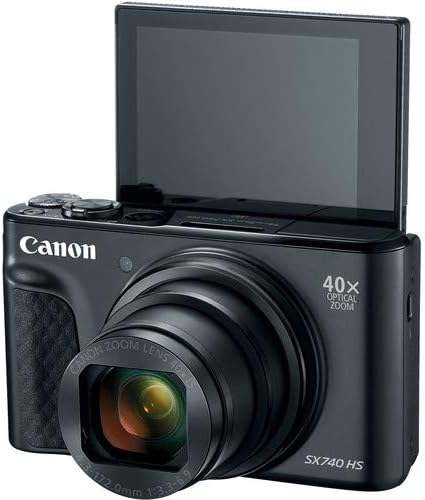
Abbildung 2: Vorderseite view of the camera with the LCD screen tilted upwards, ready for use.
Bedienung der Kamera
1. Ein-/Ausschalten
Drücken Sie die LEISTUNG Oben an der Kamera befindet sich ein Knopf zum Ein- und Ausschalten.
2. Aufnahmemodi
The camera offers various shooting modes. Use the mode dial or menu options to select:
- Automatik-Modus: For simple point-and-shoot operation, where the camera automatically adjusts settings.
- Programmmodus (P): Allows more control over settings while the camera sets exposure.
- Szenenmodi: Optimized settings for specific scenarios like portraits, landscapes, or night scenes.
- Feature Assistant: Provides on-screen explanations to help you understand and use various camera features.
3. Zoom-Funktion
The camera features a 40x optical zoom lens. Use the zoom lever around the shutter button to zoom in (telephoto) or out (wide-angle). Digital zoom can extend the range further, but may reduce image quality.

Abbildung 3: Vorderseite view of the camera with the lens extended for zooming.
4. Fokussieren
The camera primarily uses autofocus. Point the camera at your subject and half-press the shutter button to focus. The focus frame will appear on the LCD screen. For specific situations, manual focus options may be available in the menu.
5. Videoaufnahme
To record videos, switch to video mode (if available via a dedicated button or mode dial) or press the dedicated movie recording button. The camera supports 4K video capture. Press the button again to stop recording.
6. Verwendung des neigbaren LCD-Bildschirms
The 3.0-inch LCD screen can tilt 180 degrees, allowing for easy framing of selfies or shots from various angles. Adjust the screen to your desired position.

Abbildung 4: Zurück view der Kamera, wobei der LCD-Bildschirm und das Bedienfeld angezeigt werden.
7. WLAN- und Bluetooth-Konnektivität
The camera features built-in Wi-Fi and Bluetooth for connecting to compatible mobile devices. Download the Canon Camera Connect app to your smartphone or tablet to transfer images, remotely control the camera, and share photos.
- Enable Wi-Fi or Bluetooth in the camera's menu.
- Open the Canon Camera Connect app on your mobile device and follow the pairing instructions.
Wartung
1. Reinigung der Kamera
- Linse: Use a soft, lint-free cloth or a lens brush to gently remove dust. For smudges, use a specialized lens cleaning solution and cloth. Avoid touching the lens directly with your fingers.
- LCD Bildschirm: Wipe gently with a soft, dry cloth. Do not use harsh chemicals.
- Kameragehäuse: Verwenden Sie ein weiches, trockenes Tuch, um Staub und Schmutz abzuwischen.
2. Batteriepflege
- Bewahren Sie Batterien an einem kühlen, trockenen Ort auf, wenn Sie sie nicht verwenden.
- Um die Lebensdauer der Batterie zu verlängern, sollte eine häufige vollständige Entladung vermieden werden.
- Nehmen Sie den Akku aus der Kamera, wenn diese längere Zeit nicht benutzt wird.
3. Speicherung
When storing the camera for long periods, ensure it is clean, dry, and stored in a protective case to prevent dust and damage. Remove the battery and memory card.
Fehlerbehebung
Sollten Sie Probleme mit Ihrer Kamera haben, beachten Sie bitte die folgenden gängigen Lösungsansätze:
- Die Kamera lässt sich nicht einschalten: Stellen Sie sicher, dass der Akku vollständig geladen und korrekt eingesetzt ist. Versuchen Sie es gegebenenfalls mit einem anderen geladenen Akku.
- Speicherkartenfehler: Check if the memory card is inserted correctly. Format the card (this will erase all data) if the error persists, or try a different compatible SDHC card.
- Die Bilder sind unscharf: Ensure the lens is clean. Check your focus settings and make sure the camera has successfully focused on your subject before taking the shot. Use optical image stabilization for handheld shots.
- Probleme mit der WLAN-/Bluetooth-Verbindung: Ensure Wi-Fi/Bluetooth is enabled on both the camera and your mobile device. Restart both devices and try pairing again. Confirm the Canon Camera Connect app is up to date.
- Blitz zündet nicht: Check the flash mode settings. Ensure the flash is popped up if it's a manual pop-up type.
For more complex issues or persistent problems, please consult the official Canon support webWebsite oder wenden Sie sich an den Kundendienst.
Technische Daten
| Besonderheit | Spezifikation |
|---|---|
| Modellname | PowerShot SX740 HS |
| Auflösung des Fotosensors | 20.3 Megapixel |
| Optischer Zoom | 40x |
| Videoaufnahmeformat | 4K |
| Bildprozessor | Canon DIGIC 8 |
| Konnektivität | Bluetooth, HDMI, USB, WLAN |
| Anzeigetyp | Tilting LCD |
| Bildstabilisierung | Optisch |
| Akku-Typ | Lithium-Ionen (NB-13L) |
| Compatible Memory | SDHC (up to 64 GB) |
| Reihenaufnahmen | 10 Bilder pro Sekunde |
| Unterstützt File Format | JPEG, RAW |
Garantie und Support
Your Canon PowerShot SX740 HS Digital Camera is covered by a manufacturer's warranty. Please refer to the warranty card included with your product for specific terms and conditions. For technical support, service, or additional information, please visit the official Canon website or contact Canon customer service directly. Keep your purchase receipt as proof of purchase for warranty claims.
Online-Ressourcen: Canon USA Official WebWebsite