
1. Einleitung
The Lockly Secure Plus PGD728F Smart Door Lock offers advanced security and convenient keyless entry for your home. This deadbolt edition features multiple unlocking methods, including a patented PIN Genie digital keypad, a 3D biometric fingerprint sensor, smartphone app control, and voice control compatibility. Designed for reliability and ease of use, it provides peace of mind with real-time monitoring and robust construction.
Hauptmerkmale:
- Mehrere Entsperrmethoden: PIN Genie digital keypad, 3D biometric fingerprint sensor, Lockly app control, voice control (with Wi-Fi Hub), and physical key.
- Blicksicheres digitales Tastenfeld: Patented PIN Genie technology shuffles numbers to prevent code guessing.
- Fast Fingerprint Access: 0.3-second recognition, stores up to 99 fingerprints.
- Smartphone-Steuerung: Lock/unlock remotely, monitor status, manage access codes, and view history logs via the Lockly app.
- Sprachsteuerung: Compatible with Amazon Alexa and Google Assistant (requires Secure Link Wi-Fi Hub, sold separately).
- Auto-Lock & One-Touch Lock: Customizable automatic locking and instant locking features.
- Notstromversorgung: Use a 9V battery for temporary power if main batteries are depleted.
2. Lieferumfang
Your Lockly Secure Plus PGD728F package includes the following components:
- Außenmontage
- Innenmontage
- Innenmontageplatte
- Verriegeln
- Schlagplatte
- Schlagschrauben
- Plattenschrauben
- Stellschrauben
- Schutzhülle
- VIP Card
- Bedienungsanleitung
- 3M Aufkleber
- Vorlage
- 2 Backup-Schlüssel
- 4 AA-Batterien
3. Werkzeuge, die Sie benötigen
To ensure a smooth installation, please have the following tools ready:
- Kreuzschlitzschraubendreher
- Flachkopfschraubenzieher
- Maßband oder Lineal
- Drill (optional, if new holes are required)
4. Einrichtung und Installation
Follow these steps to install your Lockly Secure Plus PGD728F Smart Door Lock. For a visual guide, please refer to the official installation video below.
4.1. Türkompatibilitätsprüfung
Vor dem Einbau stellen Sie bitte sicher, dass Ihre Tür die folgenden Spezifikationen erfüllt:
- Türstärke: 1-3/8" bis 2" (35 mm bis 50 mm)
- Cross-Bore Hole Diameter: 2-1/8" (54 mm)
- Edge-Bore Hole Diameter: 1" (25 mm)
- Dornmaß: Adjustable for 2-3/8" (60mm) or 2-3/4" (70mm)

Image: Diagram illustrating door measurements for compatibility with the Lockly Secure Plus deadbolt.
4.2. Installationsschritte
For detailed step-by-step instructions, please watch the official Lockly PGD728F Installation Guide video:
Video: Official installation guide for the Lockly Secure Plus PGD728F deadbolt, demonstrating each step from door preparation to final setup.
- Vorhandenes Schloss entfernen: Carefully remove any existing deadbolt hardware from your door.
- Adjust Deadbolt: Measure your door's backset. If it's 2-3/8", adjust the deadbolt length accordingly. The deadbolt ships default for 2-3/4". Ensure the deadbolt slot aligns to the center of the door hole and the slot is in the vertical position.
- Deadbolt installieren: Insert the deadbolt into the door edge and secure it with the provided screws.
- Prepare Exterior Assembly: If drilling a new hole for added stability, refer to the template. Otherwise, peel off the adhesive backing on the exterior assembly for temporary stabilization during installation.
- Außenbaugruppe installieren: Ensure the torque blade is in the vertical position. Place the exterior assembly on the door, guiding the torque blade through the deadbolt slot and the connection cables through the cross-bore hole. Secure until flush with the door surface.
- Montage der inneren Montageplatte: Peel off the adhesive backing from the interior mounting plate. Align and secure the mounting plate to the door, guiding the connection cable through the lower left notched hole. Insert and hand-tighten the two screws (G) located on the left and right of the blade. Check alignment and tighten with a screwdriver.
- Kabel anschließen: Plug the cable coming through the mounting plate into the interior assembly. Ensure the plug is oriented correctly, matching the red side of the plug to the red side of the socket on the interior assembly. Tuck the cable under the eyelet hooks and route it to the right on the interior assembly.
- Innenbaugruppe installieren: Ensure the thumb turn is vertical. Place the interior assembly against the mounting plate, making sure the torque blade is inserted into the thumb turn shaft. Secure the interior assembly to the mounting plate with the two screws (I).
- Batterien installieren: With the door open and the deadbolt fully extended, insert three AA batteries. Press and hold the Program button, then insert the fourth battery. The lock will automatically start a self-check. Release the Program button once the check starts.
- Testsperre: Manually lock and unlock the door using the thumb turn on the interior assembly to ensure smooth operation without binding or rubbing. Leave the deadbolt extended and remove the key.
- Install Battery Cover: Install the battery cover (H) and secure it with the screw on top.
5. Bedienungsanleitung
The Lockly Secure Plus PGD728F offers multiple convenient ways to operate your smart lock.
5.1. Entsperrmethoden

Image: Visual representation of the various methods to unlock the Lockly smart lock, including keypad, fingerprint, physical key, and app control.
- PIN Genie Digitaltastatur:
The patented PIN Genie keypad features dynamic shuffling of numbers across four circles. To enter your code, simply press the numbers corresponding to your PIN within the circles. The numbers will shuffle after each use, preventing others from guessing your code based on finger placement.

Image: A hand interacting with the Lockly PIN Genie keypad, showing the dynamic shuffling of digits for enhanced security.
- 3D Biometric Fingerprint Sensor:
For quick and secure access, use the integrated 3D biometric fingerprint sensor located on the side of the exterior assembly. Simply place your registered finger on the sensor for instant unlocking. The lock recognizes fingerprints in approximately 0.3 seconds and can store up to 99 unique fingerprints.

Image: A finger being placed on the 3D biometric fingerprint sensor of the Lockly smart lock for quick unlocking.
- Lockly App Control:
Manage your lock from anywhere using the free Lockly Smart Lock app on your Android or iOS device. The app allows you to lock and unlock the door, receive real-time notifications, view access history, and share e-Keys or e-Badges with unique schedules for guests or family members. The app also supports creating Offline Access Codes that work without Wi-Fi or internet.
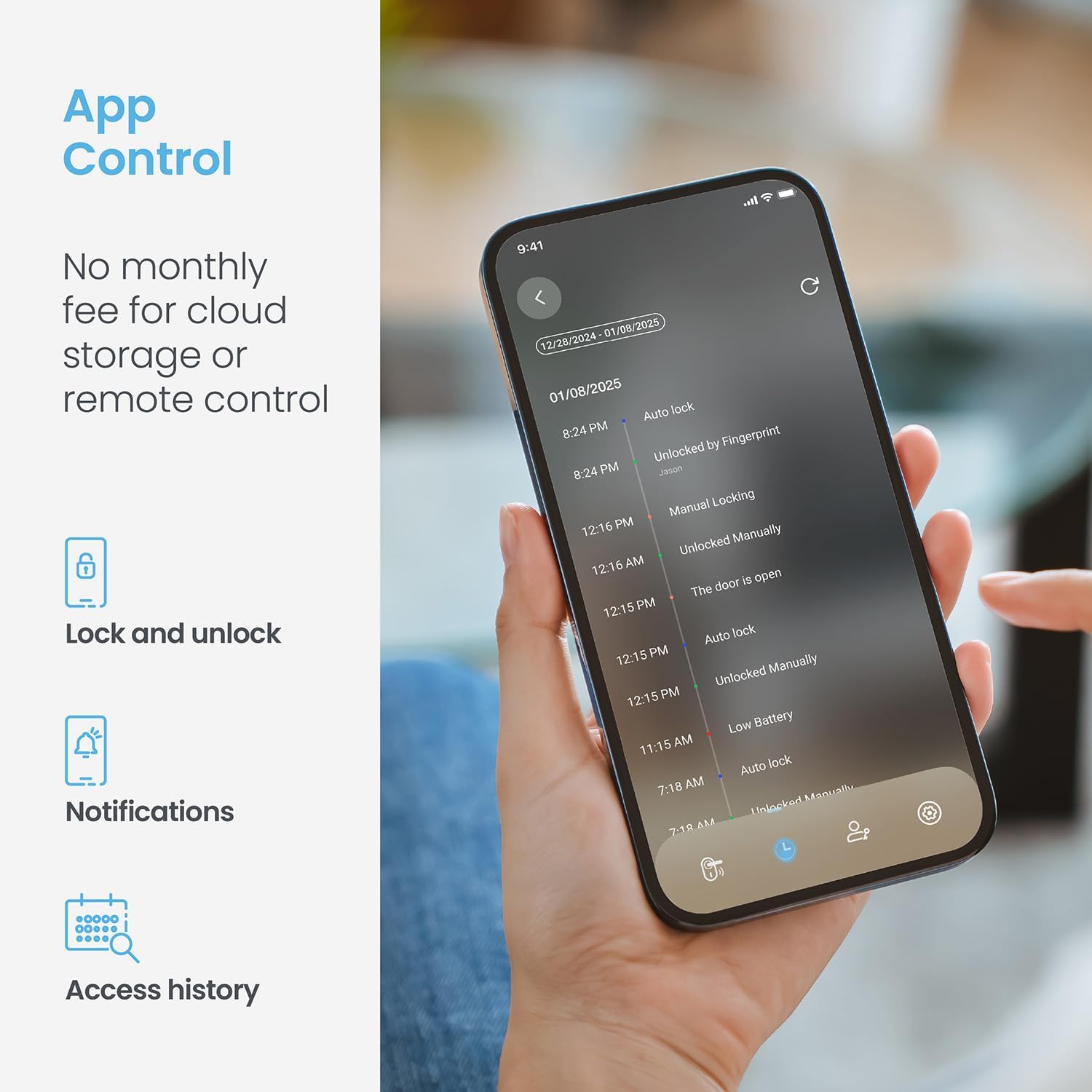
Image: A smartphone displaying the Lockly app interface, showing options for locking/unlocking, notifications, and access history.
- Sprachsteuerung:
Integrate your Lockly smart lock with Amazon Alexa or Google Assistant for hands-free control. With the optional Secure Link Wi-Fi Hub (sold separately), you can ask your voice assistant to lock or unlock your door, or check its status. Ensure the Lockly Action is enabled in your smart home app.
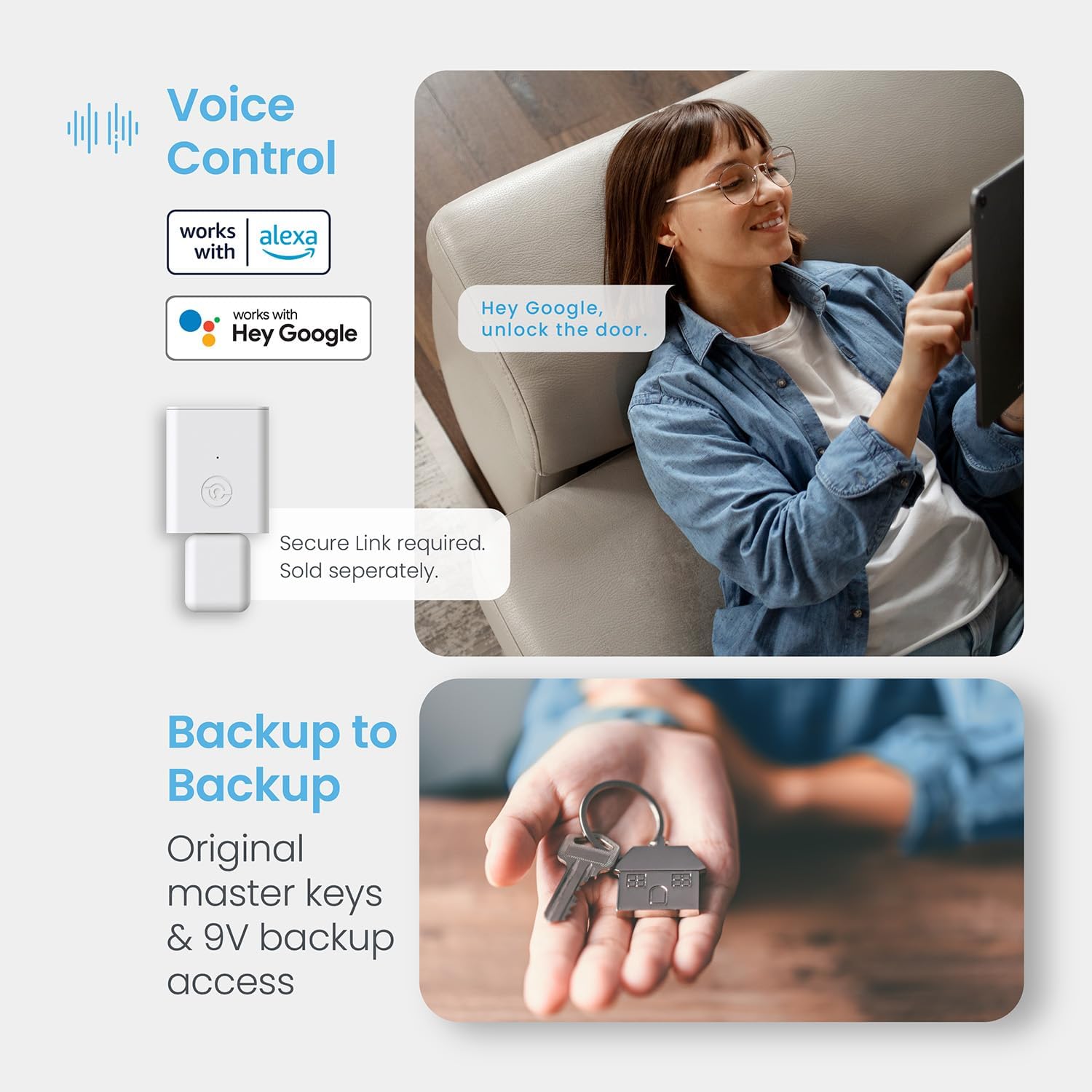
Image: A person using voice commands with a smart assistant to control their Lockly smart lock, highlighting compatibility with Alexa and Google Assistant.
- Physischer Schlüssel:
For traditional backup, the Lockly Secure Plus includes physical keys. The keyhole is discreetly located under a cover on the exterior assembly, providing a reliable manual override.
5.2. Automatic Locking Features
- Programmable Auto-Lock:
Set your lock to automatically re-lock after a customizable period, ranging from 5 to 300 seconds. This feature ensures your door is always secured, even if you forget to lock it manually.
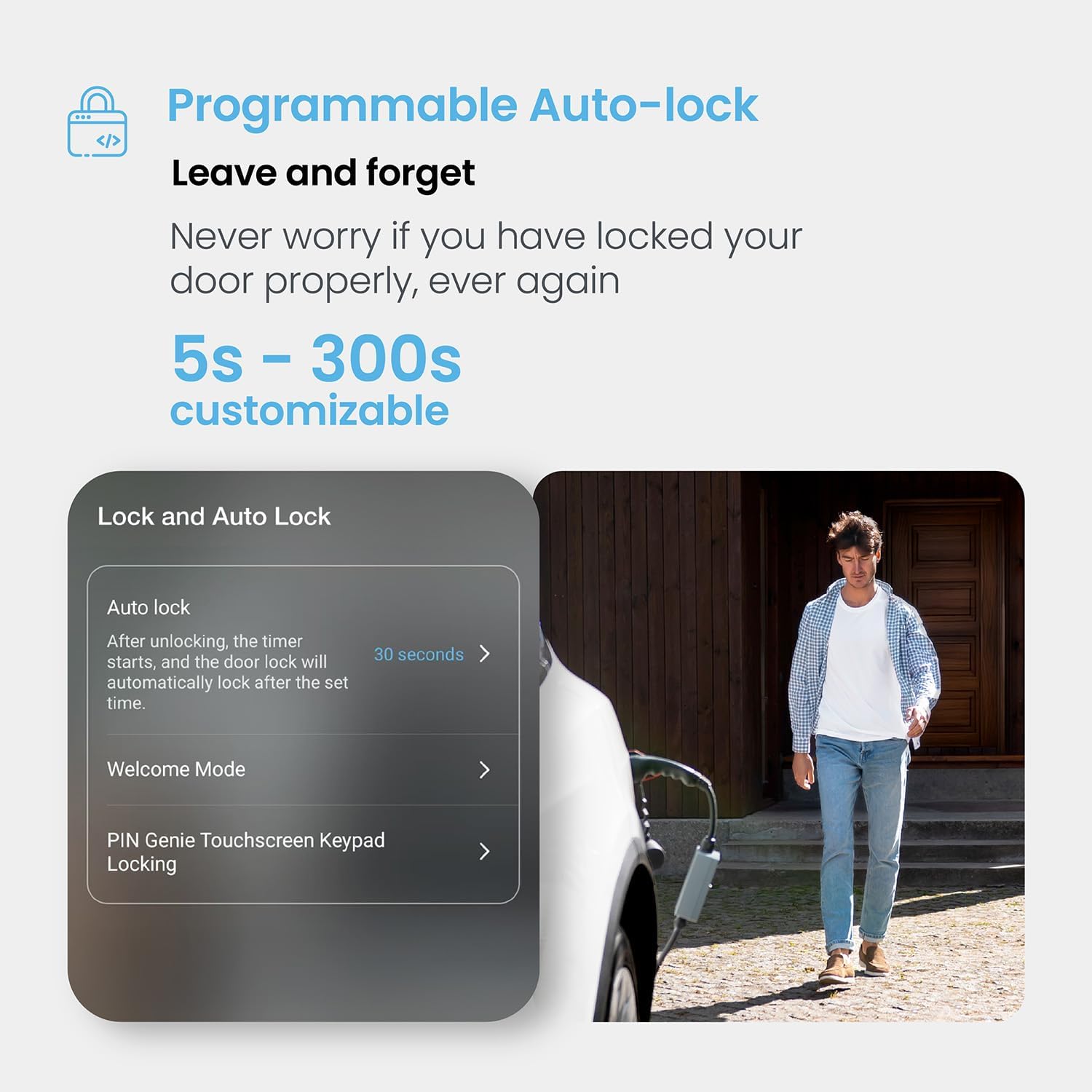
Image: A visual demonstrating the programmable auto-lock feature of the Lockly smart lock, showing customizable time settings.
- Willkommensmodus:
Temporarily disable auto-lock for extended periods, such as when hosting guests or moving items in and out. This allows the door to remain unlocked until manually secured or the mode is deactivated.
6. Wartung
6.1. Batteriewechsel
The Lockly Secure Plus PGD728F operates on 4 AA batteries. When the batteries are low, the lock will provide alerts. To replace them:
- Entfernen Sie die Batterieabdeckung an der inneren Baugruppe.
- Ersetzen Sie alle vier AA-Batterien durch neue und achten Sie dabei auf die richtige Polarität.
- Reattach the battery cover and secure it with the screw.
In case of completely depleted batteries, an emergency power supply is available. You can temporarily power the lock using a 9V battery on the instant charging terminal located on the exterior assembly.

Image: Illustration of the Lockly smart lock's battery compartment, showing the use of 4x AA batteries and the 9V emergency power contact points.
6.2. Reinigung
To clean your Lockly smart lock, use a soft, damp Verwenden Sie ein Tuch. Vermeiden Sie die Verwendung von Scheuermitteln, Lösungsmitteln oder aggressiven Chemikalien, da diese die Oberfläche und die elektronischen Bauteile beschädigen können.
7. Fehlerbehebung
Here are solutions to common issues you might encounter with your Lockly Secure Plus PGD728F:
| Ausgabe | Mögliche Ursache | Lösung |
|---|---|---|
| Das Schloss reagiert nicht und lässt sich nicht einschalten. | Leere Batterien. | Replace all 4 AA batteries. Use a 9V battery for emergency power if needed. |
| Fingerprint sensor not recognizing. | Finger is wet, dirty, or improperly placed; sensor is dirty; environmental factors (humidity). | Ensure finger and sensor are clean and dry. Try repositioning your finger. Re-register fingerprint if issue persists. Use keypad or app as alternative. |
| Keypad numbers are not visible or unresponsive. | Low battery; extreme weather exposure (e.g., direct sunlight causing overheating). | Replace batteries. If exposed to direct sun, consider a touchscreen cover accessory (P/N PGA714 SN) to mitigate heat effects. |
| Auto-lock repeatedly tries to lock/unlock. | Door/deadbolt misalignment; door sensor issue. | Check door alignment and ensure the deadbolt operates smoothly without obstruction. Verify the door sensor (small white component on the door frame) is correctly installed and aligned with the lock. |
| Cannot connect to Lockly app via Bluetooth. | Bluetooth is off on phone; phone too far from lock; app issue. | Ensure Bluetooth is enabled on your smartphone. Move closer to the lock. Restart the app or your phone. |
| Sprachsteuerung funktioniert nicht. | Wi-Fi Hub not connected or configured; Lockly Action not enabled in smart assistant app. | Ensure Secure Link Wi-Fi Hub is properly installed and connected. Enable the Lockly Action in your Amazon Alexa or Google Assistant app. |
If you encounter issues not listed here or require further assistance, please contact Lockly Customer Service.
8. Spezifikationen
| Besonderheit | Detail |
|---|---|
| Marke | Lockly |
| Modellnummer | PGD728F |
| Sperrtyp | Biometrische Daten, Tastatur |
| Besondere Merkmale | Auto-Lock, Fingerprint, One-Touch Lock, Passcode Unlock, Waterproof |
| Material | Zink |
| Ausführung | Mattschwarz |
| Artikelabmessungen (L x B x H) | 3.15 x 1.92 x 7.4 Zoll |
| Artikelgewicht | 3.59 Pfund |
| Stromquelle | 4 x AA Batteries (included), 9V Battery for Emergency Power |
| Konnektivitätsprotokoll | Bluetooth (Wi-Fi with optional Secure Link Hub) |
| Kontrollmethode | App, Fernbedienung, Touch, Sprache |
| Controllertyp | Android, iOS |
| UPC | 850003895093 |
9. Garantie und Support
Lockly is committed to providing high-quality products and excellent customer service.
9.1. Customer Service & Technical Support
Lockly offers 24/7 technical support via phone, email, and live chat to assist you with any questions or issues you may encounter.

Image: An image depicting Lockly's commitment to 24/7 customer support.
9.2. Product Commitment
Lockly stands by the quality of its products, which undergo rigorous testing for weatherproofing (IP54), salt spray resistance (72 hours), appearance pressure resistance (2,200 N), and deadbolt cycles (250,000 cycles). The product comes with a 5-year commitment.

Image: Details on Lockly's product quality, including IP54 weatherproofing, salt spray test, pressure resistance, and deadbolt cycle testing.