
1. Einleitung
Welcome to the user manual for your new HONOR View 20 smartphone. This guide provides essential information to help you set up, operate, and maintain your device. The HONOR View 20 is a powerful Dual-SIM 4G/LTE smartphone featuring a stunning design, advanced camera capabilities, and robust performance.
Key features include a 6.4-inch IPS LCD display, a 48-megapixel primary camera, a 25-megapixel front camera, a HiSilicon Kirin 980 octa-core processor, 6GB of RAM, and 128GB of internal storage. It runs on Android 9.0 (Pie) with HONOR's Magic UI.
2. Einrichtung
2.1. SIM-Karteninstallation
The HONOR View 20 supports Dual-SIM functionality. To install your SIM cards:
- Suchen Sie das SIM-Kartenfach an der Seite des Geräts.
- Verwenden Sie das mitgelieferte SIM-Auswurfwerkzeug, um das Fach zu öffnen.
- Carefully place your Nano-SIM cards into the designated slots. Ensure they are correctly oriented.
- Schieben Sie das Fach vorsichtig zurück in das Gerät, bis es einrastet.
Netzwerkkompatibilität:
This smartphone is compatible with GSM networks such as AT&T and T-Mobile. It will NOT work with CDMA networks like Verizon, Sprint, or US Cellular. Please verify network compatibility with your provider before use.
2.2. Erstes Einschalten
Press and hold the Power button (located on the right side of the device) until the HONOR logo appears. Follow the on-screen instructions to complete the initial setup, including language selection, Wi-Fi connection, and Google account setup.

Abbildung 2.1: Seite view of the HONOR View 20, highlighting the SIM card tray and physical buttons.
3. Bedienung Ihres Geräts
3.1. Anzeige und Benutzeroberfläche
The HONOR View 20 features a 6.4-inch IPS LCD capacitive touchscreen with a resolution of 1080 x 2310 pixels. The device runs on Android 9.0 (Pie) with HONOR's Magic UI, offering a smooth and intuitive user experience. The front camera is integrated into a 'punch-hole' cutout in the display, maximizing screen real estate.
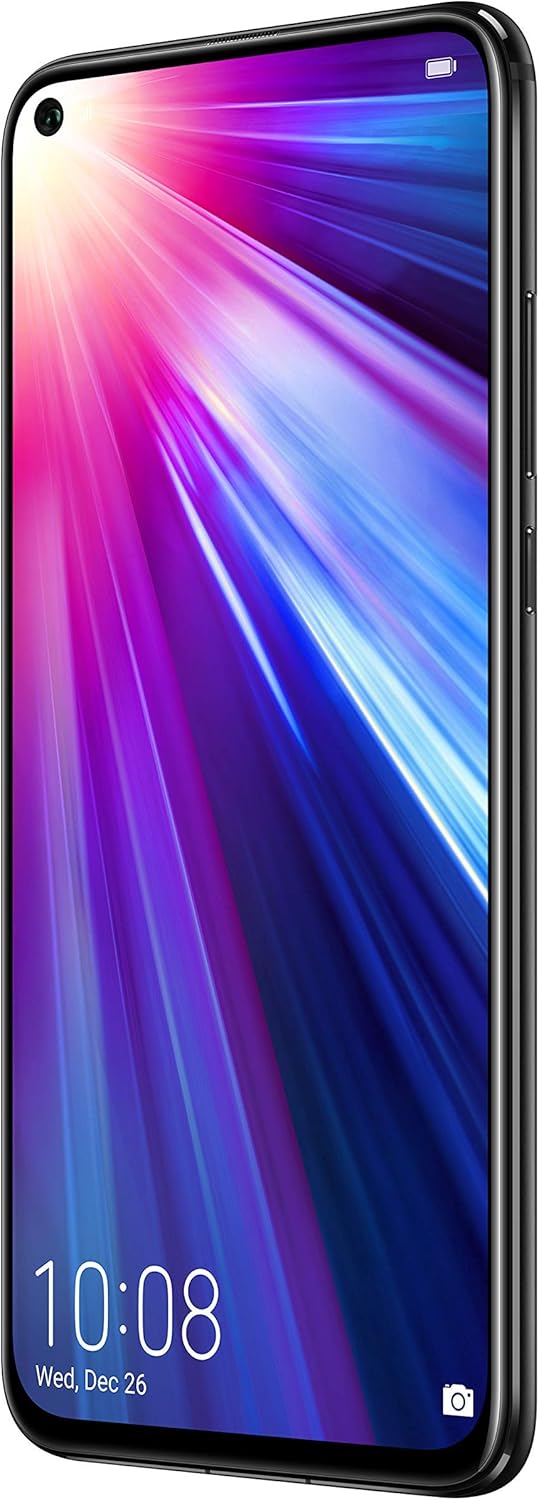
Abbildung 3.1: Vorderseite view of the HONOR View 20, showcasing the 6.4-inch display and punch-hole front camera.
3.2. Fingerabdrucksensor
For secure and convenient unlocking, the HONOR View 20 is equipped with a rear-mounted fingerprint sensor. Simply place your registered finger on the sensor to unlock the device or authorize payments.

Abbildung 3.2: Rückseite view of the HONOR View 20, highlighting the fingerprint sensor and the distinctive V-pattern design.
3.3. Akku und Aufladen
The device is powered by a 4000mAh Lithium-Polymer battery, offering an average life of 96 hours under typical usage. It supports fast charging via its USB Type-C port located at the bottom of the device.

Abbildung 3.3: Unten view of the HONOR View 20, showing the USB Type-C port for charging and data transfer.
3.4. Prozessor und Leistung
The HONOR View 20 is powered by the HiSilicon Kirin 980 (7 nm) octa-core processor, ensuring smooth multitasking and efficient performance for demanding applications and games. It comes with 6GB of RAM for seamless operation.
3.5. Audio-
The device includes a 3.5mm headphone jack, allowing you to connect your preferred wired headphones for audio playback.
4. Kamerafunktionen
The HONOR View 20 is equipped with advanced camera technology for both photography and videography.
4.1. Rückfahrkamerasystem
The rear camera system features a powerful 48-megapixel primary sensor (f/1.8, 1/2", 0.8µm, PDAF) for high-resolution photos. It is complemented by a TOF 3D stereo camera, which measures time-of-flight to accurately gauge depth, enabling advanced augmented reality (AR) features and artificial bokeh effects.
4.2. Frontkamera
For selfies and video calls, the device has a 25-megapixel front camera (f/2.0, 27mm) integrated into the display's punch-hole cutout. It supports HDR for improved image quality in various lighting conditions.
4.3. Videoaufnahme
The HONOR View 20 can record videos at 4K resolution at 30 frames per second (fps), 1080p at 30fps, and 720p at 960fps, with gyro-EIS for enhanced stabilization.
4.4. Camera Modes and AI Features
The camera offers a variety of modes and AI-powered enhancements:
- 48MP AI Ultra Clarity: Utilizes artificial intelligence to boost scene details for incredibly clear and high-resolution still images, especially suitable for scenery and static objects.
- Nachtmodus: Enhances low-light images, capturing more detail and brightness in dark environments.
- Portraitmodus: Creates a blurred background (bokeh effect) to make subjects stand out, effectively isolating people in photos.
- Blendenmodus: Allows adjustment of the aperture for creative depth-of-field control.
- Zeitlupe: Records videos at high frame rates for dramatic slow-motion playback.
- Light Painting: A specialized mode for capturing light trails, such as traffic lights or star trails.
- Zeitraffer: Compresses long periods of time into short video clips.
- Artist Mode: Applies artistic filters and effects to your photos.
- Filter: A selection of filters to enhance the mood and style of your images.
- 3D Panorama: Captures immersive panoramic shots.
- HDR (High Dynamic Range): Improves detail in both bright and dark areas of a photo.
- AR Lens: Utilizes the TOF 3D camera for augmented reality applications and effects.
5. Spezifikationen
| Besonderheit | Detail |
|---|---|
| Marke | EHRE |
| Modellname | View 20 |
| Betriebssystem | Android 9.0 (Pie) |
| Prozessor | HiSilicon Kirin 980 (7 nm), Octa-core |
| RAM | 6 GB |
| Lagerung | 128 GB (nicht erweiterbar) |
| Bildschirmgröße | 6.4 Zoll |
| Anzeigetyp | IPS-LCD |
| Auflösung | 1080 x 2310 Pixel |
| Rückfahrkamera | 48 MP (f/1.8) + TOF 3D stereo camera |
| Frontkamera | 25 MP (f/2.0) |
| Auflösung der Videoaufnahme | 4K (30 fps) |
| Batteriekapazität | 4000 mAh |
| Anzahl der SIM-Kartensteckplätze | Dual-SIM |
| Konnektivitätstechnologie | Wi-Fi, 4G LTE, GSM |
| Biometrische Sicherheit | Fingerprint Recognition (rear-mounted) |
| Kopfhöreranschluss | 3.5 mm |
| Artikelgewicht | 180 Gramm |
| Farbe | Mitternachtsschwarz |
6. Fehlerbehebung
If you encounter issues with your HONOR View 20, consider the following general troubleshooting steps:
- Gerät reagiert nicht: Um einen Neustart zu erzwingen, halten Sie den Netzschalter etwa 10-15 Sekunden lang gedrückt.
- Netzwerkverbindungsprobleme: Ensure your SIM cards are correctly inserted. Check your network settings (Settings > Wireless & networks > Mobile network). Verify with your carrier that your plan supports the device's network bands.
- Batterieverbrauch: Close unused apps running in the background. Reduce screen brightness. Disable unnecessary features like Wi-Fi, Bluetooth, or GPS when not in use.
- App-Abstürze: Löschen Sie den Cache und die Daten der betroffenen App (Einstellungen > Apps > [App-Name] > Speicher > Cache leeren/Daten löschen). Sollte das Problem weiterhin bestehen, deinstallieren Sie die App und installieren Sie sie anschließend neu.
- Software-Updates: Ensure your device's software is up to date (Settings > System > Software update). Updates often include bug fixes and performance improvements.
7. Wartung
To ensure the longevity and optimal performance of your HONOR View 20, befolgen Sie diese Wartungsrichtlinien:
- Sauber halten: Regularly wipe the screen and back of the device with a soft, lint-free cloth. Avoid harsh chemicals or abrasive materials.
- Software-Updates: Install system updates as they become available to benefit from the latest features, security patches, and performance enhancements.
- Batteriepflege: Vermeiden Sie extreme Temperaturen. Lassen Sie den Akku nicht häufig vollständig entladen. Verwenden Sie für optimale Ladeergebnisse das Original-Ladegerät.
- Datensicherung: Regularly back up your important data (photos, contacts, documents) to cloud storage or a computer to prevent loss.
- Schutzzubehör: Erwägen Sie die Verwendung einer Displayschutzfolie und einer Schutzhülle, um Kratzer und versehentliches Fallenlassen zu vermeiden.
8. Garantie und Support
Detaillierte Garantieinformationen und Kundendienst finden Sie auf der offiziellen HONOR-Website. webBesuchen Sie unsere Website oder wenden Sie sich an Ihren Händler vor Ort. Bewahren Sie Ihren Kaufbeleg für Garantieansprüche auf.