
1. Sicherheitshinweise
Bitte lesen Sie vor der Montage und Inbetriebnahme alle Anweisungen sorgfältig durch. Bewahren Sie diese Anleitung zum späteren Nachschlagen auf.
- Montage erforderlich: This desk requires self-assembly. Follow the provided assembly instructions meticulously to prevent injuries.
- Gewichtsbeschränkung: This desk is not designed to carry heavy objects. The maximum weight capacity is approximately 17 kg (37.5 lbs) to ensure stability.
- Aufsicht: Children should be supervised while using the desk, especially during adjustments.
- Platzierung: Stellen Sie den Schreibtisch auf eine ebene, stabile Fläche.
2. Produktüberschreitungview
The TecTake Children's Desk is designed to provide a comfortable and adaptable workspace for various activities such as drawing, homework, and crafts. Its thoughtful design allows for height and tilt adjustments to suit the user's needs.
Hauptmerkmale:
- Neigbarer Schreibtisch: The work surface can be tilted to provide an ergonomic position for different tasks.
- Einstellbare Höhe: The desk legs are adjustable in 7 steps, allowing the desk to grow with your child.
- Integrierte Schublade: A convenient drawer provides storage for school supplies, drawing materials, and other items.
- Removable Stopper Strips: Two removable stopper strips on the lower edge of the desktop prevent materials from sliding off when the surface is tilted.
- Stabile Konstruktion: Built with robust materials for durability and stability during daily use.
- Abgerundete Ecken: The desktop features rounded corners for enhanced safety.
- Leicht zu reinigen: The surface is washable with a damp Tuch.

Figure 1: TecTake Children's Desk, showcasing sein Design und seine Funktionen.

Abbildung 2: Überview of key features including adjustable height, tilting desktop, and storage.
3. Einrichtung
The desk comes with detailed assembly instructions in the package. Please refer to the included manual for step-by-step guidance on assembling your TecTake Children's Desk.
Schritte der Generalversammlung:
- Packen Sie alle Komponenten aus und überprüfen Sie sie anhand der Teileliste in der beiliegenden Bedienungsanleitung.
- Montieren Sie die Hauptrahmenstruktur mithilfe der mitgelieferten Hardware.
- Attach the desktop to the frame, ensuring the tilting mechanism is correctly installed.
- Install the storage drawer and stopper strips.
- Stellen Sie vor der Verwendung sicher, dass alle Schrauben und Befestigungselemente fest angezogen sind.

Figure 3: The desk's flexible design allows for various adjustments to suit user needs.
4. Bedienungsanleitung
4.1 Einstellen der Schreibtischhöhe
- Locate the height adjustment mechanisms on the desk legs.
- Carefully loosen the fasteners or pins that secure the legs at their current height.
- Adjust the desk to one of the 7 available height positions (from approximately 63 cm to 94 cm).
- Ensure both sides are adjusted to the same height and securely fasten the mechanisms before use.
4.2 Tilting the Desktop
- The desktop features a tilting mechanism for ergonomic positioning.
- To tilt, lift the desktop slightly and adjust it to the desired angle.
- Ensure the desktop is securely locked into place at the chosen angle.
- Utilize the two removable stopper strips to prevent items from sliding off the tilted surface.
4.3 Using the Storage Drawer
- The integrated drawer provides convenient storage.
- Pull the drawer out to access its contents.
- Push the drawer back in until it is fully closed to keep items secure and maintain a tidy workspace.
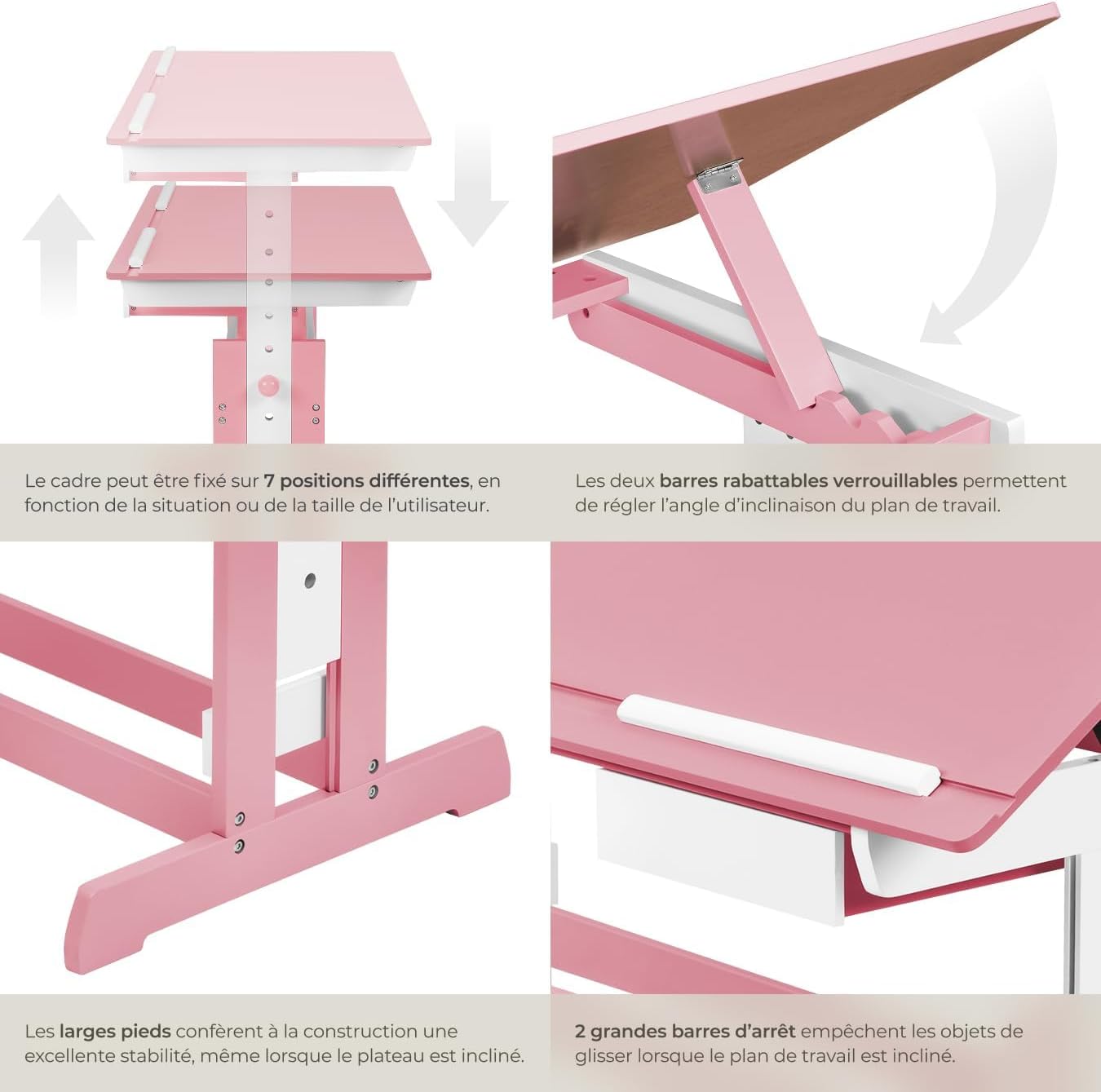
Figure 4: Close-up of the height adjustment and tilting mechanism.
5. Wartung
- Reinigung: Wischen Sie die Schreibtischoberflächen mit einem Tuch ab.amp Verwenden Sie kein scheuerndes Reinigungsmittel oder aggressive Chemikalien, die die Oberfläche beschädigen könnten.
- Inspektion: Überprüfen Sie regelmäßig alle Schrauben und Befestigungselemente, um sicherzustellen, dass sie fest sitzen. Ziehen Sie sie gegebenenfalls nach.
- Vermeiden Sie übermäßige Feuchtigkeit: Do not expose the desk to excessive moisture or direct sunlight for prolonged periods to prevent warping or discoloration.
6. Fehlerbehebung
If you encounter any issues with your TecTake Children's Desk, please refer to the following common solutions:
- Schreibtisch wackelt: Ensure the desk is placed on a level surface. Check that all assembly screws and bolts are securely tightened.
- Schwierigkeiten bei der Höhen-/Neigungseinstellung: Verify that no obstructions are present in the adjustment mechanisms. Ensure fasteners are sufficiently loosened before attempting to adjust.
- Fehlende oder beschädigte Teile: If any parts are missing or damaged upon arrival, please contact TecTake customer support for assistance.
7. Spezifikationen
| Besonderheit | Spezifikation |
|---|---|
| Marke | TecTake |
| Modellnummer | 800117 |
| Abmessungen der Arbeitsfläche | Ca. 109 x 55 cm (43 x 21.7 Zoll) |
| Höhenverstellbereich | Approx. 63 cm to 94 cm (24.8 to 37 inches) in 7 steps |
| Drawer Interior Dimensions (HxWxD) | Ca. 6 x 27 x 22 cm (2.4 x 10.6 x 8.7 Zoll) |
| Gewicht | Ca. 17 kg |
| Material | Plywood (lacquered) / Metal |
| Besonderheit | Adjustable, Tilting Desktop |
| Pflegehinweise | Mit Anzeige löschenamp Tuch |

Figure 5: Detailed dimensions and technical specifications of the desk.
8. Garantie und Support
For warranty information, product support, or to order replacement parts, please refer to the documentation included with your purchase or visit the official TecTake webBitte halten Sie Ihre Modellnummer (800117) und das Kaufdatum bereit, wenn Sie sich an den Support wenden.