
Walfront inskam115
Walfront Wireless Endoscope Camera Inskam 115 User Manual
Model: inskam115
1. Produktüberschreitungview
The Walfront Wireless Endoscope Camera Inskam 115 is a versatile inspection tool designed for various applications, including vehicle inspection, pipeline inspection, air conditioning inspection, and object retrieval. It features a wireless WiFi connection for real-time video viewing, recording, and photo capture. The camera is equipped with a mini 8mm waterproof LED lens and boasts an IP67 waterproof rating for the lens and tube. Its 6 adjustable LED lights ensure clear visibility in dark environments. The portable design with a flexible extension tube makes it easy to operate.
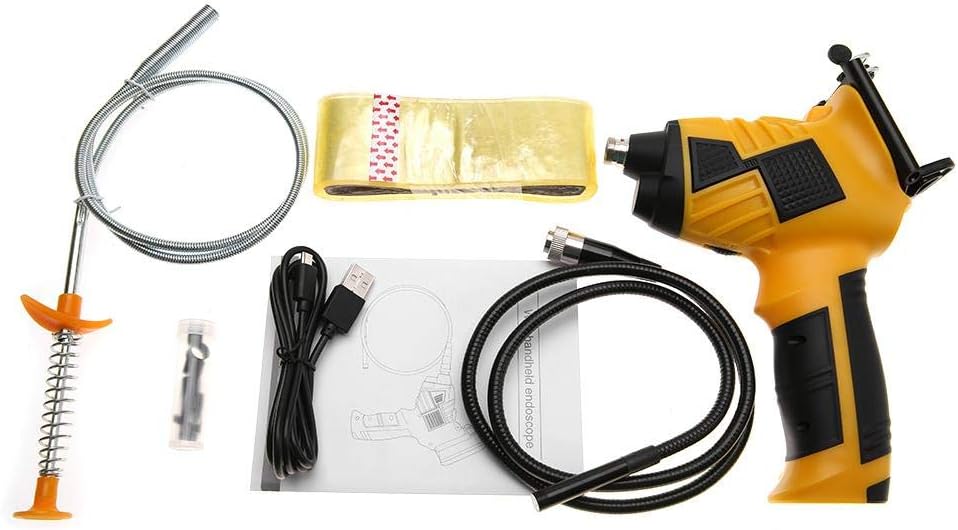
Figure 1: Walfront Inskam 115 Wireless Endoscope Camera and included accessories.
2. Sicherheitshinweise
- Das Gerät darf nicht in explosionsgefährdeten Bereichen, wie z. B. in Gegenwart von brennbaren Flüssigkeiten, Gasen oder Stäuben, verwendet werden.
- Keep the device away from water and other liquids, except for the waterproof camera lens and tube (IP67 rated). The main unit is not waterproof.
- Versuchen Sie nicht, das Gerät zu zerlegen oder zu verändern. Reparaturen dürfen nur von qualifiziertem Fachpersonal durchgeführt werden.
- Um Unterbrechungen während der Inspektion zu vermeiden, stellen Sie sicher, dass das Gerät vor Gebrauch vollständig aufgeladen ist.
- Avoid direct eye exposure to the LED lights, as they can be bright.
- Bewahren Sie das Gerät bei Nichtgebrauch an einem kühlen, trockenen Ort auf.
3. Packungsinhalt
Bitte überprüfen Sie, ob alle unten aufgeführten Artikel in Ihrem Paket enthalten sind:
- 1 x Handle (Main Unit)
- 1 x Spool (for flexible cable storage)
- 1 x Transparent Adhesive (likely for mounting/securing)
- 1 x Stripper (unclear context, possibly a cable stripper or a tool for removing something)
- 1 x USB-Kabel (zum Aufladen)
- 1 x Benutzerhandbuch
- 1 x Magnet (attachment for camera tip)
- 1 x Hook (attachment for camera tip)
- 1 x Mirror (attachment for camera tip, for side viewing)
- 1 x Protective Cap (for camera lens)
Figure 2: Contents of the Walfront Inskam 115 package, including the main unit, flexible cable, USB cable, and various attachments.
4. Spezifikationen
| Besonderheit | Beschreibung |
|---|---|
| Modell | inskam115 |
| Kabellängenoptionen | 1 Meter (flexible), 3 Meter (flexible), 5 Meter (hard cable), 10 Meter (hard cable) |
| Material | ABS + Metall |
| Bildsensor | CMOS |
| Kameraauflösung | 1920x1080, 1280x720, 640x480 |
| Horizontal Viewing-Winkel | 70° |
| Brennweite | 40-5000 mm |
| Übertragungsfrequenz | 2400 bis 2483.5 MHz |
| Mindestbeleuchtung | 0 Lux |
| Batterie | 1 x Lithium Battery, 3.7V, 2600mAh |
| LED-Leuchten | 6 pcs (adjustable brightness) |
| WLAN-Übertragungsentfernung | 10 m |
| Wasserdichtigkeit | IP67 (nur für Objektiv/Tubus) |
| Linsendurchmesser | 8 mm |
| Unterstützte Systeme | Android 4.2 / iOS 8.0 and higher |
| Gewicht | 739g ~ 1174g (approx., depending on cable length) |
| Technische Daten | 24 x 18 x 11 cm (Verpackung) |

Figure 3: Approximate dimensions of the Walfront Inskam 115 main unit.
5. Einrichtung
5.1 Aufladen des Geräts
Before first use, fully charge the endoscope. Connect the provided USB cable to the charging port on the handle and plug the other end into a standard USB power adapter (not included) or a computer USB port. The charging indicator light will show the charging status.
5.2 App-Installation
To use the endoscope, you need to download the compatible application on your smartphone or tablet. Suchen nach "Inskam" or refer to the QR code in the printed user manual (if available) in your device's app store (Google Play Store for Android, Apple App Store for iOS). Install the application.
5.3 Anschließen der Kamerasonde
Carefully connect the endoscope camera probe cable to the designated port on the main handle unit. Ensure a secure connection. You can attach accessories like the magnet, hook, or mirror to the camera tip if needed for your inspection.
5.4 Attaching Your Smartphone (Optional)
The handle includes a phone holder. Extend the holder and securely place your smartphone or tablet into it. This allows for convenient viewwährend des Betriebs.

Figure 4: The endoscope handle with a smartphone securely mounted in the integrated holder.
6. Bedienungsanleitung
6.1 Einschalten und WLAN-Verbindung
- Press and hold the power button on the endoscope handle to turn it on. The WiFi indicator light will illuminate.
- On your smartphone/tablet, go to your WiFi settings.
- Locate and connect to the WiFi network named "Inskam_XXXX" (where XXXX is a unique identifier). No password is usually required.
- Once connected, open the Inskam application. The live video feed from the endoscope camera should appear on your screen.
6.2 Einstellen der LED-Helligkeit
The endoscope features 6 adjustable LED lights around the camera lens. Use the brightness adjustment wheel or button on the handle (refer to the specific button layout in your printed manual) to increase or decrease the illumination as needed for clear viewing in dark areas.

Figure 5: The endoscope camera head with its 6 highly photosensitive LED lights, demonstrating adjustable brightness.
6.3 Fotos und Videos aufnehmen
Within the Inskam application, you will find buttons for capturing images and recording videos. Press the respective button to take a still photo or start/stop video recording. Captured media will be saved directly to your smartphone's gallery or the app's designated folder.

Figure 6: Detail of the endoscope handle, highlighting the phone holder and the dedicated picture/video capture button.
6.4 Anwendungsbeispielamples
The Walfront Inskam 115 is suitable for a wide range of inspection tasks:
- Automobile Inspection: Examining engine components, hard-to-reach areas under the hood, or inside vehicle doors.
- Pipeline Inspection: Checking for blockages, corrosion, or damage in drains, pipes, and conduits.
- Klimaanlageninspektion: Inspecting ducts, vents, and internal components of AC units.
- Object Search: Retrieving small lost items from confined spaces.
- Wartung der Ausrüstung: Visual inspection of machinery for wear and tear without extensive disassembly.
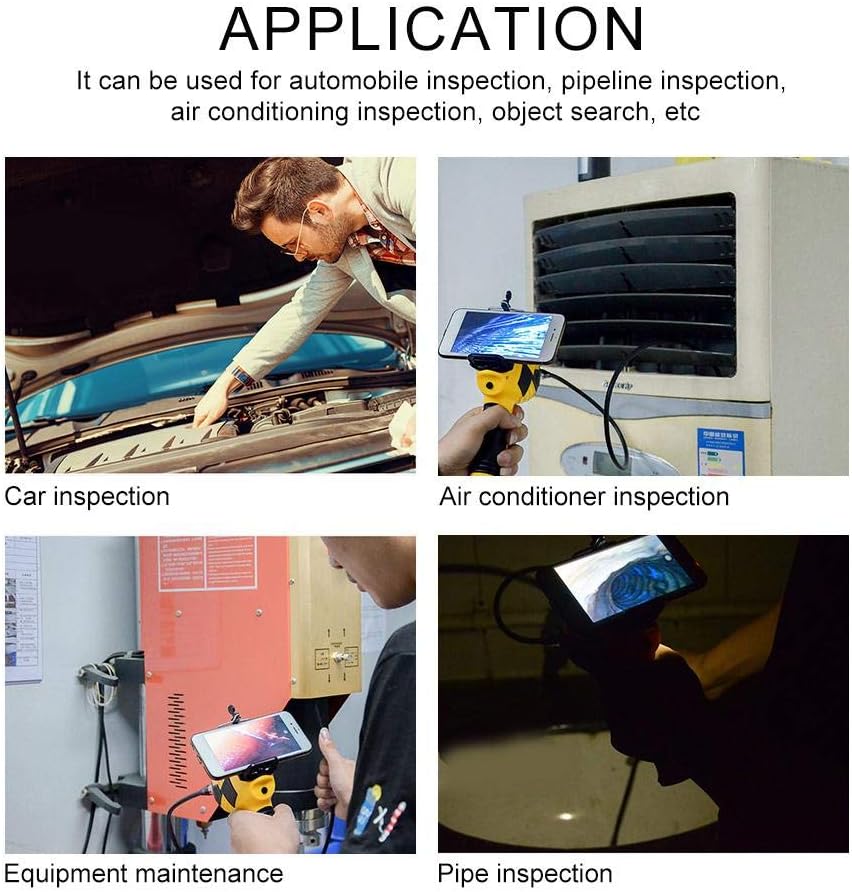
Abbildung 7: Bspamples of how the Walfront Inskam 115 can be used for various inspection and maintenance tasks.
7. Wartung
- Reinigung: Nach jedem Gebrauch, insbesondere in schmutziger oder feuchter Umgebung, sollten Sie die Kameralinse und das Kabel vorsichtig mit einem weichen Tuch abwischen.amp cloth. For stubborn dirt, a mild detergent can be used. Ensure the lens is dry before storage. Do not submerge the main handle unit in water.
- Lagerung: Store the endoscope and its accessories in a clean, dry place, away from direct sunlight and extreme temperatures. Use the provided spool to neatly coil the camera cable to prevent kinks or damage.
- Batteriepflege: Um die Lebensdauer des Akkus zu verlängern, sollte dieser nicht häufig vollständig entladen werden. Bei längerer Lagerung sollte der Akku alle paar Monate auf etwa 50 % aufgeladen werden.
8. Fehlerbehebung
| Problem | Mögliche Ursache | Lösung |
|---|---|---|
| Kein Bild auf dem Bildschirm / App verbindet sich nicht |
|
|
| Schlechte Bildqualität / Dunkles Bild |
|
|
| Gerät lädt nicht |
|
|
9. Garantie und Support
Walfront products are manufactured to high-quality standards. For information regarding warranty coverage, please refer to the warranty card included with your purchase or contact your retailer. If you encounter any issues or require technical assistance, please contact Walfront customer support through their official webWebsite oder die mit Ihrem Produkt gelieferten Kontaktinformationen.
For further assistance, you may visit the Walfront store on Amazon: Walfront Amazon Store
10. Hinweise zur Entsorgung
This symbol on the product or its packaging indicates that this product shall not be treated as household waste. Instead, it shall be handed over to the applicable collection point for the recycling of electrical and electronic equipment. By ensuring this product is disposed of correctly, you will help prevent potential negative consequences for the environment and human health, which could otherwise be caused by inappropriate waste handling of this product. The recycling of materials will help to conserve natural resources. For more detailed information about recycling of this product, please contact your local city office, your household waste disposal service or the shop where you purchased the product.
Ask a question about this manual
Ask about setup, troubleshooting, compatibility, parts, safety, or missing instructions. Manuals+ will review the question and use this page’s manual context to help answer it.