
1. Einleitung
Thank you for choosing the Cuddeback G-5086 CuddeLink Double Barrel 20MP Trail Camera. This manual provides essential information for the proper setup, operation, and maintenance of your camera. Please read it thoroughly before using the device to ensure optimal performance and longevity.
2. Produktmerkmale
The Cuddeback G-5086 trail camera is designed for reliable outdoor surveillance and wildlife monitoring, offering advanced features for high-quality image capture.
- 20-Megapixel-Kamera: Erfasst hochauflösende Standbilder.
- 0.25-Second Trigger Speed: Gewährleistet die schnelle Erfassung von sich bewegenden Motiven.
- CuddeLink Compatibility: Integrates with CuddeLink and CuddeLink Cell networks for remote image transmission.
- Double Barrel Flash Strobe: Utilizes two 1-inch xenon flash tubes for powerful illumination up to 100 feet.
- Picture Recovery Time: Fast 1 to 2 second recovery for subsequent shots.
- Burst-Modus: Capable of capturing 1 to 5 images per trigger event.
- Energiequelle: Operates on 4 D batteries (not included).
3. Packungsinhalt
Überprüfen Sie, ob alle Artikel in Ihrem Paket vorhanden sind:
- Cuddeback G-5086 Trail Camera
- Antenne
- Mounting Strap (may vary by package)
- Benutzerhandbuch (dieses Dokument)
4. Einrichtung
4.1. Einlegen der Batterie
The G-5086 camera requires 4 D-cell batteries for operation. For best performance, use high-quality alkaline or lithium batteries.
- Open the battery compartment door located on the side or bottom of the camera.
- Legen Sie 4 D-Zellen-Batterien ein und achten Sie dabei auf die richtige Polarität (+/-), wie im Batteriefach angegeben.
- Close the battery compartment door securely to maintain the weather seal.

Figure 4.1: Battery compartment with D-cell batteries installed.
4.2. Installation der SD-Karte
A Class 10 or higher SD card (up to 32GB recommended) is required to store images and videos.
- Locate the SD card slot, typically found under a protective cover on the camera's side or bottom.
- Setzen Sie die SD-Karte so ein, dass die Metallkontakte nach unten zeigen (oder wie im Steckplatzdiagramm angegeben), bis sie einrastet.
- Zum Entfernen die Karte vorsichtig hineindrücken, bis sie herausspringt.

Figure 4.2: SD card slot and external ports.
4.3. Antenneninstallation
The antenna is crucial for CuddeLink network communication.
- Screw the provided antenna clockwise into the antenna port located on the top or side of the camera until it is finger-tight.
- Ensure the antenna is oriented vertically for optimal signal reception.
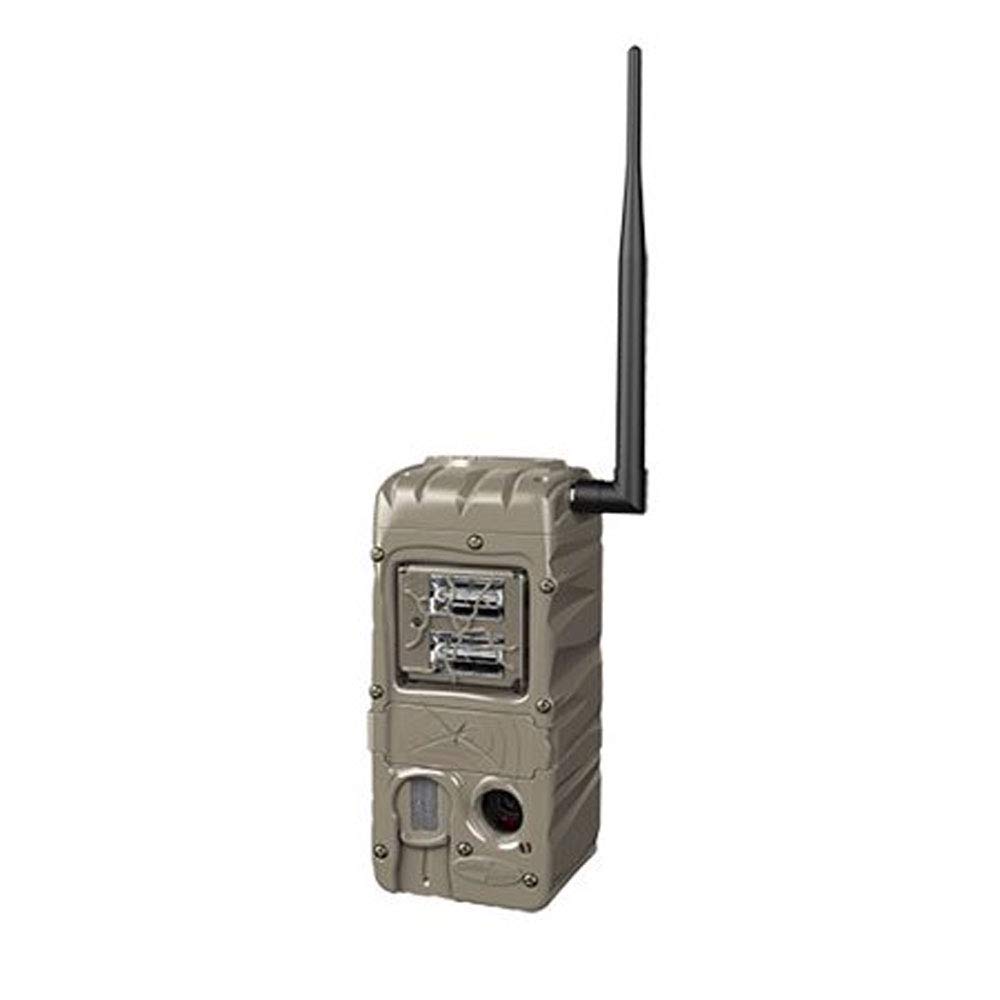
Figure 4.3: Cuddeback G-5086 Trail Camera with antenna.
4.4. Montage der Kamera
Mount the camera to a tree or post using the provided strap or a compatible mounting accessory.
- Position the camera approximately 3-6 feet (1-2 meters) off the ground.
- Aim the camera towards the desired monitoring area, avoiding direct sunlight if possible to prevent overexposure.
- Ensure the camera is stable and secure to prevent movement from wind or animals.
5. Bedienungsanleitung
5.1. Ein-/Ausschalten
Locate the power switch inside the camera housing. Slide it to the 'ON' position to power on the camera. Slide to 'OFF' to power down.
5.2. Grundeinstellungen
Access the camera's menu via the internal display and control buttons to configure settings:
- Modus: Select between Photo, Video, or Time-Lapse.
- Auflösung: Set image (e.g., 20MP) or video resolution (e.g., 720p).
- Auslöseverzögerung: Adjust the time interval before the camera triggers again after an event.
- Platzen: Configure the number of photos taken per trigger (1-5 images).
- Datum/Uhrzeit: Stellen Sie das aktuelle Datum und die Uhrzeit für eine genaue Zeiteinstellung ein.amps on captures.
5.3. CuddeLink Network Setup
The G-5086 is CuddeLink compatible, allowing it to send images to a CuddeLink Home camera or Cell camera. Refer to the CuddeLink system manual for detailed instructions on network configuration, pairing, and data transmission settings.
5.4. Daten abrufen
Images and videos are stored on the SD card. To retrieve them:
- Schalten Sie die Kamera aus.
- Entfernen Sie die SD-Karte.
- Insert the SD card into a computer's card reader or a compatible device to view und Übertragung files.
6. Wartung
6.1. Reinigung
Regularly clean the camera lens, flash, and PIR sensor window with a soft, lint-free cloth. Avoid abrasive materials or harsh chemicals.
6.2. Batteriewechsel
Tauschen Sie die Batterien aus, sobald die Anzeige für niedrigen Batteriestand aufleuchtet oder die Leistung nachlässt. Ersetzen Sie immer alle Batterien gleichzeitig durch neue des gleichen Typs.
6.3. SD-Kartenverwaltung
Periodically format the SD card using the camera's menu option to ensure optimal performance and prevent data corruption. Back up important files vor der Formatierung.
7. Fehlerbehebung
- Kamera lässt sich nicht einschalten: Überprüfen Sie den Batterieeinbau und stellen Sie sicher, dass die Batterien neu sind. Vergewissern Sie sich, dass der Netzschalter auf „EIN“ steht.
- Schlechte Bildqualität: Clean the lens and flash window. Ensure the camera is not aimed directly into strong light sources. Check settings for appropriate resolution.
- No images captured: Ensure the SD card is properly inserted and has sufficient free space. Check trigger delay and sensitivity settings. Verify the camera is in an active mode.
- Kurze Akkulaufzeit: This can be influenced by extreme temperatures, frequent triggers, or extensive CuddeLink activity. Use high-quality batteries.
- CuddeLink connectivity issues: Ensure the antenna is securely attached. Check the distance between cameras and any obstructions. Refer to the CuddeLink system manual for network diagnostics.
8. Spezifikationen
| Modellname | G-5086 |
| Effektive Standbildauflösung | 20 Megapixel |
| Auslösegeschwindigkeit | 0.25 Sekunden |
| Blitzreichweite | 100 Feet (Double Barrel Flash Strobe) |
| Picture Recovery Time | 1 bis 2 Sekunden |
| Burst Images | 1 to 5 images |
| Konnektivitätstechnologie | Wireless (CuddeLink compatible) |
| Stromquelle | 4 D Batteries (not included) |
| Verwendung im Innen- und Außenbereich | Im Freien |
| Material | Plastik |
| Abmessungen (L x B x H) | 10.05 x 4.35 x 7.4 Zoll |
| Artikelgewicht | 2.4 Unzen |
9. Garantie und Support
For warranty information and technical support, please refer to the official Cuddeback webBesuchen Sie die Website oder kontaktieren Sie direkt den Kundenservice. Bewahren Sie Ihren Kaufbeleg als Kaufnachweis auf.