
1. Einleitung
This manual provides instructions for the Zerone Universal Remote Control, designed as a replacement for various Haier TV models. It is compatible with Haier HTR-A18M, 55D3550, 40D3500M, and 48D3500 series televisions. This remote control offers direct access to digital TV functions without complex programming.

Image 1.1: The Zerone Universal Remote Control in use, demonstrating its compatibility with Haier HTR-A18M, 55D3550, 40D3500M, and 48D3500 TV models.
2. Einrichtung
2.1 Einlegen der Batterie
Für den Betrieb der Fernbedienung werden zwei (2) AAA-Batterien (nicht im Lieferumfang enthalten) benötigt. Gehen Sie zum Einlegen der Batterien wie folgt vor:
- Suchen Sie das Batteriefach auf der Rückseite der Fernbedienung.
- Drücken Sie auf den Riegel und schieben Sie die Batterieabdeckung ab.
- Legen Sie zwei AAA-Batterien ein und achten Sie darauf, dass die Plus- (+) und Minus- (-) Anschlüsse mit den Markierungen im Inneren des Batteriefachs übereinstimmen.
- Schieben Sie die Batterieabdeckung wieder an ihren Platz, bis sie sicher einrastet.
The remote is ready for use immediately after battery installation; no additional programming is required for compatible Haier TV models.

Abbildung 2.1: Detailansicht view of the remote control, highlighting the battery compartment for AAA battery installation.
3. Bedienungsanleitung
3.1 Grundfunktionen
This remote control provides standard functions for your Haier TV. Point the remote directly at your television's infrared receiver for optimal performance.
- Power-Taste (U): Schaltet den Fernseher ein oder aus.
- Eingang: Wählt die Videoeingangsquellen aus (HDMI, AV usw.).
- Zifferntasten (0-9): Direkte Kanalauswahl.
- LAUTSTÄRKE +/-: Regelt die Lautstärke nach oben oder unten.
- CH +/-: Schaltet die Kanäle nach oben oder unten.
- MUTE: Schaltet den TV-Ton stumm oder hebt die Stummschaltung auf.
- SPEISEKARTE: Öffnet das Hauptmenü des Fernsehers.
- Navigationsschaltflächen (Hoch, Runter, Links, Rechts, OK): Navigiert durch Menüs und bestätigt Auswahlen.
- ZURÜCK / BEENDEN: Returns to the previous screen or exits the current menu.
- ANZEIGE: Shows current channel information.
- SAP / AUDIO: Selects audio language or mode.
- SCHLAFEN: Sets the sleep timer.
- PICTURE / WIDE: Adjusts picture mode or aspect ratio.
- CH.LIST / FAVORITE: Accesses channel list or favorite channels.
- Media Control Buttons (Play, Pause, Fast Forward, Rewind): Steuert die Medienwiedergabe.
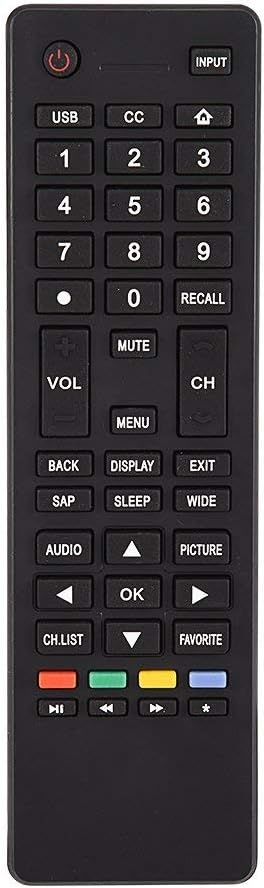
Bild 3.1: Überview of the remote control's button layout for easy identification of functions.
3.2 Betriebsbereich
The remote control has a stable signal transmission distance of up to 10 meters (33 feet). Actual remote distance may vary depending on environmental factors and the specific model of your TV.
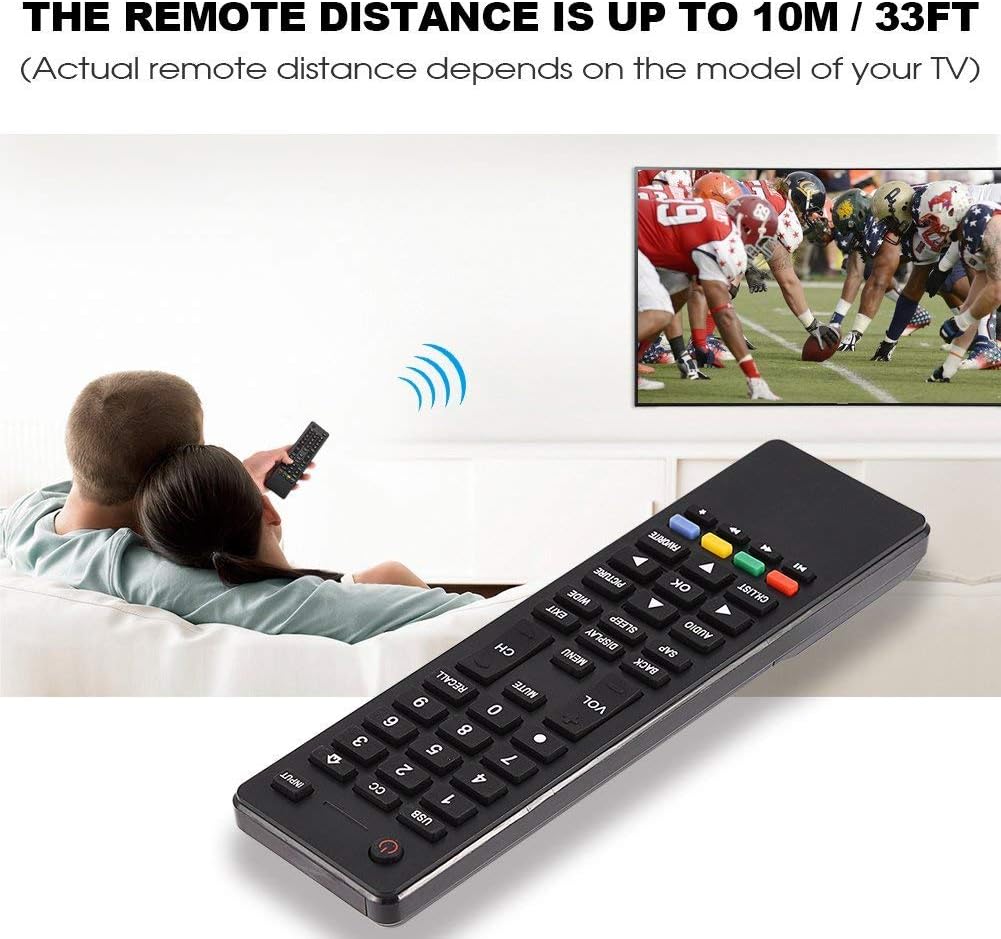
Image 3.2: Visual representation of the remote control's effective operating distance to the television.
4. Wartung
4.1 Reinigung
Reinigen Sie die Fernbedienung mit einem weichen, trockenen Tuch. Bei hartnäckigem Schmutz vorsichtig abwischen.ampen the cloth with water or a mild cleaning solution. Avoid using harsh chemicals or abrasive cleaners, as these can damage the remote's surface or internal components.
4.2 Batteriepflege
- Tauschen Sie die Batterien aus, wenn die Fernbedienung nur noch träge reagiert oder gar nicht mehr funktioniert.
- Mischen Sie keine alten und neuen Batterien oder verschiedene Batterietypen.
- Um ein Auslaufen zu verhindern, entfernen Sie die Batterien, wenn die Fernbedienung längere Zeit nicht benutzt wird.
- Entsorgen Sie gebrauchte Batterien verantwortungsvoll gemäß den örtlichen Vorschriften.
5. Fehlerbehebung
5.1 Fernbedienung reagiert nicht
- Batterien prüfen: Ensure batteries are inserted correctly with the correct polarity (+/-) and are not depleted. Replace with fresh AAA batteries if necessary.
- Sichtlinie: Make sure there are no obstructions between the remote control and the TV's infrared sensor.
- Distanz: Confirm you are within the effective operating range (up to 10 meters / 33 feet).
- TV-Kompatibilität: Verify that your TV model is listed as compatible (Haier HTR-A18M, 55D3550, 40D3500M, 48D3500).
5.2 Buttons Not Working Correctly
- Fernbedienung reinigen: Dust or debris under buttons can cause malfunction. Refer to the Maintenance section for cleaning instructions.
- Batterieprüfung: Weak batteries can lead to inconsistent button responses. Replace batteries.
6. Spezifikationen
| Besonderheit | Detail |
|---|---|
| Marke | Zerone |
| Kompatible Geräte | Haier HTR-A18M, 55D3550, 40D3500M, 48D3500 TVs |
| Konnektivitätstechnologie | Infrarot |
| Maximale Reichweite | 10 Meter (33 Fuß) |
| Akku-Typ | 2 x AAA (nicht enthalten) |
| Controllertyp | Tastensteuerung |
| Material | ABS |
| Modellnummer | Zerone9rnag3b5y4-cr |
| UPC | 647213811490 |

Image 6.1: Physical dimensions of the Zerone Universal Remote Control.
7. Garantieinformationen
This product is offered as an Amazon Renewed item. Amazon Renewed products are professionally inspected and tested to work and look like new. If you are not satisfied with your purchase, renewed products are eligible for replacement or refund under the Amazon Renewed Guarantee.
Additionally, the manufacturer provides a 90 Tage eingeschränkte Garantie. For specific details regarding the terms and conditions of this warranty, please refer to the documentation provided at the time of purchase or contact customer support.
8. Kundendienst
If you encounter any issues or have questions regarding your Zerone Universal Remote Control that are not addressed in this manual, please contact the seller or Amazon Renewed customer service for assistance.
For Amazon Renewed Guarantee claims, please visit the Amazon Renewed program page or contact Amazon customer support directly.