
1. Einleitung
This manual provides essential information for the safe and effective operation of your Retevis RT55 Marine Radio. Please read this manual thoroughly before using the device to ensure proper functionality and to prevent damage. The Retevis RT55 is a portable VHF marine transceiver designed for maritime communication, featuring IP67 waterproofing, floating capability, and vibration drainage.

Image 1.1: Retevis RT55 Marine Radio demonstrating its floating capability.
2. Packungsinhalt
Bitte prüfen Sie, ob alle unten aufgeführten Artikel in Ihrem Paket enthalten sind. Sollten Artikel fehlen oder beschädigt sein, wenden Sie sich bitte an Ihren Händler.
- 1 x Retevis RT55 Marine Radio
- 1 x Antenne
- 1 x 1200 mAh Lithium-Ionen-Akku
- 1 x Netzteil
- 1 x Ladestation
- 1 x Gürtelclip
- 1 x Schlüsselband.
- 4 x Schrauben
- 1 x Benutzerhandbuch (dieses Dokument)

Image 2.1: All components included in the Retevis RT55 package.
3. Produktüberschreitungview
Machen Sie sich mit den Komponenten und Bedienelementen des Radios vertraut.
3.1. Funkkomponenten

Image 3.1: Front panel of the Retevis RT55 Marine Radio with key controls labeled.
- Antenne: Zum Senden und Empfangen von Signalen.
- LCD Anzeige: Shows channel number, battery status, and other operational indicators.
- CH 16 Button: Quickly switches to Channel 16 (emergency channel).
- CH-Taste: Wird zur Kanalauswahl verwendet.
- TAG/FAV Button: Wechselt zwischen tagged/favorite channels.
- MUTE/VOL Button: Adjusts volume or mutes audio.
- MONI/SQL Button: Activates monitor function or adjusts squelch level.
- DUAL/SCAN Button: Activates dual watch or scan function.
- LOCK/H/L Button: Locks the keypad or switches between high/low power output.
- Pfeiltasten nach oben/unten: Navigate menus and change channels.
- PTT-Taste (Push-to-Talk): Located on the side, used to transmit.
4. Einrichtung
4.1. Einlegen der Batterie
- Stellen Sie sicher, dass das Radio ausgeschaltet ist.
- Richten Sie den Akku am Akkufach auf der Rückseite des Radios aus.
- Drücken Sie die Batterie vorsichtig an ihren Platz, bis sie sicher einrastet.

Image 4.1: The 1200mAh Lithium-ion battery pack for the RT55.
4.2. Antennenbefestigung
- Schrauben Sie die Antenne im Uhrzeigersinn auf den Anschluss oben am Radio, bis sie handfest sitzt. Nicht zu fest anziehen.
4.3. Laden des Akkus
Before initial use, fully charge the battery. A full charge typically takes several hours.
- Schließen Sie das Netzteil an die Ladeschale an.
- Stecken Sie den Netzadapter in eine normale Steckdose.
- Place the radio (with battery installed) into the charging cradle. Ensure proper contact between the radio and the cradle's charging terminals.
- The charging indicator on the cradle will illuminate (e.g., red for charging, green for fully charged).
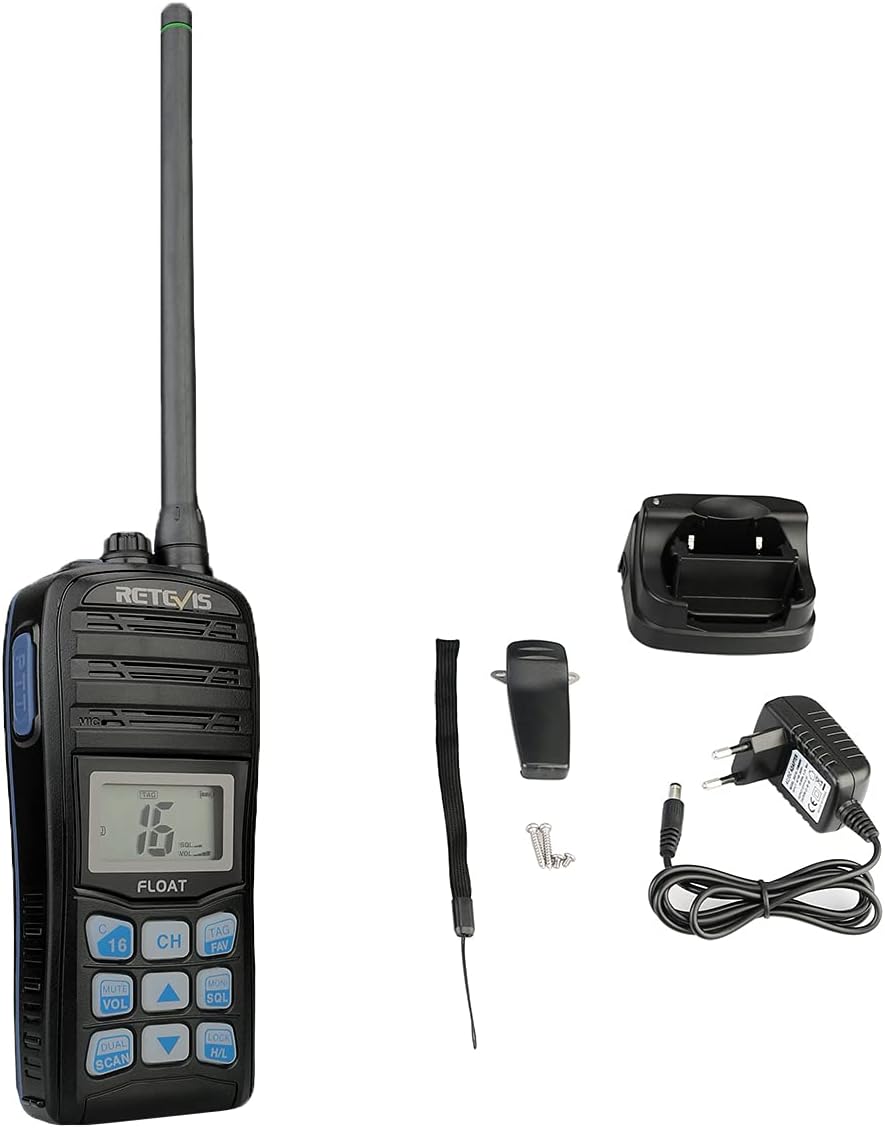
Image 4.2: The Retevis RT55 radio placed in its charging cradle.
5. Bedienungsanleitung
5.1. Ein-/Ausschalten
- Zum Einschalten halten Sie die LEISTUNG button (often integrated with the LOCK/H/L button or a dedicated button) until the display illuminates.
- Halten Sie zum Ausschalten die Taste gedrückt LEISTUNG Drücken Sie die Taste erneut, bis die Anzeige erlischt.
5.2. Lautstärkeregelung
- Drücken Sie die STUMM/VOL Taste.
- Verwenden Sie die Pfeil nach oben / unten Tasten zum Erhöhen oder Verringern der Lautstärke.
- Drücken STUMM/VOL Zur Bestätigung erneut oder warten Sie, bis die Einstellung automatisch gespeichert wird.
5.3. Kanalauswahl
The RT55 supports 88 international marine channels.
- Drücken Sie die CH Taste.
- Verwenden Sie die Pfeil nach oben / unten Tasten zur Auswahl des gewünschten Kanals.
- Drücken CH Zur Bestätigung erneut oder warten Sie, bis die Einstellung automatisch gespeichert wird.
- To quickly access the emergency channel, press the dedicated CH 16 Taste.
5.4. Rauschsperre
Die Rauschsperre eliminiert Hintergrundgeräusche, wenn kein Signal empfangen wird.
- Drücken Sie die MONI/SQL Taste.
- Verwenden Sie die Pfeil nach oben / unten buttons to adjust the squelch level (typically 0-9, where 0 is open squelch and 9 is maximum squelch).
- Drücken MONI/SQL zur Bestätigung erneut.
5.5. Dual Watch / Tri-Watch
This feature allows monitoring multiple channels simultaneously.
- Doppeluhr: Monitors the current working channel and Channel 16.
- Tri-Watch: Monitors the current working channel, Channel 16, and a designated call channel (e.g., Channel 9).
- Drücken Sie die DUAL/SCAN button to activate or cycle through these modes.

Image 5.1: Visual representation of Dual-Watch and Tri-Watch channel monitoring.
5.6. Weather Channels
The RT55 can receive weather alerts on dedicated weather channels.
- Consult your local regulations for available weather channels.
- Access weather channels via the TAG/Favorit button or a dedicated menu option.

Image 5.2: The radio displaying weather alert functionality.
5.7. Floating and Vibration Drainage
The RT55 is designed to float if dropped in water and features a vibration drainage function to clear water from the speaker.
- If the radio falls into water, it will float to the surface.
- To activate vibration drainage, typically press and hold a specific button (e.g., MONI/SQL or a dedicated drainage button) for a few seconds. The radio will emit a vibrating sound to expel water.

Image 5.3: The RT55 radio floating in water, highlighting its IP67 waterproof rating.

Image 5.4: The radio demonstrating its vibration drainage feature.
Video 5.1: Demonstration of the Retevis RT55's waterproofing, floating, and vibration drainage functions.
6. Wartung
- Reinigung: Reinigen Sie die Außenseite des Radios mit einem weichen, fusselfreien Tuch.amp Tuch. Verwenden Sie keine scharfen Chemikalien oder Scheuermittel.
- Lagerung: Bewahren Sie das Radio bei Nichtgebrauch an einem kühlen, trockenen Ort auf. Entfernen Sie die Batterie, wenn Sie es längere Zeit lagern.
- Batteriepflege: Avoid fully discharging the battery frequently. Recharge before the battery is completely depleted to prolong its lifespan.
7. Fehlerbehebung
| Problem | Mögliche Ursache | Lösung |
|---|---|---|
| Das Radio lässt sich nicht einschalten | Die Batterie ist schwach oder nicht richtig eingesetzt. | Laden Sie den Akku auf oder setzen Sie ihn korrekt wieder ein. |
| No reception or poor audio quality | Antenna loose or damaged; Squelch level too high; Out of range. | Check antenna connection; Adjust squelch level; Move closer to other radios or a repeater. |
| Kann nicht übertragen werden | Battery low; Incorrect channel selected; Keypad locked. | Charge battery; Select appropriate channel; Unlock keypad. |
| Water in speaker after submersion | Normal after water exposure. | Activate the vibration drainage function. |
8. Spezifikationen
| Besonderheit | Detail |
|---|---|
| Marke | Retevis |
| Modellnummer | RT55 |
| Farbe | Noir (Schwarz) |
| Anzahl der Kanäle | 88 |
| Frequenzbereich | UKW |
| Maximale Reichweite | 4 Kilometer |
| Wasserbeständigkeit | IP67 (wasserdicht) |
| Besondere Merkmale | Float, Monitor Function, IP67 Waterproof, Call Channel Programming, Automatic Backlight, Vibration Drainage |
| Akku-Typ | 1 x 1200mAh Lithium-ion (included) |
| Bandtage | 7.4 Volt |
| Produktabmessungen (T x B x H) | 4.1 cm (Breite) x 6.5 cm (Länge) x 14 cm (Höhe) |
| Artikelgewicht | 288 Gramm |
| Geräuschpegel | 40 Dezibel |
| Kompatible Geräte | Other two-way radios with the same band or channel, compatible accessories (headsets, earphones, external antennas) |
| Temperaturbereich | -20℃ ~ +55℃ |
| Ursprungsland | China |
9. Garantie und Support
Retevis offers the following warranty and support for the RT55 Marine Radio:
- Garantiezeit: 2 Jahre Garantie auf das Funkgerät, 1 Jahr auf Zubehör.
- Rückgaberecht: 30 days for no-reason returns.
- Service nach Ablauf der Garantie: Maintenance service is available beyond the warranty period. Buyers are responsible for associated costs.
For further assistance or technical support, please refer to the official Retevis webWebsite oder wenden Sie sich an Ihren Händler vor Ort.