
Einführung
Welcome to the Ipega PG-9033 Bluetooth Gamepad user manual. This guide provides detailed instructions for setting up, operating, maintaining, and troubleshooting your new wireless controller. Please read this manual carefully before use to ensure optimal performance and longevity of your device.
Produkt überview
The Ipega PG-9033 is a versatile Bluetooth gamepad designed for an enhanced gaming experience across multiple platforms, including Android, iOS, and PC. It features an adjustable phone holder, dual analog sticks, a D-pad, and action buttons.

Figure 1: The Ipega PG-9033 Bluetooth Gamepad with a smartphone securely mounted in its adjustable holder, actively displaying a racing game. This illustrates the controller's primary use for mobile gaming.
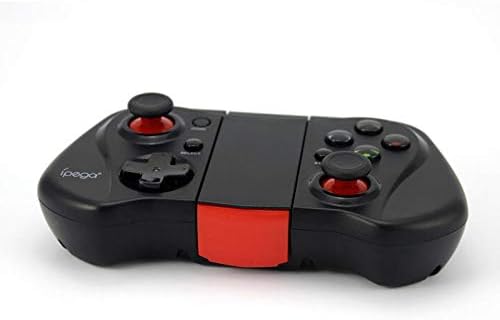
Abbildung 2: Seite A view of the Ipega PG-9033 Bluetooth Gamepad, showcasing its ergonomic design and compact form factor when not in use. The red accent on the central hinge is visible.
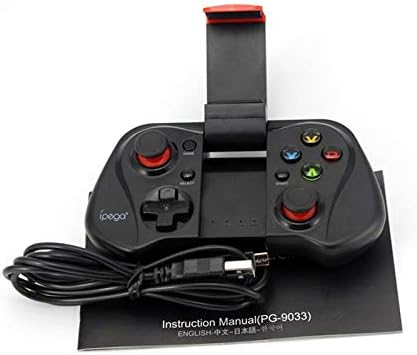
Figure 3: The Ipega PG-9033 Bluetooth Gamepad displayed alongside its USB charging cable and the included instruction manual, which clearly indicates the model number PG-9033.

Abbildung 4: Die Rückseite view of the Ipega PG-9033 Bluetooth Gamepad, featuring a label with technical details such as "BLUETOOTH CONTROLLER," working voltage, working current, and input specifications.
Aufstellen
Aufladen des Gamepads
Before first use, fully charge the gamepad using the provided USB cable.
- Connect the micro-USB end of the charging cable to the gamepad's charging port.
- Connect the USB-A end to a USB power source (e.g., computer, USB wall adapter).
- The charging indicator light will illuminate. It will typically turn off or change color when fully charged.
Kopplung mit einem Gerät
The PG-9033 supports different pairing modes for various operating systems.
Android-Kopplung
- Ensure the gamepad is off.
- Halten Sie die HEIM und die X button simultaneously until the indicator light flashes rapidly. This puts the gamepad into Android pairing mode.
- Öffnen Sie auf Ihrem Android-Gerät die Bluetooth-Einstellungen und suchen Sie nach verfügbaren Geräten.
- Select "PG-9033" from the list to pair. The indicator light will become solid when connected.
iOS Pairing (iCade Mode)
- Ensure the gamepad is off.
- Halten Sie die HEIM und die B button simultaneously until the indicator light flashes rapidly. This puts the gamepad into iOS iCade pairing mode.
- On your iOS device, go to Bluetooth settings and search for available devices.
- Select "PG-9033" from the list to pair. The indicator light will become solid when connected.
Note: iCade mode has limited game compatibility. For broader iOS compatibility, check specific game requirements.
PC-Kopplung
- Ensure the gamepad is off.
- Halten Sie die HEIM und die A button simultaneously until the indicator light flashes rapidly. This puts the gamepad into PC pairing mode.
- On your PC, go to Bluetooth settings and search for available devices.
- Select "PG-9033" from the list to pair. The indicator light will become solid when connected.
Note: A Bluetooth adapter may be required for PCs without built-in Bluetooth.
Bedienungsanleitung
Verbinden Ihres Smartphones
- Gently extend the adjustable phone holder located on the top of the gamepad.
- Carefully place your smartphone into the holder, ensuring it is securely gripped and centered.
- Passen Sie den Winkel für optimale viewing.
Game Mode Selection
The gamepad automatically enters the last used mode upon reconnection. To switch modes, disconnect the gamepad and re-pair using the desired mode's button combination (HOME + X for Android, HOME + B for iOS, HOME + A for PC).
Ein-/Ausschalten
Zum Einschalten drücken Sie die HEIM Taste. Zum Ausschalten halten Sie die Taste HEIM button for approximately 5 seconds until the indicator light turns off. The gamepad will automatically power off after a period of inactivity.
Wartung
To ensure the longevity and proper functioning of your Ipega PG-9033 gamepad, follow these maintenance guidelines:
- Halten Sie das Gerät trocken. Vermeiden Sie den Kontakt mit Feuchtigkeit oder Flüssigkeiten.
- Clean the gamepad with a soft, dry cloth. Do not use harsh chemicals or abrasive cleaners.
- Bewahren Sie das Gamepad an einem kühlen, trockenen Ort fern von direkter Sonneneinstrahlung und extremen Temperaturen auf.
- Vermeiden Sie es, das Gamepad fallen zu lassen oder starken Stößen auszusetzen.
- Um die Batterieleistung zu erhalten, laden Sie sie regelmäßig auf, auch wenn sie nicht verwendet wird.
Do not attempt to disassemble the gamepad. This will void the warranty and may cause damage.
Fehlerbehebung
Gamepad not connecting or pairing:
- Stellen Sie sicher, dass das Gamepad vollständig aufgeladen ist.
- Stellen Sie sicher, dass Bluetooth auf Ihrem Gerät aktiviert ist.
- Make sure the gamepad is in the correct pairing mode for your device (Android, iOS, or PC).
- Versuchen Sie, das Gerät in Ihren Bluetooth-Einstellungen zu entkoppeln und es anschließend erneut zu koppeln.
- Starten Sie sowohl das Gamepad als auch Ihr Gerät neu.
Tasten oder Joysticks reagieren nicht:
- Prüfen Sie, ob das Gamepad ordnungsgemäß angeschlossen ist.
- Vergewissern Sie sich, dass das Spiel, das Sie spielen, externe Controller unterstützt.
- Some games may require specific controller mapping or settings adjustments within the game.
- If the issue persists, try resetting the gamepad (if a reset button is available, typically a small pinhole).
Verzögerung oder Eingabeverzögerung:
- Ensure your device is not too far from the gamepad. Maintain a clear line of sight.
- Reduzieren Sie Störungen durch andere drahtlose Geräte.
- Schließen Sie unnötige Hintergrundanwendungen auf Ihrem Gerät.
Das Telefon passt nicht in die Halterung:
- The holder is designed for most smartphones. Ensure your phone's dimensions are within the supported range.
- Entfernen Sie alle sperrigen Handyhüllen, die einen sicheren Halt verhindern könnten.
Technische Daten
| Besonderheit | Detail |
|---|---|
| Modell | PG-9033 |
| Marke | Ipega |
| Konnektivität | Bluetooth |
| Kompatibilität | Android, iOS (iCade), PC |
| Arbeitsvolumentage | Gleichstrom 3.7 V |
| Arbeitsstrom | 30 mA |
| Eingangslautstärketage | Gleichstrom 5 V, 500 mA |
| ASIN | B07P52YH7M |
Garantie und Support
For warranty information and technical support, please refer to the official Ipega webBesuchen Sie unsere Website oder kontaktieren Sie Ihren Händler. Bewahren Sie Ihren Kaufbeleg als Kaufnachweis auf.
Dieses Handbuch dient lediglich Informationszwecken. Änderungen der Spezifikationen vorbehalten.