
1. Einleitung
This manual provides detailed instructions for the installation, operation, maintenance, and troubleshooting of the SEAFRONT SKI780 VFD Inverter Frequency Converter. This device is designed for precise motor speed control in various industrial and commercial applications. Please read this manual thoroughly before installation and operation to ensure safe and efficient use of the product.

Abbildung 1: Allgemeines view of the SEAFRONT SKI780 VFD Inverter Frequency Converter.
2. Sicherheitshinweise
Beachten Sie stets die folgenden Sicherheitsvorkehrungen, um Verletzungen oder Schäden an der Ausrüstung zu vermeiden:
- Ensure that installation and wiring are performed by qualified personnel only.
- Disconnect all power sources before performing any wiring, maintenance, or inspection.
- Überprüfen Sie, ob die Eingangslautstärketage entspricht den Spezifikationen des Wechselrichters.
- Do not touch electrical components immediately after power-off, as residual voltage may be present. Wait at least 5 minutes.
- Install the inverter in a clean, dry, and well-ventilated environment, away from direct sunlight, corrosive gases, and flammable materials.
- Stellen Sie sicher, dass das Gerät ordnungsgemäß geerdet ist.
3. Produktüberschreitungview
The SEAFRONT SKI780 VFD Inverter is a versatile device offering advanced control features for various motor applications.
Hauptmerkmale:
- Integrated synchronous control and proportional timing control.
- Six speed control modes for automatic operation.
- Ability to lock all or part of the keys (analog potentiometer unlocked).
- Normally open relay and two high configuration outputs with 100 optional channels.
- Integrated user-defined counter/meter.
- 0-100% adjustable torque output at zero speed, with zero-speed brake function.
- V/F control and output torsion control.
- Integrated communication interface.
- Equipped with a speed potentiometer and an external panel.
- Five opto-isolated digital inputs, 100 optional channels.
- One analog input, two analog output channels.
- Textile pendulum frequency function, suitable for textile equipment.

Abbildung 2: Vorderseite view of the inverter showing the control panel and terminals.
4. Spezifikationen
| Spezifikation | Wert |
|---|---|
| Modellnummer | SKI780-0D75G-1 |
| Marke | SEAFRONT |
| Eingangslautstärketage | 220 Volt (Wechselstrom) |
| Ausgangsvolumentage | 220 Volt (Wechselstrom) |
| Ausgangsleistung | 750 Watt |
| Spitzenleistung | 1500 Watt |
| Inverter Power (VA) | 2200 VA |
| Ausgangswellenform | Modifizierte Sinuswelle |
| Abmessungen (L x B x H) | 14.2 cm L x 11 cm B x 8.5 cm H (5.6 x 4.3 x 3.3 Zoll) |
| Anzahl der Steckdosen | 1 |
| Stromquelle | Vehicle DC Power Socket (Note: Product description indicates AC input) |
| Ursprungsland | China |
| GTIN/UPC | 736342831933 |

Figure 3: Dimensions of the SKI780 VFD Inverter.
5. Einrichtung
Careful installation and wiring are crucial for the proper functioning of the VFD inverter.
5.1 Montage
- Mount the inverter vertically on a stable, non-flammable surface.
- Sorgen Sie für ausreichend Freiraum um das Gerät herum, um eine ordnungsgemäße Belüftung und Wärmeableitung zu gewährleisten.
- Avoid mounting in areas with excessive vibration, dust, or moisture.
5.2 Verkabelung
Refer to the wiring diagram provided with your specific unit for detailed connections. General wiring steps include:
- Leistungsaufnahme (L, N): Connect the main AC power supply to the L and N terminals. Ensure correct voltage (220 V Wechselstrom).
- Motorleistung (U, V, W): Connect the three-phase motor leads to the U, V, and W terminals.
- Erdung (PE): Connect the ground wire to the PE terminal for safety.
- Brake Resistor (P+, PB): If a brake resistor is used, connect it to the P+ and PB terminals.
- Steueranschlüsse: Connect external control signals (digital inputs, analog inputs, relay outputs) to the respective terminals as per your application requirements.

Figure 4: Close-up of the inverter's terminal block for wiring connections.
5.3 External Panel Compatibility
If using an external control panel, ensure it is compatible with the inverter. The new panel design is specifically for new inverter models.

Figure 5: Correct connection of a new external panel to the inverter.
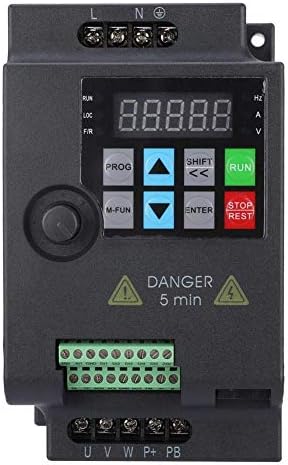
Figure 6: Incorrect connection of an old external panel to the inverter. Ensure panel compatibility.
6. Bedienungsanleitung
The inverter features a control panel for setting parameters and operating the motor.
6.1 Bedienfeld vorbeiview
Das Bedienfeld umfasst typischerweise:
- Anzeige: Zeigt Frequenz und Lautstärke antage, Strom und andere Parameter.
- PROG-Taste: Wechselt in den/verlässt den Parametereinstellungsmodus.
- M-FUN Button: Multi-function button, often used for quick access to common functions.
- Pfeiltasten nach oben/unten: Navigieren Sie durch die Menüs und passen Sie die Parameterwerte an.
- SHIFT/Left/Right Arrows: Move cursor or change digits during parameter entry.
- ENTER-Taste: Confirms selections and saves parameter changes.
- RUN-Schaltfläche: Startet den Motor.
- STOP/RESET-Taste: Stoppt den Motor oder setzt Fehlerzustände zurück.
6.2 Grundlegende Bedienung
- Einschalten: Apply power to the inverter. The display will light up.
- Frequenz einstellen: Use the Up/Down arrows or the external potentiometer to set the desired output frequency.
- Anlassermotor: Drücken Sie die LAUFEN Knopf zum Starten des Motors. Der Motor beschleunigt auf die eingestellte Frequenz.
- Motor abstellen: Drücken Sie die STOP/RESET Knopf zum Anhalten des Motors. Der Motor wird langsamer und stoppt.
6.3 Parametereinstellung
To configure advanced settings:
- Drücken Sie die PROG Taste zum Aufrufen des Parametereinstellungsmodus.
- Use the Up/Down arrows to navigate through parameter groups and individual parameters.
- Drücken EINGEBEN um einen Parameter auszuwählen.
- Use the Up/Down arrows and SHIFT buttons to adjust the parameter value.
- Drücken EINGEBEN um den neuen Wert zu speichern.
- Drücken PROG Parameter-Einstellungsmodus verlassen.
7. Wartung
Regular maintenance ensures the longevity and reliable operation of your VFD inverter.
- Reinigung: Periodically clean the inverter's exterior and ventilation openings to prevent dust accumulation. Use a soft, dry cloth. Do not use liquid cleaners.
- Inspektion: Überprüfen Sie regelmäßig die Kabelverbindungen auf festen Sitz und Anzeichen von Beschädigungen oder Korrosion. Achten Sie während des Betriebs auf ungewöhnliche Geräusche oder Gerüche.
- Kühlventilatoren: Ensure cooling fans are operating correctly and are free from obstructions. Replace noisy or faulty fans.
- Umgebungsbedingungen: Vergewissern Sie sich, dass die Betriebsumgebung innerhalb der vorgegebenen Temperatur- und Feuchtigkeitsbereiche bleibt.
- Kondensatorlebensdauer: Electrolytic capacitors have a finite lifespan. Consider professional inspection and replacement after several years of continuous operation.
8. Fehlerbehebung
Dieser Abschnitt bietet Lösungen für häufig auftretende Probleme.
| Problem | Mögliche Ursache | Lösung |
|---|---|---|
| Der Wechselrichter schaltet sich nicht ein. | No input power; Blown fuse; Faulty wiring | Check power supply; Replace fuse; Verify wiring connections. |
| Motor läuft nicht | Incorrect parameters; Motor wiring error; Overload | Check frequency and control parameters; Verify motor wiring (U, V, W); Reduce motor load. |
| Überstromfehler (OC) | Sudden load change; Short circuit in motor; Acceleration/deceleration time too short | Check motor and load; Increase acceleration/deceleration time parameters. |
| Übervolumentage Fehler (OV) | Eingangsvolumentage too high; Regeneration during deceleration | Eingangslautstärke prüfentage; Increase deceleration time; Install a brake resistor if necessary. |
| Untervoltage Fehler (UV) | Eingangsvolumentage zu niedrig; Instabilität der Stromversorgung | Eingangslautstärke prüfentage; Für eine stabile Stromversorgung sorgen. |
| Overheat fault (OH) | Schlechte Belüftung; zu hohe Umgebungstemperatur; Lüfterausfall | Improve ventilation; Reduce ambient temperature; Check and replace cooling fan. |
For persistent issues or faults not listed, please contact technical support.
9. Unterstützung
For technical assistance, product inquiries, or service requests, please contact SEAFRONT customer support through your purchase channel or the official SEAFRONT website. Please have your model number (SKI780-0D75G-1) and serial number ready when contacting support.