
Einführung
The MUSKY DY28 is a versatile device combining a Bluetooth speaker, smart touch lamp, alarm clock, and MP3 player into a single unit. This manual provides instructions for its setup, operation, and maintenance to ensure optimal performance.
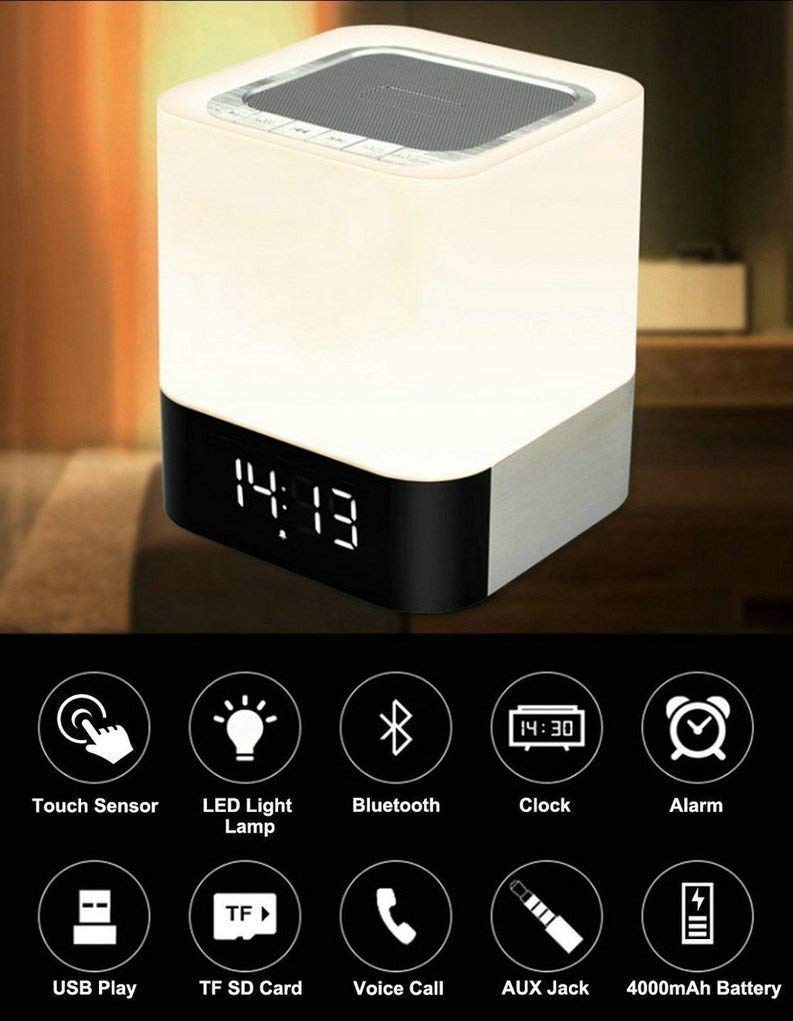
Image: The MUSKY DY28 device, showcasing its integrated clock display and touch-sensitive light panel.
Lieferumfang
- MUSKY DY28 Bluetooth-Lautsprecher
- Bedienungsanleitung
- Ladekabel
Produkteigenschaften
- Multifunktional: Bluetooth speaker, smart touch lamp, alarm clock, and MP3 player.
- Bluetooth 4.0: Easy and stable connection with Bluetooth-enabled devices.
- Einstellbares LED-Licht: Warm LED light with adjustable brightness (Max 20 Lumen) via touch sensor.
- Digitaluhr & Wecker: Big digit 12/24H alarm clock with calendar, alarm, and sleep mode functions.
- Mehrere Wiedergabemodi: Supports MP3 playback via USB, micro TF/SD Card, and 3.5mm AUX input.
- Audio Qualität: 5W single acoustic driver with enhanced passive low-frequency radiator for clear sound and solid bass.
- Lange Akkulaufzeit: Built-in 4000mAh battery provides up to 15 hours of lighting or 9 hours of music playback (depending on usage).
- Freisprechen: Integrated microphone for answering calls.
Aufstellen
1. Aufladen des Geräts
Before first use, fully charge the speaker. Connect the provided USB charging cable to the charging port on the device and to a standard USB power adapter (not included) or a computer's USB port. The charging indicator will show the charging status.
2. Ein-/Ausschalten
Locate the Power On/Off switch on the device. Slide the switch to the 'ON' position to power on the speaker. Slide it to 'OFF' to power off.
3. Bluetooth-Kopplung
- Ensure the speaker is powered on and in Bluetooth mode (indicated by a flashing blue light or voice prompt).
- Aktivieren Sie auf Ihrem Mobilgerät Bluetooth und suchen Sie nach verfügbaren Geräten.
- Select 'MUSKY DY28' from the list of devices.
- Once paired, the speaker will indicate a successful connection (e.g., solid blue light or voice prompt).
4. Uhrzeit und Alarm einstellen
Refer to the detailed control diagram for button locations. Use the 'Mode' button to cycle through functions until the clock setting is displayed. Use the 'Previous' and 'Next' buttons to adjust hours and minutes, and the 'Play/Pause' button to confirm. For alarm settings, follow a similar procedure, activating the alarm function and setting the desired time.

Bild: Detailliert view of the MUSKY DY28's control panel, highlighting buttons for power, charging, audio inputs, playback, volume, and the touch sensor.
Bedienungsanleitung
1. Musikwiedergabe
The DY28 supports multiple music sources:
- Bluetooth-Modus: After successful pairing, play music from your connected device. Use the speaker's 'Play/Pause', 'Previous', and 'Next' buttons to control playback.
- USB Eingang: Stecken Sie einen USB-Stick mit MP3 ein fileStecken Sie das Kabel in den USB-Anschluss. Der Lautsprecher schaltet automatisch in den USB-Modus und beginnt mit der Wiedergabe.
- Micro TF/SD Card: Insert a micro TF/SD card with MP3 files into the Micro SD Slot. The speaker will automatically switch to TF/SD card mode and play music.
- AUX-Eingang: Connect an external audio device using a 3.5mm AUX cable to the AUX port. The speaker will switch to AUX mode. Control playback from your external device.

Image: Visual guide demonstrating the three primary ways to play music on the DY28: via Bluetooth, Micro SD card, and USB drive.
2. Lichtbetrieb
The top panel of the speaker features a touch sensor for controlling the LED light. Tap the touch sensor to turn the light on/off and cycle through different brightness levels. The light offers a warm glow suitable for various environments.

Image: The MUSKY DY28 speaker illuminated, serving as a night light with its digital clock display visible in a low-light environment.
3. Weckerfunktionen
Once the alarm is set, it will sound at the designated time. To snooze, tap the touch sensor. To turn off the alarm, press the 'Mode' button or power off the device. The sleep mode feature allows the lamp and speaker to automatically turn off after a set period.
4. Freisprechfunktion
When a call comes in while connected via Bluetooth, the speaker will ring. Press the 'Play/Pause' button to answer the call. Press it again to end the call. The integrated microphone allows for hands-free conversation.
Technische Daten
| Besonderheit | Detail |
|---|---|
| Marke | MOSCHUSIG |
| Modellnummer | DY28 |
| Konnektivitätstechnologie | Aux-Anschluss, Bluetooth, USB |
| Art der drahtlosen Technologie | Bluetooth |
| Montagetyp | Tischhalterung |
| Lautsprechertyp | Bücherregal |
| Produkteigenschaften | Light for emergency use |
| Controllertyp | Touchpad |
| Kontrollmethode | Berühren |
| Farbe | Weiß |
| Batteriekapazität | 4000mAh (eingebaut) |
| Battery Life (Lighting) | Bis zu 15 Stunden |
| Akkulaufzeit (Musikwiedergabe) | Bis zu 9 Stunden |
| Ladezeit | 2-4 Stunden |
| Bluetooth-Reichweite | 33 Fuß / 10 Meter |
| Stromquelle | Batteriebetrieben |
| Anzahl der Audiokanäle | 5 Watt |
| Ist wasserdicht | WAHR |
| Artikelgewicht | 700 Gramm |
| Kompatible Geräte | MP3-Player, Smartphone, Tablet |
Fehlerbehebung
- Kein Strom: Stellen Sie sicher, dass das Gerät vollständig aufgeladen ist. Prüfen Sie, ob sich der Netzschalter in der Position „EIN“ befindet.
- Bluetooth-Kopplung fehlgeschlagen: Make sure the speaker is in Bluetooth pairing mode. Ensure your device's Bluetooth is enabled and within range (10 meters). Try restarting both devices.
- Kein Ton: Check the volume level on both the speaker and your connected device. Ensure the correct input mode (Bluetooth, USB, TF/SD, AUX) is selected.
- Licht funktioniert nicht: Tap the touch sensor on the top of the speaker. Ensure the device has sufficient battery charge.
- Alarm ertönt nicht: Verify the alarm time is set correctly and the alarm function is activated.
Wartung
- Reinigen Sie das Gerät mit einem weichen, trockenen Tuch. Verwenden Sie keine Scheuermittel oder Lösungsmittel.
- Vermeiden Sie es, den Lautsprecher extremen Temperaturen, direkter Sonneneinstrahlung oder hoher Luftfeuchtigkeit auszusetzen.
- Bewahren Sie das Gerät an einem kühlen, trockenen Ort auf, wenn es längere Zeit nicht benutzt wird.
- Versuchen Sie nicht, das Gerät selbst zu zerlegen oder zu reparieren, da dies zum Erlöschen der Garantie führt.
Offizielles Produktvideo
Video: Official product video demonstrating the key features and functions of the MUSKY DY28 Bluetooth Speaker, Smart Touch Lamp, and Alarm Clock.
Garantie und Support
Informationen zur Garantie und zum Kundendienst finden Sie in der mit Ihrem Kauf gelieferten Dokumentation oder wenden Sie sich direkt an den Hersteller. Bewahren Sie Ihren Kaufbeleg für eventuelle Garantieansprüche auf.