
Einführung
This manual provides detailed instructions for the setup, operation, and maintenance of your Cuddeback Model G-5048 20 Megapixel Double Barrel Strobe Camera. Designed for game and hunting applications, this camera features advanced technology to capture high-quality images with exceptional speed and clarity.
Bitte lesen Sie diese Bedienungsanleitung sorgfältig durch, bevor Sie Ihre Kamera verwenden, um eine optimale Leistung und Langlebigkeit zu gewährleisten.
Produkt überview
Hauptmerkmale
- 20-Megapixel-Kamera: Captures sharp, high-resolution images.
- Double Barrel Strobe Flash: Utilizes two flash tubes for full-color, blur-free night images with a 1-second delay.
- 0.25-second Trigger Speed: Industry-leading speed to capture fast-moving subjects.
- 1-second Recovery Speed: Rapid recovery ensures the camera is ready for the next shot almost instantly.
- Bewegungsmelder: Equipped with a motion sensor for automatic image capture.
- Zonensteuerung: Advanced feature for precise monitoring.
- Programmable Time-Lapse: Allows for custom time-lapse photography.
- Separate Day/Night Delays: Customize settings for different lighting conditions.
- Nachtsichtbereich: Bis zu 30.5 Meter (100 Fuß).
Kamerakomponenten
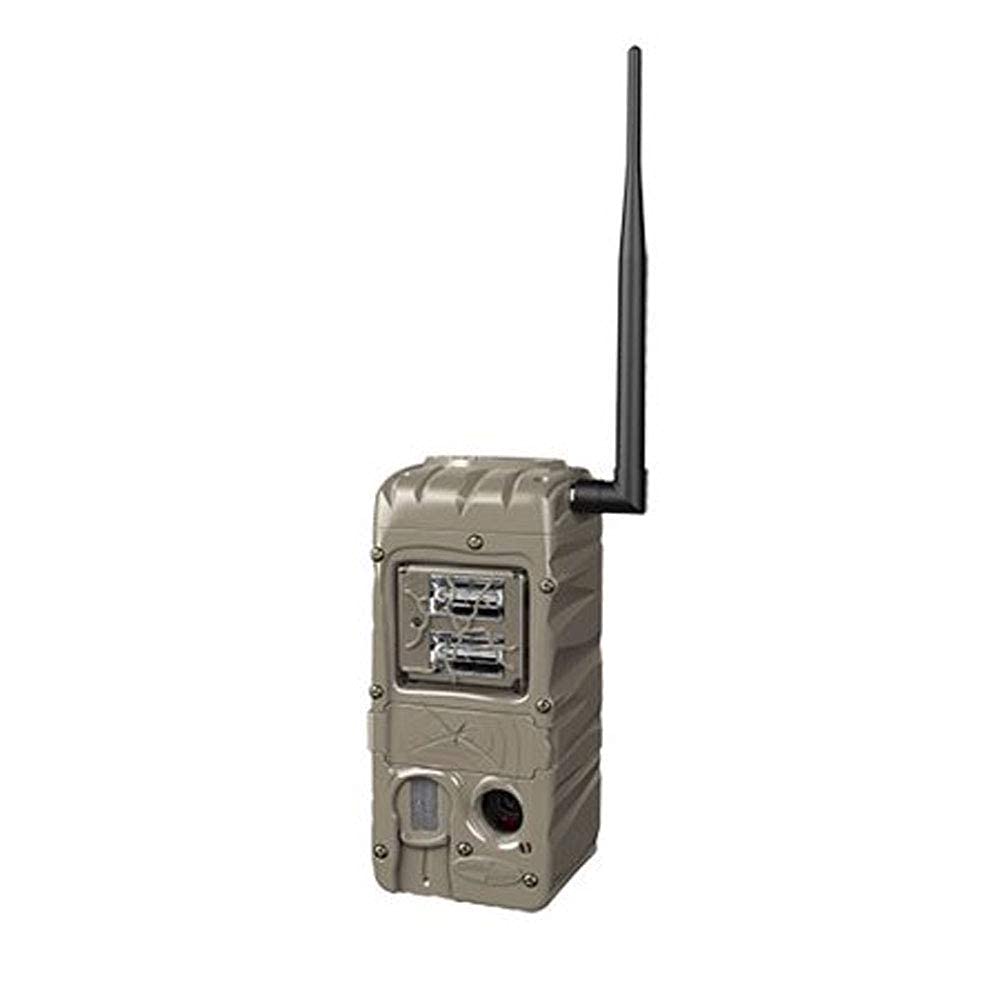
Abbildung 1: Vorderseite view of the Cuddeback Model G-5048 camera. This image shows the camera's robust, brown casing, the dual strobe flash units at the top, the motion sensor, and the lens at the bottom. The Cuddeback logo is visible at the base.
The Cuddeback G-5048 camera features a durable, weather-resistant casing. Key components include the dual strobe flash units, the camera lens, and the motion sensor. The design ensures reliable operation in various outdoor conditions.
Aufstellen
Stromquelle
The G-5048 camera can be powered via an AC/DC source. Ensure the power source is compatible with the camera's requirements. While the product specifications indicate "No" for batteries required, typical trail cameras often use batteries for remote deployment. Please refer to the camera's internal compartment or specific packaging for battery type and installation if AC/DC is not used.
Anbringen der Kamera
The camera is designed for wall mounting. Use appropriate hardware to securely attach the camera to a tree or other stable surface. Position the camera to ensure a clear field of view for the desired monitoring area, keeping in mind the 30.5-meter flash range.
- Select a sturdy mounting location, such as a tree or post.
- Ensure the camera is level and pointed towards the target area.
- Adjust the height to prevent false triggers from small animals or vegetation, typically 3-6 feet off the ground.
Bedienungsanleitung
Grundlegende Bedienung
- Speicherkarte einlegen: Open the camera housing and insert a compatible SD card (not included) into the designated slot.
- Einschalten: Connect the AC/DC power source or insert batteries (if applicable) and turn the camera on using the power switch.
- Auswahlmodus: Use the internal controls to select your desired operating mode (e.g., Photo, Video, Time-Lapse).
- Einstellungen konfigurieren: Adjust settings such as trigger delay, photo resolution, and day/night delays according to your monitoring needs.
- Deploy Camera: Close the housing securely and mount the camera in your chosen location.
Erweiterte Einstellungen
- Zonensteuerung: Refer to the detailed in-camera menu for configuring specific detection zones to optimize trigger accuracy.
- Zeitraffer: Program the camera to capture images at set intervals, independent of motion detection.
- Day/Night Delays: Customize the delay between triggers for daytime and nighttime operations to conserve power and memory.
Wartung
- Reinigung: Periodically clean the camera lens, flash units, and motion sensor window with a soft, dry cloth to ensure clear images and proper detection.
- Batteriewechsel: If using batteries, replace them when the low battery indicator appears or when performance degrades.
- Firmware-Updates: Check the Cuddeback official webAuf dieser Website finden Sie alle verfügbaren Firmware-Updates, um sicherzustellen, dass Ihre Kamera über die neuesten Funktionen und Fehlerbehebungen verfügt.
- Lagerung: When not in use, store the camera in a cool, dry place, away from direct sunlight and extreme temperatures.
Fehlerbehebung
| Problem | Mögliche Ursache | Lösung |
|---|---|---|
| Kamera lässt sich nicht einschalten | No power, incorrect battery installation, faulty power source. | Check AC/DC connection or battery orientation/charge. Ensure power switch is ON. |
| Schlechte Bildqualität | Verschmutzte Linse, falsche Einstellungen, schlechte Lichtverhältnisse. | Clean the lens. Verify resolution settings. Ensure adequate lighting or proper flash operation at night. |
| Kamera löst nicht aus | Motion sensor obstructed, incorrect sensitivity settings, subject out of range. | Clear sensor path. Adjust motion sensor sensitivity. Ensure subject is within detection range. |
| Flash not working at night | Flash disabled, low power, faulty flash unit. | Check camera settings to ensure flash is enabled. Verify power source. Contact support if issue persists. |
Technische Daten
| Besonderheit | Detail |
|---|---|
| Marke | Kussrücken |
| Modellname | G-5048 |
| Effektive Standbildauflösung | 20 Megapixel |
| Auslösegeschwindigkeit | 0.25 Sekunden |
| Wiederherstellungsgeschwindigkeit | 1 Sekunde |
| Blitztyp | Double Barrel Strobe |
| Nachtsichtbereich | 30.5 Meter (100 Fuß) |
| Nachtsicht | Farb-Nachtsicht |
| Konnektivitätstechnologie | Kabellos (Wi-Fi) |
| Stromquelle | Wechselstrom/Gleichstrom |
| Batterien erforderlich | No (refer to manual for specific power options) |
| Besonderheit | Motion Detector, Zone Control, Programmable Time-Lapse |
| Montagetyp | Wandhalterung |
| Material | Plastik |
| Farbe | Braun |
| Empfohlene Verwendung | Game and Hunting |
| UPC | 700868005048 |
| ASIN | B07Q2D31WY |
Garantie und Support
For warranty information and technical support, please refer to the official Cuddeback webBesuchen Sie die Website oder kontaktieren Sie direkt den Kundenservice. Bewahren Sie Ihren Kaufbeleg als Kaufnachweis für Garantieansprüche auf.
Cuddeback Official WebWebsite: www.cuddeback.com