
BSIDE BSIDE ZT-M1 Auto/Manual Digital
BSIDE ZT-M1 Digital Multimeter
Bedienungsanleitung
Einführung
This manual provides detailed instructions for the safe and effective operation of your BSIDE ZT-M1 Auto/Manual Digital Multimeter. This device is designed for precise electrical measurements, featuring an 8000-count triple display, V.F.C converter, and various measurement modes including voltage, current, resistance, capacitance, frequency, and temperature. Please read this manual thoroughly before use and keep it for future reference.
Sicherheitshinweise
Always observe safety precautions when using electrical testing equipment. Failure to do so may result in injury or damage to the device or equipment under test.
- Die für jeden Messbereich angegebenen maximalen Eingangswerte dürfen nicht überschritten werden.
- Ensure the test leads are properly connected and the function switch is set to the correct range before making any measurements.
- Bei Arbeiten an stromführenden Leitungen ist äußerste Vorsicht geboten. Vermeiden Sie den Kontakt mit blanken Drähten oder Klemmen.
- Verwenden Sie das Multimeter nicht, wenn es beschädigt erscheint oder die Messleitungen ausgefranst oder gebrochen sind.
- Tauschen Sie die Batterien umgehend aus, sobald die Anzeige für niedrigen Batteriestand erscheint, um genaue Messwerte zu gewährleisten.
- Halten Sie das Gerät trocken und sauber. Setzen Sie es keinen extremen Temperaturen oder hoher Luftfeuchtigkeit aus.
Produkt überview und Komponenten
The BSIDE ZT-M1 Multimeter comes with essential accessories for various testing needs.
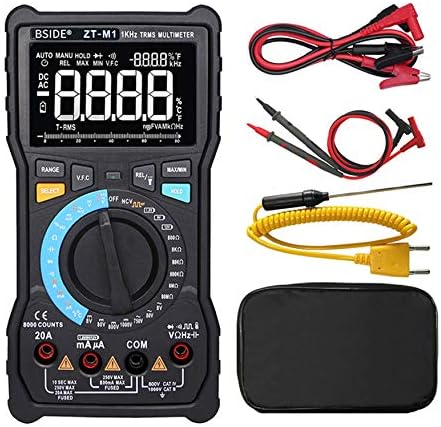
Abbildung 1: The BSIDE ZT-M1 Digital Multimeter shown with its complete set of accessories, including standard test leads (red and black), alligator clip adapters, a K-type thermocouple temperature probe, and a protective carrying pouch.
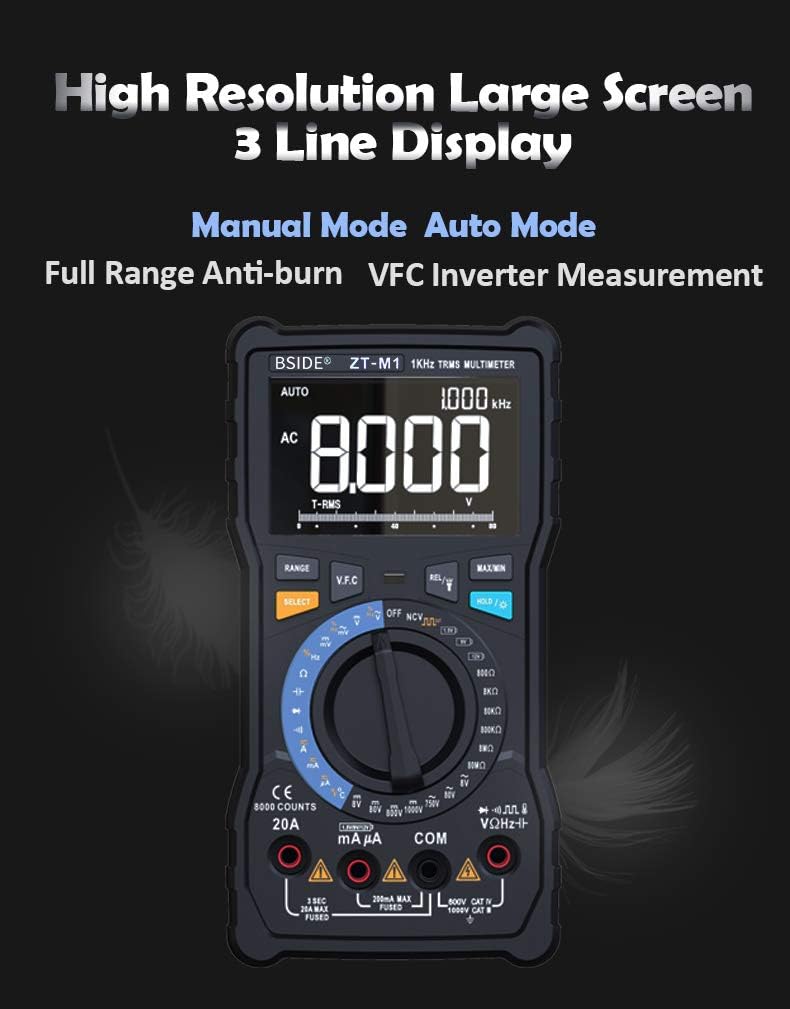
Abbildung 2: Eine detaillierte view of the multimeter's high-resolution, 3-line display. This display can show multiple readings simultaneously, such as AC voltage, frequency, and an analog bar graph, enhancing readability and data interpretation.

Abbildung 3: Key physical features of the multimeter. This includes a convenient back probe holder for secure storage, an integrated flashlight for illumination in dark environments, and a robust protective case designed to shield the device from impacts and abrasions.
Aufstellen
Einlegen der Batterie
The BSIDE ZT-M1 is powered by standard batteries (not specified in input, assuming common type like AA/AAA or 9V). To install or replace batteries:
- Stellen Sie sicher, dass das Multimeter ausgeschaltet ist und trennen Sie alle Messleitungen.
- Suchen Sie die Abdeckung des Batteriefachs auf der Rückseite des Geräts.
- Use a screwdriver (if required) to open the compartment.
- Legen Sie die neuen Batterien ein und achten Sie dabei auf die richtige Polarität (+/-), wie im Batteriefach angegeben.
- Schließen Sie den Batteriefachdeckel fest.
Anschließen der Messleitungen
Schließen Sie die schwarze Messleitung immer an die „COM“-Buchse (Common) an. Schließen Sie die rote Messleitung je nach Messart an die entsprechende Eingangsbuchse an.
- Für Bdtage, Resistance, Capacitance, Frequency, Diode, and Continuity measurements: Connect the red lead to the "VΩHz" jack.
- For Current measurements (mA/µA): Connect the red lead to the "mAµA" jack.
- For High Current measurements (A): Connect the red lead to the "20A" jack.
- For Temperature measurements: Connect the K-type thermocouple probe to the designated temperature input jacks (usually marked with temperature symbols).
Bedienungsanleitung
Ein-/Ausschalten und Modusauswahl
Turn the rotary switch to the desired measurement function to power on the multimeter. To turn off the multimeter, rotate the switch to the "OFF" position. The device features both Auto and Manual ranging modes.

Abbildung 4: Illustration of the multimeter's rotary switch, highlighting the distinct Auto Mode and Manual Mode sections. Auto mode automatically selects the correct measurement range, while Manual mode allows the user to select a specific range for precise control.
Messfunktionen
- DC-Voltage (V/mV): Rotate the switch to the DC Voltage position. Connect test leads in parallel with the circuit or component. Ranges: 800.0mV, 8.000V, 80.00V, 800.0V, 1000V.
- AC-Lautstärketage (V/mV): Rotate the switch to the AC Voltage position. Connect test leads in parallel. Ranges: 800.0mV, 8.000V, 80.00V, 800.0V, 750V. Features True RMS measurement.
- DC Current (A/mA/µA): Rotate the switch to the DC Current position. Connect test leads in series with the circuit. Ranges: 800.0µA, 8.000mA, 80.00mA, 800.0mA, 8.000A, 20.00A.
- AC Current (A/mA/µA): Rotate the switch to the AC Current position. Connect test leads in series. Ranges: 800.0µA, 8.000mA, 80.00mA, 800.0mA, 8.000A, 20.00A. Features True RMS measurement.
- Widerstand (Ω): Rotate the switch to the Resistance position. Ensure the circuit is de-energized. Connect test leads across the component. Ranges: 800.0Ω, 8.000kΩ, 80.00kΩ, 800.0kΩ, 8.000MΩ, 80.00MΩ.
- Capacitance (F/nF/mF): Rotate the switch to the Capacitance position. Ensure capacitors are discharged before testing. Ranges: 9.999nF, 99.99nF, 999.9nF, 9.999µF, 99.99µF, 999.9µF, 9.999mF, 99.99mF.
- Frequenz (Hz): Rotate the switch to the Frequency position. Ranges: 9.999Hz, 99.99Hz, 999.9Hz.
- Arbeitszyklus: Available in conjunction with Frequency measurement. Range: 1%~99%.
- Temperatur (°C/°F): Rotate the switch to the Temperature position. Connect the K-type thermocouple. Ranges: -20°C to 1000°C (-4°F to 1832°F).
- Diodentest: Rotate the switch to the Diode position. Used to check the forward voltagDer Abfall einer Diode.
- Durchgangsprüfung: Rotate the switch to the Continuity position. An audible beep indicates continuity (low resistance).
- Rechteckwellenausgang: The multimeter can generate a square wave signal. Frequencies: 50Hz~5000Hz.
Sonderfunktionen
- Datenaufnahme: Drücken Sie die Taste „HOLD“, um den aktuellen Messwert auf dem Display einzufrieren. Drücken Sie erneut, um die Taste zu lösen.
- Hintergrundbeleuchtung: The display features a backlight for improved visibility in low-light conditions. (Activation method not specified, assuming a dedicated button or automatic).
- V.F.C (Variable Frequency Converter) Measurement: This function allows for accurate measurement of the output voltage of variable frequency drives (VFDs) or inverters.
- Batterietest: The multimeter includes a dedicated function for testing battery voltage.
- Automatisches Ausschalten: Um die Batterielebensdauer zu verlängern, schaltet sich das Multimeter nach einer gewissen Zeit der Inaktivität automatisch aus.
- Anzeige für niedrigen Batteriestand: An icon on the display will indicate when the battery level is low and requires replacement.
- Taschenlampe: An integrated flashlight assists in illuminating the test area, especially useful in dark environments.

Abbildung 5: The multimeter's capability to display temperature in both Celsius and Fahrenheit, along with an analog bar graph. Below, it demonstrates the V.F.C function, showing its ability to accurately measure the output voltage from an inverter, which is crucial for industrial applications.
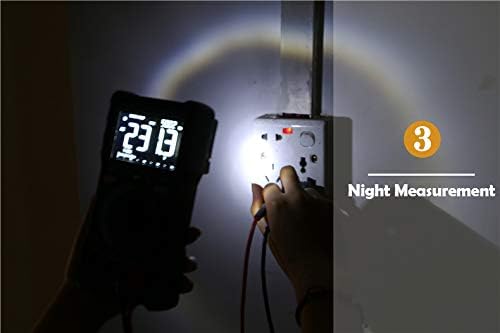
Abbildung 6: The multimeter's built-in flashlight in use, providing illumination for making measurements in dimly lit or dark conditions, such as inspecting a wall socket at night.
Wartung
Reinigung
Löschen Sie den Fall mit Anzeigeamp Mit einem Tuch und mildem Reinigungsmittel reinigen. Keine Scheuermittel oder Lösungsmittel verwenden. Das Gerät vor Gebrauch vollständig trocknen.
Batteriewechsel
When the low battery indicator appears, replace the batteries as described in the "Setup" section. Remove batteries if the device will not be used for an extended period to prevent leakage.
Lagerung
Store the multimeter in a cool, dry place, away from direct sunlight and extreme temperatures. Utilize the provided protective case for enhanced durability and protection.
Fehlerbehebung
If you encounter issues with your BSIDE ZT-M1 Multimeter, refer to the following common problems and solutions:
- Kein Display/Strom eingeschaltet: Überprüfen Sie den Einbau der Batterien und stellen Sie sicher, dass die Batterien nicht entladen sind.
- Ungenaue Messwerte: Verify test lead connections, ensure the correct function and range are selected. Check battery level.
- „OL“ oder Überlastungsanzeige: The measured value exceeds the selected range. Switch to a higher range or use auto-ranging mode.
- Kein Kontinuitätssignal: Stellen Sie sicher, dass der Stromkreis spannungsfrei ist. Prüfen Sie die Messleitungen auf Beschädigungen.
- Displayflackern: Low battery may cause display instability. Replace batteries.
Technische Daten
Detailed technical specifications for the BSIDE ZT-M1 Digital Multimeter:
| Parameter | Wertebereich |
|---|---|
| Anzeige | 8000 Counts, 3-Line Triple Display |
| Reichweite | Auto/Manuell |
| Material | ABS/PVC |
| Aktualisierungsrate | 3-mal / Sekunde |
| Echter Effektivwert | Ja |
| DC-Voltage (V) | 800.0mV / 8.000V / 80.00V / 800.0V / 1000V (±0.5%+3) |
| AC-Lautstärketage (V) | 800.0mV / 8.000V / 80.00V / 800.0V / 750V (±1.0%+3) |
| Gleichstrom (A) | 800.0µA / 8.000mA / 80.00mA / 800.0mA / 8.000A / 20.00A (±1.2%+3) |
| Wechselstrom (A) | 800.0µA / 8.000mA / 80.00mA / 800.0mA / 8.000A / 20.00A (±1.5%+3) |
| Widerstand (Ω) | 800.0Ω / 8.000kΩ / 80.00kΩ / 800.0kΩ / 8.000MΩ (±0.5%+3), 80.00MΩ (±1.5%+3) |
| Kapazität (F) | 9.999nF (±5.0%+5), 99.99nF / 999.9nF / 9.999µF / 99.99µF / 999.9µF (±2.0%+5), 9.999mF / 99.99mF (±5.0%+5) |
| Frequenz (Hz) | 9.999Hz / 99.99Hz / 999.9Hz (±0.1%+2) |
| Arbeitszyklus | 1%~99% (±0.1%+2) |
| Temperatur | -20°C ~ 1000°C / -4°F ~ 1832°F (±2.5%+5) |
| Diodentest | Ja |
| Durchgangsprüfung | Ja |
| Rechteckwellenausgang | 50 Hz ~ 5000 Hz |
| V.F.C Converter | Ja |
| Daten halten | Ja |
| Hintergrundbeleuchtung | Ja |
| Batterietest | Ja |
| Anzeige für niedrigen Batteriestand | Ja |
| Automatische Abschaltung | Ja |
Garantieinformationen
Specific warranty details for the BSIDE ZT-M1 Multimeter are not provided in this manual. Please refer to the product packaging or the manufacturer's official webDie Garantiebedingungen finden Sie auf der Webseite.
Kundenservice
For technical assistance, troubleshooting beyond this manual, or inquiries regarding your BSIDE ZT-M1 Multimeter, please contact the retailer or manufacturer directly. Contact information is typically available on the product packaging or the official BSIDE webWebsite.
Ask a question about this manual
Ask about setup, troubleshooting, compatibility, parts, safety, or missing instructions. Manuals+ will review the question and use this page’s manual context to help answer it.