
1. Einleitung
The LAUNCH CRP123XV2.0 is an advanced OBD2 diagnostic tool designed to assist in comprehensive vehicle diagnosis and maintenance. This 2025 upgraded model offers enhanced features, including 4-system diagnosis (Engine, Transmission, ABS, SRS) and 7 essential reset functions. Equipped with an Android 8.1 operating system, a 5-inch touchscreen, and a robust 6100mAh battery, it provides a user-friendly and efficient experience for both professional technicians and car enthusiasts. This manual provides detailed instructions for the proper use and care of your device.

Figure 1: LAUNCH CRP123XV2.0 Diagnostic Tool Overview
2. Einrichtung
2.1. Auspacken und erste Aufladung
Upon receiving your LAUNCH CRP123XV2.0, carefully unbox all components. It is recommended to fully charge the device before its first use. Connect the provided charging cable to the device and a suitable power source. The 6100mAh battery ensures extended operation.
2.2. Einschalten und Sprachauswahl
Press and hold the power button to turn on the device. Follow the on-screen prompts to select your preferred language. The device supports multiple languages.
2.3. Wi-Fi Connection and Software Update
Connect the device to a stable Wi-Fi network. This is crucial for receiving lifetime free software updates, which frequently add new vehicle models and functions. Navigate to the 'Upgrade' section in the main menu to check for and install available updates. Regular updates ensure optimal performance and compatibility.
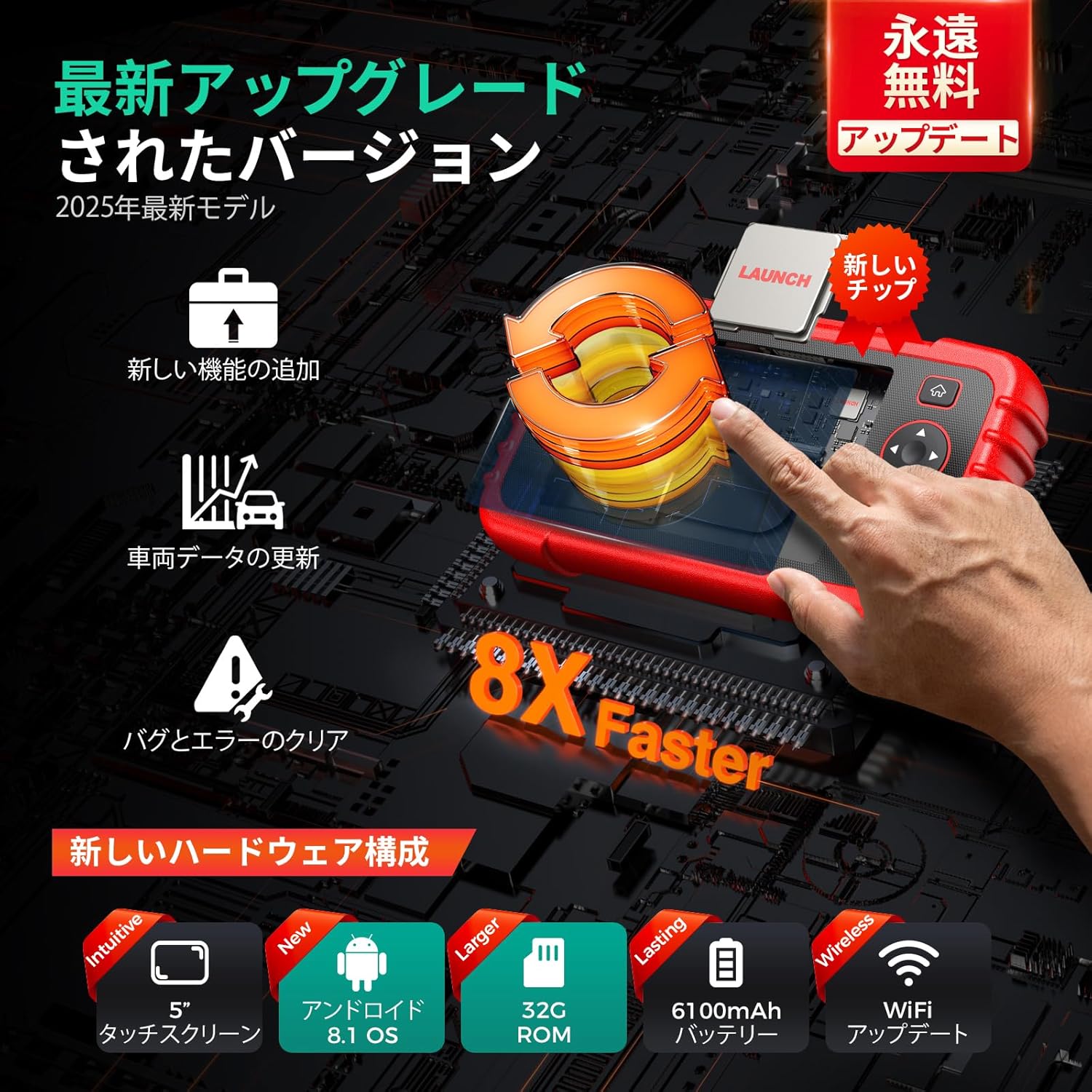
Figure 2: Hardware Upgrades and Wireless Update Capability
2.4. Fahrzeugverbindung
Locate the OBD2 port in your vehicle (typically under the dashboard). Connect the diagnostic tool's cable to the vehicle's OBD2 port. Ensure a secure connection before proceeding with any diagnostic operations.
3. Bedienungsanleitung
3.1. 4-System Diagnosis
The CRP123XV2.0 provides in-depth diagnosis for four critical vehicle systems: Engine, Transmission, Anti-lock Braking System (ABS), and Supplemental Restraint System (SRS/Airbag). When a warning light illuminates, use this function to:
- Read DTCs (Diagnostic Trouble Codes): Identify the specific fault codes causing the issue.
- Fehlercodes löschen: Erase fault codes after repairs are completed, turning off warning lights.
- View Lebensdaten: Monitor real-time parameters from the selected system.

Figure 3: 4-System Diagnostic Capabilities
3.2. 7 Reset-Funktionen
The device includes 7 commonly used maintenance reset functions:
- Ölrücksetzung: Setzt das Öllebensdauersystem nach einem Ölwechsel zurück.
- SAS-Reset (Lenkwinkelsensor): Kalibriert den Lenkwinkelsensor.
- BMS-Reset (Batteriemanagementsystem): Registriert eine neue Batterie im Steuergerät.
- Brake Reset (EPB Electronic Parking Brake): Setzt die elektronischen Parkbremsbeläge nach dem Austausch zurück.
- DPF-Regeneration (Dieselpartikelfilter): Leitet den DPF-Regenerationsprozess ein.
- ABS-Blutung: Performs ABS bleeding to restore brake sensitivity.
- Drosselklappenanpassung: Lernt die Drosselklappenstellung neu.

Abbildung 4: Überview of 7 Reset Functions
3.3. Live Data Stream Display
Monitor various real-time vehicle parameters such as oil temperature, pressure, transmission temperature, engine RPM, and coolant temperature. The device can display data in a single multi-graph or merge up to four PIDs (Parameter IDs) for comparative analysis, helping to pinpoint anomalies.

Figure 5: Live Data Stream with 4-in-1 Graph
3.4. DTC Code Definition
The built-in DTC library provides detailed explanations for diagnostic trouble codes, allowing you to understand the meaning of each code without needing external resources.
3.5. Fahrzeugzustandsbericht
Generate a comprehensive vehicle health report automatically. This report can be recorded, played back for further analysis, shared via email, or printed from a computer. It provides a clear overview über den Status des Fahrzeugs.

Abbildung 6: Erstellung und Weitergabe von Diagnoseberichten
3.6. Batterievolumentage-Test
Überwachen Sie die Batteriespannung des Fahrzeugs.tage in real-time. The device displays the voltage both graphically and numerically, providing insight into the battery's health.
3.7. FCA AutoAuth
The CRP123XV2.0 supports FCA AutoAuth, enabling diagnosis of 2018 and newer FCA SGW (Security Gateway) equipped vehicles.
4. Wartung
4.1. Reinigen des Geräts
Verwenden Sie ein weiches,amp cloth to clean the device's exterior. Avoid using abrasive cleaners or solvents that could damage the screen or casing. Keep the OBD2 connector free from dust and debris.
4.2. Software-Updates
Regularly check for and install software updates via Wi-Fi. These updates provide new features, bug fixes, and expanded vehicle compatibility. Navigate to the 'Upgrade' section on the main menu to perform updates.
4.3. Batteriepflege
Um die Akkulaufzeit zu verlängern, sollte das Gerät nicht häufig vollständig entladen werden. Bewahren Sie das Gerät bei Nichtgebrauch an einem kühlen, trockenen Ort auf. Bei längerer Lagerung sollte der Akku auf etwa 50–70 % geladen sein.
4.4. Speicherung
Store the diagnostic tool in its protective carrying case to prevent damage from impacts or environmental factors. Keep it away from extreme temperatures and direct sunlight.
5. Fehlerbehebung
5.1. Gerät lässt sich nicht einschalten
- Stellen Sie sicher, dass das Gerät vollständig aufgeladen ist.
- Vergewissern Sie sich, dass der Netzschalter richtig gedrückt und gedrückt gehalten wird.
5.2. Verbindungsprobleme mit dem Fahrzeug
- Check that the OBD2 cable is securely connected to both the device and the vehicle's OBD2 port.
- Stellen Sie sicher, dass die Zündung des Fahrzeugs eingeschaltet ist (Motor aus oder laufen, je nach Test).
- Confirm your vehicle is OBD2 compliant (most vehicles manufactured after 1996 are).
- Note: Some specific vehicle models, such as Daihatsu, may not be supported. Refer to the product specifications for compatible brands.
5.3. Update Failures
- Stellen Sie eine stabile und leistungsstarke WLAN-Verbindung sicher.
- Prüfen Sie, ob auf dem Gerät ausreichend Speicherplatz vorhanden ist.
- Starten Sie das Gerät neu und versuchen Sie das Update erneut.
5.4. Falsche Sprachanzeige
If the language display is incorrect or appears to be a poor translation, navigate to the settings menu to re-select the desired language. While efforts are made for accurate translations, minor discrepancies may occur.
5.5. General Issues and Technical Support
For any other issues or detailed assistance, utilize the 'Online Feedback' feature on the device or contact the seller directly. Providing detailed information about the problem will help in receiving a prompt and appropriate solution.

Figure 7: Support and Troubleshooting Resources
6. Spezifikationen
| Besonderheit | Beschreibung |
|---|---|
| Modell | CRP123XV2.0 |
| Betriebssystem | Android 8.1 |
| Prozessor | New, faster processor |
| Erinnerung | 32 GB ROM |
| Anzeige | 5-Zoll-Touchscreen (720p) |
| Batterie | Wiederaufladbarer Lithium-Ionen-Akku mit 6100 mAh |
| Konnektivität | Wireless WiFi |
| Fahrzeugabdeckung | 1996-2025 models, 80+ brands (Universal Fit) |
| Maße | 25.3 x 18.7 x 8.2 cm |
| Gewicht | 1.06 kg |
| UPC | 680666201616 |

Figure 8: Model Comparison and Upgrades
7. Garantie und Support
7.1. Qualitätsgarantie
The LAUNCH CRP123XV2.0 comes with a one-year quality guarantee. In the event of any quality-related issues within this period, free replacement or repair services will be provided.
7.2. Kostenlose Software-Updates auf Lebenszeit
Enjoy lifetime free software updates for your device. These updates ensure your tool remains current with the latest vehicle models and diagnostic technologies. Connect to Wi-Fi regularly to download and install updates.
7.3. Technischer Support
For any questions or concerns regarding the product, please contact the seller directly. The device also features an 'Online Feedback' function, allowing you to submit issues and receive appropriate solutions.