
1. Produktüberschreitungview
The Symcode 2D Bluetooth Ring Barcode Scanner is a wearable, wireless, and compact device designed for efficient barcode reading. Its ring design allows for comfortable wear on the finger, enhancing user satisfaction and productivity. This scanner supports a wide range of 1D and 2D barcodes and offers versatile connectivity options for various operating systems and devices.

Figure 1: Symcode 2D Bluetooth Ring Barcode Scanner
2. Packungsinhalt
Bitte überprüfen Sie nach dem Öffnen des Pakets, ob alle unten aufgeführten Artikel vorhanden und in einwandfreiem Zustand sind:
- 1 x Mini Barcode Scanner
- 1 x English Version User Manual
- 1 x USB-Kabel
- 1 x Charger Head
- 1 x Mobile Phone 4.0 Receiver (Bluetooth Dongle)

Abbildung 2: Packungsinhalt
3. Funktionen
- Tragbares Ringdesign: Allows for comfortable use on the finger, left or right, increasing satisfaction and comfort during extended use.
- Duale drahtlose Konnektivität: Supports both 2.4G Wireless (via dongle) and Bluetooth 4.0 for flexible connection to various devices.
- Breite Kompatibilität: Compatible with Microsoft Windows XP/7.0/8.0/10, Android, and iOS devices.
- Extensive Barcode Support: Scans 1D codes (UPC, EAN, Code128, Code39, Code11, Interleaved 2 of 5, Codabar, etc.) and 2D codes (PDF417, Data Matrix, QR Code, etc.).
- Große Übertragungsdistanz: Up to 30 feet (10m) for Bluetooth and up to 492ft (150m) in barrier-free environments for 2.4G wireless.
- Zwei Upload-Modi: Supports Instant Upload Mode (synchronous data upload) and Storage Mode (stores up to 50,000 barcodes in 512KB memory for later upload).
- Langlebige Batterie: Provides up to 6 hours of continuous scanning and a standby time of up to 720 hours. Fully recharges in approximately 1.5 hours.
4. Einrichtung
4.1 Aufladen des Scanners
Before initial use, fully charge the scanner using the provided USB cable and charger head. Connect the USB cable to the scanner's charging port and the other end to a power source. The charging indicator light will show the charging status.

Abbildung 3: Batterieinformationen
4.2 Mit einem Gerät verbinden
The scanner offers two primary connection methods: 2.4G Wireless via dongle and Bluetooth 4.0.
4.2.1 2.4G Wireless Connection (via Dongle)
- Plug the 2.4G wireless receiver (dongle) into an available USB port on your laptop, PC, or POS system.
- Schalten Sie den Barcode-Scanner ein. Er sollte sich automatisch mit dem Dongle koppeln.
- A successful connection will be indicated by a specific sound or light on the scanner.
4.2.2 Bluetooth 4.0-Verbindung
- Ensure Bluetooth is enabled on your mobile phone, tablet, or computer.
- Schalten Sie den Barcode-Scanner ein.
- On your device, search for available Bluetooth devices. The scanner should appear as "Barcode Scanner HID" or similar.
- Select the scanner to pair. A successful connection will be indicated by a specific sound or light on the scanner.

Abbildung 4: Optionen für drahtlose Verbindungen

Abbildung 5: Übertragungsdistanz
Video 1: Demonstrates unboxing, product rotation, and connecting the scanner to a laptop and mobile device via Bluetooth for scanning.
5. Bedienungsanleitung
5.1 Tragen des Scanners
The ring scanner is designed to be worn on your finger. Adjust the strap for a comfortable and secure fit. The scanner head can be rotated 180 degrees to accommodate different scanning angles and user preferences.

Figure 6: 180 Degree Rotation
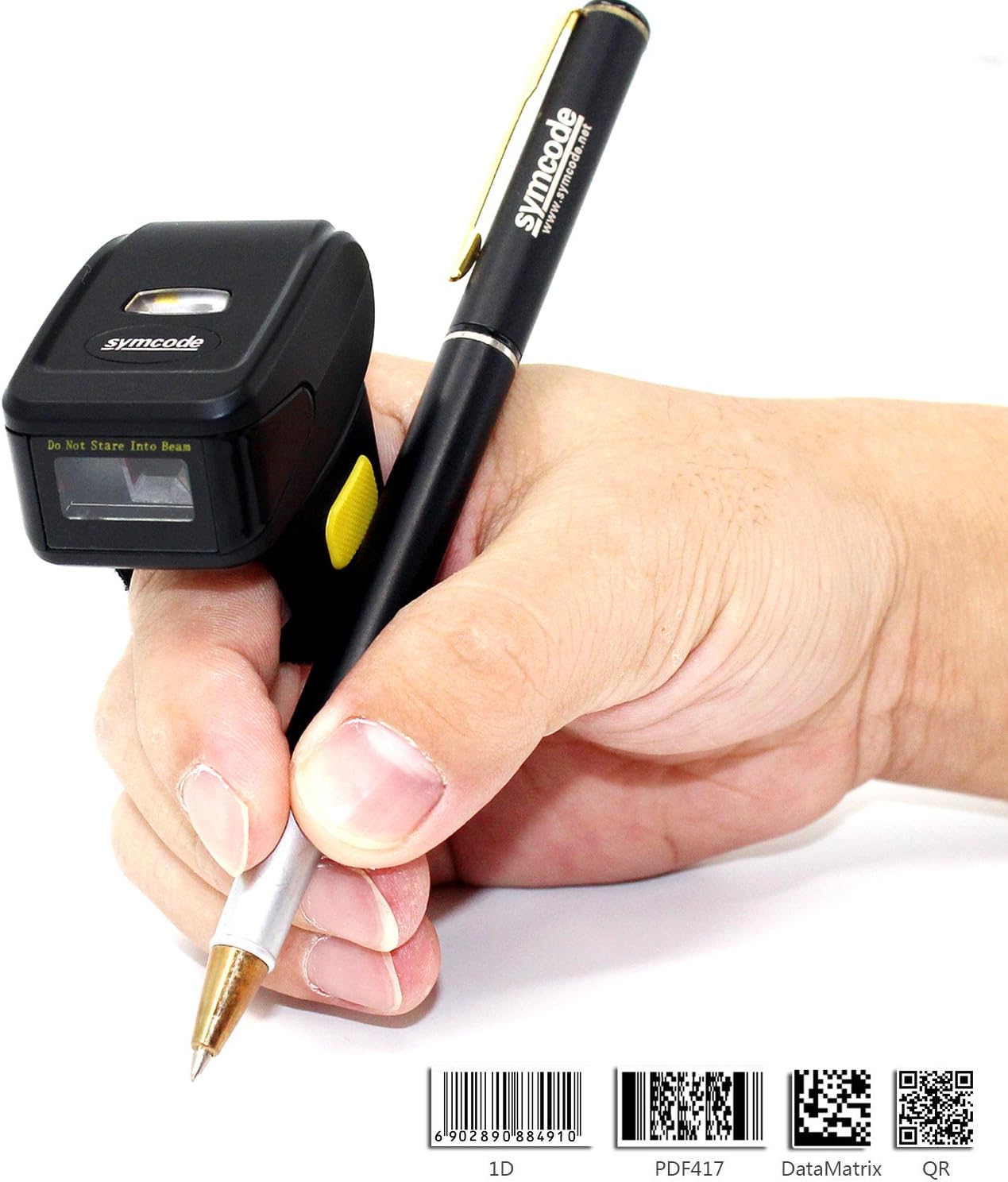
Figure 7: Ergonomic Use
5.2 Scannen von Barcodes
Once connected, point the scanner's laser at the barcode you wish to scan and press the trigger button. The scanner will emit a beep and/or flash to indicate a successful scan. The scanned data will appear on your connected device.
5.3 Upload-Modi
Der Scanner unterstützt zwei Daten-Upload-Modi:
- Sofort-Upload-Modus: Data is synchronously uploaded to your device as soon as a barcode is scanned. This is ideal for real-time inventory management or POS systems.
- Speichermodus: Barcode data is stored in the scanner's internal memory (up to 512KB, capable of holding over 50,000 barcodes). This mode is useful when working out of range of your device. Data can be uploaded later when a connection is re-established. Refer to the included user manual for specific instructions on switching between modes and uploading stored data.

Abbildung 8: Zwei Upload-Modi
6. Spezifikationen
| Besonderheit | Detail |
|---|---|
| Modellnummer | MJ-R30CB-2D |
| Lichtquelle | 650nm visible laser |
| Scanrate | 100 ± 10 scans/second |
| Reading Preciseness | 0.10 mm (4 mil) |
| Schnittstelle | Mobile phone wireless 4.0 (Bluetooth) |
| Batterie | DC 3.7V, 360mA Li-ion battery (1 Lithium Ion battery included) |
| Erinnerung | 512 KB |
| Unterstützte Betriebssysteme | Microsoft Windows XP/7.0/8.0/10, Android, iOS |
| Leseabstand | 2.5-600mm (100% UPC/EAN) |
| Unterstützte Barcode-Typen | Codabar, Code 11, Code 93, MSI, Code 128, UCC/EAN-128, Code 39, EAN-8, EAN-13, UPC-A, ISBN, Industrial 25, Interleaved 25, Standard 25, 2/5 Matrix, GS1 DataBar (formerly RSS) variants, PDF417, Data Matrix (ECC200, ECC000, 050, 080, 100, 140), QR Code |
| Scan Scope | 10 mm bis 250 mm |
| Scanwinkel | Roll: ±35 degree / Pitch: ±65 degree / Yaw: ±50 degree |
| Bitfehlerrate | 1 / 5 Millionen |
| Leistungsvolumentage | 5V |
| Sicherheitsleistung | CE und RoHS |
| Maße | 150mm x 50mm x 65mm (Product: 1.81 x 1.97 x 1.38 inches) |
| Gewicht | 95 g (4.4 Unzen) |
7. Wartung
To ensure the longevity and optimal performance of your Symcode barcode scanner, follow these maintenance guidelines:
- Reinigung: Reinigen Sie das Gehäuse des Scanners mit einem weichen, trockenen Tuch. Verwenden Sie für das Scanfenster ein Linsenreinigungstuch, um Kratzer zu vermeiden. Verwenden Sie keine Scheuermittel oder Lösungsmittel.
- Lagerung: Bewahren Sie den Scanner an einem kühlen, trockenen Ort fern von direkter Sonneneinstrahlung und extremen Temperaturen auf.
- Batteriepflege: Avoid fully discharging the battery frequently. Recharge the scanner when the battery low indicator appears. If storing for an extended period, charge the battery to about 50% and recharge every few months.
- Handhabung: Handle the scanner with care. Avoid dropping it or subjecting it to strong impacts, as this can damage internal components.
8. Fehlerbehebung
Sollten Sie Probleme mit Ihrem Scanner haben, beachten Sie bitte die folgenden gängigen Schritte zur Fehlerbehebung:
- Scanner schaltet sich nicht ein: Ensure the battery is charged. Connect the scanner to the charger and try again.
- No data transmitted after scanning: Verify that the scanner is properly connected to your device (Bluetooth or 2.4G wireless). Check the device's input settings to ensure it's ready to receive data.
- Kopplung via Bluetooth nicht möglich: Ensure the scanner is in pairing mode. On your device, try forgetting the scanner and re-pairing. Make sure no other Bluetooth devices are interfering.
- Schlechte Scanleistung: Ensure the barcode is clean and not damaged. Adjust the distance and angle of the scanner to the barcode. Check for sufficient lighting.
- Falsche Datenausgabe: Verify the scanner's configuration settings. You may need to scan specific configuration barcodes from the full user manual to adjust settings like prefix/suffix or data format.
For more detailed troubleshooting or issues not covered here, please consult the comprehensive user manual included in your package or contact Symcode customer support.
9. Garantie und Support
Symcode products are designed for reliability and performance. For information regarding product warranty, please refer to the warranty card included with your purchase or visit the official Symcode website. For technical support, product inquiries, or service requests, please contact Symcode customer service through the channels provided on their official webWebsite oder der Produktverpackung.
Visit the official Symcode Store for more products and support: Symcode Amazon Store
Additional resources may be available on the manufacturer's webWebsite: www.cnlhwood.com