
BOAVISION 1080P WiFi PTZ Camera
BOAVISION 1080P WiFi PTZ Security Camera User Manual
Model: 1080P WiFi PTZ Camera
Einführung
This manual provides detailed instructions for the installation, operation, and maintenance of your BOAVISION 1080P WiFi PTZ Security Camera. Please read this manual thoroughly before using the product to ensure proper functionality and safety.
Packliste
Überprüfen Sie, ob alle Artikel im Paket vorhanden sind:
- BOAVISION WiFi PTZ IP Camera
- Netzwerkkabel
- Schnellstartanleitung
- Stromversorgung
- Screws Bag (for mounting)
- Waterproof Port Kit
- Installations-CD

Image: Contents of the BOAVISION PTZ Camera package, including the camera, network cable, power supply, mounting screws, waterproof port, and manual.
Setup und Installation
1. Stromanschluss
Connect the provided power adapter to the camera's power input port and then plug it into a power outlet. The camera will initiate its startup sequence.
2. Netzwerkverbindung
The camera supports 2.4GHz Wi-Fi connectivity. Ensure your Wi-Fi network is 2.4GHz, as 5GHz networks are not supported. For initial setup or a stable connection, you may use the provided network cable to connect the camera directly to your router.
3. App-Installation und -Kopplung
Download the "CamHiPro" application from the Google Play Store (for Android devices) or the Apple App Store (for iOS devices). The camera is also compatible with PC (Mac OS, Windows) software available on the included CD or for download.
- Install the CamHiPro app on your smartphone or tablet.
- Öffnen Sie die App und folgen Sie den Anweisungen auf dem Bildschirm, um Ihre Kamera hinzuzufügen. Dies geschieht in der Regel durch Scannen eines QR-Codes auf der Kamera oder durch manuelle Eingabe ihrer ID.
- Configure Wi-Fi settings within the app if connecting wirelessly.

Image: The CamHiPro app interface shown on various devices, including smartphones, tablets, and computers, highlighting multi-platform compatibility.
4. Physical Mounting
The camera is designed for outdoor wall mounting. Use the provided screws and waterproof port kit to secure the camera in your desired location. Ensure the mounting surface is stable and can support the camera's weight.

Image: A BOAVISION PTZ camera mounted, illustrating its 355-degree pan and 90-degree tilt capabilities, controlled via a mobile application.
Bedienungsanleitung
Pan/Tilt and Optical Zoom
Control the camera's movement and zoom directly from the CamHiPro app. The camera offers 355 degrees of horizontal pan and 90 degrees of vertical tilt, providing a wide 328-foot view. The 5x optical zoom allows for detailed observation without loss of image quality.

Image: Comparison showing a scene at 1X optical zoom versus 5X optical zoom, demonstrating the camera's ability to magnify distant objects clearly.
HD Color Night Vision
The camera features 1080P resolution and is equipped with 6 array infrared LEDs and 2 white supplement lights, enabling clear color night vision up to 196 feet. You can switch between normal (infrared), smart, and full-color night vision modes via the app.
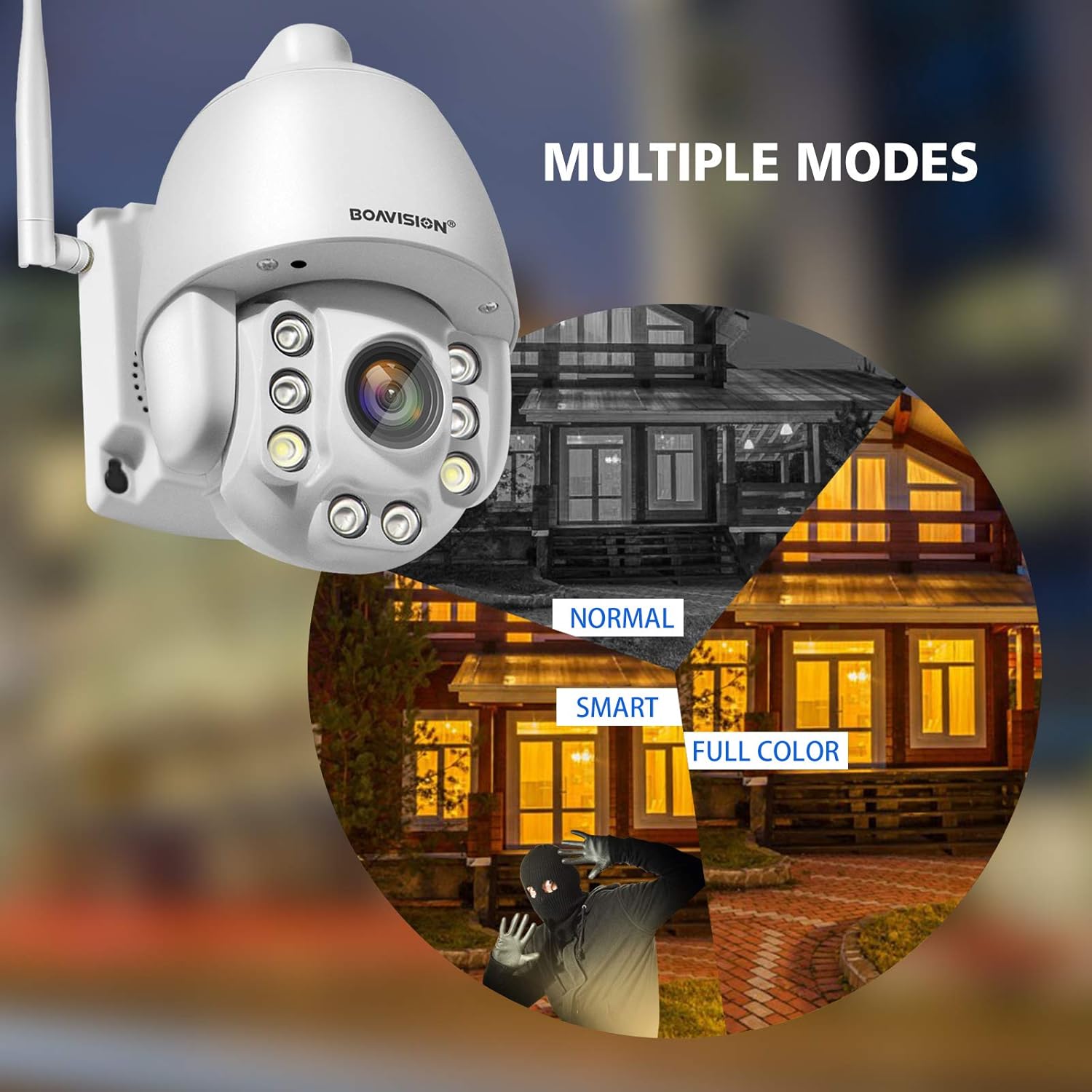
Image: Illustrates the three night vision modes: Normal (infrared black and white), Smart (activates white light upon motion), and Full Color (constant white light for color video at night).
Zwei-Wege-Audio
Utilize the built-in microphone and speaker for two-way communication. The anti-noise technology ensures clear audio. This feature allows you to speak with visitors or deter intruders remotely through the app.

Image: A delivery person at a door, with speech bubbles indicating two-way audio communication between the person and someone viewing through the camera app on a smartphone.
Bewegungserkennung und Alarme
Configure motion detection zones and sensitivity within the CamHiPro app. Upon detecting motion, the camera can send push notifications to your phone or email alerts, providing real-time security updates.

Image: Depicts a person triggering motion detection at night, with the camera's spotlight activating and an alert shown on a smartphone screen.
Lagerung
The camera supports local storage via a TF card slot (microSD card, not included). Ensure the card is inserted correctly for continuous recording or event-triggered recording. Cloud storage options may also be available through the app.
Wartung
- Reinigung: Reinigen Sie das Kameraobjektiv regelmäßig mit einem weichen, trockenen Tuch, um eine klare Bildqualität zu gewährleisten. Verwenden Sie keine scharfen Chemikalien.
- Firmware-Updates: Check the CamHiPro app periodically for firmware updates to ensure optimal performance and security.
- Stromversorgung: Stellen Sie sicher, dass die Stromversorgung fest angeschlossen und unbeschädigt ist.
- Abdichtung: Verify that all connections, especially the waterproof port, are sealed correctly to maintain the IP66 weather resistance.
Fehlerbehebung
- Kamera verbindet sich nicht mit WLAN:
- Stellen Sie sicher, dass Ihr WLAN-Netzwerk mit 2.4 GHz arbeitet. Die Kamera unterstützt kein 5-GHz-WLAN.
- Überprüfen Sie, ob das WLAN-Passwort korrekt ist.
- Place the camera closer to the Wi-Fi router to improve signal strength.
- Starten Sie die Kamera und Ihren Router neu.
- Versuchen Sie für die Ersteinrichtung eine Verbindung über ein Ethernet-Kabel herzustellen.
- Kein Bild oder schlechte Bildqualität:
- Stromanschluss prüfen.
- Reinigen Sie das Kameraobjektiv.
- Sorgen Sie für ausreichende Beleuchtung, um eine optimale Bildqualität zu gewährleisten, insbesondere nachts.
- Verify network stability and bandwidth.
- Keine Benachrichtigungen durch Bewegungserkennung empfangen:
- Check app notification settings on your phone and within the CamHiPro app.
- Ensure motion detection is enabled and sensitivity is adjusted correctly.
- Vergewissern Sie sich, dass die Kamera über eine stabile Internetverbindung verfügt.
- Probleme mit der Zwei-Wege-Audioübertragung:
- Ensure microphone and speaker permissions are granted to the CamHiPro app.
- Check volume settings on your device and within the app.
- Minimieren Sie Hintergrundgeräusche für eine klarere Kommunikation.
Technische Daten
| Modell | 1080P WiFi PTZ Camera |
| Auflösung | 1080p (1920x1080) |
| Optischer Zoom | 5x |
| Schwenk-/Neigebereich | Schwenkbereich: 355 Grad, Neigungsbereich: 90 Grad |
| Nachtsichtbereich | Bis zu 196 Fuß (60 Meter) |
| Nachtsichttyp | HD Color Night Vision (Infrared, Smart, Full Color modes) |
| Audio | Two-Way Audio with Anti-Noise Technology |
| Konnektivität | 2.4GHz Wi-Fi (IEEE 802.11b/g/n), Ethernet |
| Lagerung | TF Card Slot (MicroSD, up to 128GB, not included) |
| Kompatibilität | iOS, Android, Mac OS, Windows (via CamHiPro app/software) |
| Stromquelle | AC/DC-Adapter |
| Wetterbeständigkeit | IP66 (staubdicht und wasserdicht) |
| Abmessungen (L x B x H) | 6.89 x 4.53 x 4.33 Zoll |
| Gewicht | 1.76 Pfund |
| Montagetyp | Wandhalterung |
| Videoaufnahmeformat | MPEG-4 |
Garantieinformationen
Spezifische Garantiebedingungen finden Sie in der Regel in Ihren Kaufunterlagen oder auf der offiziellen Website des Herstellers. webBitte konsultieren Sie diese Ressourcen für Informationen zu Garantiedauer und -bedingungen.
Kundenservice
For technical assistance, troubleshooting not covered in this manual, or further inquiries, please contact BOAVISION customer support. Refer to the contact information provided in your product packaging or on the official BOAVISION webWebsite.
Besuchen Sie auch die BOAVISION Store on Amazon für zusätzliche Produktinformationen und Ressourcen.
Ask a question about this manual
Ask about setup, troubleshooting, compatibility, parts, safety, or missing instructions. Manuals+ will review the question and use this page’s manual context to help answer it.