
1. Einleitung
Thank you for choosing the DOSS SoundBox Plus Bluetooth Speaker. This manual provides essential information for setting up, operating, and maintaining your speaker to ensure optimal performance and longevity. The DOSS SoundBox Plus delivers 16W HD stereo sound with deep bass, features intuitive touch controls, and offers dynamic LED lights that sync with your music. It supports wireless stereo pairing for an enhanced audio experience and provides up to 20 hours of playtime.
2. Packungsinhalt
Bitte prüfen Sie das Paket auf folgende Artikel:
- DOSS SoundBox Plus Bluetooth Speaker
- Micro-USB-Ladekabel
- Benutzerhandbuch (dieses Dokument)
3. Produktüberschreitungview
Familiarize yourself with the components and controls of your DOSS SoundBox Plus speaker.

Abbildung 3.1: Vorderseite view of the DOSS SoundBox Plus Bluetooth Speaker, showing the speaker grilles and top panel controls.
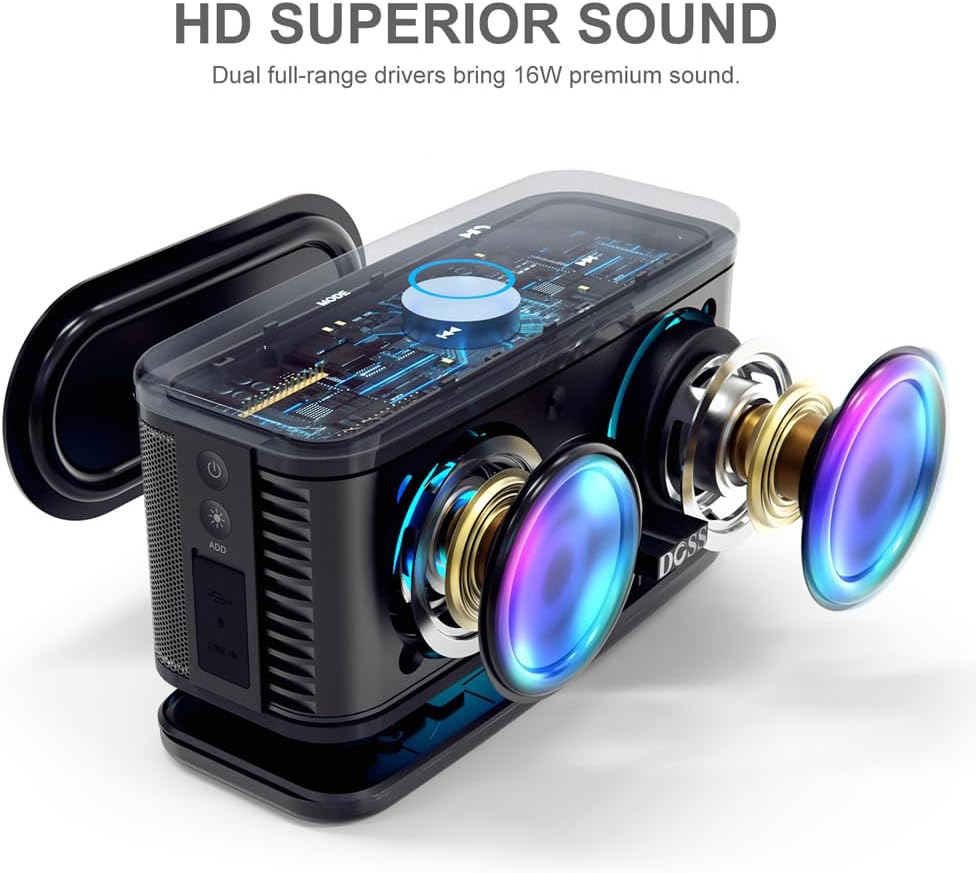
Abbildung 3.2: Explosionsdarstellung view illustrating the dual full-range drivers and passive radiator for HD superior sound.
Bedienelemente und Anzeigen:
- Netzschalter: Schaltet den Lautsprecher ein oder aus.
- Modus-Taste: Switches between Bluetooth, AUX, and TF card modes.
- Wiedergabe-/Pause-Taste: Steuert die Musikwiedergabe.
- Volume Control (Touch Ring): Rotate clockwise/counter-clockwise on the illuminated ring to adjust volume.
- Schaltflächen für vorherigen/nächsten Titel: Springt zum vorherigen oder nächsten Lied.
- Lichtmodustaste: Cycles through different LED light effects or turns them off.
- Micro-USB-Anschluss: Zum Aufladen des Lautsprechers.
- AUX-Eingangsanschluss: Für kabelgebundene Audioverbindungen.
- TF-Karten-Slot: Zum direkten Abspielen von Musik von einer TF-Karte (Micro SD-Karte).
4. Einrichtung
4.1 Aufladen des Lautsprechers
Before first use, fully charge your DOSS SoundBox Plus speaker. A full charge takes approximately 3-4 hours using the provided micro USB cable. The built-in 3200mAh rechargeable battery provides up to 20 hours of playtime at 50% volume (without lights).
- Schließen Sie das Micro-USB-Kabel an den Ladeanschluss des Lautsprechers an.
- Verbinden Sie das andere Ende des Kabels mit einem USB-Netzteil (nicht im Lieferumfang enthalten) oder einem USB-Anschluss Ihres Computers.
- Die LED-Anzeige zeigt den Ladestatus an und erlischt, wenn der Akku vollständig geladen ist.

Figure 4.1: The speaker is designed for extended playtime, indicating its 3200mAh battery capacity and 20-hour duration.
4.2 Ein-/Ausschalten
- Zum Einschalten die Ein-/Aus-Taste gedrückt halten, bis ein akustisches Signal ertönt.
- Zum Ausschalten die Ein-/Aus-Taste erneut gedrückt halten, bis sich der Lautsprecher ausschaltet.
4.3 Bluetooth-Kopplung
Der Lautsprecher wechselt automatisch in den Bluetooth-Kopplungsmodus, wenn er zum ersten Mal eingeschaltet wird oder wenn kein Gerät angeschlossen ist.
- Stellen Sie sicher, dass der Lautsprecher eingeschaltet und im Bluetooth-Modus ist (erkennbar an einer blinkenden blauen Leuchte).
- Aktivieren Sie auf Ihrem Gerät (Smartphone, Tablet, Computer) Bluetooth und suchen Sie nach verfügbaren Geräten.
- Select "DOSS SoundBox Plus" from the list of devices.
- Once connected, you will hear a confirmation sound, and the blue light will become solid.
Note: The speaker will automatically reconnect to the last paired device if it's within range.
5. Bedienung Ihres Lautsprechers
5.1 Grundlegende Musikwiedergabe
- Abspielen/Pause: Drücken Sie einmal die Play/Pause-Taste.
- Nächster Titel: Drücken Sie einmal die Taste „Nächster Titel“.
- Vorheriges Lied: Drücken Sie einmal die Taste „Vorheriger Titel“.
5.2 Lautstärkeregelung
The DOSS SoundBox Plus features a sensitive touch control ring for volume adjustment.

Figure 5.1: Adjust volume effortlessly using the capacitive touch control ring on the speaker's top panel.
- Lautstärke erhöhen: Gently slide your finger clockwise along the illuminated touch ring.
- Lautstärke verringern: Gently slide your finger counter-clockwise along the illuminated touch ring.
5.3 LED-Lichtmodi
Enhance your listening experience with dynamic LED lights that sync to the rhythm of your music.

Figure 5.2: The speaker's lights dynamically change color and pattern in sync with the music.
- Press the Light Mode button to cycle through different light patterns.
- Drücken Sie weiter, um das Licht auszuschalten.
5.4 Drahtlose Stereo-Kopplung (TWS-Funktion)
You can pair two DOSS SoundBox Plus speakers together for a true stereo sound experience and double the volume.

Figure 5.3: Two DOSS SoundBox Plus speakers wirelessly paired for an immersive stereo sound experience.
- Ensure both DOSS SoundBox Plus speakers are powered on and not connected to any Bluetooth device.
- On one speaker (this will be the primary speaker), press and hold the "ADD" button (usually near the charging port) until you hear a pairing prompt.
- Die beiden Lautsprecher verbinden sich automatisch miteinander. Nach erfolgreicher Kopplung hören Sie einen Bestätigungston.
- Sobald die Kopplung abgeschlossen ist, verbinden Sie Ihr Gerät über Bluetooth mit dem Hauptlautsprecher, wie in Abschnitt 4.3 beschrieben.
Note: TWS pairing only works with two DOSS SoundBox Plus speakers.
6. Wartung
- Reinigung: Reinigen Sie den Lautsprecher mit einem weichen, trockenen Tuch. Verwenden Sie keine Scheuermittel oder Lösungsmittel.
- Lagerung: Bewahren Sie den Lautsprecher an einem kühlen, trockenen Ort fern von direkter Sonneneinstrahlung und extremen Temperaturen auf.
- Batteriepflege: To preserve battery life, fully charge the speaker at least once every three months if not in regular use. Avoid fully discharging the battery frequently.
- Wasserbeständigkeit: This product is NOT waterproof. Avoid exposure to water or excessive moisture.
7. Fehlerbehebung
| Problem | Mögliche Ursache | Lösung |
|---|---|---|
| Der Lautsprecher lässt sich nicht einschalten. | Batterie ist leer. | Charge the speaker fully using the micro USB cable. |
| Kein Ton aus dem Lautsprecher. | Volume is too low or muted. Device not connected. Incorrect mode selected. | Increase volume on both the speaker (using the touch ring) and your connected device. Ensure Bluetooth is connected or AUX/TF card is properly inserted. Press the Mode button to cycle through modes. |
| Die Bluetooth-Verbindung schlägt fehl. | Speaker is out of range. Device's Bluetooth is off. Speaker is connected to another device. | Move the speaker closer to your device (within 66 feet). Ensure Bluetooth is enabled on your device. Disconnect from other devices or reset the speaker's Bluetooth. |
| Der Ton ist verzerrt. | Volume is too high. Low battery. | Decrease the volume. Charge the speaker. |
| Volume control via touch ring is unresponsive or difficult. | Improper touch technique. | Ensure you are gently sliding your finger along the illuminated blue circle on the top panel, rather than just tapping. A continuous slide is required for adjustment. |
8. Spezifikationen
| Besonderheit | Detail |
|---|---|
| Modellname | SoundBox Plus |
| Maximale Lautsprecherausgangsleistung | 16 Watt |
| Konnektivitätstechnologie | Bluetooth, USB (zum Aufladen) |
| Drahtlose Kommunikationstechnologie | Bluetooth 4.2 |
| Bluetooth-Reichweite | Bis zu 66 Fuß (20 Meter) |
| Batteriekapazität | 3200 mAh Lithium-Polymer |
| Akkulaufzeit | Up to 20 Hours (at 50% volume, without lights) |
| Ladezeit | 3-4 Stunden |
| Technische Daten | 4.1"T x 8.6"B x 4.2"H (10.4 cm T x 21.8 cm B x 10.7 cm H) |
| Artikelgewicht | 1.4 Pfund (0.64 kg) |
| Kontrollmethode | Berühren |
| Im Lieferumfang enthaltene Komponenten | Micro-USB-Kabel |

Figure 8.1: Detailed dimensions of the DOSS SoundBox Plus speaker.
9. Garantie und Support
Für DOSS-Produkte gilt eine 12-monatige Garantie ab Kaufdatum, die alle qualitätsbezogenen Bedenken abdeckt.
If you encounter any issues with your product or require assistance, please feel free to contact DOSS customer support. We are committed to providing you with 24-hour prompt assistance and support.

Figure 9.1: DOSS customer support details, including phone number and email address.
- Telefon: 1-833-275-3677
- E-Mail: support@dossav.com