
Sylvan HX-5000
Sylvan HX-5000 Hydroxyl & Ozone Generator User Manual
Modell: HX-5000
1. Einleitung
The Sylvan HX-5000 is an industrial-grade hydroxyl and ozone generator designed for air purification and odor elimination in large spaces. This unit offers the flexibility to operate in hydroxyl-only mode for occupied environments, ozone-only mode for unoccupied environments, or a combination of both for advanced treatment. It is intended for professional use in restoration and industrial applications.
This manual provides essential information for the safe and effective operation, setup, and maintenance of your HX-5000 unit. Please read it thoroughly before initial use.
2. Wichtige Sicherheitshinweise
- WARNUNG: DO NOT USE THE OZONE FUNCTION IN OCCUPIED SPACES. Ozone is a powerful oxidizer and can be harmful to humans, pets, and plants. Ensure the treatment area is completely vacant during ozone generation and for a sufficient period afterward (typically 24 hours) to allow ozone to dissipate.
- Always operate the unit in a well-ventilated area when using the hydroxyl function.
- The hydroxyl function requires an external air mover (sold separately) to effectively distribute hydroxyl molecules.
- Do not operate the unit if the power cord is damaged or if the unit shows signs of malfunction.
- Keep the unit away from water and moisture. Do not immerse in liquids.
- Stellen Sie sicher, dass das Gerät auf einer stabilen, ebenen Fläche steht.
- Vor jeglichen Wartungs- oder Reinigungsarbeiten den Netzstecker des Geräts ziehen.
- Dieses Gerät ist nicht für den Gebrauch durch Personen (einschließlich Kinder) mit eingeschränkten physischen, sensorischen oder geistigen Fähigkeiten oder Mangel an Erfahrung und Wissen bestimmt, es sei denn, sie werden von einer für ihre Sicherheit verantwortlichen Person beaufsichtigt oder erhalten Anweisungen zur Verwendung des Geräts.
3. Produktüberschreitungview
The Sylvan HX-5000 combines hydroxyl and ozone generation capabilities in a single robust unit. It features a control panel for selecting operating modes and adjusting ozone output.
3.1 Komponenten der Einheit
- Haupteinheit: Houses the hydroxyl optic assemblies and ozone generator.
- Bedienfeld: For power, mode selection, and ozone adjustment.
- Luftauslass: Where treated air exits the unit.
- Stromeingang: Zum Anschließen des Netzkabels.
- Handhaben: Für den Transport.

Abbildung 3.1: Vorderseite view of the Sylvan HX-5000 unit, showing the handle and the air outlet with internal components visible.
3.2 Systemsteuerung
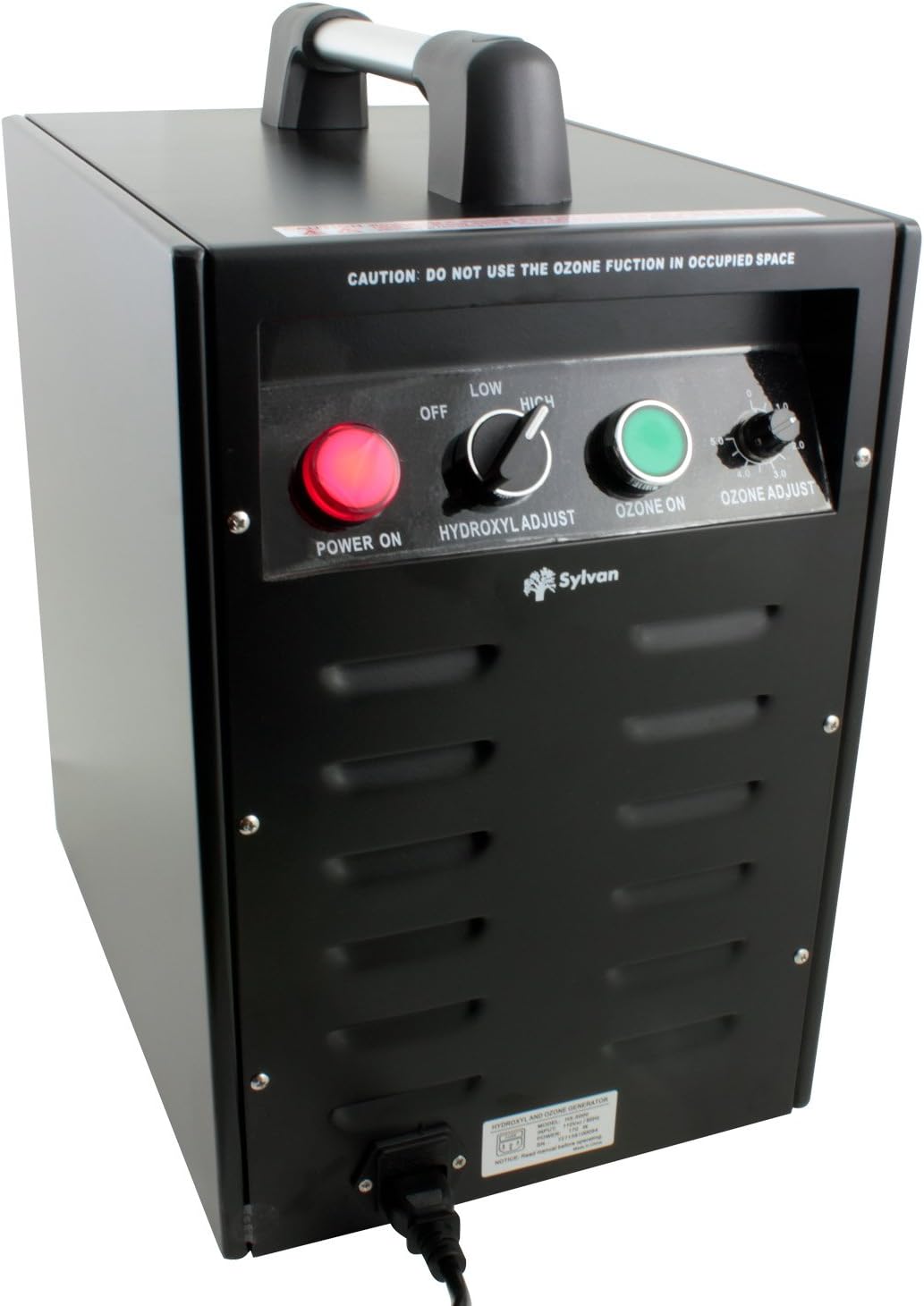
Abbildung 3.2: Ausführlich view des Bedienfelds.
- POWER ON (Red Button): Aktiviert das Gerät.
- HYDROXYL ADJUST (Toggle Switch): Selects between OFF, LOW, and HIGH hydroxyl output.
- OZONE ON (Green Button): Activates the ozone generation function.
- OZONE ADJUST (Rotary Knob): Adjusts ozone output from 0 to 5000 mg/hr.
- CAUTION Label: "DO NOT USE THE OZONE FUNCTION IN OCCUPIED SPACE"
4. Einrichtung und Installation
- Auspacken des Geräts: Carefully remove the HX-5000 from its packaging. Inspect for any shipping damage.
- Platzierung: Place the unit on a stable, level surface in the area to be treated. Ensure adequate clearance around the air inlet and outlet for proper airflow.
- Connect Air Mover (for Hydroxyl Function): For effective distribution of hydroxyl molecules, connect an external air mover (sold separately) to the air outlet of the HX-5000. The air mover helps circulate the treated air throughout the space.
- Stromanschluss: Plug the power cord into the unit's power inlet, then into a standard electrical outlet (AC power).
- Gebietsvorbereitung:
- Für Hydroxyl-only treatment: Ensure the area is well-ventilated if occupied.
- Für Ozone treatment (or combined Hydroxyl + Ozone): Evacuate all humans, pets, and plants from the treatment area. Close windows and doors to contain the ozone.

Figure 4.1: Sylvan HX-5000 connected to an external air mover for hydroxyl distribution.
5. Bedienungsanleitung
The HX-5000 offers three operating modes: Hydroxyl-only, Ozone-only, and Combined Hydroxyl + Ozone.
5.1 Hydroxyl-Only Operation (Occupied Spaces)
This mode is suitable for continuous air purification in occupied environments.
- Ensure an air mover is connected and operating to distribute hydroxyls effectively.
- Drücken Sie die EIN (red) button.
- Legen Sie die HYDROXYL ADJUST toggle switch to NIEDRIG or HOCH, depending on the treatment intensity required.
- Stellen Sie sicher, dass OZONE ON (green) button is AUS und die OZONE ADJUST Knopf eingestellt ist 0.
- Allow the unit to operate for the desired duration. Hydroxyl treatment typically requires longer periods (36-48 hours for small rooms) compared to ozone.
5.2 Ozone-Only Operation (Unoccupied Spaces)
CRITICAL: Ensure the treatment area is completely vacant of humans, pets, and plants before activating ozone.
- Ensure the area is evacuated and sealed (windows/doors closed).
- Drücken Sie die EIN (red) button.
- Legen Sie die HYDROXYL ADJUST toggle switch to AUS.
- Drücken Sie die OZONE ON (green) button.
- Passen Sie die OZONE ADJUST rotary knob to the desired output level (0-5000 mg/hr).
- Allow the unit to operate for the required treatment time (e.g., 24 hours for small rooms).
- Nach der Behandlung: Turn off the unit, unplug it, and ventilate the area thoroughly for at least 24 hours before re-entry.
5.3 Combined Hydroxyl + Ozone Operation (Unoccupied Spaces)
CRITICAL: This mode is highly oxidizing. Ensure the treatment area is completely vacant of humans, pets, and plants before activating.
- Ensure an air mover is connected and operating.
- Ensure the area is evacuated and sealed.
- Drücken Sie die EIN (red) button.
- Legen Sie die HYDROXYL ADJUST toggle switch to NIEDRIG or HOCH.
- Drücken Sie die OZONE ON (green) button.
- Passen Sie die OZONE ADJUST rotary knob to the desired output level.
- Allow the unit to operate for the required treatment time.
- Nach der Behandlung: Turn off the unit, unplug it, and ventilate the area thoroughly for at least 24 hours before re-entry.
6. Wartung
Regular maintenance ensures optimal performance and longevity of your HX-5000 unit.
- Reinigung der Außenseite: Wischen Sie die Außenseite des Geräts mit einem weichen,amp Mit einem Tuch abwischen. Keine Scheuermittel oder Lösungsmittel verwenden. Vor der Reinigung sicherstellen, dass das Gerät vom Stromnetz getrennt ist.
- Wartung des Luftfilters: The unit uses an Activated Carbon filter. Regularly check and clean or replace the air filter as needed to maintain airflow and efficiency. Refer to the filter manufacturer's instructions for specific cleaning or replacement intervals.
- Hydroxyl Optic Assemblies: The hydroxyl optic assemblies (UV lamps) have a limited lifespan. If hydroxyl output diminishes, they may need replacement. Contact Sylvan customer support for replacement parts and instructions.
- Ozonplatten: Ozone generation relies on ceramic plates. If ozone output diminishes, these plates may need cleaning or replacement. Contact Sylvan customer support for replacement parts and instructions.
7. Fehlerbehebung
| Problem | Mögliche Ursache | Lösung |
|---|---|---|
| Gerät lässt sich nicht einschalten. | Keine Stromversorgung. Der Netzschalter wurde nicht gedrückt. | Überprüfen Sie den Netzkabelanschluss und die Steckdose. Press the red POWER ON button. |
| No hydroxyl output. | Hydroxyl switch OFF. Optic assemblies worn out. | Set HYDROXYL ADJUST to LOW or HIGH. Contact Sylvan support for replacement optic assemblies. |
| No ozone output. | Ozone button OFF. Ozone adjust knob set to 0. Ozone plates dirty/worn. | Press the green OZONE ON button. Adjust OZONE ADJUST knob to desired level. Contact Sylvan support for cleaning/replacement of ozone plates. |
| Reduzierter Luftstrom. | Verstopfter Lufteinlass/Luftauslass. Schmutziger Luftfilter. | Stellen Sie sicher, dass keine Hindernisse vorhanden sind. Clean or replace the Activated Carbon filter. |
If troubleshooting steps do not resolve the issue, please contact Sylvan customer support.
8. Spezifikationen
- Modell: HX-5000
- Marke: Sylvan
- Produktabmessungen (T x B x H): 17" x 10" x 15"
- Artikelgewicht: 35 Pfund
- Energiequelle: AC
- Kontrollmethode: Touch-, Tastensteuerung
- Filtertyp: Aktivkohle
- Bedeckte Bodenfläche: Bis zu 2500 Quadratmeter
- Ozonausstoß: 0 - 5000 mg/hr (Adjustable)
- Besondere Merkmale: Hydroxyl and Ozone Generator Combo with Adjustable Ozone Output

Figure 8.1: Dimensions of the Sylvan HX-5000 unit.
9. Garantie und Support
For warranty information, technical support, or to order replacement parts, please contact Sylvan customer service. Refer to your purchase documentation for specific warranty terms and contact details.
Hersteller: SYLVAN
Ask a question about this manual
Ask about setup, troubleshooting, compatibility, parts, safety, or missing instructions. Manuals+ will review the question and use this page’s manual context to help answer it.