
1. Einleitung
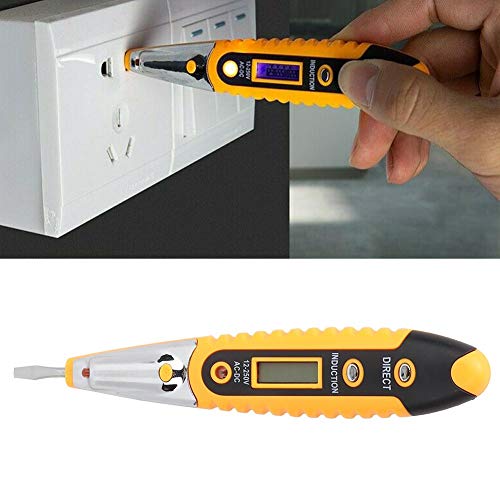
The Walfront VD700 Digital Test Pencil is a versatile tool designed for detecting AC and DC current within a range of 12-250V. It is also capable of identifying zero lines, phase lines, and breakpoints in AC circuits, as well as testing non-live conductors and continuity. Constructed from chrome vanadium alloy steel and ABS insulating plastic, this test pencil offers high hardness, wear resistance, and durability. Its insulated, ergonomic handle ensures comfortable and safe operation.
2. Sicherheitshinweise
WARNING: Always prioritize safety when working with electrical systems. Failure to follow these instructions may result in electric shock, injury, or death.
- Maximale Lautstärketage: AC vol nicht messentage über 250V.
- Isolierung: The tool features an insulated handle for safety. Ensure your hands are dry and you are not standing in water when using the device.
- Körperliche Verfassung: Do not use the device if the screen is not lit, if there is visible damage, or if the tip is not intact.
- DC-Voltage: Der Tester wird keine Lautstärke erkennentage wenn die Lautstärketage ist DC.
- Shielded Wires: Der Tester wird keine Lautstärke erkennentage if the wire is shielded.
- Erdung: Der Tester wird keine Lautstärke erkennentage if the operator is not grounded or is otherwise isolated from the ground.
- Conduit/Insulation: Der Tester kann keine Lautstärke erkennentage if the wire is partially buried, in a grounded metal conduit, too far from the voltage source, or if the insulation is too thick or incompatible.
- Known Live Circuit: Vor der Verwendung sollte das Testgerät stets an einem bekannten, unter Spannung stehenden Stromkreis getestet werden, um sicherzustellen, dass es ordnungsgemäß funktioniert.
3. Produktüberschreitungview


Hauptmerkmale:
- Material: Chrome vanadium alloy steel and ABS insulating plastic for high hardness and durability.
- Bandtage Reichweite: Detects 12-250V AC and DC current.
- Funktionalität: Simple detection of zero line, phase line, and breakpoints in AC current. Also tests non-live conductors and continuity.
- Ergonomisches Design: Soft, insulated handle for comfortable and safe use.
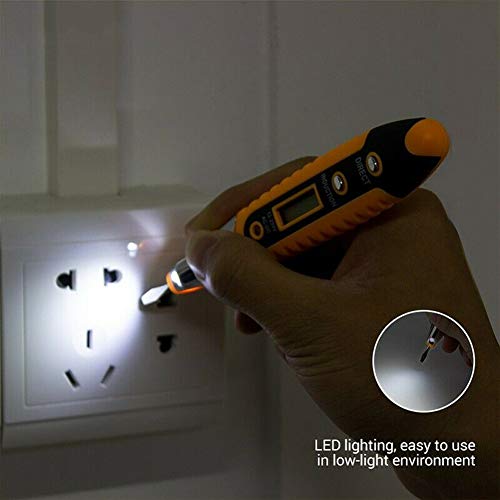
- LED-Beleuchtung: Integrated LED for improved visibility in low-light environments.
4. Einrichtung
Einlegen der Batterie:
The Walfront VD700 Test Pencil requires 3 AG10 (1.5V) batteries (not included). Follow these steps to install them:
- Unscrew the cap at the top of the test pencil to reveal the battery compartment.
- Insert three AG10 batteries, ensuring correct polarity (+/-).
- Securely screw the cap back onto the test pencil.

5. Bedienungsanleitung
Bandtage Detection (12-250V AC/DC):
- Ensure the test pencil is powered on and functioning correctly.
- Gently touch the tip of the test pencil to the conductor or surface you wish to test.
- The digital display will indicate the detected voltage.
Zero Line, Phase Line, and Breakpoint Detection (AC Current):
- Press the "inductive break point test" button on the test pencil.
- When the charged symbol appears on the display, the line being tested is the phase line.
- To detect a breakpoint in a live circuit, move the test pen along the wire. The point where the charged symbol disappears indicates the breakpoint.
Verwendung des LED-Lichts:
The integrated LED light can be activated to illuminate dark work areas, enhancing visibility during testing.
6. Wartung
- Reinigung: Wipe the test pencil with a dry, clean cloth. Do not use abrasive cleaners or solvents.
- Lagerung: Bewahren Sie das Gerät an einem kühlen, trockenen Ort fern von direkter Sonneneinstrahlung und extremen Temperaturen auf.
- Batteriewechsel: Replace batteries when the display becomes dim or the device fails to power on. Ensure correct battery type and polarity.
7. Fehlerbehebung
- Gerät lässt sich nicht einschalten: Überprüfen Sie den Batterieeinbau und stellen Sie sicher, dass die Batterien nicht entladen sind. Tauschen Sie sie gegebenenfalls aus.
- Kein Voltage-Erkennung:
- Ensure the circuit being tested is within the 12-250V AC/DC range.
- Verify the wire is not shielded or in a grounded metal conduit.
- Confirm the test pencil is in close proximity to the voltagDie Quelle.
- Check if the insulation of the wire is too thick for non-contact detection.
- Test the device on a known live circuit to confirm functionality.
- Ungenaue Messwerte: Ensure proper contact with the conductor and that environmental factors (e.g., strong electromagnetic fields) are not interfering.
8. Spezifikationen
| Besonderheit | Detail |
|---|---|
| Marke | Walfront |
| Modell | VD700 |
| Material | Chrome vanadium alloy steel and ABS insulating plastic |
| Bandtage Erfassungsbereich | 12-250V AC and DC |
| Batteriemodell | 3 x AG10 (1.5V) (not included) |
| Technische Daten | 25 x 7 x 2 cm |
| Artikelgewicht | 0.02 Kilogramm |
| Farbe | Gelb |
| Stil | Digital, Ergonomic |
9. Garantie und Support
Informationen zur Garantie und technische Unterstützung finden Sie auf der Produktverpackung oder wenden Sie sich direkt an den Walfront-Kundendienst. Bewahren Sie Ihren Kaufbeleg für eventuelle Garantieansprüche auf.