
Einführung
This manual provides instructions for the Extreme Networks Summit X460-24p, a high-performance, managed Layer 3 Ethernet switch designed for enterprise and data center environments. It features 24 Gigabit Ethernet ports with Power over Ethernet (PoE) capabilities, along with additional SFP and shared Gigabit SFP ports for flexible connectivity.
Sicherheitshinweise
Sicherheitshinweise
- Always disconnect all power supply inputs before removing any panel for servicing.
- This device contains a Class 1 Laser product. Avoid direct eye exposure to beam.
- Stellen Sie während der Installation eine ordnungsgemäße Erdung sicher.
- Refer to the installation manual for power cord selection and additional compliance markings.
Packungsinhalt
Lieferumfang
- Extreme Networks Summit X460-24p Switch
- Netzkabel (regionsspezifisch)
- Rack-Montagesatz
- Dokumentation (dieses Handbuch)
Produkt überview
The Summit X460-24p switch is designed for efficient network management and high-speed data transfer.
Rückseite

This image displays the rear panel of the Summit X460-24p switch, highlighting the power input, fan modules, and the SummitStack ports. The overall chassis is purple.

Eine detaillierte view of the SummitStack ports (Stack Port 1 and Stack Port 2) located on the rear of the switch, used for stacking multiple switches.
Produktetikett
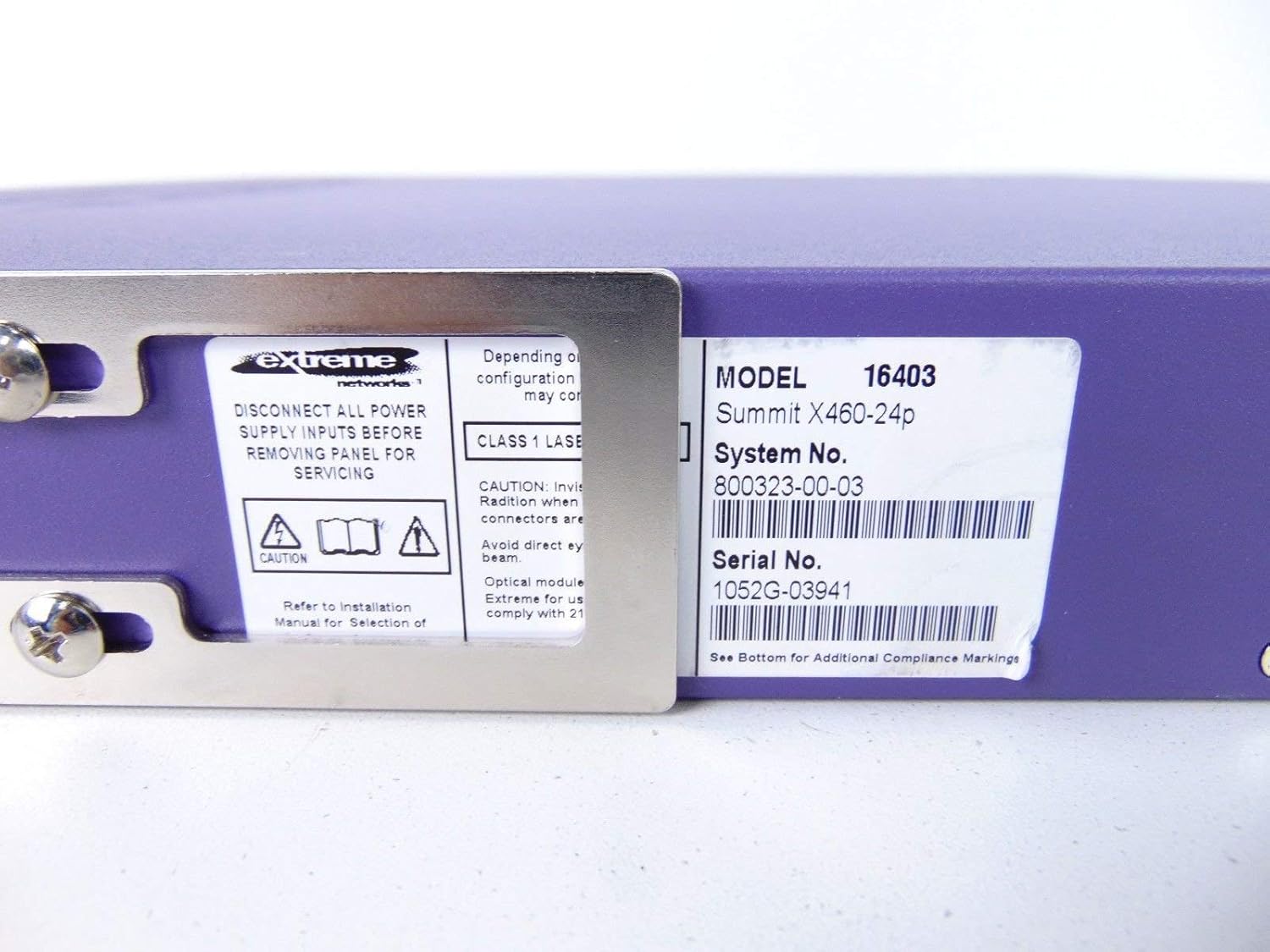
This label provides critical identification information for the switch, including Model: 16403, Summit X460-24p, System No.: 800323-00-03, and Serial No.: 1052G-03941.
Optionale Komponenten

This image shows the label for an optional Extreme Networks Summit 750W PoE AC Power Supply Unit (PSU), Model 10931, System No. 800382-00-03, Serial No. 1053A-41986.

This image displays the label for an optional Extreme Networks SummitStack Module, Model 16419, System No. 800384-00-01, Serial No. 1122G-02565.
Aufstellen
Installationshandbuch
Rack-Montage
The Summit X460-24p is designed for standard 19-inch rack mounting. Use the provided rack-mounting kit to secure the switch in a server rack. Ensure adequate ventilation around the unit.
Anschließen der Stromversorgung
Connect the power cord to the AC power inlet on the rear of the switch and then to a grounded electrical outlet. The switch will power on automatically.
Anschließen von Netzwerkkabeln
- Connect Ethernet cables from your network devices to the 24 10/100/1000Base-T PoE ports on the front panel.
- For uplink or fiber connections, use the SFP or shared Gigabit SFP ports.
- For stacking, connect SummitStack ports on multiple switches using appropriate stacking cables.
Zugriff auf die Erstkonfiguration
Access the switch's management interface via a console cable connected to the console port, or through a web browser if the switch has a default IP address configured. Refer to the Extreme Networks documentation for detailed initial setup procedures.
Bedienungsanleitung
Grundlegende Bedienung
Ein-/Ausschalten
The switch powers on automatically when connected to a power source. To power off, disconnect the power cord. For proper shutdown, it is recommended to use the software-based shutdown command if available.
LED-Anzeigen
Observe the LED indicators on the front panel for status information regarding power, system health, port activity, and PoE status. Consult the full product documentation for a detailed explanation of each LED's behavior.
Management-Schnittstelle
The switch can be managed via a Command Line Interface (CLI) accessible through the console port or Telnet/SSH, or through a web-basierte grafische Benutzeroberfläche (GUI).
Wartung
Pflege und Wartung
Reinigung
Keep the switch clean and free of dust. Use a soft, dry cloth for external cleaning. Do not use liquid or aerosol cleaners.
Firmware-Aktualisierungen
Periodically check the Extreme Networks support website for firmware updates to ensure optimal performance and security. Follow the provided instructions for firmware upgrade procedures.
Lüfter- und Stromversorgungsmodule
The switch may feature hot-swappable fan and power supply modules. Refer to the Extreme Networks documentation for instructions on replacement if necessary.
Fehlerbehebung
Häufige Probleme
Kein Strom
- Stellen Sie sicher, dass das Netzkabel sowohl mit dem Schalter als auch mit der Steckdose fest verbunden ist.
- Überprüfen Sie, ob die Steckdose funktioniert.
Port Link Down
- Überprüfen Sie die Ethernet-Kabelverbindung an beiden Enden.
- Vergewissern Sie sich, dass das angeschlossene Gerät eingeschaltet ist und ordnungsgemäß funktioniert.
- Überprüfen Sie den Portstatus über die Management-Schnittstelle.
Probleme mit der Netzwerkkonnektivität
- Verify IP configuration and network settings.
- Check for conflicting IP addresses.
- Consult network diagnostics tools.
Technische Daten
Technische Spezifikationen
| Besonderheit | Beschreibung |
|---|---|
| Modell | Summit X460-24p (Part Number: 16403) |
| Häfen | 24 x 10/100/1000Base-T PoE+ ports, 4 x shared Gigabit SFP, 4 x SFP |
| Schicht | Verwalteter Layer 3-Switch |
| Marke | Extreme Netzwerke |
| Schnittstellentyp | PoE, SFP |
| Systemnummer | 800323-00-03 |
| Seriennummer | 1052G-03941 |
| UPC | 683332278646 |
Garantie und Support
Garantieinformationen
This product typically comes with a 90-day limited warranty. For specific warranty terms and conditions, please refer to the official Extreme Networks warranty statement or contact your vendor.
Technische Unterstützung
For technical assistance, visit the official Extreme Networks support website or contact their customer service. Have your product model and serial number ready when seeking support.