
Einführung
This manual provides comprehensive instructions for the setup, operation, and maintenance of your Zerone Universal Remote Control. This remote is designed to function with various Pioneer DVD player models, offering a convenient replacement or secondary control unit.
Kompatibilität
The Zerone Universal Remote Control is compatible with the following Pioneer DVD player models:
- Pioneer VXX2811
- Pioneer VXX2914
- Pioneer VXX3218
- Pioneer VXX2801
- Pioneer VXX2800
- Pioneer VXX2913
For optimal performance, ensure your DVD player model is listed above.
Aufstellen
1. Einlegen der Batterie
- Suchen Sie das Batteriefach auf der Rückseite der Fernbedienung.
- Schieben Sie die Batterieabdeckung nach unten oder drücken Sie den Riegel und heben Sie sie an, um sie zu öffnen.
- Insert two (2) AA 1.5V batteries, ensuring the positive (+) and negative (-) terminals align correctly with the markings inside the compartment.
- Setzen Sie die Batterieabdeckung wieder ein, indem Sie sie zurückschieben, bis sie sicher einrastet.
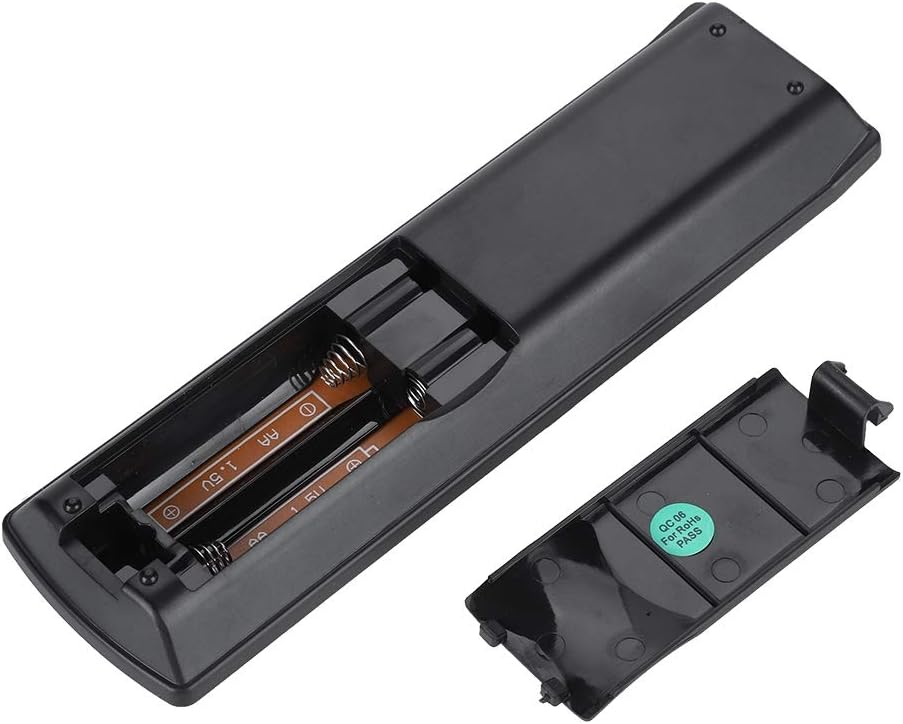
Bild: Rückseite view of the Zerone remote control, showing the battery compartment cover.

Image: The battery compartment of the remote control with two AA batteries correctly inserted.
No programming or setup is required. Once batteries are installed, the remote is ready for use with compatible Pioneer DVD players.
Bedienungsanleitung
Point the remote control directly at your Pioneer DVD player. The effective control distance is typically over 8 meters (approximately 26 feet), though this may vary based on environmental factors and the specific DVD player model.

Bild: Vorderseite view of the Zerone Universal Remote Control, displaying all buttons and their labels.
Hauptfunktionen:
- STANDBY/EIN: Powers the DVD player on or off.
- ÖFFNEN SCHLIESSEN: Öffnet oder schließt das Disc-Fach.
- AUDIO: Selects audio tracks or languages.
- UNTERTITEL: Toggles or selects subtitle options.
- WINKEL: Ändert die viewing angle if supported by the DVD.
- Zifferntasten (0-9): Direct track selection or input.
- KLAR: Clears numerical input.
- EINGEBEN: Bestätigt die Auswahl.
- HAUPTMENÜ: Accesses the main menu of the DVD.
- SPEISEKARTE: Öffnet das Disc-Menü.
- HOME MENU: Navigates to the home menu of the DVD player.
- ZURÜCKKEHREN: Kehrt zum vorherigen Bildschirm oder Menü zurück.
- Steuerkreuz (Oben, Unten, Links, Rechts) & ENTER: Navigiert durch Menüs und bestätigt Auswahlen.
- Playback Controls (Play, Pause, Stop, Fast Forward, Rewind, Skip Forward, Skip Backward): Standardmäßige Medienwiedergabefunktionen.
- SPIEL-MODUS: Selects playback modes (e.g., repeat, shuffle).
- UMGEBEN: Adjusts surround sound settings.
- ZOOMEN: Zoomt in das Video hinein oder heraus.
- ANZEIGEN: Zeigt Informationen auf dem Bildschirm an.

Image: A hand holding the Zerone remote control, demonstrating its ergonomic design and ease of use.

Image: The remote control positioned in front of a television displaying content, illustrating its intended use.

Image: A visual representation of the remote control's effective operating distance, indicating a range of over 8 meters.
Wartung
- Reinigung: Reinigen Sie die Fernbedienung mit einem weichen, trockenen Tuch. Verwenden Sie keine flüssigen Reinigungsmittel oder Scheuermittel.
- Batteriewechsel: Tauschen Sie die Batterien aus, wenn die Fernbedienung nur noch langsam reagiert oder gar nicht mehr funktioniert. Ersetzen Sie immer beide Batterien gleichzeitig durch neue.
- Lagerung: Bewahren Sie die Fernbedienung an einem kühlen, trockenen Ort fern von direkter Sonneneinstrahlung und extremen Temperaturen auf.
- Schäden vermeiden: Die Fernbedienung darf nicht fallen gelassen oder Wasser ausgesetzt werden.
Fehlerbehebung
- Fernbedienung reagiert nicht:
- Stellen Sie sicher, dass die Batterien korrekt und mit der richtigen Polarität eingelegt sind.
- Ersetzen Sie die alten Batterien durch neue AA-Batterien.
- Check for any obstructions between the remote control and the DVD player's infrared sensor.
- Ensure you are within the effective operating range (typically within 8 meters).
- Bestimmte Funktionen funktionieren nicht:
- Verify that your Pioneer DVD player model is listed in the compatibility section.
- Some advanced functions may be specific to the original remote or not supported by all DVD player models.
Technische Daten
| Schalenmaterial | High-grade ABS |
| Kontrolldistanz | > 8 meters (316 inches) |
| Akku-Typ | 2 x AA 1.5V Batteries (Not included) |
| Maße | Ca. 174 x 49 x 20 mm (6.85 x 1.93 x 0.79 Zoll) |
| Gewicht | Ca. 75 g (2.46 Unzen) |
| Modellnummer | 743562180017 |
Garantie und Support
For warranty information or technical support, please refer to the documentation provided with your purchase or contact the manufacturer, Zerone, directly through their official channels. Keep your purchase receipt as proof of purchase.