
FLEXISPOT EN2
FLEXISPOT EN2 Elektrischer Stehschreibtisch Bedienungsanleitung
Model: EN2 (48x30" Maple Top + White Frame)
Einführung
This manual provides detailed instructions for the assembly, operation, and maintenance of your FLEXISPOT EN2 Electric Standing Desk. Please read this manual thoroughly before assembly and use to ensure safe and efficient operation. This model features a 48x30 inch maple top and a white frame, designed to enhance your workspace with adjustable height functionality and integrated power solutions.
Sicherheitshinweise
- Exceeding the maximum weight limit of 176 pounds may cause damage or injury. Always adhere to the specified weight limit for safety.
- Proper assembly is required for stability. Ensure all components are securely fastened according to the assembly instructions.
- Stellen Sie den Schreibtisch auf eine stabile, ebene Fläche, um ein Umkippen zu verhindern.
- The desk is equipped with overload and overheat protection to prevent undue overuse. Do not attempt to bypass these safety features.
- Um Unfälle zu vermeiden, sollten Kinder und Haustiere während des Betriebs vom Schreibtisch ferngehalten werden.
- Ensure there are no obstructions in the desk's path when adjusting height. The anti-collision system is designed to detect obstacles, but caution is always advised.
Packungsinhalt
Your FLEXISPOT EN2 desk will arrive in two separate packages. Please verify all components are present before beginning assembly.

Image: The desk components are shipped in two separate packages for the desktop and the frame.
- 48x30" Maple Desktop (Whole-piece)
- White Electric Desk Frame
- 6-Button Digital Controller
- Integrated Desk Clamp Power Strip (with 3 AC outlets and 2 USB charging ports)
- Kabelmanagementsystem
- Assembly Hardware and Tools (some tools may not be included, an electric drill is recommended for faster assembly)
Montageanleitung
Assembly typically requires two people for ease and safety, especially when handling the desktop and frame. An electric drill (not included) is recommended for quicker assembly of certain components.
- Komponenten auspacken: Carefully remove all parts from both packages and lay them out on a clean, soft surface to prevent scratches. Verify all items listed in the 'Package Contents' section are present.
- Schreibtischgestell zusammenbauen: Follow the detailed instructions provided in the separate assembly guide for connecting the desk legs, crossbars, and feet. Ensure all screws are tightened securely.
- Desktop anbinden: Carefully place the desktop upside down on a soft surface. Position the assembled desk frame onto the desktop, aligning the pre-drilled holes. Secure the desktop to the frame using the provided screws.
- Install Controller and Power Strip: Mount the 6-button digital controller and the clamp power strip to the underside or edge of the desktop as desired. The power strip can be clipped to the back or side.
- Verkabelung anschließen: Connect all motor and controller cables according to the wiring diagram in the assembly guide. Ensure connections are firm.
- Kabel verwalten: Utilize the included cable management system to organize and secure all wires, preventing tangles and ensuring a tidy workspace.
- Den Schreibtisch umdrehen: Mit Hilfe von Helfern den zusammengebauten Schreibtisch vorsichtig aufrichten und an den gewünschten Ort stellen.

Image: Effective cable management transforms a cluttered workspace into an organized one.
Bedienungsanleitung
Your FLEXISPOT EN2 desk features an intuitive digital controller for easy height adjustments and memory presets.
Digital Controller Functions

Image: The digital controller allows for precise height adjustments and saving preferred positions.
- Auf-/Ab-Tasten (▲ / ▼): Press and hold these buttons to smoothly adjust the desk height. The desk adjusts from 28.1 inches to 45.7 inches. Release the button at your desired height. The motor operates quietly, typically below 50 dB.
- Speichervoreinstellungen (1, 2, 3, 4): To save a preferred height, adjust the desk to the desired position, then press the 'M' button (if present, or a similar 'Set' button) followed by one of the numbered preset buttons (1-4). To recall a saved height, simply press the corresponding numbered button.
- Antikollisionssystem: The desk is equipped with a smart anti-collision system. If the desk encounters an obstruction during height adjustment, it will automatically stop and reverse slightly to prevent damage or injury.
Integrierte Steckdosenleiste
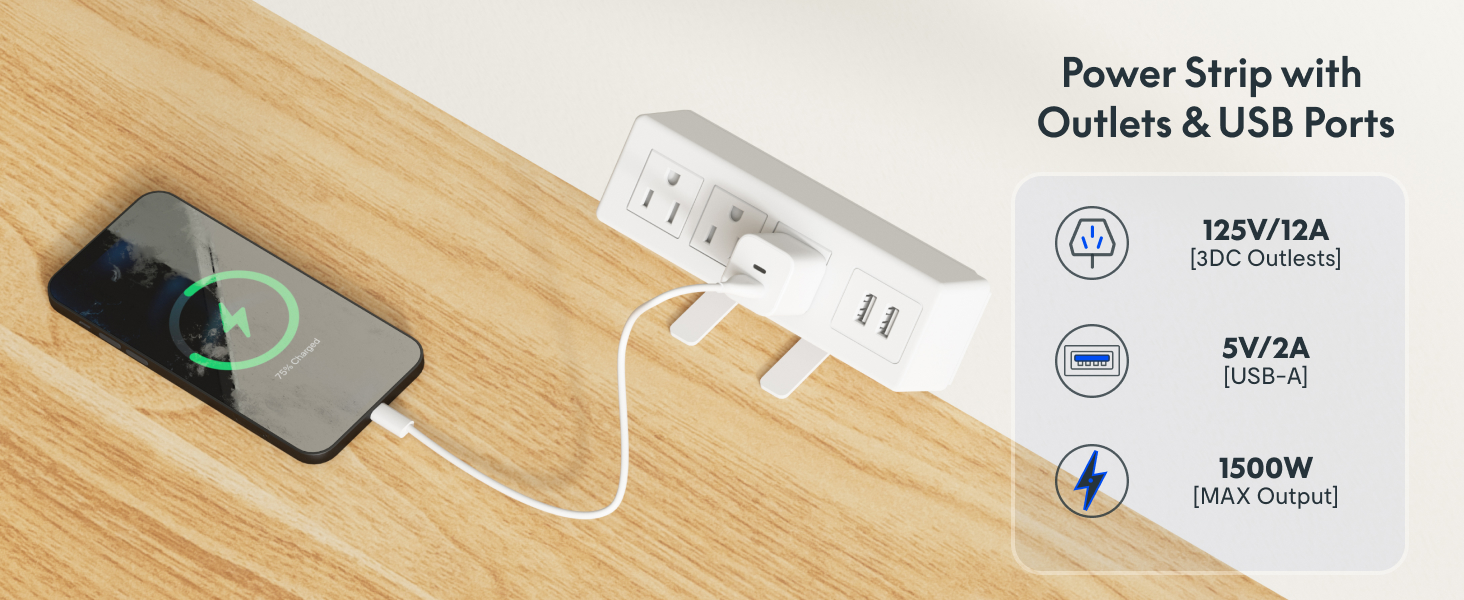
Bild: Die clamp power strip provides convenient access to power and USB charging.
The removable desktop power outlet provides convenient access to power for your devices.
- It includes 3 AC outlets (125V/12A) and 2 USB charging ports (5V/2A).
- The power strip can be clipped to the back or side of your desk.
- Ensure the power strip is securely clamped and connected to a wall outlet before use.
Wartung
- Reinigung: Wischen Sie die Tischplatte und den Rahmen mit einem weichen, fusselfreien Tuch ab.amp Verwenden Sie kein scheuerndes Reinigungsmittel oder aggressive Chemikalien, die die Oberfläche beschädigen könnten.
- Regelmäßige Kontrollen: Überprüfen Sie regelmäßig alle Schrauben und Verbindungen, um sicherzustellen, dass sie fest sitzen. Ziehen Sie sie gegebenenfalls nach.
- Kabelmanagement: Ensure cables remain neatly organized and are not pinched or tangled, which could affect desk operation or damage wires.
- Motorpflege: The motor is designed for durability. Avoid overloading the desk or operating it continuously for extended periods without rest to prevent overheating.
Fehlerbehebung
If you encounter issues with your FLEXISPOT EN2 desk, refer to the following common solutions:
- Schreibtisch bewegt sich nicht:
- Prüfen Sie, ob das Netzkabel sowohl am Schreibtisch als auch an einer funktionierenden Wandsteckdose fest eingesteckt ist.
- Ensure all cables connecting the motor, controller, and power supply are firmly attached.
- Try plugging the desk into a different power outlet to rule out an issue with the original outlet.
- If an error code is displayed on the controller, consult the full product manual or contact customer support for specific instructions.
- Ungleichmäßige Bewegung oder Geräusche:
- Vergewissern Sie sich, dass der Schreibtisch auf einer ebenen Fläche steht.
- Prüfen Sie, ob sich unter oder um die Tischbeine herum Hindernisse befinden.
- Stellen Sie sicher, dass alle Montageschrauben fest angezogen sind.
- Das Antikollisionssystem löst häufig aus:
- Ensure there are no objects near the desk that could be mistaken for an obstruction during movement.
- The sensitivity of the anti-collision system may be adjustable in advanced settings (refer to the full manual if available).
Sollten diese Schritte das Problem nicht beheben, wenden Sie sich bitte an den FLEXISPOT-Kundendienst, um weitere Unterstützung zu erhalten.
Technische Daten

Image: Key dimensions and features of the FLEXISPOT EN2 desk.
| Marke | FLEXISPOT |
| Modell | EN 2-Norm |
| Abmessungen der Tischplatte (T x B) | 30" x 48" |
| Desktop-Material | Maple Wood (Whole-piece) |
| Rahmenfarbe | Weiß |
| Höhenverstellbereich | 28.1" - 45.7" |
| Maximale Gewichtskapazität | 176 kg |
| Motorgeräuschpegel | Weniger als 50 dB |
| Steckdosenleisten | 3 AC (125V/12A), 2 USB (5V/2A) |
| Montage erforderlich | Ja (2 Personen empfohlen) |
| Besondere Merkmale | 4 Memory Presets, Anti-Collision System, Cable Management |
Garantie und Support
FLEXISPOT provides comprehensive warranty coverage for your EN2 Electric Standing Desk:
- 5 Jahr Garantie: Deckt Rahmen, Motoren und andere mechanische Geräte ab.
- 2 Jahr Garantie: Beinhaltet Steuerungen, Schalter und Elektronik.
For warranty claims, technical support, or any questions not covered in this manual, please contact FLEXISPOT customer service through their official website or the retailer where the product was purchased. Please have your model number (EN2) and proof of purchase ready.
Ask a question about this manual
Ask about setup, troubleshooting, compatibility, parts, safety, or missing instructions. Manuals+ will review the question and use this page’s manual context to help answer it.