
1. Einführung und Endeview
This manual provides detailed instructions for the installation, operation, and maintenance of your Soundstream VRN-DD7HB Double DIN Bluetooth In-Dash Car Stereo Receiver. Please read this manual thoroughly before using the product to ensure proper functionality and to prevent damage.
The VRN-DD7HB is designed to enhance your in-car audio experience with features such as Smart Sense Glass Panel Touch Screen Technology, Bluetooth V4.0 for hands-free calling and A2DP wireless audio playback, and compatibility with OEM steering wheel controls and rear view Kameras.
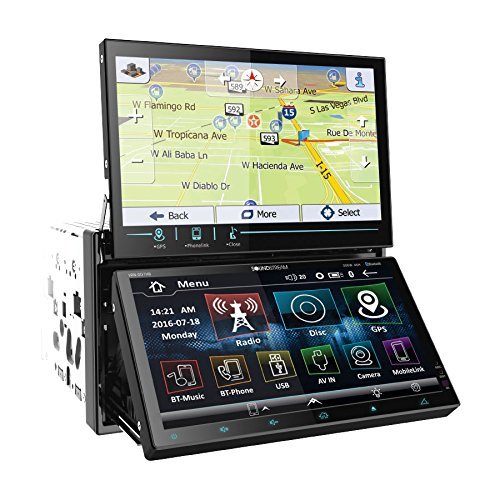
Abbildung 1.1: Front view of the Soundstream VRN-DD7HB Car Stereo Receiver, showcasing its double DIN form factor and touchscreen display.
2. Sicherheitshinweise
Um einen sicheren Betrieb zu gewährleisten und Verletzungen oder Schäden zu vermeiden, beachten Sie bitte folgende Vorsichtsmaßnahmen:
- Bedienen Sie das Gerät nicht so, dass Sie vom Fahren abgelenkt werden. Die Verkehrssicherheit hat stets Vorrang.
- Consult a professional for installation to avoid electrical damage or improper wiring.
- Das Gerät darf nicht auseinandergenommen oder verändert werden. Dies kann zu Fehlfunktionen oder einem Stromschlag führen.
- Stellen Sie die Lautstärke so ein, dass Sie die Verkehrsgeräusche von draußen noch hören können.
- Warnung zu Proposition 65: Dieses Produkt enthält Chemikalien, von denen der Staat Kalifornien weiß, dass sie Krebs und Geburtsfehler oder andere Fortpflanzungsschäden verursachen.
3. Einrichtung und Installation
Professional installation is highly recommended for this car stereo receiver. Incorrect wiring can cause severe damage to the unit or your vehicle's electrical system.
3.1 Kabelverbindungen
Ensure all power, ground, speaker, and accessory wires are connected correctly according to your vehicle's wiring diagram and the unit's wiring harness. Pay close attention to the following:
- Strom (Gelb): An eine konstante 12V-Stromversorgung anschließen.
- Zubehör (Rot): An geschaltete 12V-Stromversorgung (Zündung) anschließen.
- Masse (Schwarz): Connect securely to a clean chassis ground point.
- Lautsprecherausgänge: Schließen Sie das Gerät an die Lautsprecher Ihres Fahrzeugs an und achten Sie dabei auf die richtige Polarität.
- Hinteren View Kameraeingang: Connect the video output of your rear view camera to the designated input on the receiver. Ensure the reverse trigger wire is connected to your vehicle's reverse light circuit.
- Lenkradsteuerungseingabe: Connect to your vehicle's OEM steering wheel control interface (if applicable). Refer to your vehicle's manual and the steering wheel control interface instructions for proper connection.
3.2 Montage
Mount the double DIN unit securely into your vehicle's dashboard using the provided mounting hardware. Ensure there is adequate space for ventilation and wiring.
4. Bedienungsanleitung
4.1 Ein-/Ausschalten
Press the power button (usually located on the front panel or a soft-touch button on the screen) to turn the unit on or off. The unit will also power on/off with your vehicle's ignition.
4.2 Touchscreen-Bedienung
The VRN-DD7HB features a Smart Sense Glass Panel Touch Screen. Navigate menus, select functions, and adjust settings by touching the corresponding icons or areas on the display.
4.3 Bluetooth-Konnektivität
- Koppeln eines Geräts:
- Stellen Sie sicher, dass Bluetooth auf Ihrem Mobilgerät aktiviert ist.
- On the VRN-DD7HB, navigate to the Bluetooth menu.
- Suchen nach available devices on your mobile phone. The unit should appear as "Soundstream VRN-DD7HB" or similar.
- Select the unit on your phone to pair. Enter the PIN (usually "0000") if prompted.
- Nach erfolgreicher Kopplung bestätigt das Gerät die Verbindung.
- Freisprechen: After pairing, you can make and receive calls directly through the unit using the built-in front panel Bluetooth microphone and your car's speakers.
- A2DP Audio Playback: Stream audio wirelessly from your paired device. Select the Bluetooth audio source on the receiver and control playback (play/pause, skip) from the unit or your phone.
4.4 Rückseite View Kameraeingang
When the vehicle is shifted into reverse, the unit will automatically display the image from the connected rear view camera on its 800x480 widescreen resolution display. This feature provides assistance for parking and maneuvering.
4.5 Lenkradsteuerung
If an OEM steering wheel control interface is connected, you can program the unit to respond to your vehicle's steering wheel buttons for functions such as volume control, track skipping, and mode selection. Refer to the unit's settings menu for steering wheel control configuration.
5. Wartung
Proper maintenance ensures the longevity and optimal performance of your car stereo receiver.
- Reinigen des Bildschirms: Verwenden Sie ein weiches, fusselfreies Tuch, um den Touchscreen vorsichtig abzuwischen. Bei hartnäckigen Flecken etwas nachhelfen.ampReinigen Sie das Tuch mit Wasser oder einem für Bildschirme geeigneten Reiniger. Vermeiden Sie scheuernde Materialien oder aggressive Chemikalien.
- Allgemeine Reinigung: Halten Sie das Gerät frei von Staub und Schmutz. Reinigen Sie Lüftungsschlitze und Tastenbereiche mit einer weichen Bürste oder Druckluft.
- Vermeiden Sie extreme Temperaturen: Setzen Sie das Gerät keiner extremen Hitze oder Kälte aus, da dies seine Leistung und Lebensdauer beeinträchtigen kann.
6. Fehlerbehebung
If you encounter issues with your VRN-DD7HB, refer to the following common problems and solutions:
| Problem | Mögliche Ursache/Lösung |
|---|---|
| Gerät lässt sich nicht einschalten. |
|
| Kein Ton aus den Lautsprechern. |
|
| Bluetooth-Gerät kann nicht gekoppelt werden. |
|
| Hinteren view Das Kamerabild wird nicht angezeigt. |
|
7. Spezifikationen
| Besonderheit | Detail |
|---|---|
| Modellnummer | VRN-DD7HB |
| Anzeige | Smart Sense Glass Panel Touch Screen, 800x480 Widescreen Resolution |
| Bluetooth-Version | V4.0 (Hands-Free Calling, A2DP Audio Playback) |
| Mikrofon | Built-in Front Panel Bluetooth Microphone |
| Konnektivitätstechnologie | Bluetooth, USB, 3.5-mm-Klinke |
| Kompatible Geräte | Smartphone, Lautsprecher |
| Controllertyp | Android (via Bluetooth/USB connection) |
| Audioausgabemodus | Stereo |
| Surround Sound-Kanalkonfiguration | 4.0 |
| Ausgangsleistung | 220 Watt |
| Farbe | SCHWARZ |
| Technische Daten | 11.3 x 4.7 x 9.2 Zoll |
| Artikelgewicht | 9.01 Pfund |
8. Garantie und Support
This product is offered as a renewed item. Renewed products are professionally inspected and tested to work and look like new. If not satisfied with the purchase, renewed products are typically eligible for replacement or refund under the Amazon Renewed Guarantee. Please refer to the specific terms and conditions of the Amazon Renewed Guarantee for details regarding your purchase.
For technical support or further assistance, please contact the seller or refer to the Soundstream official webWebsite für allgemeine Produktinformationen.