
Einführung
Thank you for choosing the Zelotes F-35 2.4GHz Vertical Wireless Rechargeable Gaming Mouse. This ergonomic mouse is designed to provide a comfortable and efficient user experience, reducing wrist strain during extended use. Featuring multiple connectivity options and customizable buttons, it is ideal for both productivity and gaming on various devices.
Produkteigenschaften
- Ergonomisches vertikales Design: Positions the hand in a natural handshake posture to minimize wrist and forearm strain.
- Multimodale Konnektivität: Supports 2.4GHz wireless via USB dongle, Bluetooth 1, and Bluetooth 2 for versatile device pairing.
- Wiederaufladbarer Akku: Built-in rechargeable battery for convenience.
- Einstellbare DPI: Up to 2400 DPI for precise cursor control, suitable for various tasks and gaming.
- 6 programmierbare Tasten: Includes left/right click, scroll wheel, DPI button, and forward/backward buttons for enhanced functionality.
- Optischer Sensor: Reliable and accurate tracking on most surfaces.
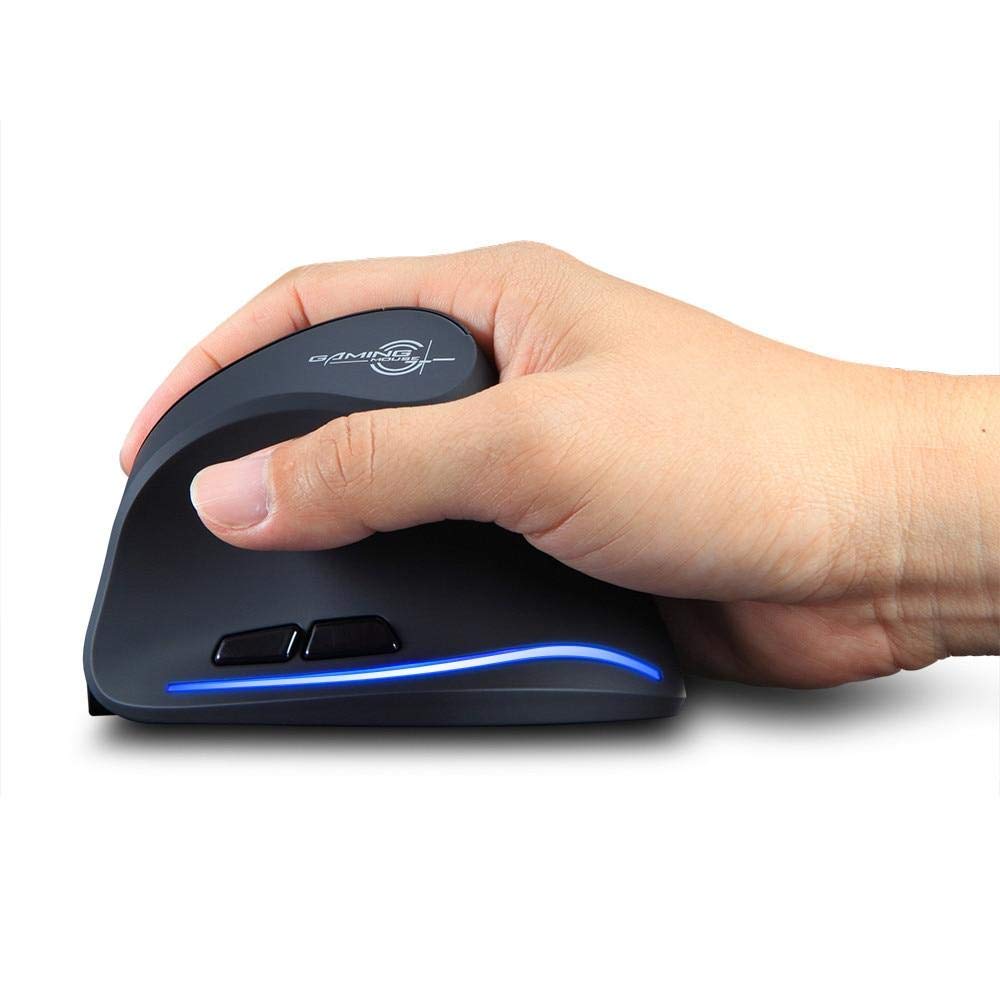
Image: The Zelotes F-35 Vertical Wireless Gaming Mouse, showcasing its unique ergonomic shape and illuminated accents.

Image: A visual comparison illustrating the natural hand position with a vertical mouse versus the twisted wrist position with a traditional horizontal mouse, highlighting the ergonomic benefits.
Installationsanweisungen
- Einschalten: Suchen Sie den Ein-/Ausschalter an der Unterseite der Maus und schieben Sie ihn in die Position „EIN“.
- Verbindungsmodus auswählen: The mouse supports three connection modes: 2.4GHz wireless (via USB dongle), Bluetooth 1, and Bluetooth 2. Use the 'Mode Switch' button on the bottom of the mouse to cycle through these options. The corresponding indicator light will illuminate.
- Drahtlose 2.4-GHz-Verbindung:
- Remove the USB receiver dongle from its storage slot on the bottom of the mouse.
- Stecken Sie den USB-Empfänger in einen freien USB-Anschluss Ihres Computers oder Laptops.
- Die Maus sollte sich automatisch verbinden.
- Bluetooth-Verbindung (BT1/BT2):
- Switch the mouse to either Bluetooth 1 or Bluetooth 2 mode using the 'Mode Switch'.
- Öffnen Sie auf Ihrem Computer oder Laptop die Bluetooth-Einstellungen und suchen Sie nach neuen Geräten.
- Select 'Zelotes F-35' from the list of available devices to pair.

Image: The underside of the Zelotes F-35 mouse, highlighting the ON/OFF switch, mode switch, and the integrated storage slot for the 2.4GHz USB receiver dongle.
Bedienungsanleitung
The Zelotes F-35 mouse features 6 buttons designed for intuitive control and enhanced productivity:
- Linksklick-Taste: Standardmäßige primäre Klickfunktion.
- Rechtsklick-Schaltfläche: Standardmäßige Sekundärklickfunktion.
- Scrollrad: Scroll up or down for navigation. Can also be pressed for a middle-click function.
- DPI-Einstelltaste: Located near the scroll wheel, press to cycle through different DPI settings (e.g., 800/1200/1600/2400) to adjust cursor sensitivity.
- Vorwärts-Taste: Located on the thumb rest, typically navigates forward in web Browser bzw file Entdecker.
- Rückwärts-Taste: Located on the thumb rest, typically navigates backward in web Browser bzw file Entdecker.
Laden und Akku
The Zelotes F-35 mouse is equipped with a rechargeable battery for continuous use.
- Ladeanschluss: The mouse features a USB-C charging port, typically located at the front base of the mouse.
- Laden: Connect the provided USB-C cable to the mouse and the other end to a USB power source (e.g., computer USB port, wall adapter).
- Batterieanzeige: The mouse may have an indicator light to show charging status or low battery. Refer to the product packaging for specific indicator behavior.
- Akkulaufzeit: The average battery life is approximately 12 months, depending on usage.
Wartung
- Reinigung: Reinigen Sie die Mausoberfläche mit einem weichen, trockenen Tuch. Bei hartnäckigem Schmutz kann ein leicht trocknendes Tuch hilfreich sein.amp Es kann ein Tuch verwendet werden, um sicherzustellen, dass keine Feuchtigkeit in die inneren Bauteile eindringt.
- Sensorpflege: Um eine genaue Abtastung zu gewährleisten, muss der optische Sensor an der Unterseite der Maus sauber und frei von Staub und Schmutz sein.
- Lagerung: Schalten Sie die Maus bei längerer Nichtbenutzung aus, um die Batterielebensdauer zu verlängern. Bewahren Sie den USB-Empfänger im dafür vorgesehenen Steckplatz auf, um ihn nicht zu verlieren.
Fehlerbehebung
- Maus reagiert nicht:
- Stellen Sie sicher, dass die Maus eingeschaltet ist.
- Prüfen Sie den Akkustand und laden Sie den Akku gegebenenfalls auf.
- For 2.4GHz connection, ensure the USB receiver is securely plugged into the computer.
- Stellen Sie für eine Bluetooth-Verbindung sicher, dass Bluetooth auf Ihrem Gerät aktiviert und die Maus korrekt gekoppelt ist. Versuchen Sie, die Geräte erneut zu koppeln, falls die Probleme weiterhin bestehen.
- Ungenaue Nachverfolgung:
- Reinigen Sie den optischen Sensor an der Unterseite der Maus.
- Stellen Sie sicher, dass Sie die Maus auf einer geeigneten Oberfläche verwenden (nicht reflektierend, kein Glas).
- Stellen Sie die DPI-Einstellung auf ein angenehmes Niveau ein.
- Verbindungsabbrüche:
- Ensure the mouse is within the effective range of your device (typically up to 10 meters for wireless).
- Minimieren Sie Störungen durch andere drahtlose Geräte.
Technische Daten
| Besonderheit | Detail |
|---|---|
| Marke | Zeloten |
| Modell | F-35 |
| Typ | 2.4 GHz Kabellos, Bluetooth |
| Betriebsmodus | Optoelektronisch |
| Anzahl der Tasten | 6 |
| Anzahl der Rollen | 1 |
| Handausrichtung | Rechts |
| Schnittstellentyp | USB |
| DPI | 2400 |
| Besonderheit | Wiederaufladbar, kabellos |
| Bewegungserkennung | Optisch |
| Kompatible Geräte | Laptop, Personalcomputer |
| Betriebssystem | Linux, Windows 7 (und neuer) |
| Durchschnittliche Batterielebensdauer | 12 Monate |
| Stromquelle | Batteriebetrieben |
| Farbe | Schwarz |
| Ursprungsland | China |
Garantie und Support
For warranty information and technical support, please refer to the documentation included with your product or visit the official Zelotes webSie können sich auch an den Händler wenden, bei dem Sie das Produkt gekauft haben, um Unterstützung zu erhalten.