1. Einleitung
Vielen Dank für Ihren Einkauf.asing the NewRixing NR-4014 Portable Wireless Bluetooth Stereo Speaker. This device is a versatile sound system designed for portability and high-quality audio. It features Bluetooth connectivity, FM radio, and supports playback from TF cards, U-disks, and AUX input. The integrated microphone allows for hands-free calling, and its ergonomic design with a silicone handle ensures easy transport.
2. Produktmerkmale
- Erweiterte Bluetooth-Konnektivität: Easily connects to Bluetooth-enabled devices within a 10-meter range.
- Hochauflösendes Audio: Equipped with a 10W loudspeaker for clear and powerful sound.
- Mehrere Wiedergabemodi: Supports FM radio, TF card, U-disk, and AUX input.
- Freisprechen: Eingebautes Mikrofon für komfortable Anrufverwaltung.
- Tragbares Design: Features a silicone handle for easy carrying.
- Lange Akkulaufzeit: Integrated 1500mAh rechargeable battery provides up to 6 hours of music playback.
3. Packungsinhalt
Bitte prüfen Sie das Paket auf folgende Artikel:
- 1 x NewRixing NR-4014 Speaker
- 1 x USB-Ladekabel
- 1 x AUX Audiokabel
- 1 x Benutzerhandbuch
4. Produktüberschreitungview

Abbildung 1: Front view of the NewRixing NR-4014 speaker, showcasing its grille and control panel.
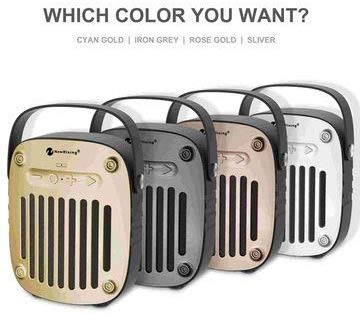
Abbildung 2: Seite view of the NewRixing NR-4014 speaker, highlighting its portable handle and compact design.
The speaker features a control panel, input ports (AUX, TF card, U-disk, USB charging), and a power button. Specific button functions are detailed in the Operating Instructions section.
5. Einrichtung
5.1 Erstaufladung
Before first use, fully charge the speaker. Connect the provided USB charging cable to the speaker's charging port and the other end to a 5V USB power adapter (not included) or a computer USB port. The charging indicator will illuminate during charging and turn off once fully charged. A full charge takes approximately 3 hours.
5.2 Ein-/Ausschalten
- So schalten Sie das Gerät ein: Press and hold the Power button until you hear an audible indication.
- So schalten Sie das Gerät aus: Press and hold the Power button again until the speaker powers down.
6. Bedienungsanleitung
6.1 Bluetooth-Kopplung
- Ensure the speaker is powered on and in Bluetooth mode (indicated by a flashing LED, if present).
- Aktivieren Sie auf Ihrem Mobilgerät (Smartphone, Tablet usw.) Bluetooth und suchen Sie nach verfügbaren Geräten.
- Select "NR-4014" from the list of found devices.
- Sobald die Kopplung hergestellt ist, gibt der Lautsprecher eine akustische Bestätigung aus, und die LED-Anzeige hört auf zu blinken.
- Sie können nun Audio von Ihrem Gerät über den Lautsprecher abspielen.
6.2 FM-Radio-Modus
- Drücken Sie die Modus-Taste (falls vorhanden), um in den FM-Radiomodus zu wechseln.
- Drücken Sie die Wiedergabe-/Pause-Taste, um automatisch verfügbare FM-Sender zu scannen und zu speichern.
- Verwenden Sie die Tasten „Vorheriger Titel“/„Nächster Titel“, um zwischen gespeicherten Sendern zu navigieren.
6.3 TF Card / U-Disk Playback
- Insert a TF card or U-disk (up to 32GB) with MP3 audio files in den entsprechenden Steckplatz.
- Der Lautsprecher erkennt das Speichermedium automatisch und startet die Wiedergabe.
- Use the Play/Pause, Previous/Next track buttons to control playback.
6.4 AUX-Eingangsmodus
- Connect one end of the provided AUX cable to the speaker's AUX input port.
- Connect the other end to the audio output jack of your external audio device (e.g., MP3 player, laptop).
- The speaker will automatically switch to AUX mode or require a press of the Mode button.
- Audio playback is controlled via your external device.
6.5 Freisprechfunktion
- When connected to a smartphone via Bluetooth, incoming calls will be routed to the speaker.
- Press the Play/Pause button (or Call button, if present) to answer an incoming call.
- Drücken Sie die Wiedergabe-/Pause-Taste erneut, um den Anruf zu beenden.
6.6 Lautstärkeregelung
Volume is typically controlled by long-pressing the Previous/Next track buttons or directly from the connected device.
7. Wartung
- Halten Sie den Lautsprecher von Wasser, Feuchtigkeit und extremen Temperaturen fern.
- Reinigen Sie den Lautsprecher mit einem weichen, trockenen Tuch. Verwenden Sie keine Scheuermittel oder Lösungsmittel.
- Vermeiden Sie es, den Lautsprecher fallen zu lassen oder starken Stößen auszusetzen.
- Wenn der Lautsprecher längere Zeit nicht benutzt wird, sollte er an einem kühlen, trockenen Ort aufbewahrt und regelmäßig aufgeladen werden, um die Batterieleistung zu erhalten.
8. Fehlerbehebung
| Problem | Mögliche Ursache | Lösung |
|---|---|---|
| Der Lautsprecher lässt sich nicht einschalten. | Schwache Batterie. | Laden Sie den Lautsprecher mindestens 3 Stunden lang auf. |
| Kopplung via Bluetooth nicht möglich. | Bluetooth not enabled on device; speaker too far; speaker not in pairing mode. | Ensure Bluetooth is on, speaker is in pairing mode, and within 10 meters. Try restarting both devices. |
| Aus dem Lautsprecher kommt kein Ton. | Volume too low; incorrect mode selected; cable not connected properly (AUX). | Increase volume on both speaker and connected device. Verify correct mode (BT, FM, AUX, TF/U-disk). Check cable connections. |
| Der FM-Radioempfang ist schlecht. | Schwaches Signal; Umwelteinflüsse. | Move the speaker to a location with better signal. Try rescanning stations. |
9. Spezifikationen
| Modellnummer | NR-4014 |
| Kabellose Version | 4.2 + EDR |
| Wireless Streaming Range | Bis zu 10 Meter |
| Ausgangsleistung | 2 * 5 W (insgesamt 10 W) |
| Frequenzgang | 100MHz - 18KHz |
| Signal-Rausch-Verhältnis | ≥80 dB |
| Radiofrequenz | 87 bis 108 MHz |
| Leistungsaufnahme | Gleichstrom 5 V |
| Batterie | Built-in 1500mAh 3.7V rechargeable lithium battery |
| Ladezeit | Ungefähr 3 Stunden |
| Spielzeit | Bis zu 6 Stunden (bei maximaler Lautstärke) |
| Lautsprechertreiber | 4Ω 5W, 52mm |
| Impedanz | 4 Ohm |
| Kontrollmethode | Berühren |
| Wasserbeständigkeit | Yes (as per specifications) |
| Produktabmessungen (L x B x H) | 17.8 x 15.3 x 5.7 cm |
| Produktgewicht | 720g |
| Unterstützter Speicher | TF Card, U-Disk (up to 32GB) |
10. Garantie und Support
This product is covered by a standard manufacturer's warranty. For specific warranty terms and conditions, please refer to the documentation provided at the time of purchase or contact your retailer. For technical support or service inquiries, please contact the vendor or retailer from whom you purchased the product.
Bitte bewahren Sie Ihren Kaufbeleg für Garantieansprüche auf.


